
1. Įvadas
This manual provides detailed instructions for the installation, operation, and maintenance of the Yitouniu EWeLink 4CH Smart WiFi 85-250V Switch Controller, Model EWB4CH-D1. This device allows remote control of up to four electrical appliances via the eWeLink mobile application, Bluetooth, or RF remote control, and supports voice control through compatible smart assistants like Amazon Alexa and Google Assistant.
Prieš įdiegdami ir naudodami atidžiai perskaitykite šį vadovą, kad užtikrintumėte tinkamą veikimą ir saugą.
2. Produktas baigtasview ir Savybės
The EWB4CH-D1 is a versatile 4-channel smart switch controller designed for various applications, including smart home automation, access control, and DIY projects. It offers multiple control methods and operating modes for enhanced flexibility.
Pagrindinės funkcijos:
- 4 kanalų valdymas: Independently control up to four electrical devices.
- Keli valdymo metodai:
- eWeLink App (iOS/Android) for remote control.
- Bluetooth connectivity for local control and pairing.
- RF 433MHz remote control support.
- Manual buttons on the device.
- Valdymas balsu: Suderinamas su „Amazon Alexa“ ir „Google Assistant“, kad būtų galima valdyti laisvų rankų įranga.
- Lankstūs darbo režimai: Supports Point (Momentary), Self-Locking (Toggle), and Interlocking modes.
- Tvarkaraštis ir laikmačiai: Set timed schedules for connected devices via the eWeLink app.
- Įrenginio bendrinimas: Share control of the device with multiple users through the eWeLink app.
- Platus ttage Įvestis: AC 85-250V and Micro USB 5V input options.
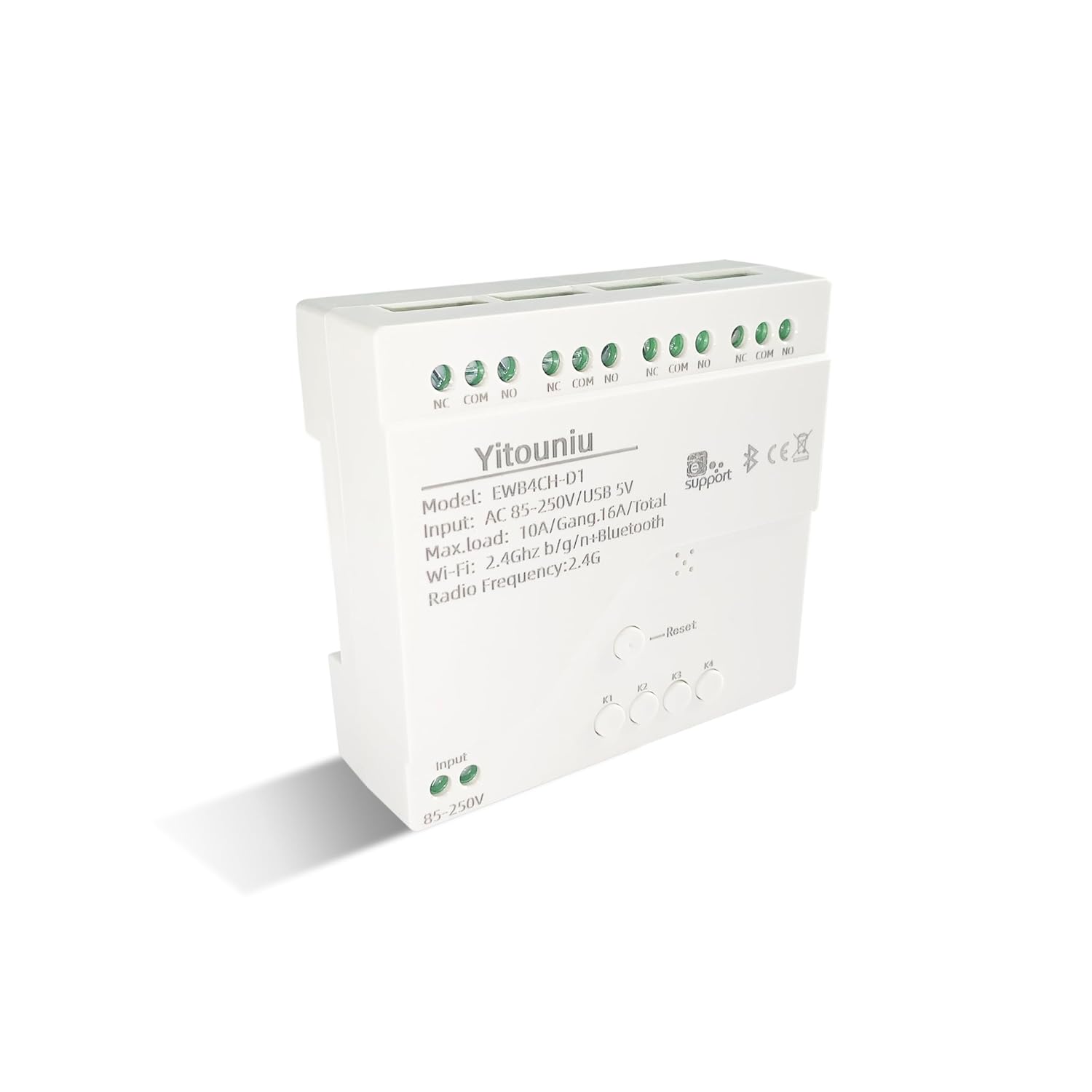
1 vaizdas: priekis view of the Yitouniu EWB4CH-D1 Smart Switch Controller, showing input terminals, control buttons, and model information.

Image 2: The Yitouniu EWB4CH-D1 Smart Switch Controller alongside its internal circuit board, illustrating the components and relay switches.
3. Kas yra dėžutėje
Atidarius pakuotę, patikrinkite, ar yra visi komponentai:
- 1x Yitouniu EWeLink 4CH Smart WiFi Switch Controller (Model EWB4CH-D1)
- 1x naudojimo instrukcija (šis dokumentas)
4. Specifikacijos
| Parametras | Vertė |
|---|---|
| Modelis | EWB4CH-D1 |
| Įvesties tomastage | AC 85-250V, Micro USB 5V |
| Maximum Current (per gang) | 10A |
| Maksimali apkrova (bendra) | 16A / 3500W (for 4 gangs) |
| bevielio ryšio standartas | Wi-Fi 2.4GHz b/g/n + Bluetooth |
| Darbinė temperatūra | -20°C iki 70°C |
| Medžiaga | Antipirenas ABS |
| Gaminio matmenys (I x P x A) | 3.15 x 2.95 x 0.98 colio (80 x 75 x 25 mm) |
| Svoris | 3.84 uncijos (109 g) |
| Veikimo režimas | ON-OFF-ON |
| Kontakto tipas | Normally Open (NO), Common (COM), Normally Closed (NC) |
| Jungties tipas | Sraigtinis terminalas |
| Pavaros tipas | App, RF Remote, Manual Button |
5. Sąranka
5.1 Saugos priemonės
ĮSPĖJIMAS: Montavimas susijęs su dideliu garsutage. Ensure power is disconnected at the circuit breaker before performing any wiring. If you are unsure about electrical wiring, consult a qualified electrician. Improper installation can lead to electric shock, fire, or property damage.
5.2 Sujungimo schema
The device features screw terminals for input power and four independent relay outputs. Each output has Normally Open (NO), Common (COM), and Normally Closed (NC) contacts.
- Įvesties galia: Connect AC 85-250V to the 'Input 85-250V' terminals. Alternatively, for low-voltage applications or testing, connect a 5V Micro USB power supply to the Micro USB port.
- Load Connections (Channels K1-K4): Each channel (K1, K2, K3, K4) has three terminals:
- NC (paprastai uždaryta): Connected to COM when the relay is OFF.
- COM (bendra): The common terminal for the relay.
- NE (įprastai atidaryta): Connected to COM when the relay is ON.
Connect your appliance's power line to the COM terminal and the control line to either NO or NC, depending on whether you want the appliance to be ON or OFF when the relay is activated.

3 pav.: Viršus view of the Yitouniu EWB4CH-D1 controller, clearly showing the input terminals and the NC, COM, NO terminals for each of the four channels.
5.3 eWeLink App Installation and Device Pairing
- Atsisiųskite „eWeLink“ programą: Ieškokite "eWeLink" in the Apple App Store (iOS) or Google Play Store (Android) and install it.
- Registruotis / Prisijungti: Atidarykite programėlę ir sukurkite naują paskyrą arba prisijunkite naudodami esamą.
- Įjunkite susiejimo režimą: Power on the EWB4CH-D1 controller. Press and hold the 'Reset' button on the device for approximately 5-7 seconds until the Wi-Fi indicator LED flashes rapidly.
- Pridėti įrenginį programėlėje: In the eWeLink app, tap the '+' icon (usually in the bottom center or top right) to add a new device. Select 'Quick Pairing' or 'Bluetooth Pairing' if available.
- Prisijunkite prie „Wi-Fi“: Follow the on-screen instructions to connect the device to your 2.4GHz Wi-Fi network. Enter your Wi-Fi password when prompted. (5GHz Wi-Fi networks are not supported).
- Įrenginio pavadinimas: Once successfully paired, give your device a descriptive name (e.g., "Living Room Lights Controller").
6. Veikimo režimai
The EWB4CH-D1 supports three distinct operating modes, configurable within the eWeLink app:
- Point (Momentary) Mode: When activated, the relay turns ON for a set duration (0.5 seconds to 1 hour) and then automatically turns OFF. This mode is suitable for applications like garage door openers or momentary button presses.
- Self-Locking (Toggle) Mode: Each channel operates independently. When activated, the relay turns ON and stays ON until it is manually turned OFF. This is ideal for controlling lights or other devices that need to remain in a specific state.
- Interlocking Mode: In this mode, only one channel can be ON at a time. When one channel is activated, any other currently active channel will automatically turn OFF. This is useful for controlling motors with forward/reverse functions or blinds.
To change the operating mode, access the device settings within the eWeLink app.
7. Valdymas programėle ir balsu
7.1 „eWeLink“ programėlės valdymas
After successful pairing, you can control each of the four channels independently from anywhere using the eWeLink app. The app provides real-time status updates for each channel.
- Nuotolinis įjungimas / išjungimas: Tap the respective channel button in the app to turn devices on or off.
- Planavimas: Set up single, repeating, or countdown timers for automated control.
- Scenos: Create custom scenes to control multiple devices with a single tap or based on specific conditions.
- Įrenginio bendrinimas: Share control of your device with family members or other users by inviting them through the app.

Image 4: Illustration showing how one mobile phone can control multiple smart switches, and how a single smart switch can be controlled by multiple mobile phones.

Image 5: Screenshot of the eWeLink app interface highlighting the 'Share Device' option, allowing users to grant control access to others.
7.2 Balso valdymo integravimas
The EWB4CH-D1 is compatible with Amazon Alexa and Google Assistant. To enable voice control:
- Link eWeLink Account: In your Alexa or Google Home app, search for the "eWeLink Smart Home" skill/service and link it to your eWeLink account.
- Atraskite įrenginius: Once linked, ask your smart assistant to "Discover devices" or manually initiate device discovery in the app.
- Balso komandos: You can now use voice commands to control your connected appliances.
Example komandos:
- „Alexa, įjunk [Įrenginio pavadinimas]“
- „Ei, „Google“, išjunkite [Įrenginio pavadinimas]“

Image 6: Depiction of smart speakers (Amazon Echo, Google Home) used for voice control, with example commands for turning on/off lights.

Image 7: Illustration of using voice commands with Alexa or Google Assistant to control a garage door, demonstrating hands-free operation.
8. Priežiūra
To ensure optimal performance and longevity of your EWB4CH-D1 controller:
- Valymas: Prieš valydami atjunkite maitinimą. Įrenginį nuvalykite sausa, minkšta šluoste. Nenaudokite skystų valiklių ar tirpiklių.
- Firmware atnaujinimai: Reguliariai tikrinkite „eWeLink“ programėlę, ar nėra galimų programinės įrangos atnaujinimų. Nuolat atnaujinant programinę įrangą užtikrinamos naujausios funkcijos ir saugos pataisymai.
- Aplinkos sąlygos: Venkite įrenginio laikymo ekstremaliose temperatūrose, didelėje drėgmėje ar tiesioginiuose saulės spinduliuose.
9. Problemų sprendimas
If you encounter issues with your EWB4CH-D1 controller, refer to the following common problems and solutions:
- Įrenginys nesusijungia:
- Įsitikinkite, kad jūsų „Wi-Fi“ tinklas yra 2.4 GHz dažnio. 5 GHz tinklai nepalaikomi.
- Patikrinkite, ar teisingas „Wi-Fi“ slaptažodis.
- Make sure the device is in pairing mode (Wi-Fi LED flashing rapidly). If not, press and hold the 'Reset' button.
- Perkelkite įrenginį arčiau „Wi-Fi“ maršrutizatoriaus.
- Įrenginys neprisijungęs programėlėje:
- Patikrinkite savo interneto ryšį.
- Įsitikinkite, kad įrenginys įjungtas.
- Iš naujo paleiskite įrenginį atjungdami ir vėl prijungdami maitinimą.
- Check if your router settings have changed or if there's Wi-Fi interference.
- Balso valdymas neveikia:
- Confirm that your eWeLink account is correctly linked to your Alexa or Google Home app.
- Ensure the device is discovered by your smart assistant.
- Use the exact device name configured in the eWeLink app for voice commands.
- RF remote control not responding:
- Ensure the RF remote is paired with the controller (refer to specific RF pairing instructions if provided with your remote).
- Check the battery in the RF remote.
10. Saugos informacija
Prašome laikytis šių saugos nurodymų:
- Nebandykite ardyti ar modifikuoti įrenginio. Tai gali panaikinti garantiją ir sukelti pavojų saugumui.
- Ensure proper wiring according to local electrical codes and this manual.
- Do not exceed the maximum current and load ratings of the device (10A per gang, 16A/3500W total).
- Laikykite prietaisą atokiau nuo vandens, drėgmės ir degių medžiagų.
- Šis prietaisas skirtas naudoti tik patalpose.
- Laikyti vaikams nepasiekiamoje vietoje.
11. Garantija ir palaikymas
For warranty information and technical support, please refer to the seller's policy or contact the manufacturer directly. Typically, support can be accessed through the eWeLink app's 'FAQ & Feedback' section or the official eWeLink websvetainę.