
Įvadas
Thank you for choosing the Tronsmart T7 Lite Portable Bluetooth Speaker. This manual provides essential information for setting up, operating, and maintaining your speaker to ensure optimal performance and longevity. Please read it thoroughly before use.
Kas yra dėžutėje
- 1 x T7 Lite nešiojamas lauko garsiakalbis
- 1 x Type-C įkrovimo laidas
- 1 x Vartotojo vadovas
- 1 x dirželis
- Garantijos kortelė
Produktas baigtasview
Familiarize yourself with the Tronsmart T7 Lite speaker's components and controls.
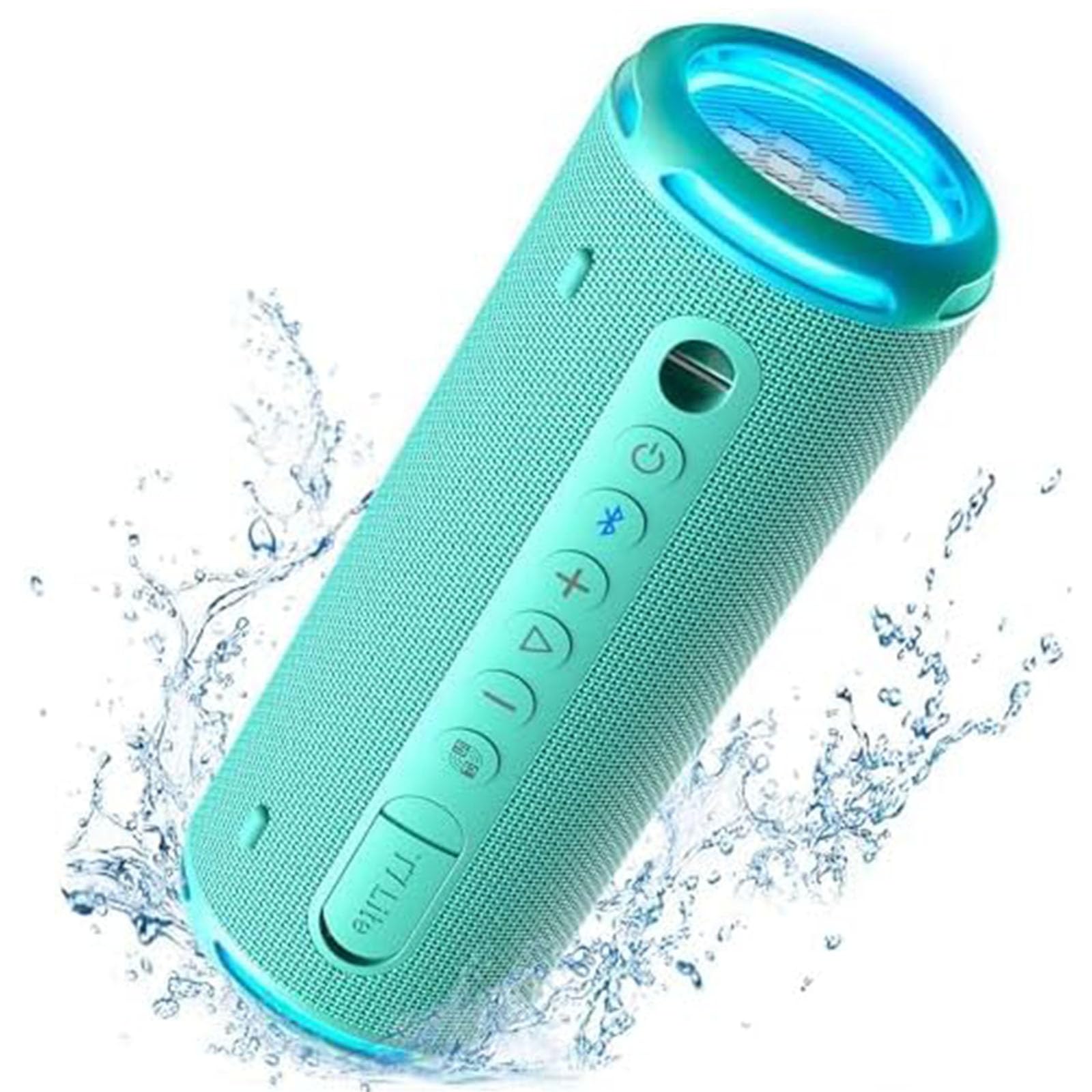
Control Buttons & Ports
- Maitinimo mygtukas: Paspauskite ir palaikykite, kad įjungtumėte/išjungtumėte.
- Bluetooth mygtukas: Paspauskite, kad įjungtumėte Bluetooth poravimo režimą.
- Garsumo padidinimas (+): Padidinti garsumą.
- Sumažinti garsumą (-): Sumažinti garsumą.
- Atkūrimo / pristabdymo mygtukas: Leisti arba pristabdyti garso įrašą.
- EQ mygtukas: Cycle through equalizer modes.
- C tipo įkrovimo prievadas: Garsiakalbio įkrovimui.
- AUX įvesties prievadas: Laidiniam garso prijungimui.
- TF kortelės lizdas: Skirta muzikai groti tiesiai iš TF kortelės.
Sąranka
1. Įkraukite garsiakalbį
Before first use, fully charge the speaker using the provided Type-C charging cable and a compatible USB power adapter (not included). The LED indicator will show charging status.
2. Maitinimo įjungimas/išjungimas
Press and hold the Power button for 2 seconds to turn the speaker on or off. A sound prompt will indicate the power status.
3. „Bluetooth“ poravimas
- Turn on the speaker. The Bluetooth indicator will flash blue, indicating it's ready for pairing.
- Įjunkite „Bluetooth“ savo įrenginyje (išmaniajame telefone, planšetiniame kompiuteryje ir kt.).
- Select "Tronsmart T7 Lite" from the list of available Bluetooth devices.
- Once connected, the Bluetooth indicator will remain solid blue, and you will hear a confirmation sound.
The speaker features Bluetooth 5.3, offering a stable wireless connection up to 49 feet (15 meters).

Garsiakalbio valdymas
Pagrindiniai valdikliai
- Leisti / pristabdyti: Trumpai paspauskite paleidimo/pauzės mygtuką.
- Pagarsink: Trumpai paspauskite mygtuką „+“.
- Patildyti: Trumpai paspauskite mygtuką „-“.
- Kitas takelis: Ilgai paspauskite mygtuką „+“.
- Ankstesnis takelis: Ilgai paspauskite mygtuką „-“.
- Atsiliepti / Baigti skambutį: Trumpai paspauskite paleidimo/pauzės mygtuką.
- Atmesti skambutį: Ilgai paspauskite paleidimo/pauzės mygtuką.
EQ and App Control
Customize your audio experience using the Tronsmart app. The app allows you to adjust the equalizer settings and control the light show. Download the Tronsmart app from your device's app store.

Vaivorykštės šviesų šou
The speaker features a dynamic rainbow light show that moves to the beat of your music. Press the EQ button to cycle through different light modes or turn the lights off. You can also control the light show via the Tronsmart app.

Tikras belaidžio stereo (TWS) poravimas
For an immersive stereo sound experience, you can pair two Tronsmart T7 Lite speakers together.
- Įsitikinkite, kad abu garsiakalbiai įjungti ir neprijungti prie jokio kito „Bluetooth“ įrenginio.
- On one speaker (this will be the primary speaker), press and hold the Bluetooth button for 3 seconds until you hear a prompt.
- The two speakers will automatically connect to each other. Once connected, the primary speaker's Bluetooth indicator will flash blue, and the secondary speaker's indicator will be solid blue.
- Prijunkite savo įrenginį prie pagrindinio garsiakalbio per „Bluetooth“.

Pagrindinės savybės
- Enhanced Bass & Versatility: The T7 Lite features a cutout design that reduces obstructions to sound transmission, boosting bass output. It delivers powerful audio with a maximum volume of 90dB.
- 24 valandų žaidimo laikas: Equipped with a built-in 4000mAh battery, the speaker can continuously play high-quality audio for up to 24 hours at 50% volume. Playtime may vary based on light display, audio content, and volume levels.
- IPX7 Waterproof & Durable Fabric: This wireless Bluetooth speaker is resistant to rain, splashes, and can be submerged in 3.3 feet of water for up to 30 minutes. Its durable fabric material and sturdy rubber cover provide protection for outdoor use.
- Ryškios spalvos parinktys: The T7 Lite is available in various colors, allowing you to choose one that matches your style.


Specifikacijos
| Prekės ženklas | Tronsmart |
| Modelio pavadinimas | T7 Lite |
| Garsiakalbio tipas | Lauke |
| Ypatingos savybės | LED Light, Lightweight, Portable, Stereo Pairing, Waterproof |
| Ryšio technologija | Bluetooth 5.3 |
| belaidis diapazonas | 49 pėdos (15 metro) |
| Didžiausia išėjimo galia | 24 vatų |
| Žaidimo laikas | Iki 24 valandų (esant 50% garsumui) |
| Atsparumo vandeniui įvertinimas | IPX7 |
| Kontrolės metodas | Programėlė, mygtukai |
| Gaminio matmenys | 2.83 colio gylio x 2.83 colio pločio x 7.68 colio aukščio (7.2 cm x 7.2 cm x 19.5 cm) |
| Prekės svoris | 1.04 svarų (0.47 kg) |
| Baterija | 1 ličio jonų baterija (pridedama) |
Priežiūra
- Valymas: Nuvalykite garsiakalbį minkšta, damp audinys. Nenaudokite stiprių cheminių medžiagų ar abrazyvinių valiklių.
- Saugykla: Garsiakalbį laikykite vėsioje, sausoje vietoje, toliau nuo tiesioginių saulės spindulių ir ekstremalių temperatūrų.
- Akumuliatoriaus priežiūra: Norėdami pailginti baterijos veikimo laiką, pilnai įkraukite garsiakalbį bent kartą per tris mėnesius, jei nenaudojate jo reguliariai.
- Vandens ekspozicija: While IPX7 rated, ensure the charging port cover is securely closed before exposing the speaker to water. After exposure, dry the speaker thoroughly before charging.
Trikčių šalinimas
- Garsiakalbis neįsijungia:
- Įsitikinkite, kad garsiakalbis yra visiškai įkrautas. Prijunkite jį prie maitinimo šaltinio ir bandykite dar kartą.
- Nepavyksta susieti su „Bluetooth“ įrenginiu:
- Make sure the speaker is in pairing mode (Bluetooth indicator flashing blue). Ensure your device's Bluetooth is enabled and within range. Forget previous pairings on your device and try reconnecting.
- Nėra garso arba garsas per mažas:
- Check the volume levels on both the speaker and your connected device. Ensure the speaker is not muted. If using AUX-in, check the cable connection.
- Nepavyko susieti TWS:
- Ensure both speakers are Tronsmart T7 Lite models and are not connected to any other Bluetooth devices. Try resetting both speakers and repeating the TWS pairing steps.
Garantija ir palaikymas
The Tronsmart T7 Lite Portable Bluetooth Speaker comes with a limited warranty. Please refer to the included Warranty Card for detailed terms and conditions. For technical support, product inquiries, or warranty claims, please visit the official Tronsmart websvetainėje arba susisiekite tiesiogiai su jų klientų aptarnavimo tarnyba.
Official Tronsmart Store: Tronsmart Store on Amazon