
1. Įvadas
Thank you for choosing the Omzer OM-CLB Automatic Self-Cleaning Cat Litter Box. This device is designed to provide a clean and hygienic environment for your cat(s) by automating the litter cleaning process. It features app control, health monitoring, and a large capacity suitable for multiple cats.

Image: The Omzer OM-CLB Automatic Self-Cleaning Cat Litter Box, showcasing its compact design next to a cat and travel luggage, highlighting its suitability for maintaining pet care while owners are away.
2. Saugos instrukcijos
- Prieš naudodami įrenginį, perskaitykite visas instrukcijas.
- Saugokite prietaisą nuo vandens ir drėgmės.
- Įsitikinkite, kad maitinimo laidas nėra pažeistas ir tinkamai prijungtas prie įžeminto lizdo.
- Neleiskite vaikams ar naminiams gyvūnėliams žaisti su įrenginiu.
- Use only recommended cat litter types (clumping clay litter is generally suitable).
- Nebandykite patys ardyti ar taisyti įrenginio. Pagalbos kreipkitės į klientų aptarnavimo tarnybą.
- Įsitikinkite, kad prietaisas pastatytas ant stabilaus, lygaus paviršiaus.
3. Produktas baigtasview
The Omzer OM-CLB features an enclosed design with an internal rotating drum, a waste collection bin, and various sensors for safe and efficient operation.

Paveikslėlis: sprogęs view diagram of the Omzer OM-CLB, illustrating the locations and functions of its three integrated sensors: the Entrance Infrared Sensor for cat detection, the Waste Collecting Box Infrared Sensor for capacity monitoring, and the Gravity Sensor for differentiating multiple cats.
Pagrindiniai komponentai:
- Pagrindinis blokas: Houses the rotating drum and control panel.
- Rotating Drum: Contains the cat litter and sifts waste.
- Waste Collection Bin: Located beneath the drum, collects sifted waste.
- Valdymo skydelis: Rankinio valdymo ir būsenos mygtukai bei indikatoriai.
- Jutikliai: Includes an Entrance Infrared Sensor (halts rotation upon cat detection), a Waste Collecting Box Infrared Sensor (alerts when full), and a Gravity Sensor (differentiates multiple cats).
- Maitinimo adapteris: Skirta prijungti įrenginį prie elektros lizdo.
4. Sąranka
4.1 Išpakavimas
- Atsargiai išimkite visus komponentus iš pakuotės.
- Patikrinkite, ar visos dalys yra ir nepažeistos.
- Išsaugokite pakuotę būsimam transportavimui ar saugojimui.
4.2 Įdėjimas
- Place the litter box on a firm, level surface indoors.
- Ensure there is adequate space around the unit for ventilation and access.
- Venkite statyti šalia šilumos šaltinių arba tiesioginiuose saulės spinduliuose.
4.3 Užpildymas kraiku
- Open the top access point of the rotating drum.
- Pour clumping cat litter into the drum.
- Ensure the litter level is between the MIN and MAX lines indicated inside the drum. Do not overfill.
- Close the top access point securely.

Image: A hand demonstrating the process of adding cat litter to the Omzer OM-CLB, with a visual cue for the maximum fill level to ensure proper operation and prevent litter from sticking.
4.4 Maitinimo jungtis
- Connect the power adapter to the unit's power input.
- Įjunkite maitinimo adapterį į standartinį elektros lizdą.
- The unit will power on, and indicator lights may illuminate.
4.5 App Connection (Omzer Smart App)
The Omzer OM-CLB supports 2.4G Wi-Fi for app control and monitoring.
- Download the 'Omzer Smart' app from your device's app store.
- Susikurkite paskyrą arba prisijunkite.
- Follow the in-app instructions to add your Omzer OM-CLB device. This typically involves putting the device into pairing mode and connecting to your home 2.4G Wi-Fi network.
- Once connected, you can access remote control, health monitoring, and scheduling features.

Image: A smartphone screen showing the Omzer Smart app's interface, which provides status reminders, multi-cat data insights, timing functions, and remote cleaning control for the Omzer OM-CLB Automatic Self-Cleaning Cat Litter Box.
5. Naudojimo instrukcijos
5.1 Automatinis valymo ciklas
- The device is designed to automatically initiate a cleaning cycle a few minutes after your cat exits the litter box.
- The internal drum will rotate, sifting clean litter and depositing waste into the collection bin.
- The Entrance Infrared Sensor ensures the drum stops rotation immediately if a cat approaches during a cycle.
5.2 Rankinis valymas
- Press the 'Clean' button on the control panel to initiate a cleaning cycle manually.
- Alternatively, use the Omzer Smart app to start a cleaning cycle remotely.
5.3 Programos funkcijos
- Nuotolinio valdymo pultas: Start/stop cleaning cycles from anywhere.
- Sveikatos stebėjimas: Track your cat's litter box usage, frequency, and duration. This data can provide insights into your cat's health.
- Status Reminders: Receive notifications for waste bin full, litter levels, or maintenance alerts.
- Planavimas: Set custom cleaning schedules.
6. Priežiūra
6.1 Emptying the Waste Collection Bin
- When the Waste Collecting Box Infrared Sensor detects a full bin, you will receive an alert via the app or an indicator light on the unit.
- Pull out the waste collection bin from the front of the unit.
- If using a drawstring liner, pull the drawstring to seal the bag and dispose of the waste.
- Replace the liner (if applicable) and slide the bin back into the unit until it clicks into place.
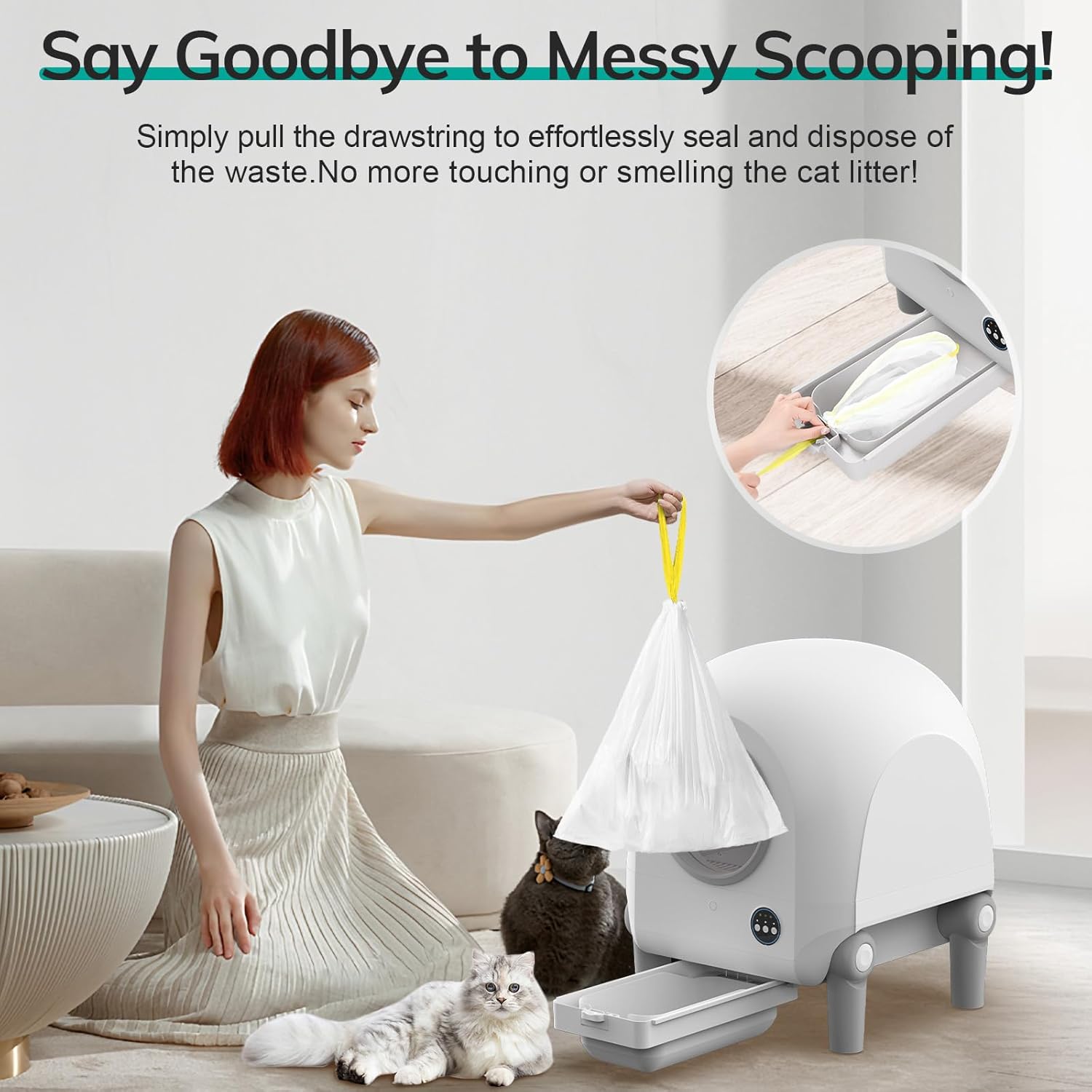
Image: A user demonstrating the waste disposal process by pulling the drawstring of a liner bag from the Omzer OM-CLB's waste collection bin, illustrating a hygienic and hands-free method of waste removal.
6.2 Įrenginio valymas
- Išorė: Išorinius paviršius nuvalykite reklamaamp skudurėliu ir švelniu plovikliu. Venkite stiprių cheminių medžiagų.
- Vidinis būgnas: For a deeper clean, empty all litter from the drum. The drum can be removed for washing with water and mild soap. Ensure it is completely dry before reassembling.
- Jutikliai: Gently wipe sensors with a soft, dry cloth to ensure proper function.
- Always unplug the unit before performing any deep cleaning.
6.3 Litter Replacement
- Regularly check the litter level and replenish as needed to maintain optimal performance.
- Completely replace all litter every 2-4 weeks, or as necessary, depending on usage and odor.
7. Problemų sprendimas
| Problema | Galima priežastis | Sprendimas |
|---|---|---|
| Įrenginys neįsijungia | Power cord disconnected; outlet malfunction | Patikrinkite maitinimo laido jungtį; pabandykite įjungti į kitą lizdą. |
| Valymo ciklas neprasideda automatiškai | Cat still in unit; sensors obstructed; litter level too high/low | Ensure cat has exited; clean sensors; adjust litter level. |
| Waste bin full alert, but bin is not full | Waste Collecting Box Infrared Sensor obstructed/dirty | Clean the sensor located above the waste bin. |
| Programa neprisijungia prie įrenginio | Incorrect Wi-Fi (not 2.4G); device not in pairing mode; poor signal | Ensure 2.4G Wi-Fi; re-enter pairing mode; move device closer to router. |
| Litter sticking to drum | Litter type unsuitable; drum dirty; humidity | Use high-quality clumping litter; clean drum thoroughly; ensure low humidity. |
8. Specifikacijos
| Funkcija | Detalė |
|---|---|
| Modelio numeris | OM-CLB |
| Gaminio matmenys (I x P x A) | 59.5 l x 54.5 W x 59 A centimetrai |
| Prekės svoris | 13 kg |
| Talpa | 100L (Litter Drum) |
| Medžiaga | Polyester (Housing) |
| Ryšys | 2.4G Wi-Fi (App-Controlled) |
| Tikslinės rūšys | Kat |
| Spalva | Pilka |
9. Garantija ir palaikymas
Omzer provides 24/7 U.S.-based customer support for any inquiries or issues you may encounter with your OM-CLB Automatic Self-Cleaning Cat Litter Box.
For assistance, please contact our support team through the Omzer Smart app or visit our official websvetainė kontaktinei informacijai.