
Next YE-65GFSG8-QLED
Next YE-65GFSG8-QLED 65-inch UHD 4K QLED Google TV User Manual
Model: YE-65GFSG8-QLED
1. Įvadas
Ačiū, kad pirkoteasing the Next YE-65GFSG8-QLED 65-inch UHD 4K QLED Google TV. This manual provides essential information for setting up, operating, and maintaining your new television. Please read it thoroughly before use and keep it for future reference.

1.1 vaizdas: priekis view of the Next YE-65GFSG8-QLED 65-inch QLED Google TV.
2. Saugos informacija
Please observe the following safety precautions to prevent damage and ensure safe operation:
- Saugokite televizorių nuo lietaus ar drėgmės.
- Neuždenkite vėdinimo angų.
- Užtikrinkite tinkamą elektros jungčių įžeminimą.
- Laikykite televizorių atokiau nuo tiesioginių saulės spindulių, šilumos šaltinių ir atviros liepsnos.
- Naudokite tik prie televizoriaus pridėtą maitinimo laidą.
- Nebandykite patys taisyti televizoriaus. Visus techninės priežiūros darbus patikėkite kvalifikuotiems specialistams.
- Pastatykite televizorių ant stabilaus, lygaus paviršiaus arba tvirtai pritvirtinkite jį prie sienos.
3. Pakuotės turinys
Patikrinkite, ar pakuotėje yra visi reikalingi daiktai:
- Next YE-65GFSG8-QLED 65-inch UHD 4K QLED Google TV
- Nuotolinio valdymo pultas
- Maitinimo laidas
- Vartotojo vadovas (šis dokumentas)
- Televizoriaus stovo komponentai (jei taikoma)
- Screws for Stand Assembly (if applicable)
4. Sąranka
4.1. Stovo surinkimas (neprivaloma)
Jei televizoriaus netvirtinate prie sienos, stovą pritvirtinkite taip:
- Atsargiai padėkite televizorių ekranu žemyn ant minkšto, švaraus paviršiaus, kad nepažeistumėte ekrano.
- Sulygiuokite stovo komponentus su tvirtinimo angomis televizoriaus apačioje.
- Pritvirtinkite stovą naudodami pateiktus varžtus. Neperveržkite.
- Atsargiai pakelkite televizorių į vertikalią padėtį ant stabilaus paviršiaus.
4.2. Prietaisų prijungimas
Prijunkite išorinius įrenginius prie atitinkamų prievadų televizoriaus gale.
4.1 vaizdas: galinis view of the TV with connection ports labeled.
- HDMI (3 ports, one with ARC): Connect Blu-ray players, game consoles, set-top boxes, etc. Use the HDMI (ARC) port for audio return channel functionality with compatible sound systems.
- USB (2 prievadai): Prijunkite USB atmintines, kad galėtumėte atkurti medijos failus arba atnaujinti programinę įrangą.
- DVB-S / DVB-T (TV 1, TV 2): Connect satellite (DVB-S) or terrestrial (DVB-T) antenna cables for broadcast TV reception.
- CI Module: Insert a Conditional Access Module (CAM) for encrypted digital TV services.
- Mini AV įvestis: Connect older devices using an AV adapter cable (not always included).
- Optinis išėjimas: Prijunkite prie garso juostos arba garso imtuvo, kad gautumėte skaitmeninę garso išvestį.
- Ethernet: Prijunkite Ethernet kabelį laidiniam interneto ryšiui.
4.3. Maitinimo prijungimas
Prijunkite maitinimo laidą prie televizoriaus maitinimo įvesties, tada – prie sieninio lizdo. Televizorius persijungs į budėjimo režimą.
5. Naudojimo instrukcijos
5.1. Pirmasis nustatymas
When you power on the TV for the first time, follow the on-screen instructions to:
- Pasirinkite savo kalbą ir regioną.
- Connect to a Wi-Fi network or use the wired Ethernet connection.
- Prisijunkite naudodami „Google“ paskyrą, kad galėtumėte pasiekti „Google TV“ funkcijas.
- Scan for available TV channels (if using antenna/satellite).

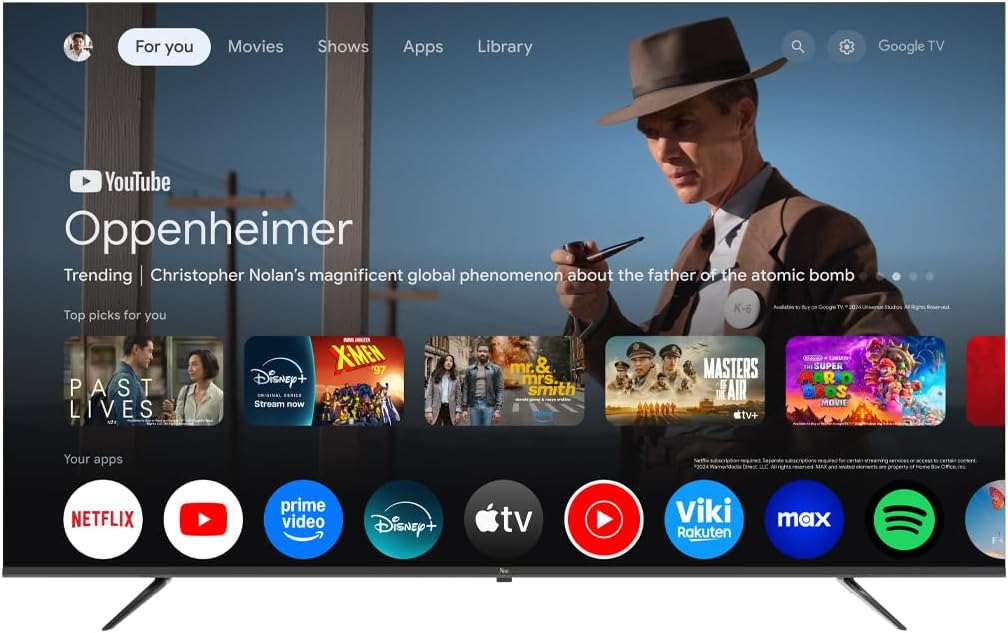
Image 5.1: Google TV interface on the Next QLED TV.
5.2. „Google TV“ funkcijos
Your TV runs on Google TV, providing access to a wide range of content and smart features:
- Asmeninės rekomendacijos: Get suggestions based on your viewistorija.
- Valdymas balsu: Use the built-in Google Assistant via the remote control to search for content, control smart home devices, and more.
- Prieiga prie programos: Download and stream from popular services like YouTube, Netflix, Disney+, and more via the Google Play Store.
- Įtaisytasis „Chromecast“: Transliuokite turinį iš suderinamų mobiliųjų įrenginių tiesiai į televizorių.
5.3. QLED ekrano technologija
The QLED display technology in your TV offers enhanced picture quality:
- Ryškios spalvos: Quantum Dot technology produces a wider color gamut and higher color saturation.
- Aukštos Ryškumas: Experience brighter images with improved contrast.
- HDR palaikymas: High Dynamic Range (HDR) content delivers greater detail in both bright and dark scenes.

Image 5.2: Visual representation of QLED technology's enhanced color saturation.

Image 5.3: Visual representation of HDR technology's improved dynamic range.
5.4. Nuotolinio valdymo pultas
The included remote control allows you to navigate the TV's interface, adjust settings, and access smart features. Refer to the remote control diagram (if available in the physical manual) for specific button functions.
5.5. Produktas baigtasview Vaizdo įrašas
Watch this video for a brief overview of the Next QLED Google TV's key features, including QLED technology, Ultra HD quality, Google TV integration, and frameless design.
5.1 vaizdo įrašas: Viršview of Next QLED Google TV features.
6. Priežiūra
Kad užtikrintumėte televizoriaus ilgaamžiškumą ir optimalų veikimą:
- Ekrano valymas: Švelniai nuvalykite ekraną minkšta, nepūkuota šluoste. Įsisenėjusioms dėmėms valyti naudokite specialiai ekranui skirtą valymo tirpalą, užteptą ant šluostės, o ne tiesiai ant ekrano.
- Spintos valymas: Televizoriaus korpusą valykite minkšta, sausa šluoste. Nenaudokite abrazyvinių valiklių ar tirpiklių.
- Vėdinimas: Įsitikinkite, kad ventiliacijos angos nėra dulkės ir neužsikimšusios, kad išvengtumėte perkaitimo.
- Išjungti: Disconnect the TV from the power outlet during electrical storms or when it will be unused for extended periods.
7. Problemų sprendimas
Jei kyla problemų dėl televizoriaus, žr. šiuos dažniausiai pasitaikančius sprendimus:
| Problema | Galimas sprendimas |
|---|---|
| Nėra galios | Patikrinkite, ar maitinimo laidas tvirtai prijungtas prie televizoriaus ir sieninio lizdo. Įsitikinkite, kad lizdas veikia. |
| Nėra vaizdo, bet yra garsas | Patikrinkite, ar pasirinktas teisingas įvesties šaltinis. Patikrinkite kabelių jungtis su išoriniais įrenginiais. |
| Nėra garso, bet vaizdas yra | Patikrinkite garsumo lygį ir nutildymo būseną. Įsitikinkite, kad garso kabeliai tinkamai prijungti. Patikrinkite televizoriaus garso išvesties nustatymus. |
| Nuotolinio valdymo pultas neveikia | Pakeiskite baterijas. Įsitikinkite, kad tarp nuotolinio valdymo pulto ir televizoriaus IR jutiklio nėra jokių kliūčių. |
| Prasta vaizdo kokybė | Patikrinkite antenos / kabelio jungtis. Sureguliuokite vaizdo nustatymus (ryškumą, kontrastą, ryškumą). Įsitikinkite, kad šaltinio turinys yra aukštos kokybės. |
| Nepavyksta prisijungti prie „Wi-Fi“. | Restart your router. Ensure the Wi-Fi password is correct. Move the TV closer to the router or use a wired Ethernet connection. |
Jei problema išlieka ir išbandžius šiuos sprendimus, susisiekite su klientų aptarnavimo tarnyba.
8. Specifikacijos
Key technical specifications for the Next YE-65GFSG8-QLED 65-inch UHD 4K QLED Google TV:
| Funkcija | Detalė |
|---|---|
| Modelis | YE-65GFSG8-QLED |
| Ekrano dydis | 65 colio (165 cm) |
| Ekrano technologija | QLED |
| Rezoliucija | 4K UHD (itin didelės raiškos) |
| Atnaujinimo dažnis | 60 Hz |
| Operacinė sistema | Google TV |
| Ryšys | „Bluetooth“, Ethernet, HDMI (3 prievadai), USB (2 prievadai), „Wi-Fi“ |
| Krašto santykis | 16:9 |
| Gaminio matmenys (D x P x A) | 27.8 cm gylio x 144.6 cm pločio x 88.9 cm aukščio |
| Produkto svoris | 16.3 kilogramo |
| Įtraukti komponentai | Nuotolinio valdymo pultas |
| Ypatinga funkcija | Berėmis dizainas |
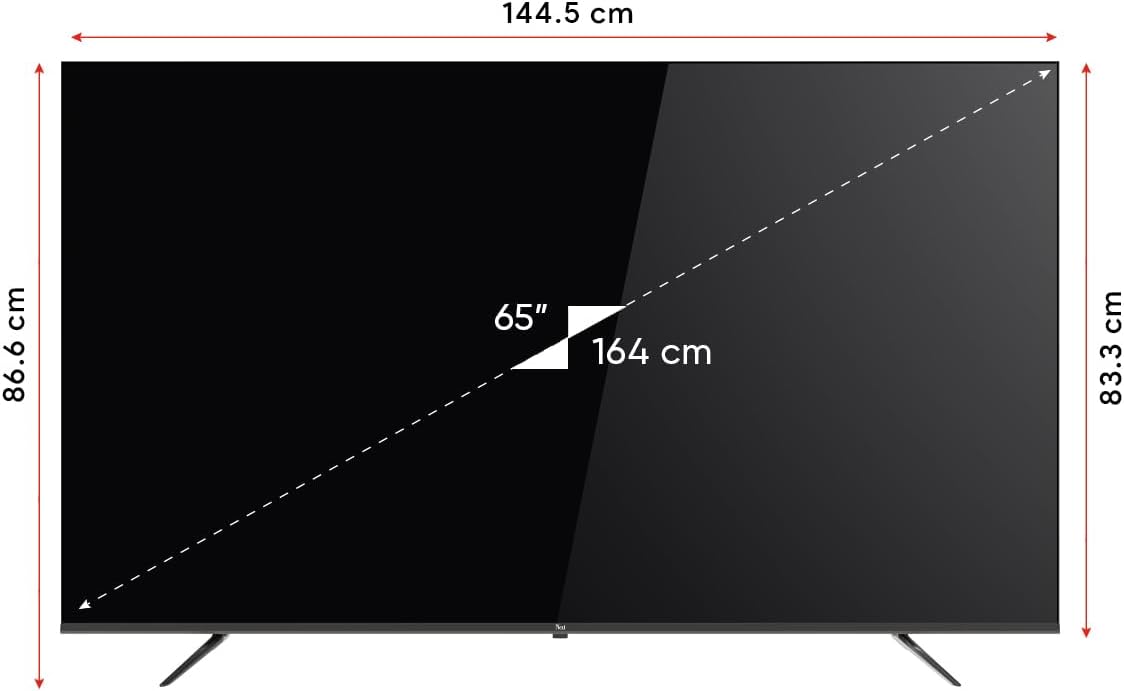
Image 8.1: TV dimensions (144.5 cm width, 86.6 cm height, 65" / 164 cm diagonal).
9. Garantija ir palaikymas
Your Next YE-65GFSG8-QLED TV comes with a manufacturer's warranty:
- Garantinis laikotarpis: 2 Years Manufacturer Warranty.
- Palaikymas: For technical assistance, warranty claims, or further inquiries, please refer to the contact information provided in your warranty card or visit the official Next websvetainę.
Ask a question about this manual
Ask about setup, troubleshooting, compatibility, parts, safety, or missing instructions. Manuals+ will review the question and use this page’s manual context to help answer it.