
1. Produktas baigtasview

Image: The LEVN Wireless Headset HS019, a black on-ear headset with a microphone boom, designed for professional communication.
The LEVN Wireless Headset HS019 is designed for clear communication and productivity in professional and personal environments. It features advanced AI Noise Cancelling technology, Bluetooth 5.2 connectivity, and a versatile charging base with integrated USB ports. Enjoy extended usage with its long-lasting battery and flexible connection options.
2. Kas yra dėžutėje
Patikrinkite pakuotės turinį, kad įsitikintumėte, jog yra visi reikalingi daiktai:
- LEVN belaidės ausinės
- Įkrovimo bazė
- USB raktas
- Vartotojo vadovas
- USB-C kabelis
3. Sąranka
3.1 Ausinių įkrovimas
Before first use, fully charge your LEVN Wireless Headset. You can charge it using the included USB-C cable or by placing it on the multifunction charging base.
- Naudojant USB-C kabelį: Connect the USB-C cable to the headset's charging port and to a USB power source (e.g., computer, wall adapter).
- Naudojant įkrovimo bazę: Place the headset onto the charging base. Ensure the charging contacts align. The base also provides storage for the USB dongle.

Image: LEVN Wireless Headset placed on its multifunction charging base, which also features four USB ports for additional device connectivity. The base provides a convenient charging and storage solution.
The charging base includes four USB ports for flexible data transfer and connecting peripheral devices like mobile hard drives or USB flash drives, helping to keep your workspace organized.
3.2 Belaidis prisijungimas
The headset offers two wireless connection methods: via the 2.4G USB dongle or Bluetooth 5.2.

Image: Illustration showing the two wireless connection methods for the LEVN Wireless Headset: a USB dongle for a stable 2.4G connection and Bluetooth 5.2 for broader compatibility.
3.2.1 Using the 2.4G USB Dongle
- Insert the USB dongle into an available USB port on your computer or device.
- Power on the headset. It should automatically pair with the dongle.
- Once connected, the indicator light on the dongle will show a steady blue, and the headset will confirm connection.
- Ensure the LEVN Headset is selected as the audio input and output device in your computer's sound settings.
The USB dongle provides a secure, stable connection with low latency and an impressive wireless range of up to 15 meters (49 feet).
3.2.2 „Bluetooth“ naudojimas 5.2
- Įjunkite laisvų rankų įrangą.
- Put the headset into pairing mode (refer to the headset's specific button combination for pairing, usually holding the power button for a few seconds until the indicator light flashes).
- On your device (smartphone, tablet, computer), go to Bluetooth settings and search for new devices.
- Select "LEVN HS019" (or similar name) from the list of available devices to pair.
- Once connected, the headset's indicator light will show a steady blue, and you will hear a confirmation tone.
4. Naudojimo instrukcijos
4.1 Maitinimo įjungimas/išjungimas
- Maitinimas: Paspauskite ir palaikykite maitinimo mygtuką maždaug 3 sekundes, kol užsidegs indikatoriaus lemputė.
- Išjungti: Paspauskite ir palaikykite maitinimo mygtuką maždaug 3 sekundes, kol užges indikatoriaus lemputė.
4.2 Skambučių valdymas
- Atsiliepti / Baigti skambutį: Vieną kartą paspauskite daugiafunkcį mygtuką.
- Atmesti skambutį: Paspauskite ir 2 sekundes palaikykite daugiafunkcį mygtuką.
- Garsumo didinimas / sumažinimas: Use the physical volume rocker buttons located on the headset.
- Nutildyti / įjungti mikrofoną: Press the dedicated Mute button on the microphone boom or earcup. This provides instant call privacy.
4.3 Dirbtinio intelekto triukšmo slopinimas
The LEVN HS019 features AI Noise Cancellation, which eliminates up to 99.9% of background noise, ensuring your voice remains clear during calls and online meetings. This feature is automatically active to optimize your audio experience.
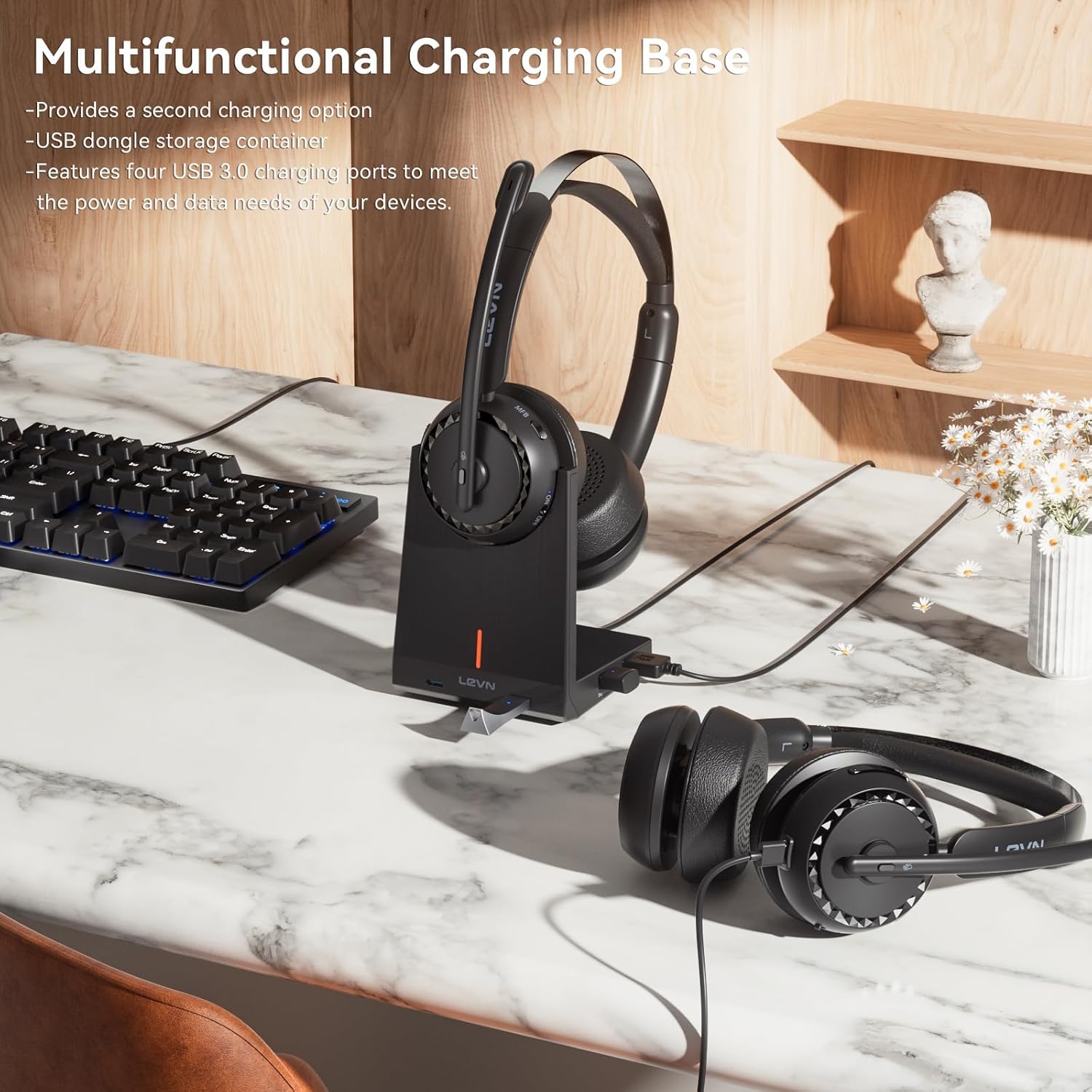
Image: A person wearing the LEVN Wireless Headset in an office environment, demonstrating the AI Noise Cancellation feature. Visual representation shows background noise being filtered out, resulting in clear voice transmission.
4.4 Baterijos veikimo laikas
The headset is equipped with a high-capacity battery, providing up to 65 hours of continuous playback on a single charge. This ensures extended use for long work sessions or entertainment without frequent recharging.

Image: A LEVN Wireless Headset positioned above a clock face indicating "65h", surrounded by batteries, symbolizing its ultra-long battery life of 65 hours.
5. Priežiūra
- Valymas: Ausines ir įkrovimo pagrindą valykite minkšta, sausa šluoste. Venkite naudoti stiprias chemines medžiagas ar abrazyvines medžiagas.
- Saugykla: When not in use, store the headset in a cool, dry place, preferably on its charging base to keep it charged and protected.
- Akumuliatoriaus priežiūra: Norėdami pailginti baterijos veikimo laiką, venkite dažnai visiškai iškrauti ausines. Reguliariai jas įkraukite.
- Komfortas: The headset is designed for comfort with plush materials. Adjust the headband and earcups for a secure yet comfortable fit during extended use.

Image: The LEVN Wireless Headset resting on a soft, cloud-like surface, illustrating its comfortable design and feather-light feel for all-day wear.
6. Problemų sprendimas
If you encounter issues with your LEVN Wireless Headset, please refer to the following common solutions:
- Nėra garso / neveikia mikrofonas:
- Įsitikinkite, kad ausinės įjungtos ir visiškai įkrautos.
- Verify the headset is correctly paired via Bluetooth or the USB dongle.
- Check your computer's sound settings to ensure the LEVN Headset is selected as the default input and output device.
- If using the USB dongle, try unplugging and re-inserting it. Restarting your computer may also resolve the issue.
- Ensure the microphone is not muted using the physical mute button.
- Connection Drops/Unstable Connection:
- Įsitikinkite, kad esate ne toliau kaip 15 metrų belaidžio ryšio diapazone.
- Minimize interference from other wireless devices (e.g., Wi-Fi routers, other Bluetooth devices).
- Pabandykite iš naujo susieti ausines su savo įrenginiu arba iš naujo prijungti USB adapterį.
- Ausinės neįkraunamos:
- Ensure the USB-C cable is securely connected to both the headset/charging base and the power source.
- If using the charging base, ensure the headset is correctly seated and the charging contacts are clean.
- Išbandykite kitą USB-C laidą arba maitinimo adapterį.
7. Specifikacijos
| Funkcija | Detalė |
|---|---|
| Prekės ženklas | LEVN |
| Modelio numeris | HS019 |
| Modelio pavadinimas | LE-HS016 V3 |
| Ryšio technologija | Belaidis ryšys („Bluetooth 5.2“, 2.4G USB adapteris) |
| Bluetooth diapazonas | Iki 15 metrų (49 pėdų) |
| Triukšmo valdymas | AI triukšmo panaikinimas |
| Ausų išdėstymas | Ant ausies |
| Baterijos veikimo laikas | Iki 65 valandų (atkūrimas) |
| Charging Ports on Base | 4 USB prievadų |
| Valdymo tipas | Call Control (Buttons) |
| Dažnių diapazonas | nuo 20 Hz iki 20,000 Hz |
| Medžiaga | Plastic, Stainless Steel, Leather |
| Svoris | 120 gramų |
8. Garantija ir palaikymas
LEVN products are designed for reliability and performance. For warranty information, technical support, or customer service inquiries, please refer to the official LEVN website or contact their customer support directly. The contact details are typically provided in the packaging or on the manufacturer's websvetainę.
Išsaugokite pirkimo įrodymą, kad galėtumėte kreiptis dėl garantijos.