
Flashpoint R2 Nano
Flashpoint R2 Nano Touchscreen TTL Wireless Flash Trigger User Manual
For Panasonic and Olympus Cameras
1. Įvadas
The Flashpoint R2 Nano Remote is a compact and advanced wireless flash trigger designed for Panasonic and Olympus camera systems. It offers precise control over your flash settings through an intuitive touchscreen interface and OLED display, enhancing your photography experience with seamless integration and reliable performance.
Pagrindinės funkcijos:
- Sklandus integravimas: Full TTL compatibility with Olympus/Panasonic cameras for optimal exposure.
- Ultimate Reliability: Stable 2.4 GHz radio frequency with 32 channels, ensuring consistent triggering up to 328 feet (100 meters).
- Didelės spartos sinchronizavimas (HSS): Achieve sync speeds up to 1/8000s for creative effects and motion freezing.
- Intuityvus jutiklinio ekrano valdymas: Responsive interface for quick and easy adjustments.
- Versatile Group Control: Manage up to 16 groups (A-F, 0-9) independently for complex lighting setups.
2. Kas yra dėžutėje
Upon unboxing your Flashpoint R2 Nano, please verify that all components are present:
- Flashpoint R2 Nano Remote
- USB-C įkrovimo laidas
- Sandėliavimo krepšys
- Vartotojo vadovas (šis dokumentas)
3. Produktas baigtasview
Familiarize yourself with the components and controls of your R2 Nano remote.
3.1 pav.: Priekinė ir šoninė dalys View of the R2 Nano with Key Components Labeled.
- Jutiklinis ekranas: Main interface for settings and control.
- Pasirinkite skambinti: Meniu naršymui ir verčių reguliavimui.
- Maitinimo jungiklis: Įjungia/išjungia įrenginį.
- Bandymo mygtukas: Suveikia bandomasis blyksnis.
- Mygtuko montavimas / nuėmimas: Releases the remote from the hotshoe.
- Montavimo anga: Jungiamas prie fotoaparato karštosios jungties.
- USB-C įkrovimo prievadas: Baterijos įkrovimui.

Figure 3.2: R2 Nano Touchscreen Interface Details.
- Kanalas (CH): Displays the current wireless channel (e.g., CH6).
- Group (A, B, C, etc.): Indicates the active flash groups.
- Išėjimo galios lygis: Shows the flash power setting (e.g., +0.0, 1/128).
- Parameters - / +: Touch controls for decreasing/padid.asing vertės.
- Sinchronizavimo režimai: Icons indicating sync modes (e.g., HSS, front curtain, rear curtain).
- Modeliavimas L.amp: Icon for modeling lamp statusą.
- Baterijos indikatorius: Rodo esamą baterijos lygį.
4. Sąranka
4.1 Akumuliatoriaus įkrovimas
The R2 Nano is equipped with a built-in rechargeable lithium battery. Before first use, fully charge the device.
- Locate the USB-C charging port on the side of the R2 Nano.
- Connect the provided USB-C charging cable to the port.
- Kitą laido galą prijunkite prie USB maitinimo adapterio (nepridedamas) arba kompiuterio USB prievado.
- The battery indicator on the screen will show charging status. A full charge from 0% to 100% typically takes approximately 2 hours.

Figure 4.1: Charging the R2 Nano via USB-C.
4.2 Tvirtinimas prie kameros
The R2 Nano features an easy-mounting, durable hotshoe design for secure attachment to your camera.
- Įsitikinkite, kad jūsų kamera yra išjungta.
- Slide the R2 Nano's mounting slot onto your camera's hotshoe.
- Gently push until it clicks into place, ensuring a secure connection.
- To detach, press the Installing/Detaching Button and slide the remote off.

Figure 4.2: Mounting the R2 Nano on a Camera Hotshoe.
5. Naudojimo instrukcijos
5.1 Įjungimas / išjungimas
- To power on, press and hold the Power Switch until the screen illuminates.
- To power off, press and hold the Power Switch until the screen turns off.
5.2 Jutiklinio ekrano sąsajos naršymas
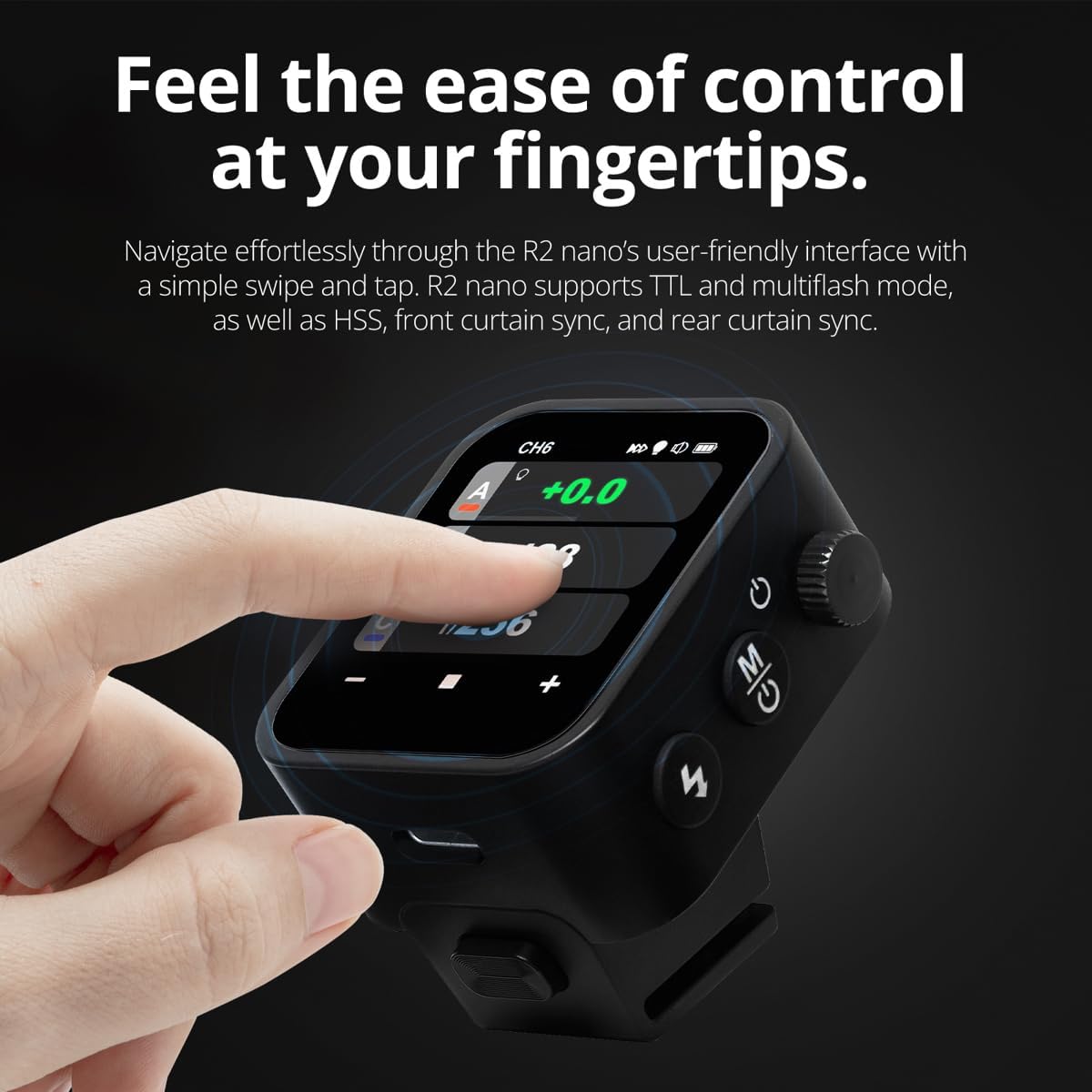
The R2 Nano features a responsive touchscreen and a select dial for intuitive control.

Figure 5.1: High Definition OLED Screen Interface.
- Prisilietimo sąveika: Tap on a group (A, B, C, etc.) to select it for adjustment. Tap on parameters like power level to modify them.
- Pasirinkite skambinti: Rotate the dial to scroll through options or adjust values. Press the dial to confirm selections.
- Parametrų reguliavimas: Use the on-screen '-' and '+' buttons or the Select Dial to change flash power, exposure compensation, or other settings.

Figure 5.2: Touchscreen Interaction for Settings Adjustment.
5.3 Setting Channels and Groups
To avoid interference and control multiple flashes, set appropriate channels and groups.
- Access the channel settings through the touchscreen menu. Select a channel from 1 to 32. Ensure your flash units are set to the same channel.
- Assign flash units to different groups (A-F, 0-9) to control them independently. The R2 Nano allows control of up to 16 groups.
5.4 Blykstės režimai (TTL, rankinis, kelios blykstės)
The R2 Nano supports various flash modes to suit different shooting scenarios.
- TTL (per objektyvą): Automatically adjusts flash output for correct exposure. Ideal for fast-paced shooting where lighting conditions change frequently.
- Rankinis (M): Allows precise control over flash power output (e.g., 1/1 to 1/256). Suitable for consistent lighting setups and creative control.
- Multi-flash (Stroboscopic): Vienos ekspozicijos metu suveikia keletas greitų blyksnių, kad užfiksuotų kelis objekto judesius.
5.5 Sync Modes (HSS, Front Curtain, Rear Curtain)
Select the appropriate sync mode based on your shutter speed and desired effect.
- HSS (didelės spartos sinchronizavimas): Enables flash synchronization at shutter speeds faster than the camera's native sync speed (up to 1/8000s). Useful for overpowering ambient light or using wide apertures in bright conditions.
- Priekinės užuolaidos sinchronizavimas: The flash fires at the beginning of the exposure. This is the standard sync mode.
- Galinės užuolaidos sinchronizavimas: The flash fires just before the second curtain closes. This creates a streaking effect behind moving subjects, giving a sense of motion.
6. Priežiūra
Proper maintenance ensures the longevity and optimal performance of your R2 Nano remote.
- Valymas: Use a soft, dry cloth to clean the exterior of the device. For the touchscreen, use a microfiber cloth specifically designed for electronics. Avoid using harsh chemicals or abrasive materials.
- Saugykla: When not in use, store the R2 Nano in its provided storage bag to protect it from dust and scratches. Store in a cool, dry place away from direct sunlight and extreme temperatures.
- Akumuliatoriaus priežiūra: To maintain battery health, avoid fully discharging the battery frequently. If storing for extended periods, charge the battery to approximately 50% every few months.
- Karštosios jungties kontaktai: Keep the hotshoe contacts clean and free of debris to ensure reliable communication with your camera.
7. Problemų sprendimas
If you encounter issues with your Flashpoint R2 Nano, refer to the following common problems and solutions.
| Problema | Galima priežastis | Sprendimas |
|---|---|---|
| Įrenginys neįsijungia. | Baterija išsikrovusi. | Įkraukite įrenginį naudodami USB-C laidą. |
| Blykstės įrenginiai neveikia. | Neteisingi kanalo arba grupės nustatymai. | Ensure the R2 Nano and flash units are set to the same channel and correct groups. |
| Blykstės įrenginiai neveikia. | Remote not securely mounted. | Ensure the R2 Nano is fully seated in the camera's hotshoe. |
| Inconsistent flash triggering. | Aplinkos trukdžiai. | Change the wireless channel to one with less interference. Ensure no obstructions between remote and flash. |
| Jutiklinis ekranas nereaguoja. | Laikinas programinės įrangos triktis. | Išjunkite įrenginį, palaukite kelias sekundes ir vėl jį įjunkite. |
| HSS neveikia. | Camera or flash not set to HSS mode. | Verify HSS is enabled on both the R2 Nano and your compatible flash unit. Ensure camera shutter speed is above sync speed. |
8. Specifikacijos
| Funkcija | Detalė |
|---|---|
| Modelis | Flashpoint R2 Nano |
| Suderinamumas | Panasonic and Olympus Cameras |
| Belaidis dažnis | 2.4 GHz |
| Kanalai | 32 |
| Grupės | 16 (AF, 0-9) |
| belaidis diapazonas | Iki 100 metrų (328 pėdų) |
| Sinchronizavimo greitis | Iki 1/8000 s (HSS) |
| Ekranas | Touchscreen OLED |
| Baterija | Įmontuota įkraunama ličio baterija |
| Įkrovimo prievadas | USB-C |
| Gaminio matmenys | 5.25 x 4.25 x 2.5 colio |
| Prekės svoris | 6.4 uncijos |
| Gamintojas | Pliūpsnio taškas |
| Pasiekiama pirmoji data | 19 m. birželio 2024 d |
9. Garantija ir palaikymas
Flashpoint products are designed for reliability and performance. For warranty information, technical support, or service inquiries, please refer to the official Flashpoint websvetainėje arba susisiekite su įgaliotuoju pardavėju.
Prašome išsaugoti pirkimo įrodymą bet kokiems garantiniams reikalavimams.
Ask a question about this manual
Ask about setup, troubleshooting, compatibility, parts, safety, or missing instructions. Manuals+ will review the question and use this page’s manual context to help answer it.