
Įvadas
Thank you for choosing the Oakcastle HIFI150 Stereo System. This manual provides essential information for setting up, operating, and maintaining your device. Please read it thoroughly before use and retain it for future reference.
Saugos informacija
Norėdami užtikrinti saugų darbą ir išvengti žalos, laikykitės šių saugos priemonių:
- Saugokite įrenginį nuo lietaus, drėgmės ar ekstremalių temperatūrų.
- Neatidarykite casing. Visus techninės priežiūros darbus patikėkite kvalifikuotiems darbuotojams.
- Užtikrinkite tinkamą vėdinimą aplink įrenginį. Neužblokuokite jokių ventiliacijos angų.
- Naudokite tik su įrenginiu pateiktą maitinimo adapterį.
- Keep the unit away from heat sources such as radiators, stoves, or other heat-producing appliances.
- Įrenginį valykite tik sausa šluoste.
Pakuotės turinys
Prašome patikrinti, ar pakuotėje yra visi reikalingi daiktai:
- Oakcastle HIFI150 stereo sistema
- Nuotolinio valdymo pultas
- Nuotolinio valdymo baterijos
- Maitinimo kabelis
- Vartotojo vadovas
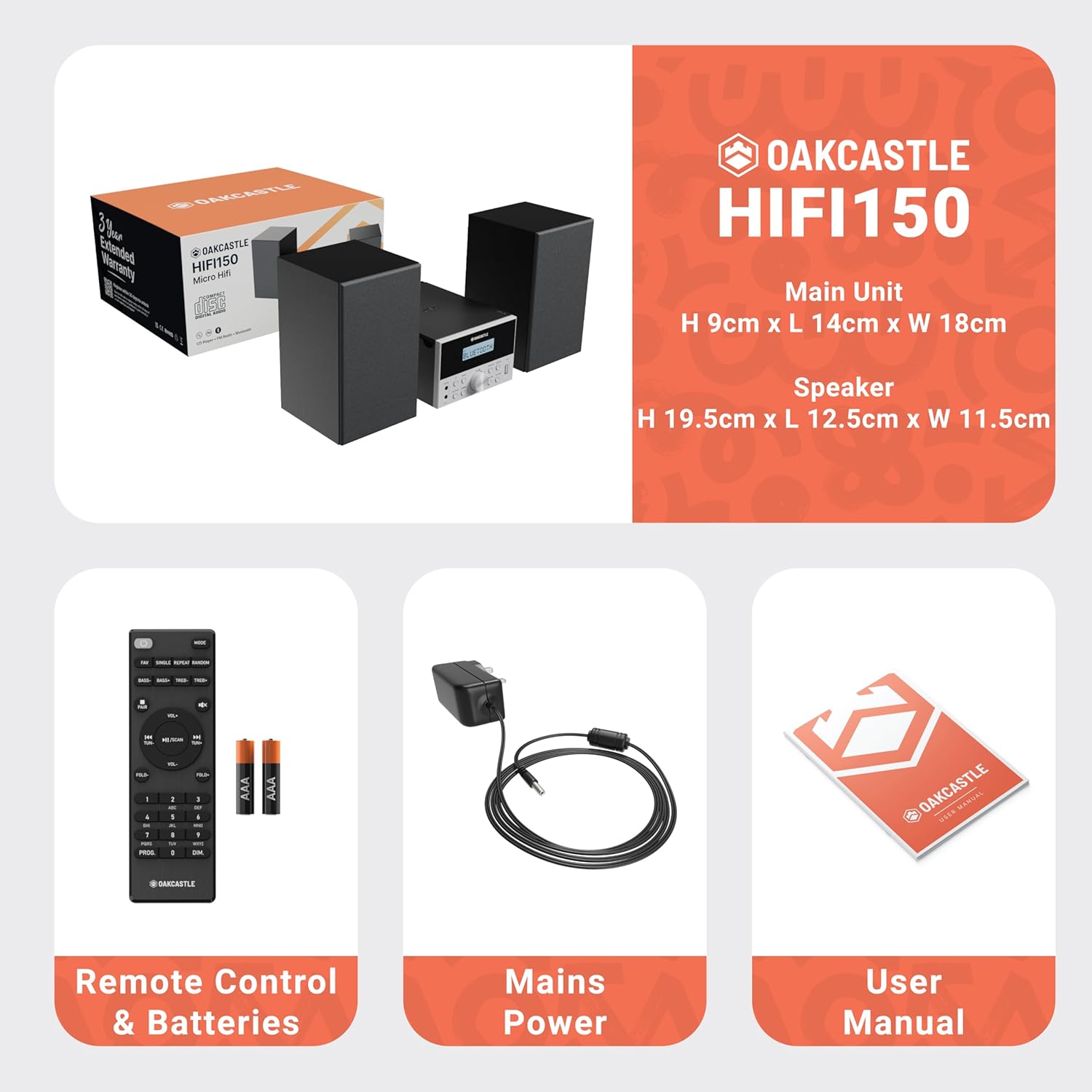
Image: The Oakcastle HIFI150 package contents, showing the main unit, two speakers, remote control with batteries, power adapter, and user manual.
Produktas baigtasview
The Oakcastle HIFI150 features a compact design with intuitive controls and multiple connectivity options.
Priekinio skydelio valdikliai ir ekranas

Image: A close-up of the Oakcastle HIFI150 main unit's front panel, highlighting the digital display, central volume knob, mode selection buttons, and front-facing AUX In and USB ports. The display shows 'BLUETOOTH'.
- Ekranas: Rodo dabartinį režimą, takelio informaciją ir radijo dažnį.
- Maitinimo mygtukas: Įjungia arba išjungia įrenginį.
- Režimo mygtukas: Cycles through input sources (CD, FM, Bluetooth, AUX, USB).
- Garsumo rankenėlė: Reguliuoja pagrindinį garsumą.
- Atkūrimo / pristabdymo mygtukas: Valdo CD, USB ir „Bluetooth“ atkūrimą.
- Praleidimo / derinimo mygtukai: Naršo takelius arba ieško radijo dažnių.
- AUX prievadas: Skirta išoriniams garso įrenginiams prijungti per 3.5 mm laidą.
- USB prievadas: Garso įrašams leisti files iš USB atmintinės.
Galinio skydelio jungtys
The rear panel includes connections for speakers and power.
Sąranka
1. Garsiakalbių prijungimas
Connect the included speakers to the speaker terminals on the rear of the main unit. Ensure correct polarity (red to red, black to black) for optimal sound quality.
2. Maitinimo prijungimas
Prijunkite maitinimo laidą prie kintamosios srovės įvado pagrindinio įrenginio gale, tada kitą galą prijunkite prie standartinio sieninio lizdo.
Naudojimo instrukcijos
Maitinimo įjungimas/išjungimas
Paspauskite Galia mygtuką priekiniame skydelyje arba nuotolinio valdymo pulte, kad įjungtumėte arba išjungtumėte įrenginį.
Režimo pasirinkimas
Paspauskite Režimas button on the front panel or remote control repeatedly to cycle through the available input sources: CD, FM radijas, Bluetooth, AUX, ir USB.
Bluetooth veikimas
- Pasirinkite Bluetooth mode using the Mode button. The display will show 'BLUETOOTH' and the unit will enter pairing mode.
- Išmaniajame telefone ar kitame „Bluetooth“ įrenginyje įjunkite „Bluetooth“ ir ieškokite galimų įrenginių.
- Select 'OAKCASTLE HIFI150' from the list. Once connected, the unit will confirm the connection.
- You can now stream audio wirelessly from your device to the HIFI150.
CD atkūrimas

Image: The Oakcastle HIFI150 with its top-loading CD player mechanism open, revealing a compact disc placed inside. The display shows 'CD'.
- Atidarykite CD skyriaus dangtelį.
- Place a CD (MP3, CD, WMA, or CD-R format) onto the spindle with the label side facing up.
- Uždarykite CD skyriaus dangtelį.
- Pasirinkite CD mode. The unit will read the disc and begin playback automatically.
- Atkūrimui valdyti naudokite mygtukus „Paleisti / pristabdyti“ ir „Praleisti“.
FM radijo veikimas

Image: The Oakcastle HIFI150 main unit with its telescopic antenna extended, displaying an FM radio frequency on its screen. The unit is placed between two speakers.
- Pasirinkite FM radijas režimu.
- Ištieskite teleskopinę anteną, kad signalas būtų geresnis.
- Automatinis nuskaitymas: Press and hold the Play/Pause button to automatically scan and save available FM stations (up to 30 presets).
- Rankinis derinimas: Use the Skip/Tune buttons to manually adjust the frequency.
- Atšaukti išankstinius nustatymus: Use the 'FAV/PROG' button on the remote to cycle through saved stations.
USB atkūrimas
- Įdėkite USB įrenginį į USB prievadą priekiniame skydelyje.
- Pasirinkite USB mode. The unit will automatically detect and begin playing compatible audio files (MP3, WMA).
- Atkūrimui valdyti naudokite mygtukus „Paleisti / pristabdyti“ ir „Praleisti“.
AUX įvestis
- Prijunkite išorinį garso įrenginį (pvz., MP3 grotuvą, išmanųjį telefoną) prie AUX įėjimas port on the front panel using a 3.5mm audio cable (not included).
- Pasirinkite AUX režimu.
- Valdykite atkūrimą iš prijungto išorinio įrenginio.
Garsumo valdymas
Pasukite Tūrio rankenėlė priekiniame skydelyje arba naudokite VOL +/- mygtukais ant nuotolinio valdymo pulto, kad sureguliuotumėte garso lygį.
Nuotolinio valdymo pulto naudojimas
The included remote control provides full functionality for the HIFI150. Ensure batteries are correctly inserted. Point the remote control towards the front panel of the main unit for optimal response.
Priežiūra
Valymas
- Nuvalykite įrenginį minkštu, sausu skudurėliu.
- Nenaudokite abrazyvinių valiklių, vaško ar tirpiklių, nes jie gali pažeisti apdailą.
Sandėliavimas
Jei prietaisas ilgesnį laiką nebus naudojamas, atjunkite jį nuo maitinimo lizdo ir laikykite vėsioje, sausoje vietoje.
Trikčių šalinimas
If you encounter issues with your HIFI150, please refer to the following common problems and solutions:
| Problema | Galima priežastis | Sprendimas |
|---|---|---|
| Nėra galios | Maitinimo laidas neprijungtas; Maitinimo lizdo gedimas | Įsitikinkite, kad maitinimo laidas yra tvirtai prijungtas; Pabandykite naudoti kitą maitinimo lizdą. |
| Nėra garso | Volume too low; Incorrect input mode; Speakers not connected | Padidinkite garsumą; Pasirinkite tinkamą įvesties režimą; Patikrinkite garsiakalbių jungtis. |
| CD negroja | CD inserted incorrectly; Disc scratched/dirty; Incorrect format | Reinsert CD correctly; Clean or replace disc; Ensure disc is compatible (MP3, CD, WMA, CD-R). |
| Bluetooth neprisijungia | Bluetooth mode not selected; Device too far; Device already connected to another unit | Pasirinkite „Bluetooth“ režimą; perkelkite įrenginį arčiau; atjunkite nuo kitų įrenginių ir bandykite dar kartą. |
| Prastas FM priėmimas | Antena neištiesta; silpnas signalas | Fully extend the telescopic antenna; Try repositioning the unit. |
Specifikacijos
| Modelio numeris | 1000002971 |
| Prekės ženklas | Ąžuolas |
| Ryšys | „Bluetooth 5.2“, USB, AUX |
| Garso išvestis | 20W |
| Palaikoma laikmena | CD, MP3, WMA, CD-R, USB |
| Radijas | FM Radio with 30 Presets |
| Suderinami įrenginiai | MP3 grotuvas, išmanusis telefonas, planšetinis kompiuteris |
| Spintos medžiaga | Mediena |
| Spalva | Juoda |
| Prekės matmenys (I x P x A) | 13.7 x 17.8 x 9 cm |
| Prekės svoris | 2 kilogramo |
Garantija ir palaikymas
The Oakcastle HIFI150 comes with an extended 3-year warranty. Registration is required to activate the full warranty period. Please refer to the warranty card included in your package or visit the official Oakcastle website for registration details and support information.
For technical assistance or further inquiries, please contact Oakcastle customer support through their official channels.