
HiBy R4
HiBy R4 Digital Audio Player Instruction Manual
Modelis: R4
Įvadas
This instruction manual provides comprehensive guidance for the setup, operation, maintenance, and troubleshooting of your HiBy R4 Digital Audio Player. Please read this manual thoroughly to ensure proper use and to maximize your audio experience.

Image: The HiBy R4 Digital Audio Player, showcasing savo elegantišku dizainu.
Produktas baigtasview
The HiBy R4 is a high-fidelity digital audio player designed for superior sound quality and versatile media playback. It features an Android 12 operating system, advanced audio components, and extensive connectivity options.
Pagrindinės funkcijos:
- Android 12 OS: Provides a familiar and customizable user interface, supporting various third-party applications.
- Aukšta garso kokybė: Equipped with 4 DAC chips, 2 low-phase noise crystals, 28 Tantalum capacitors, and a Class A headphone amplifier for enhanced audio resolution and dynamic range.
- Dual Circuitry: Pioneers PCM/DSD dual circuitry for independent operation of DAC, low-pass filters, and power supplies, optimizing audio output for different music files.
- Didelės raiškos palaikymas: Supports DSD 256 native, PCM768kHz/32bit audio, and MQA 16X unfolding.
- Belaidis ryšys: Features Bluetooth 5.0 (two-way, UAT, LDAC, aptX, aptX HD, AAC, SBC codecs) and dual-band Wi-Fi (2.4GHz/5GHz) for streaming and file perkėlimas.
- Išplečiama saugykla: 32 GB vidinės ROM, galima išplėsti iki 2 TB naudojant „Micro SD“ kortelę.
- Universalūs išėjimai: Includes both 3.5mm single-ended and 4.4mm balanced dual interfaces.
- Fiziniai valdikliai: Dedicated FN keys for quick access to functions like key lock and screen rotation.
- Ekranas: 4.7-inch high-definition LCD screen.
- Baterija: Large 4500mAh battery for extended usage.
Komponentai:
- HiBy R4 unit
- Type C to Type C charging cable (2.0)
- Vartotojo vadovas
- Front screen protector (2, 1 pre-applied)
- TPU korpusas
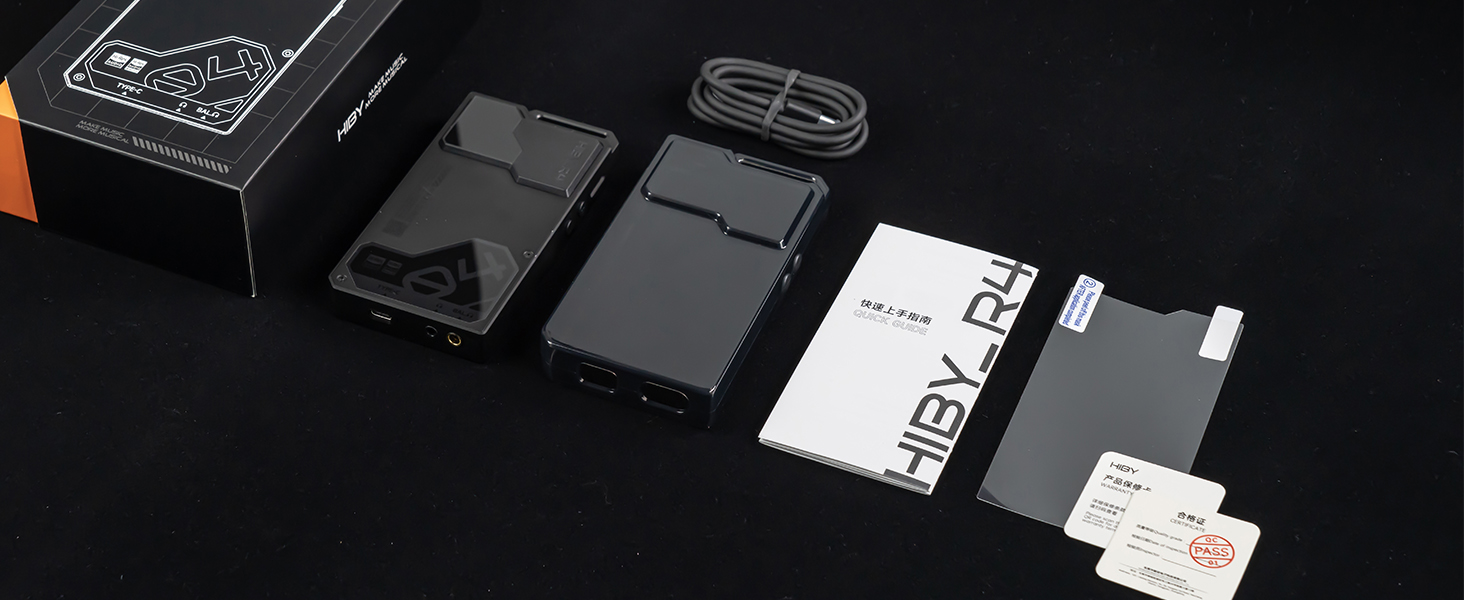
Image: Contents of the HiBy R4 retail box, including the player, cables, and accessories.
Sąranka
1. Pradinis įkrovimas
Before first use, fully charge the HiBy R4. Connect the provided Type-C to Type-C charging cable to the device and a compatible 20W PD charger. A full charge typically takes approximately 2 hours.
2. „Micro SD“ kortelės įdėjimas
The HiBy R4 has 32GB of internal storage. For additional storage, insert a Micro SD card (up to 2TB supported) into the designated slot. Ensure the card is inserted correctly until it clicks into place.
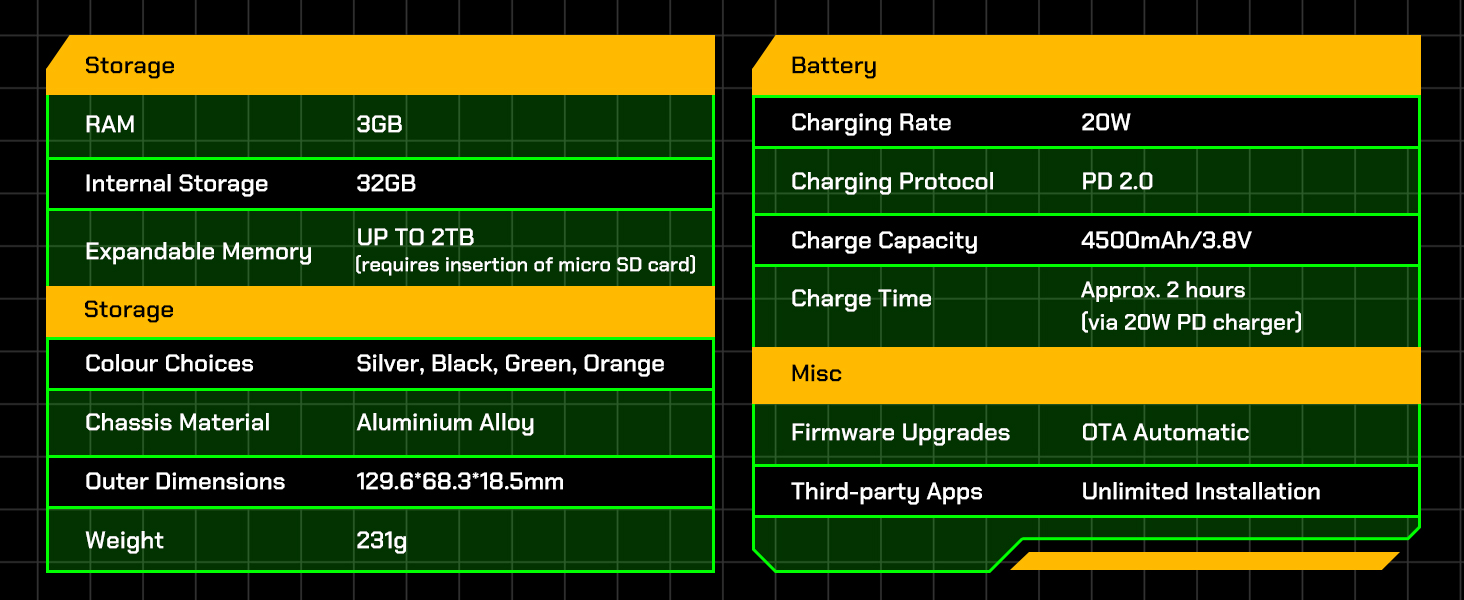
Image: Diagram illustrating the storage capabilities of the HiBy R4, including internal and expandable memory.
3. Įjungimas/išjungimas
Press and hold the power button (usually located on the side) until the screen illuminates to power on the device. To power off, press and hold the power button, then select "Power off" from the on-screen options.
4. Initial Android 12 Setup
Upon first startup, follow the on-screen prompts to configure basic settings such as language, Wi-Fi connection, and Google account (optional). This process is similar to setting up an Android smartphone.

Image: Screenshot of the HiBy R4 running the Android 12 operating system.
5. Applying Screen Protector
One screen protector is pre-applied at the factory. An additional screen protector is included in the box. If needed, carefully apply the spare screen protector following the instructions provided with the accessory.
Naudojimo instrukcijos
1. Pagrindinė navigacija
Navigate the HiBy R4 using its 4.7-inch touchscreen, similar to an Android smartphone. Swipe, tap, and pinch to interact with applications and settings. Physical buttons on the side control power, volume, and playback.
2. Ausinių prijungimas
The device supports both 3.5mm single-ended and 4.4mm balanced headphone outputs. Connect your headphones to the appropriate port for optimal audio quality.

Image: Close-up of the HiBy R4's bottom, showing the 3.5mm single-ended and 4.4mm balanced headphone jacks, and the USB-C port.
3. Bluetooth ryšys
The HiBy R4 features Bluetooth 5.0 with two-way communication. To pair with a Bluetooth device:
- Eikite į Nustatymai > Prijungti įrenginiai > „Bluetooth“.
- Įjunkite Bluetooth.
- Pasirinkite „Susieti naują įrenginį“ ir iš sąrašo pasirinkite norimą įrenginį.
It supports high-definition Bluetooth codecs including UAT, LDAC, aptX, aptX HD, AAC, and SBC.

Image: Visual representation of the HiBy R4's bidirectional Bluetooth audio capabilities and supported codecs.
4. Wi-Fi ryšys
Connect to dual-band Wi-Fi (2.4GHz and 5GHz) via Settings > Network & internet > Wi-Fi. This enables downloading and installing third-party apps, DLNA, AirPlay, and Wi-Fi song transfer.
5. Muzikos grojimas
The HiBy R4 can play local high-resolution audio files or stream from installed applications like Spotify, Pandora, Amazon Music, and Tidal. It supports DSD 256 native, PCM768kHz/32bit audio, and MQA 16X unfolding. The system-wide SRC bypass technology ensures original audio quality.

Image: Illustration of the HiBy R4's True Systemwide Bitperfect Audio feature, ensuring high-fidelity sound.
6. Fizinė kontrolė
Utilize the physical FN keys for quick access to functions such as key lock and screen rotation. Volume controls are also available via dedicated buttons.
Priežiūra
1. Valymas
Nuvalykite įrenginį minkštu, sausu skudurėliu. Venkite naudoti stiprias chemines medžiagas ar abrazyvines medžiagas, kurios gali pažeisti ekraną ar korpusą.asing.
2. Akumuliatoriaus priežiūra
The HiBy R4 is equipped with a 4500mAh battery. To prolong battery life, avoid exposing the device to extreme temperatures. While charging, you can set a battery charge limit in the settings to prevent overcharging if connected for extended periods, such as during file pervedimai.
3. Programinės įrangos atnaujinimai
The device supports OTA (Over-The-Air) automatic firmware upgrades. Ensure your device is connected to Wi-Fi to receive and install the latest updates, which can improve performance and add new features.
4. Sandėliavimo valdymas
Regularly manage your 32GB internal storage and up to 2TB expandable Micro SD card. Delete unnecessary files or transfer them to a computer to maintain optimal performance.
Trikčių šalinimas
1. Įrenginys neįsijungia
- Įsitikinkite, kad akumuliatorius pakankamai įkrautas. Prijunkite įrenginį prie maitinimo šaltinio ir leiskite jam įkrauti bent 15 minučių, prieš bandydami vėl įjungti.
- Perform a hard reset by holding the power button for an extended period (e.g., 10-15 seconds).
2. Poor Audio Quality / No Sound
- Check headphone connections for both 3.5mm and 4.4mm ports. Ensure they are fully inserted.
- Verify volume levels on the device and any connected headphones/speakers.
- If using Bluetooth, ensure the device is properly paired and within range. Try re-pairing the Bluetooth device.
- Išbandykite su skirtingomis ausinėmis arba garso įrašais files izoliuoti problemą.
3. „Wi-Fi“ / „Bluetooth“ ryšio problemos
- Toggle Wi-Fi or Bluetooth off and on in the settings.
- Restart the HiBy R4.
- Ensure the device is within range of the Wi-Fi router or Bluetooth accessory.
- For Wi-Fi, try connecting to a different network if available.
4. Touchscreen Unresponsive / Laggy
- Iš naujo paleiskite įrenginį.
- Įsitikinkite, kad ekranas yra švarus ir be dulkių ar drėgmės.
- If the issue persists after a restart, consider checking for available firmware updates.
5. Album Art Not Displaying Correctly
- Ensure the device is connected to Wi-Fi, as some album art may be downloaded.
- Verify that album art is embedded correctly within your audio files.
- Consider using the HiBy Music app's features for managing and downloading album art.
6. File Transfer Issues with Micro SD Card
- Ensure the Micro SD card is properly formatted (exFAT is recommended).
- Try connecting the HiBy R4 to a different USB port or computer.
- Jei perkeliama files directly to the SD card via a card reader, ensure the card reader is functioning correctly.
Specifikacijos
Generolas
- Modelis: HiBy R4
- Operacinė sistema: Android 12
- SoC: Snapdragon 665
- DAC: ES9018C2M * 4
- Amplifier Components: OPA1652*4 & OPA1612*2
- Palaikomi garso formatai: DSD 256, PCM768kHz/32bit, MQA 16x Unfolding
Ryšys
- „Wi-Fi“: Supports 2.4GHz / 5GHz
- Bluetooth: Bluetooth 5.0
- USB: USB2.0 & USB3.2 Gen1, Maximum Transfer Rate 5Gbps
Ekranas
- Dydis: 4.7 colio
- Tipas: IPS
- Rezoliucija: 720*1280
Sandėliavimas
- RAM: 3 GB
- Vidinė saugykla: 32 GB
- Išplečiama atmintis: Up to 2TB (requires insertion of micro SD card)
Baterija
- Įkrovimo greitis: 20W
- Įkrovimo protokolas: PD 2.0
- Įkrovimo talpa: 4500 mAh / 3.8 V
- Įkrovimo laikas: Approx. 2 hours (via 20W PD charger)
- Veikimo laikas: 11 valandos
Fizinės charakteristikos
- Važiuoklės medžiaga: Aliuminio lydinys
- Išoriniai matmenys: 129.6 * 68.3 * 18.5 mm
- Svoris: 231g
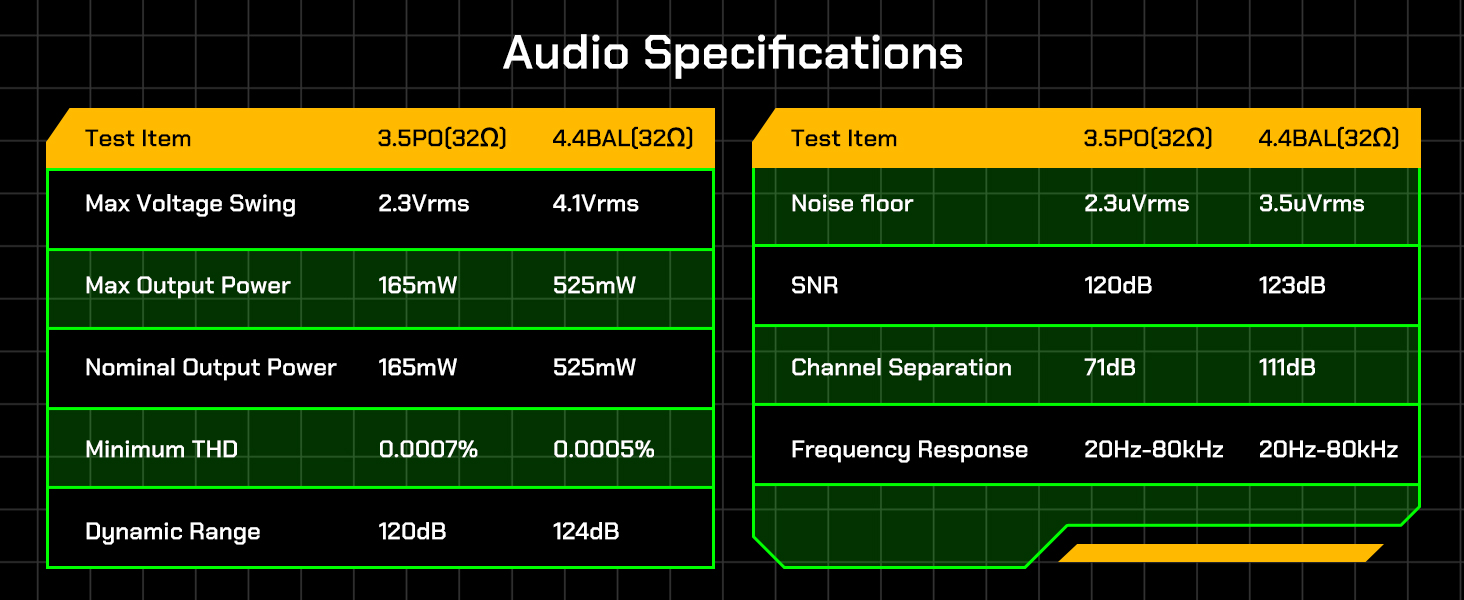
Image: Detailed table of HiBy R4 audio specifications for 3.5mm PO and 4.4mm BAL outputs.

Image: Table outlining the hardware specifications of the HiBy R4, including processor, DAC, and display details.
Garantija ir palaikymas
For detailed warranty information, please refer to the separate warranty card included with your HiBy R4 unit. If you encounter any issues or have questions regarding your HiBy R4 Digital Audio Player, please contact HiBy customer support. Contact information can typically be found on the official HiBy websvetainėje arba pridėtame naudotojo vadove.
Oficialus produkto vaizdo įrašas
Video: An official product video from HiBy showcasing the features and design of the R4 Digital Audio Player.
Ask a question about this manual
Ask about setup, troubleshooting, compatibility, parts, safety, or missing instructions. Manuals+ will review the question and use this page’s manual context to help answer it.