
1. Įvadas
Thank you for choosing the Rraycom BW6 Wireless Security Camera. This 2K outdoor security camera is designed to provide reliable surveillance with features such as full-color night vision, AI motion detection, two-way audio, and weatherproof construction. This manual will guide you through the setup, operation, and maintenance of your camera to ensure optimal performance and security.
2. Kas yra dėžutėje
Atidžiai patikrinkite pakuotės turinį. Jei trūksta kokių nors daiktų arba jie pažeisti, susisiekite su klientų aptarnavimo tarnyba.
- BW6 Rechargeable Battery Security Camera
- Metalinis laikiklis
- Varžtų rinkinys
- USB kabelis
- Vartotojo vadovas (šis dokumentas)
3. Produkto ypatybės
The Rraycom BW6 camera offers a range of advanced features for comprehensive home security.

3.1 paveikslas: Baigėsiview of Rraycom BW6 Camera Features.
3.1 High-Resolution Video
Užfiksuokite aiškų ir detalų maistątage with 2K QHD resolution and a wide 130-degree viewkampas, sumažinant akląsias zonas.

3.2 paveikslas: 2K Resolution and 130-degree Wide Angle View.
3.2 Pažangus naktinis matymas
The camera supports both full-color night vision and infrared mode, ensuring clear visibility even in low-light conditions.

3.3 paveikslas: Full Color Night Vision vs. Infrared Mode.
3.3 Pažangus judesio aptikimas
Equipped with AI motion detection, the camera can distinguish between humans and other moving objects, reducing false alarms. You can also customize specific motion detection zones to focus on critical areas.

3.4 paveikslas: AI Motion Detection Capabilities.

3.5 paveikslas: Customizable Motion Detection Zones.
3.4 Dvipusis garsas
Communicate directly with visitors or deter intruders using the built-in microphone and speaker.

3.6 paveikslas: Two-Way Audio Communication.
3.5 Atsparus oro sąlygoms dizainas
With an IP65 weatherproof rating, the camera is designed to withstand various outdoor conditions, including rain, sun, and snow.

3.7 paveikslas: IP65 Weatherproof Rating.
3.6 Lanksčios saugojimo galimybės
Įrašas footage to a Micro SD card (up to 256GB, not included) or utilize cloud storage services for secure data backup and access.

3.8 paveikslas: Cloud and Micro SD Storage Options.
3.7 Išmaniųjų namų integracija
The camera is compatible with Amazon Alexa, allowing for convenient voice control and integration into your smart home ecosystem.
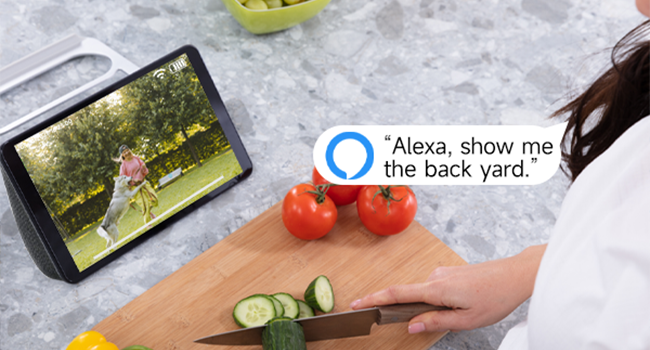
3.9 paveikslas: Amazon Alexa Integration.
4. Sąrankos vadovas
4.1 Kameros įkrovimas
Before initial use, fully charge the camera using the provided USB cable. Connect the USB cable to the camera's charging port and a standard USB power adapter (not included). The charging indicator light will show the charging status.
4.2 Programėlės diegimas ir paskyros sukūrimas
- Download the official Rraycom app from your smartphone's app store (available for Android and iOS).
- Atidarykite programėlę ir vykdykite ekrane pateikiamus nurodymus, kad sukurtumėte naują paskyrą arba prisijunkite, jei jau turite.
4.3 Kameros susiejimas
- Ensure your camera is powered on and your smartphone is connected to a 2.4GHz Wi-Fi network.
- In the Rraycom app, tap the "Add Device" or "+" icon.
- Iš sąrašo pasirinkite savo fotoaparato modelį.
- The app will prompt you to scan a QR code displayed on your camera or generate a QR code on your phone for the camera to scan. Follow the specific instructions in the app.
- Once the camera successfully connects, you will hear a confirmation sound, and the camera will appear in your app's device list.
4.4 Fotoaparato montavimas
Pasirinkite tinkamą vietą kamerai, užtikrindami, kad ji būtų skaidri view of the area you wish to monitor and good Wi-Fi signal strength. Use the provided metal mount and screws to securely attach the camera to a wall or other stable surface. Adjust the camera's angle for optimal coverage.
5. Naudojimo instrukcijos
5.1 Tiesiogiai View Prieiga
Open the Rraycom app and select your camera from the device list to access the live video feed. You can view the 2K resolution footage realiu laiku.
5.2 Judesio aptikimo nustatymai
Navigate to the camera settings in the app to configure motion detection. You can:
- Enable/disable AI Human Detection.
- Set up custom motion detection zones to monitor specific areas.
- Adjust motion sensitivity levels.
- Configure alert notifications (push notifications, siren alarm).
5.3 Dvipusis ryšys
Kol vyksta gyvai view, tap the microphone icon in the app to speak through the camera's speaker. Tap the speaker icon to listen to audio from the camera's microphone.
5.4 Įrašymas ir atkūrimas
The camera automatically records when motion is detected. You can access recorded footage through the app:
- Saugykla debesyje: View recordings stored in the cloud (subscription may be required).
- SD kortelės saugykla: Access recordings saved on the Micro SD card inserted into the camera.
5.5 Naktinio matymo režimai
The camera automatically switches between day and night vision modes. In night vision settings, you can typically choose between:
- Spalvotas naktinis matymas: Utilizes built-in spotlights to provide color images in low light.
- Infraraudonųjų spindulių nakties vizija: Provides black and white images using infrared LEDs.
5.6 „Alexa“ balso komandos
To integrate with Amazon Alexa, enable the Rraycom skill in the Alexa app. Once linked, you can use voice commands such as "Alexa, show me the [camera name]" to view the live feed on compatible Alexa devices.
6. Priežiūra
6.1 Akumuliatoriaus valdymas
The BW6 camera is battery-powered. Monitor the battery level in the app and recharge the camera using the USB cable when the battery is low. Battery life varies based on usage, motion detection frequency, and environmental factors.
6.2 Valymas
Reguliariai valykite kameros objektyvą ir korpusą minkšta šluosteamp cloth to remove dust and dirt. Avoid using harsh chemicals that could damage the camera's finish or lens.
6.3 Firmware atnaujinimai
Ensure your camera's firmware is up to date. The Rraycom app will typically notify you of available updates. Follow the in-app instructions to perform firmware updates, which can improve performance and add new features.
7. Problemų sprendimas
If you encounter issues with your Rraycom BW6 camera, refer to the following common problems and solutions:
| Problema | Galimas sprendimas |
|---|---|
| Kamera neprisijungia prie „Wi-Fi“. |
|
| Motion detection is delayed or misses events |
|
| Dažni klaidingi aliarmai |
|
| Static noise in recordings |
|
| Prastas akumuliatoriaus veikimo laikas |
|
8. Specifikacijos
Technical details of the Rraycom BW6 Wireless Security Camera:
| Funkcija | Detalė |
|---|---|
| Prekės ženklas | Rraycom |
| Modelio pavadinimas | BW6 |
| Ryšio technologija | Belaidis ryšys (Wi-Fi) |
| Ypatinga funkcija | Motion Sensor, Full Color Night Vision, Two-Way Talk |
| Naudojimas viduje / lauke | Viduje, Lauke |
| Suderinami įrenginiai | Android & iOS, Amazon Alexa |
| Montavimo tipas | Sieninis laikiklis |
| Atsparumo vandeniui įvertinimas | IP65 |
| Maitinimo šaltinis | Maitinamas baterijomis |
| Baterijos talpa | 5200 mAh |
| Laukas View | 130 laipsnių |
| Vaizdo įrašymo raiška | 2K |
| Vaizdo įrašymo formatas | MP4 |
| Saugojimo palaikymas | „Micro SD“ kortelė (iki 256 GB), debesies saugykla |
| Prekės matmenys | 1 x 1 x 1 colių (apytiksliai) |
9. Garantija ir palaikymas
For warranty information, please refer to the product packaging or contact Rraycom customer service directly. If you have any questions, technical issues, or require assistance with your Rraycom BW6 camera, please contact our support team:
El. paštas: aftersale@rraycom.com
Please provide your product model (BW6) and a detailed description of your issue when contacting support for faster assistance.