
Įvadas
This manual provides detailed instructions for the installation, operation, and maintenance of your darkFlash DB330M Micro-ATX PC Case. Please read this manual thoroughly before beginning assembly to ensure proper setup and safe usage. The DB330M case features a 270° panoramic tempered glass panel, pre-installed PWM ARGB fans, and a high-speed I/O panel.
Saugos informacija
- Prieš montuodami ar atlikdami bet kokius kompiuterio korpuso komponentus, visada atjunkite maitinimo šaltinį nuo sieninio lizdo.
- Handle tempered glass panels with care to prevent breakage. Avoid impacts or sharp objects.
- Mūvėkite antistatines pirštines arba naudokite antistatinį riešo dirželį, kad išvengtumėte elektrostatinės iškrovos (ESD) sukeliamos žalos jautriems komponentams.
- Laikykite smulkias dalis ir varžtus vaikams nepasiekiamoje vietoje.
- Užtikrinkite tinkamą vėdinimą aplink kompiuterio korpusą, kad jis neperkaistų.
Pakuotės turinys
Patikrinkite, ar pakuotėje yra visi reikalingi daiktai:
- darkFlash DB330M Micro-ATX PC Case
- 3 x Pre-installed PWM ARGB Fans
- Priedų dėžutė (varžtai, kabelių laikikliai ir kt.)
- Vartotojo vadovas (šis dokumentas)
Savybės baigėsiview
- 270° Panoramic Tempered Glass: Provides an expansive view vidinių komponentų ir RGB apšvietimo.
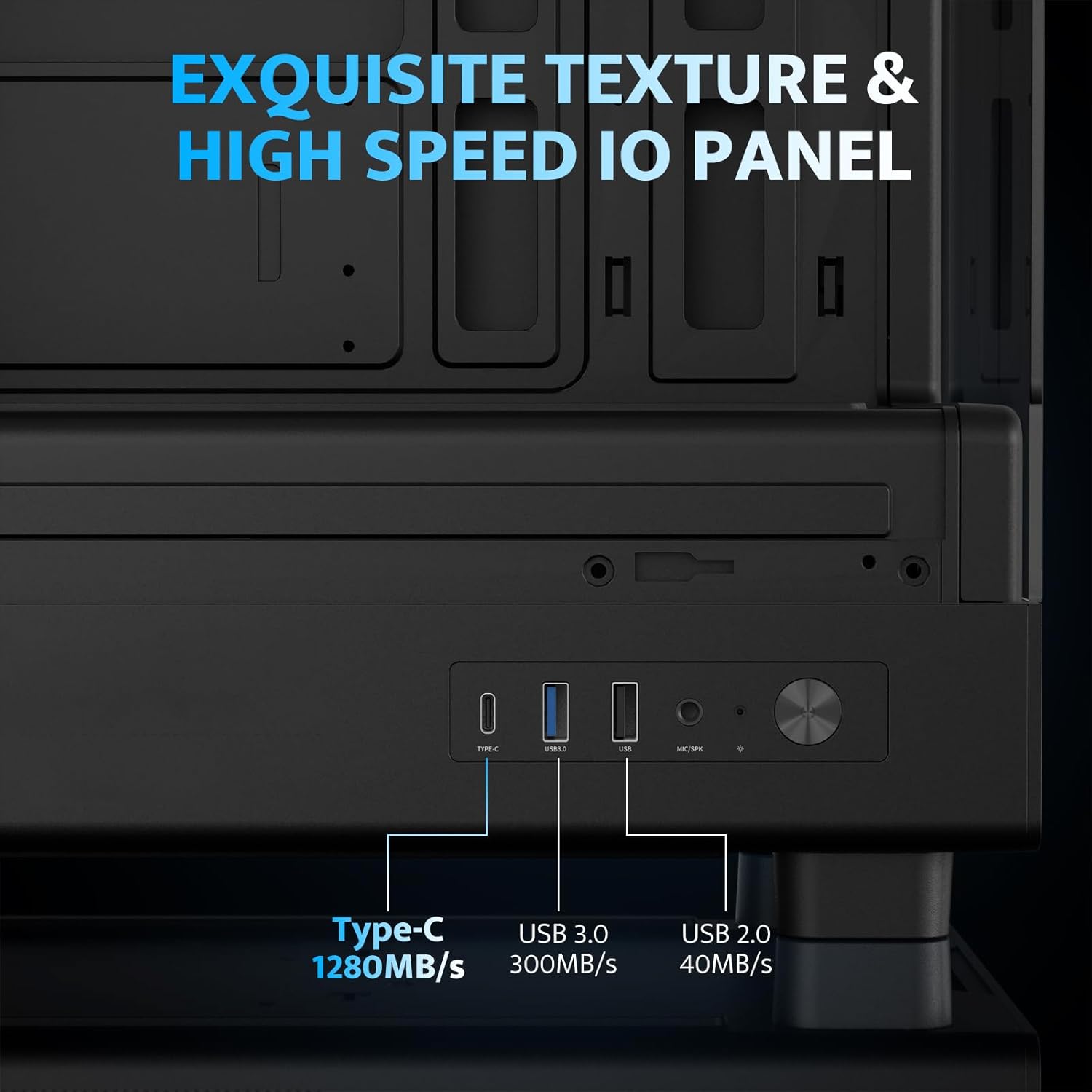
- High-Speed I/O Panel: Includes USB 3.0 and Type-C ports for fast data transfer.
- Vertical Airflow Cooling: Optimized design with pre-installed fans for efficient heat dissipation.
- Magnetiniai dulkių filtrai: Located on top and bottom to keep components clean.
- Lengvas montavimas: User-friendly design for hassle-free assembly and maintenance.
Specifikacijos
| Funkcija | Specifikacija |
|---|---|
| Modelio pavadinimas | DB330M PC CASE |
| Matmenys (IxPxH) | 8.58 colio gylis x 13.11 colio plotis x 15.75 colio aukštis (218 mm x 333 mm x 400 mm) |
| Pagrindinės plokštės suderinamumas | Micro ATX, ITX |
| Atvejo tipas | Midi bokštas |
| Medžiaga | Plastikas, Grūdintas stiklas |
| Iš anksto įdiegti ventiliatoriai | 3 x 120 mm PWM ARGB ventiliatoriai |
| Maksimalus procesoriaus aušintuvo aukštis | 180 mm |
| Maksimalus GPU klirensas | 305 mm |
| Radiatoriaus atrama (viršuje) | Iki 240 mm |
| Maitinimo šaltinio tvirtinimo tipas | Bottom Mount (Max 140mm PSU length) |
| I/O prievadai | 1 x USB 3.0, 1 x Type-C, Audio In/Out |
Sąranka ir diegimas
1. Accessing the Interior (Quick Release Design)
The darkFlash DB330M features a quick-release design for easy access to internal components. The tempered glass panels can be removed by gently pulling them away from the chassis. The top panel also detaches for fan/radiator installation.

2. Pagrindinės plokštės montavimas
Install your Micro-ATX or ITX motherboard into the designated area. Ensure standoffs are correctly aligned and secured. The case supports CPU coolers up to 180mm in height and GPUs up to 305mm in length.

3. Ventiliatoriaus ir aušinimo sistemos montavimas
The case comes with three pre-installed 120mm PWM ARGB fans. Two fans are located at the top, and one at the rear. Additional fan mounts are available at the bottom (up to 2 x 120mm) for enhanced airflow. The case supports a 240mm AIO radiator on the top panel.
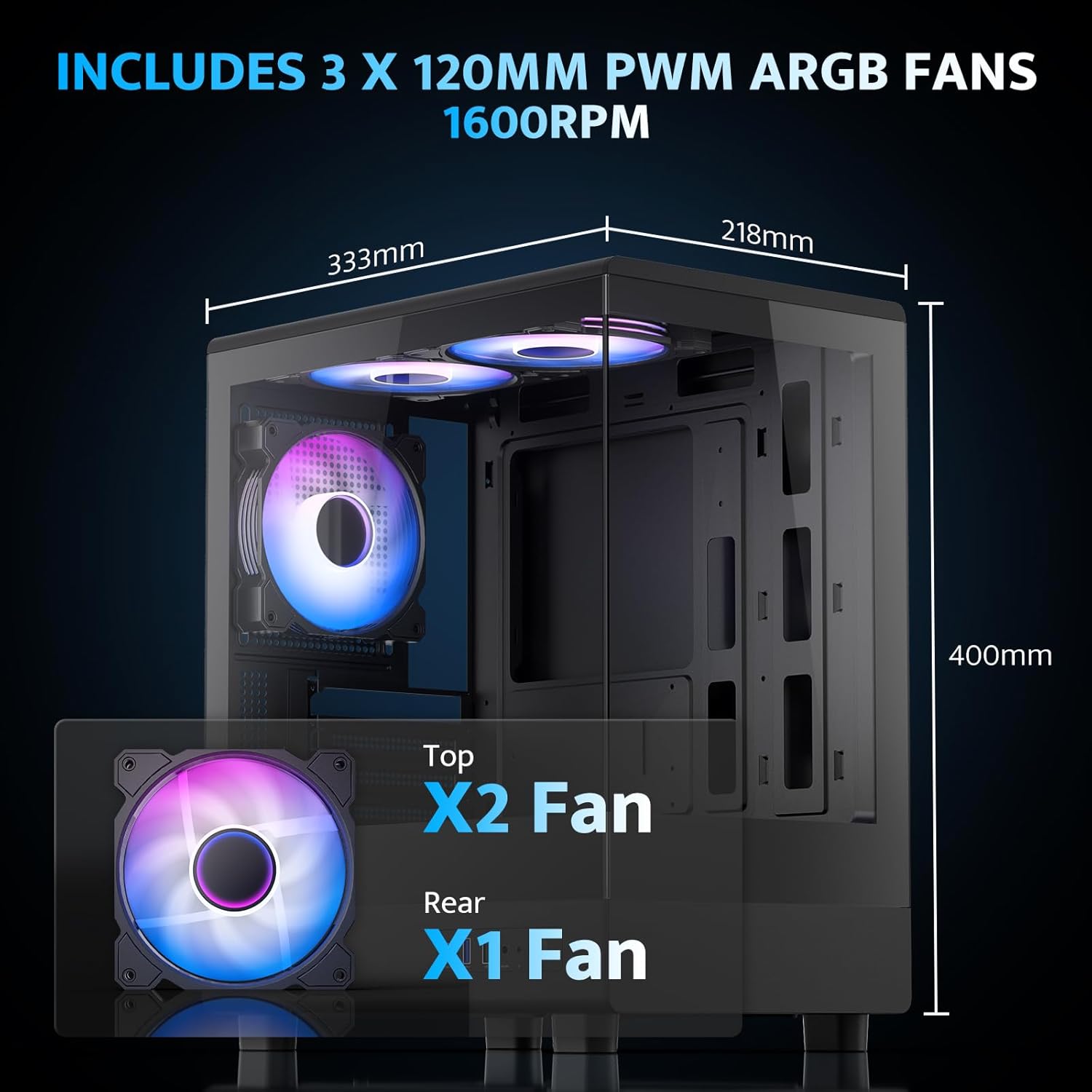
The pre-installed fans are PWM ARGB type, offering speed adjustment and rich lighting modes with motherboard synchronization. Note: An RGB hub controller is not included.

4. Power Supply and Storage Installation
Install your power supply unit (PSU) in the bottom mount. The case supports PSUs up to 140mm in length. Utilize the standard hard drive cage for storage devices.
5. Connecting Front I/O Panel
Connect the front I/O panel cables to your motherboard. The panel includes a Type-C port, USB 3.0 port, and USB 2.0 port for various connectivity needs.
6. Kabelių valdymas
Utilize the cable routing options and tie-downs behind the motherboard tray to ensure clean cable management. This improves airflow and aesthetics.
Naudojimo instrukcijos
1. Įjungimas
After all components are securely installed and connected, plug in the power cable to your PSU and press the power button on the front I/O panel to start your system.
2. ARGB ventiliatoriaus valdymas
The pre-installed ARGB fans can be controlled via compatible motherboard software (if connected to an ARGB header) to customize lighting effects and fan speeds. Refer to your motherboard manual for specific software instructions.
3. Oro srauto konfigūracija
The DB330M is designed with optimized airflow channels. The pre-installed fans facilitate vertical airflow, with the fan above the PSU directing air towards the graphics card. Ensure no obstructions block the airflow paths.


Priežiūra
1. Dulkių filtro valymas
Regularly clean the magnetic dust filters located on the top and bottom of the case. Gently remove the filters and clean them with compressed air or a soft brush. Reattach them securely after cleaning.
2. Bendras valymas
Use a soft, dry cloth to wipe down the exterior of the case. For tempered glass panels, use a glass cleaner and a microfiber cloth. Avoid abrasive cleaners or solvents.
Trikčių šalinimas
- Kompiuteris neįsijungia:
- Ensure the power supply is properly connected to the wall and the PSU switch is in the 'ON' position.
- Verify all power cables from the PSU are securely connected to the motherboard and components.
- Patikrinkite priekinio skydelio maitinimo jungiklio jungtį su pagrindine plokšte.
- Ventiliatoriai nesisuka / RGB neveikia:
- Confirm fan power cables are connected to the motherboard or fan controller.
- Ensure ARGB cables are connected to a compatible ARGB header on the motherboard or an ARGB controller.
- Check motherboard software settings for fan speed and RGB control.
- Neveikiantys USB prievadai:
- Verify the front panel USB 3.0 and Type-C cables are correctly plugged into the corresponding headers on your motherboard.
- Įsitikinkite, kad pagrindinės plokštės tvarkyklės yra atnaujintos.
Garantija ir palaikymas
darkFlash provides a 1 metų garantija for this computer case. For technical support, warranty claims, or further assistance, please contact darkFlash customer service through their official websvetainėje arba mažmenininke, iš kurio įsigijote produktą. Išsaugokite pirkimo įrodymą, kad galėtumėte patvirtinti garantiją.
Oficialus „darkFlash“ Websvetainė: www.darkflash.com