
Produktas baigtasview
The TP-Link Archer MR505 is a 4G+ Cat6 AC1200 Wireless Dual Band Gigabit Router designed to provide reliable internet connectivity. This router supports dual-band Wi-Fi (2.4 GHz and 5 GHz) and features Gigabit Ethernet ports for high-speed wired connections. It is compatible with 4G+ Cat6 networks, offering mobile broadband access.

1 pav.: priekis view of the Archer MR505 router.
2 pav.: šonas view of the Archer MR505 router.
Pakuotės turinys
Patikrinkite, ar pakuotėje yra visi reikalingi daiktai:
- TP-Link Archer MR505 maršrutizatorius
- Maitinimo adapteris
- Greito montavimo vadovas
- RJ45 Ethernet kabelis

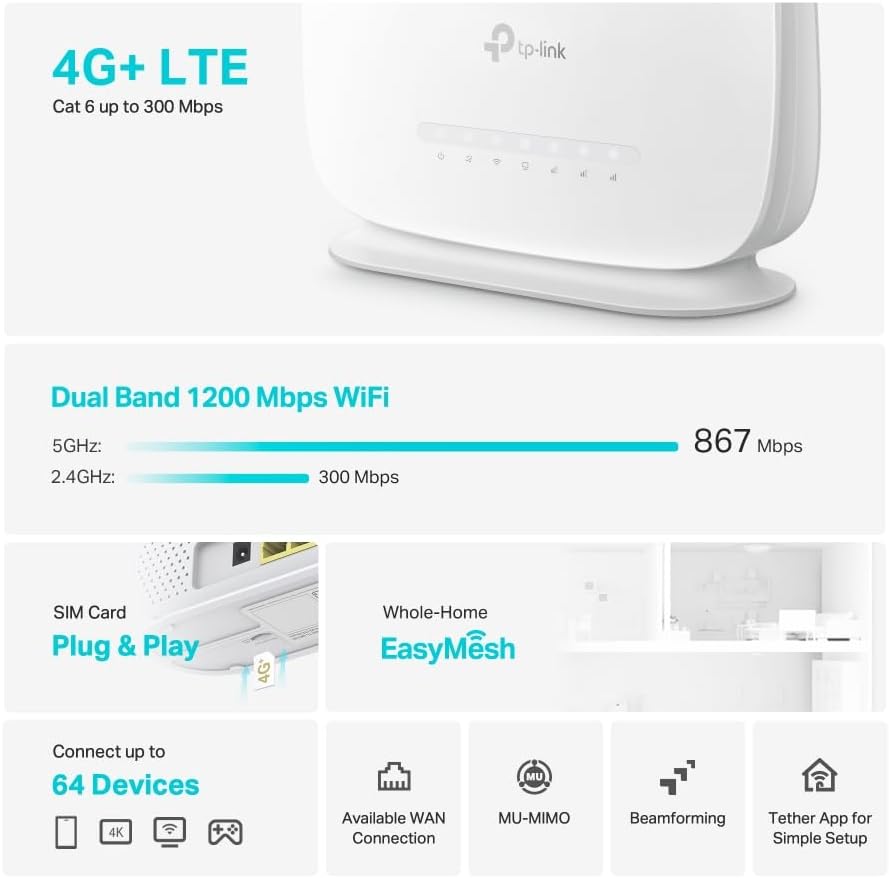
Figure 3: Key features and components of the Archer MR505.
Sąrankos instrukcijos
Follow these steps to set up your Archer MR505 router:
- Įdėkite SIM kortelę: Locate the SIM card slot on the router. Insert your 4G/LTE SIM card into the slot until it clicks into place. Ensure the SIM card is a normal data SIM for optimal compatibility. Some data-only SIM cards may require specific configurations or may not be fully compatible.
- Prijunkite maitinimą: Prijunkite pateiktą maitinimo adapterį prie maršrutizatoriaus maitinimo prievado, tada įjunkite jį į maitinimo lizdą. Maršrutizatorius įsijungs automatiškai.
- Palaukite inicijavimo: Allow a few minutes for the router to boot up and establish a connection to the 4G/LTE network. The LED indicators on the front panel will show the connection status.
- Pradinis „Wi-Fi“ ryšys:
- Find the default Wi-Fi network name (SSID) and password printed on the label at the bottom of the router.
- Prijunkite kompiuterį arba mobilųjį įrenginį prie šio „Wi-Fi“ tinklo.
- Prieigos maršrutizatoriaus valdymas:
- Atidarykite a web browser and enter the default management address (e.g., http://tplinkwifi.net or http://192.168.1.1).
- Prisijunkite naudodami numatytąjį vartotojo vardą ir slaptažodį (paprastai admin/admin or specified on the label).
- Konfigūruoti tinklo nustatymus: Follow the on-screen Quick Setup wizard to configure your internet connection, change the Wi-Fi network name (SSID), and set a strong, unique password for both your Wi-Fi and router management interface.
- Tether App Setup (Optional): Download the TP-Link Tether app from your device's app store. The app provides an intuitive way to manage your router settings from your smartphone or tablet.
- Išorinė antena (neprivaloma): If using external antennas (not included), connect them to the designated ports on the back of the router. You may need to manually enable external antenna usage through the router's web sąsaja arba „Tether“ programėlė.
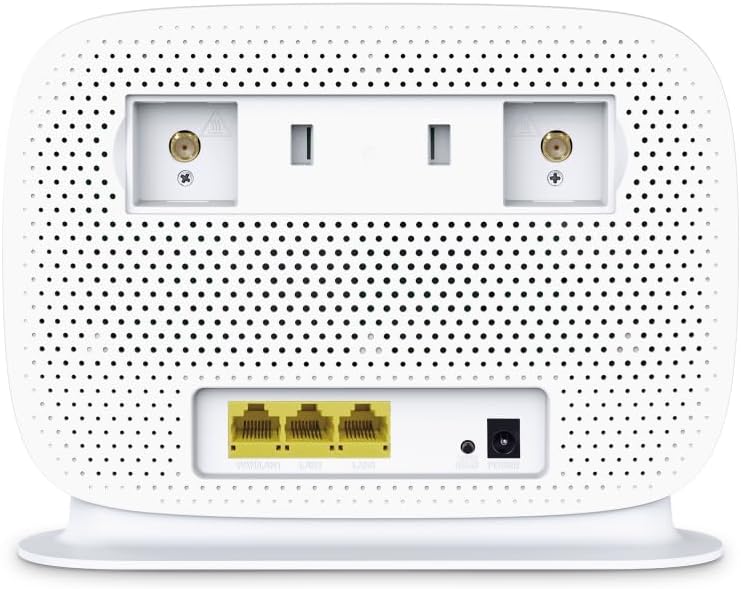
Figure 4: Rear panel of the Archer MR505 with ports and SIM slot.

Figure 5: Archer MR505 in various usage scenarios.
Naudojimo instrukcijos
The Archer MR505 provides robust wireless and wired connectivity:
- Dviejų juostų „Wi-Fi“: The router operates on both 2.4 GHz and 5 GHz bands, offering speeds up to 300 Mbps and 867 Mbps respectively, for a total of AC1200 Wi-Fi.
- 4G+ Cat6 Connectivity: Enjoy mobile broadband speeds up to 300 Mbps download and 300 Mbps upload (maximum upstream data transfer rate).
- Gigabit Ethernet prievadai: Four Gigabit LAN ports (1000 Mbps) are available for high-speed wired connections to devices like computers, gaming consoles, or smart TVs. One port can also function as a WAN port for traditional broadband connections.
- Įrenginio talpa: The router can support connectivity for up to 64 devices simultaneously.
- „Smart Connect“: This feature automatically assigns devices to the best available Wi-Fi band (2.4 GHz or 5 GHz) for optimized performance.
- „EasyMesh“ suderinamumas: The Archer MR505 is compatible with TP-Link EasyMesh, allowing you to create a seamless whole-home mesh Wi-Fi network by adding compatible range extenders.
- Pažangios technologijos: Features like MU-MIMO and Beamforming enhance Wi-Fi efficiency and range, especially for multiple connected devices.
- Saugumas: The router supports WPA3 encryption for enhanced network security.

Figure 6: Versatile connectivity and speed capabilities.

Figure 7: Whole-Home EasyMesh integration.
Priežiūra
To ensure optimal performance and security of your router:
- Firmware atnaujinimai: Regularly check for and install the latest firmware updates from the TP-Link official website or via the Tether app. Firmware updates often include security patches and performance improvements.
- Saugūs slaptažodžiai: Use strong, unique passwords for your Wi-Fi network and router management interface. Change them periodically.
- Fizinis išdėstymas: Maršrutizatorių pastatykite centrinėje vietoje, atokiau nuo kliūčių ir trukdžių šaltinių (pvz., mikrobangų krosnelių, belaidžių telefonų), kad maksimaliai padidintumėte „Wi-Fi“ ryšio aprėptį.
- Valymas: Keep the router clean and free from dust. Ensure ventilation holes are not blocked.
- Periodiškai paleiskite iš naujo: Restarting the router occasionally can help resolve minor network issues and improve performance.
Trikčių šalinimas
If you encounter issues with your Archer MR505 router, consider the following:
- No Internet Connection via 4G/LTE:
- Įsitikinkite, kad SIM kortelė tinkamai įdėta ir aktyvuota.
- Verify that your SIM card is a normal data SIM. Some data-only SIM cards may require specific APN settings or might not be fully compatible. Contact your mobile service provider for details.
- Check the 4G/LTE signal strength indicated by the router's LEDs. If the signal is weak, try repositioning the router or consider using external antennas (if supported and configured).
- Iš naujo paleiskite maršrutizatorių ir prijungtus įrenginius.
- „Wi-Fi“ ryšio problemos:
- Įsitikinkite, kad jūsų įrenginys yra maršrutizatoriaus „Wi-Fi“ ryšio diapazone.
- Įsitikinkite, kad naudojate teisingą „Wi-Fi“ slaptažodį.
- If a device frequently connects and disconnects, try restarting that specific device.
- Patikrinkite, ar netrukdo kiti elektroniniai prietaisai.
- Lėtas interneto greitis:
- Check your 4G/LTE signal strength. Weak signal can significantly reduce speed.
- Įsitikinkite, kad jokios kitos programos ar įrenginiai nenaudoja per daug pralaidumo.
- If using Wi-Fi, try connecting to the 5 GHz band for faster speeds, if your device supports it.
- Atlikite greičio testą, kad patvirtintumėte tikrąjį gaunamą greitį.
- Nepavyksta pasiekti maršrutizatoriaus valdymo puslapio:
- Įsitikinkite, kad jūsų įrenginys prijungtas prie maršrutizatoriaus tinklo (per „Wi-Fi“ arba eterneto kabelį).
- Verify you are entering the correct management address (e.g., http://tplinkwifi.net).
- Pabandykite išvalyti naršyklės talpyklą arba naudoti kitą naršyklę.
Specifikacijos
| Prekės ženklas | TP-Link |
| Modelio pavadinimas | Lankininkas MR505 |
| bevielio ryšio standartas | 802.11ac (Wi-Fi 5) |
| Dažnių juostos klasė | Dviejų dažnių juosta (2.4 GHz ir 5 GHz) |
| „Wi-Fi“ duomenų perdavimo sparta | Up to 300 Mbps (2.4 GHz), Up to 867 Mbps (5 GHz) - AC1200 Total |
| 4G+ Cat6 Speed | Up to 300 Mbps Download, Up to 300 Mbps Upload |
| Ethernet prievadai | 4 x Gigabit LAN Ports (1000 Mbps), 1 x WAN/LAN Port |
| Antenos tipas | Internal (External antenna support available) |
| Saugumo protokolas | WPA3 |
| Kontrolės metodas | App (TP-Link Tether) |
| Suderinami įrenginiai | Laptop, Personal Computer, Smart Television, Smartphone, Tablet |
| Maitinimo įvestis | 12 voltų |
| Prekės svoris | 0.93 kilogramo |
| Įtraukti komponentai | Archer MR505, Power Adapter, Quick Installation Guide, RJ45 Ethernet Cable |
Garantija ir palaikymas
Informacijos apie garantiją ieškokite prie gaminio pridėtoje garantijos kortelėje arba apsilankykite oficialioje TP-Link svetainėje. website for your region. Support resources, including FAQs, firmware downloads, and contact information, are available on the TP-Link support website and through the TP-Link Tether app.
Oficialus TP-Link Websvetainė: https://www.tp-link.com
„TP-Link Tether“ programėlė: Available on iOS App Store and Google Play Store.