
Įvadas
This manual provides comprehensive instructions for the setup, operation, maintenance, and troubleshooting of your BPXX D463B Bluetooth Thermal Label Printer. Please read this manual thoroughly before using the printer to ensure proper function and longevity of the device.
Saugos informacija
- Use only the original power adapter provided with the printer.
- Saugokite spausdintuvą nuo vandens ar per didelės drėgmės.
- Venkite spausdintuvo laikymo tiesioginiuose saulės spinduliuose arba šalia šilumos šaltinių.
- Keep the printer away from dust and debris to prevent internal damage.
- Do not attempt to disassemble or repair the printer yourself. Contact customer support for assistance.
- Užtikrinkite tinkamą vėdinimą aplink spausdintuvą darbo metu.
Pakuotės turinys
Patikrinkite, ar pakuotėje yra visi toliau išvardyti daiktai:
- BPXX D463B USB & Bluetooth Printer
- USB kabelis
- Maitinimo adapteris
- Maitinimo laidas
- U Disk (USB flash drive with drivers and guide)
- OTG adapteris
- Labels (sample roll)
- Greitos pradžios vadovas

Image: Contents of the BPXX D463B Thermal Label Printer package.
Produktas baigtasview
The BPXX D463B is a compact and efficient thermal label printer designed for various labeling needs, including shipping labels, product labels, and more. It features both Bluetooth and USB connectivity for versatile use across different operating systems.

Vaizdas: priekis view of the BPXX D463B Thermal Label Printer in operation.
Pagrindinės funkcijos:
- Aukštos kokybės spausdinimas: 203dpi resolution for clear images, text, and barcodes.
- Dvigubas ryšys: Supports Bluetooth for iOS, Android, and Windows, and USB for Windows, Mac OS, Linux, and ChromeOS.
- Platus suderinamumas: Works with major e-commerce and shipping platforms like Amazon, Shopify, eBay, UPS, USPS, FedEx, and more.
- Greitas spausdinimo greitis: Up to 152mm/s (72 sheets of 4x6 labels per minute).
- Automatinis etikečių aptikimas: Automatically identifies label size for ease of use.
- Patvari spausdinimo galvutė: Features an aluminum alloy print head with smart temperature control for prolonged service life.
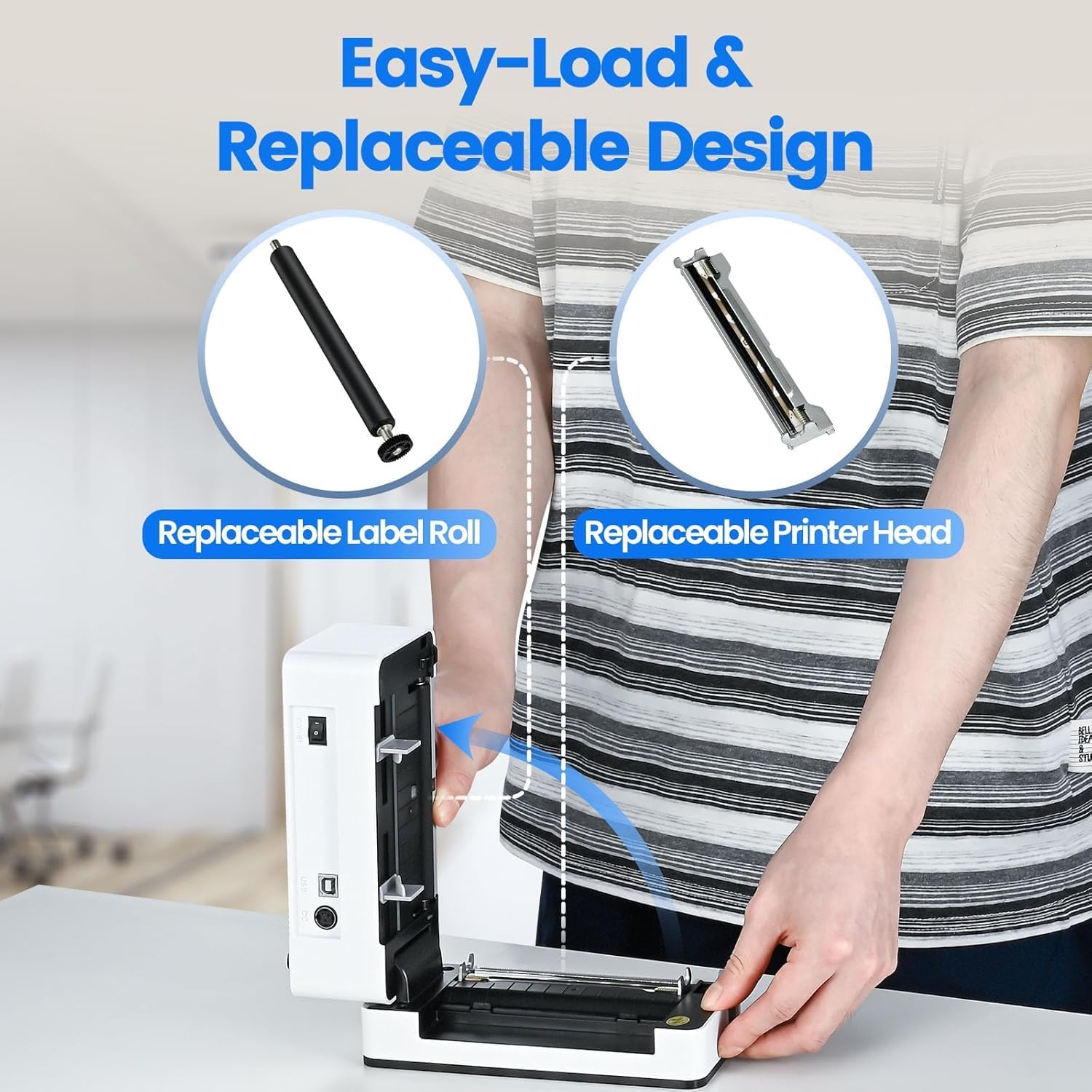
Image: The printer's aluminum alloy print head, designed for durability and extended service life.
Sąranka
1. Etikečių įkėlimas
- Atidarykite viršutinį spausdintuvo dangtį.
- Insert the thermal labels into the label compartment, ensuring the printable side is facing up.
- Sureguliuokite etikečių kreipiklius, kad jie tiksliai atitiktų etikečių plotį.
- Close the top cover. The printer will automatically detect the label size and feed a few labels to calibrate.

Image: Illustration of the easy-load label mechanism.
2. Prisijungimas prie įrenginio
The D463B printer offers both Bluetooth and USB connectivity.

Image: Connectivity options for the BPXX D463B printer.
Bluetooth Connection (iOS, Android, Windows):
- Ensure the printer is powered on. The indicator light should be blue.
- Download the "4Barcode" APP from your device's app store (iOS/Android) or install the driver for Windows from the provided U Disk.
- Įjunkite „Bluetooth“ savo mobiliajame įrenginyje arba kompiuteryje.
- Open the "4Barcode" APP or the printer driver software.
- Ieškokite available Bluetooth devices and select "D463B" or a similar name.
- Pair the device. Once paired, you can begin printing wirelessly.
USB Connection (Windows, Mac OS, Linux, ChromeOS):
- Prijunkite vieną USB kabelio galą prie spausdintuvo, o kitą – prie kompiuterio.
- Insert the provided U Disk into your computer.
- Follow the instructions on the U Disk to install the appropriate printer drivers for your operating system. A detailed installation guide video is included on the U Disk.
- Įdiegus tvarkykles, kompiuteris atpažins spausdintuvą ir jis bus paruoštas naudoti.
Spausdintuvo valdymas
Spausdinimo procesas
After successful setup and connection, you can print labels from various applications and platforms.

Image: Demonstrating the printer's high-speed and high-definition printing capabilities.
- Atidarykite dokumentą arba etiketę file norite atsispausdinti (pvz., siuntimo etiketės PDF failą).
- Pasirinkite spausdinimo parinktį savo programoje.
- Choose the "BPXX D463B" printer from the list of available printers.
- Ensure the correct label size is selected in the print settings (e.g., 4x6 inches). The printer supports various label sizes up to 4.1 inches in width.
- Patvirtinkite spausdinimo nustatymus ir pradėkite spausdinimą.

Image: The printer's maximum 4.1-inch label width capability and auto-detection feature.
Platformos suderinamumas
The BPXX D463B is compatible with a wide range of e-commerce and shipping platforms, streamlining your workflow:
- Amazon
- Shopify
- eBay
- Shopee
- UPS
- USPS
- Shippo
- FedEx
- Etsy
- Laivų stotis
- PayPal
- Ir daug daugiau.

Image: The printer's compatibility with major e-commerce and shipping platforms.
Priežiūra
Spausdintuvo valymas
Regular cleaning ensures optimal print quality and extends the life of your printer.
- Turn off the printer and unplug it from the power source before cleaning.
- Lengvai naudokite minkštą, nepūkuotą audinį dampened with isopropyl alcohol to clean the print head. Allow it to dry completely before use.
- Wipe down the exterior of the printer with a dry, soft cloth.
- Iš etikečių skyriaus pašalinkite dulkes ar etikečių likučius.
Komponentų keitimas
The BPXX D463B is designed for easy replacement of key components to maximize its lifespan.
Image: Easy-load and replaceable design for label roll and printer head.
Replacing the Label Roll:
Follow the "Loading Labels" instructions in the Setup section to replace an empty label roll.
Replacing the Printer Head:
While the aluminum alloy print head is designed for durability, it is replaceable if needed. Refer to the detailed instructions provided on the U Disk or contact customer support for guidance on replacing the print head.
Trikčių šalinimas
| Problema | Galima priežastis | Sprendimas |
|---|---|---|
| Printer not powering on. | Maitinimo laidas neprijungtas; problema su maitinimo lizdu. | Įsitikinkite, kad maitinimo laidas yra tvirtai prijungtas. Išbandykite kitą maitinimo lizdą. |
| Nepavyksta prisijungti per „Bluetooth“. | Bluetooth not enabled; incorrect app/driver; printer not discoverable. | Ensure Bluetooth is on. Use the "4Barcode" APP. Restart printer and device. |
| Poor print quality (faded, unclear). | Print head dirty; incorrect label type; low-quality labels. | Clean the print head. Ensure you are using thermal labels. Try new labels. |
| Labels not feeding correctly. | Labels improperly loaded; label guides not adjusted. | Reload labels, ensuring they are straight and guides are snug. |
| Printer not recognized by computer (USB). | Drivers not installed; faulty USB cable/port. | Install drivers from the U Disk. Try a different USB cable or port. |
Specifikacijos
| Funkcija | Detalė |
|---|---|
| Modelio pavadinimas | D463B |
| Spausdinimo technologija | Šiluminis |
| Ryšio technologija | Bluetooth, USB |
| Spausdinimo raiška | 203 DPI (taškai colyje) |
| Maksimalus spausdinimo greitis (vienspalvis) | 152mm/s (72 sheets 4x6 labels/min) |
| Maksimalus etiketės plotis | 4.1 colių |
| Compatible Label Sizes | 4"x6", 3"x2", 3"x1", 2"x1", 2-5/16" x 4" inches |
| Suderinami įrenginiai | Laptops, PCs, Tablets, Smartphones |
| Palaikoma OS | iOS, Android, Windows, Mac OS, Linux, ChromeOS |
| Gaminio matmenys | 3.35 "D x 3.35" P x 7.28" A |
| Prekės svoris | 3.12 svaro |
| Maitinimo šaltinis | Kintamosios srovės adapteris (pridedamas) |

Image: The compact size of the BPXX D463B printer.
Garantija
The BPXX D463B Thermal Label Printer comes with a vienerių metų garantija nuo įsigijimo datos. Ši garantija taikoma gamybos defektams ir gedimams įprasto naudojimo metu. Ji netaikoma žalai, atsiradusiai dėl netinkamo naudojimo, nelaimingų atsitikimų, neleistino remonto ar stichinių nelaimių.
Išsaugokite pirkimo įrodymą, kad galėtumėte kreiptis dėl garantijos.
Pagalba klientams
For any questions, technical assistance, or warranty claims, please contact BPXX customer support through the following channels:
- El. paštas: Refer to the contact information provided in your product packaging or on the official BPXX websvetainę.
- Palaikymas internetu: Visit the BPXX official webDUK, tvarkyklių ir pagalbos išteklių svetainė.
When contacting support, please have your printer model (D463B) and purchase information ready.