
Mediashop 9010041056028
Mediashop Kendox Life Tracker Smartwatch User Manual
Modelis: 9010041056028
Įvadas
Thank you for choosing the Mediashop Kendox Life Tracker Smartwatch. This manual provides essential information for setting up, operating, and maintaining your device. Please read it carefully to ensure optimal performance and longevity of your smartwatch.

Image: The Kendox Life Tracker Smartwatch, featuring a sleek black design with a digital display showing time, date, battery, steps, and vital signs like temperature.
Pakuotės turinys
Įsitikinkite, kad jūsų siuntinyje yra visi daiktai:
- 1x Kendox Life Tracker Health Watch
- 1x įkrovimo laidas
Sąrankos vadovas
1. Įrenginio įkrovimas
Before first use, fully charge your Kendox Life Tracker. Connect the provided charging cable to the charging port on the back of the smartwatch and plug the other end into a USB power source (e.g., computer, wall adapter).

Vaizdas: Stambus planas view of the charging cable connected to the charging port of the Kendox Life Tracker Smartwatch.
2. Programėlės diegimas ir susiejimas
To unlock the full potential of your smartwatch, download the companion app on your smartphone. The Kendox Life Tracker is compatible with both iOS and Android devices.
- Ieškokite the official "Kendox Life Tracker" app in the Apple App Store (for iOS) or Google Play Store (for Android).
- Įdiekite programą ir atidarykite ją.
- Follow the on-screen instructions within the app to pair your smartwatch via Bluetooth. Ensure Bluetooth is enabled on your smartphone.

Image: Logos for Android and iPhone, indicating compatibility with both operating systems.
Naudojimo instrukcijos
Naršymas sąsajoje
The Kendox Life Tracker features a 4.3 cm High-Definition display. Swipe left/right or up/down to navigate through different screens and menus. Tap to select an option.
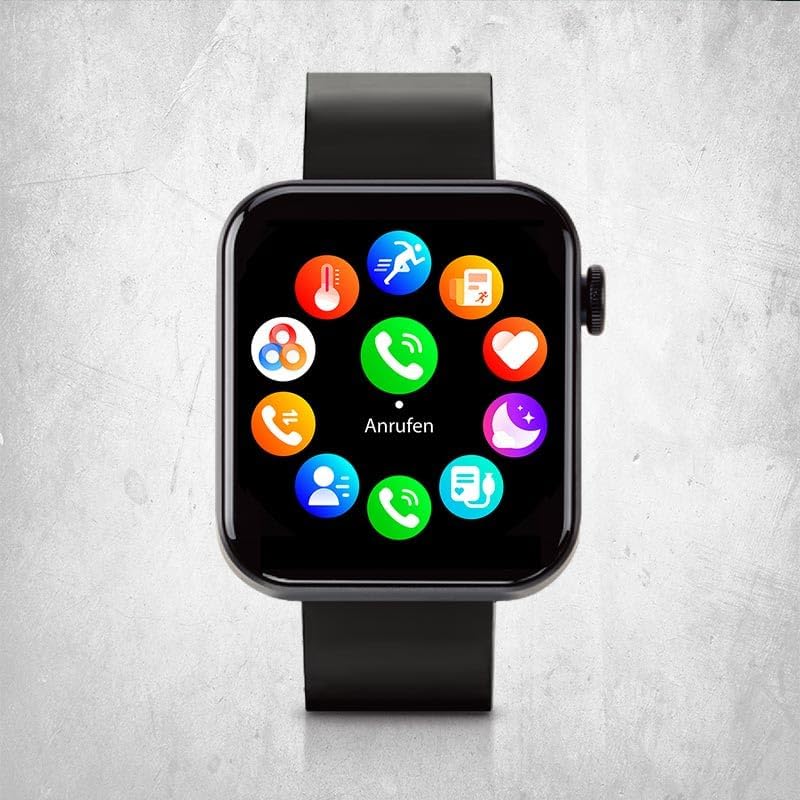
Image: The smartwatch display showing a circular menu of various app icons, including calls, messages, and health tracking.
Pagrindinės savybės ir funkcijos
24/7 Vital Value Display
Continuously monitor your body temperature, heart rate, blood pressure, and blood oxygen levels. Access these readings directly on your watch or through the app for detailed historical data.

Image: A close-up of the smartwatch on a wrist, showing a heart icon and a heart rate reading of 91 BPM.
Intelligent Sport Modes
Choose from 18 different sport modes to track your fitness activities. The watch records steps, distance, calorie consumption, mileage, and training duration for comprehensive fitness tracking.

Image: The smartwatch on a person's wrist, displaying a timer during a workout, indicating active sport mode tracking.
Smart Functions (Calls & Messages)
Make and receive calls and messages directly from your watch when connected to your smartphone. Enjoy other versatile functions like weather information, flashlight, alarm clock, and reminders.

Image: A close-up of the smartwatch on a wrist, showing a numeric keypad for dialing a phone number.
Real-time Sleep Analysis
Optimize your sleep habits with real-time monitoring of sleep phases and patterns. The Kendox Life Tracker helps ensure restful sleep and improved well-being by providing insights into your sleep quality.
Priežiūra
Išmaniojo laikrodžio valymas
Reguliarus valymas padeda išlaikyti jūsų įrenginio išvaizdą ir funkcionalumą.
- Nuvalykite ekraną ir korpusą minkštu, nepūkuotu skudurėliu.
- Esant sunkiai įsisenėjusioms dėmėms, šiek tiek dampNuvalykite šluostę vandeniu. Venkite naudoti stiprias chemines medžiagas ar abrazyvines medžiagas.
- Prieš įkrovimą įsitikinkite, kad įkrovimo kontaktai yra švarūs ir sausi.
Atsparumas vandeniui
The Kendox Life Tracker is sweat-resistant and waterproof. However, it is not recommended for diving or high-pressure water activities. Always dry the watch thoroughly after exposure to water.
Trikčių šalinimas
| Problema | Galima priežastis | Sprendimas |
|---|---|---|
| Laikrodis neįsijungia | Išsikrovęs akumuliatorius; įrenginys užstrigo. | Charge the watch for at least 30 minutes. If still unresponsive, perform a soft reset by pressing and holding the side button for 10-15 seconds. |
| Nepavyksta susieti su išmaniuoju telefonu | Bluetooth off; watch not in pairing mode; app issues. | Ensure Bluetooth is enabled on your phone. Restart both the watch and phone. Reinstall the app if necessary. Check app permissions. |
| Inaccurate vital sign readings | Improper fit; sensor obstruction; movement during measurement. | Ensure the watch is worn snugly on your wrist. Clean the sensor on the back of the watch. Remain still during measurements. Note that this device is not a medical instrument. |
| Pranešimai negauti | App permissions; Bluetooth connection lost; notification settings. | Check notification permissions in the app and on your phone. Verify Bluetooth connection. Ensure notifications are enabled in the watch app settings. |
Specifikacijos
| Funkcija | Detalė |
|---|---|
| Modelio numeris | 9010041056028 |
| Prekės ženklas | Mediashop |
| Ekranas | 4.3 cm High-Definition Digital Display |
| Ryšys | Bluetooth |
| Operacinė sistema | Wear OS |
| Suderinami įrenginiai | Smartphones (iOS & Android), Tablets, PCs, Laptops |
| Matmenys | 21 x 4.3 x 8 cm |
| Svoris | 120 gramų |
| Atsparumas vandeniui | Sweat-resistant and waterproof (not for diving) |
| Baterijos veikimo laikas | Up to 7 days (depending on usage) |

Image: An infographic highlighting key specifications such as the 4.3 cm High-Definition Display, up to 7 days battery life, sweat resistance, waterproofing, flexible silicone band, and integrated flashlight.
Garantija ir palaikymas
For warranty information and customer support, please refer to the official Mediashop websvetainėje arba susisiekite tiesiogiai su jų klientų aptarnavimo tarnyba. Išsaugokite pirkimo įrodymą, jei prireiktų garantijos.
Gamintojas: Mediashop
ASIN: B0DCBF6JTG
Modelis: 9010041056028
Norėdami gauti daugiau pagalbos, apsilankykite Mediashop Store on Amazon.
Ask a question about this manual
Ask about setup, troubleshooting, compatibility, parts, safety, or missing instructions. Manuals+ will review the question and use this page’s manual context to help answer it.