
1. Įvadas
The Nexxt Solutions Smart Wi-Fi Indoor Pan and Tilt Camera (NHC-P710) provides advanced home security and monitoring capabilities. Featuring 2K HD resolution, motion detection, night vision, and two-way audio, this camera allows for comprehensive surveillance and remote interaction. Its 355-degree rotatable design ensures wide coverage, making it an ideal solution for monitoring your home, pets, or loved ones.
This manual provides detailed instructions for setting up, operating, and maintaining your camera to ensure optimal performance and security.

Figure 1.1: Nexxt Solutions Smart Wi-Fi Indoor Pan and Tilt Camera (NHC-P710) and packaging.
2. Kas yra dėžutėje
Atidarę pakuotę, patikrinkite, ar yra visi komponentai ir ar jie geros būklės:
- Indoor PTZ Wi-Fi camera
- Maitinimo adapteris
- USB tipo C laidas
- 1 tvirtinimo kronšteinas
- 2 varžtai
- 2 betoniniai inkarai
- Greito nustatymo vadovas
3. Sąrankos vadovas
3.1. Pasiruošimas montavimui
- Įsitikinkite, kad jūsų „Wi-Fi“ tinklas yra 2.4 GHz dažnio. Ši kamera nepalaiko 5 GHz „Wi-Fi“.
- Place the camera within range of your Wi-Fi router.
- Download the Nexxt Home app from the App Store (iOS) or Google Play Store (Android).
3.2. Fotoaparato įjungimas
- Connect the USB Type-C cable to the camera's power port.
- Įjunkite maitinimo adapterį į standartinį elektros lizdą.
- Palaukite, kol sumirksės kameros indikatoriaus lemputė, rodanti, kad ji paruošta susiejimui.
3.3. Adding the Camera to the Nexxt Home App
- Open the Nexxt Home app and log in or create a new account.
- Norėdami pridėti naują įrenginį, palieskite piktogramą „+“ viršutiniame dešiniajame kampe.
- Select "Security Camera" or search for the NHC-P710 model.
- Follow the on-screen instructions to connect the camera to your Wi-Fi network. This typically involves scanning a QR code generated by the app with the camera's lens.
- Prijungę galite pavadinti savo kamerą ir priskirti ją konkrečiam kambariui.

Figure 3.1: Simple setup process for the 2K HD Smart Wi-Fi Indoor Camera.
3.4. Kameros montavimas (neprivaloma)
The camera can be placed on a flat surface or mounted to a wall or ceiling using the included mounting bracket.
- Pasirinkite tinkamą montavimo vietą, užtikrindami aiškų view ir prieigą prie elektros lizdo.
- Attach the mounting bracket to the desired surface using the provided screws and anchors.
- Securely attach the camera to the mounting bracket by twisting it into place.
4. Naudojimo instrukcijos
4.1. Gyvai View ir nuotolinė prieiga
Once connected, you can access the live video feed from your camera anytime, anywhere, using the Nexxt Home app on your smartphone.
- Open the Nexxt Home app and select your camera from the device list.
- The live feed will appear. You can switch between standard and HD resolution.
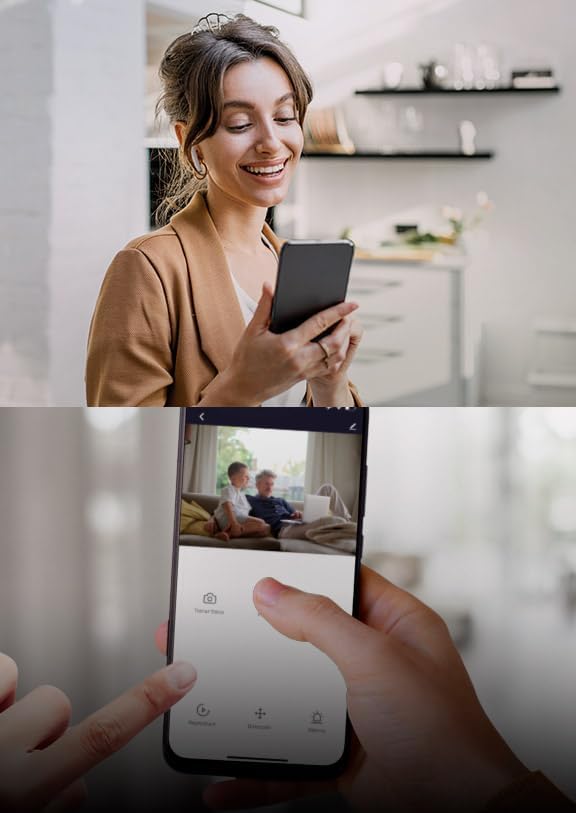
4.1 pav.: Nuotolinis valdymas viewing of the camera feed via the Nexxt Home app.
4.2. Pakreipimo ir pasukimo valdymas
The camera features a 355-degree rotatable design, allowing you to adjust its viewkampu nuotoliniu būdu.
- Gyvai view interface of the app, use the directional controls (usually a joystick or arrow buttons) to pan (move horizontally) and tilt (move vertically) the camera lens.

Figure 4.2: The camera's 355-degree rotatable design for comprehensive coverage.
4.3. Dvipusis garsas
The built-in microphone and speaker enable two-way communication.
- Programėlės tiesioginiame ekrane palieskite mikrofono piktogramą. view kalbėti per kamerą.
- Norėdami klausytis garso iš kameros aplinkos, palieskite garsiakalbio piktogramą.

Figure 4.3: Two-way communication feature.
4.4. Judesio aptikimas ir įspėjimai
The camera can detect motion and send instant alerts to your smartphone.
- Enable motion detection in the camera settings within the Nexxt Home app.
- Prireikus sureguliuokite jautrumo lygius ir nustatykite aptikimo zonas.
- Gaukite tiesioginius pranešimus į savo telefoną, kai aptinkamas judesys.

Figure 4.4: Advanced motion detection with an effective range of up to 32 feet.
4.5. Naktinis matymas
Integrated IR LEDs provide clear night vision, even in low light or complete darkness.
- Naktinio matymo funkcija įsijungia automatiškai esant prastam apšvietimui.
- You can manually toggle night vision on/off in the app settings if desired.

Figure 4.5: Integrated IR LEDs allow clear night vision monitoring.
4.6. Vietinė atmintis („MicroSD“ kortelė)
The camera supports local storage via a microSD card (up to 128GB, not included).
- Insert a formatted microSD card into the camera's slot.
- Configure recording settings (continuous, event-triggered) in the Nexxt Home app.
- Review įrašytas footage tiesiai iš programėlės.
5. Funkcijos Overview
The Nexxt Solutions Smart Wi-Fi Indoor Pan and Tilt Camera is equipped with a range of features designed for enhanced security and convenience:
- Full 2K HD Resolution: Provides sharp live streaming and video playback for clear monitoring.
- Išplėstinis judesio aptikimas: Detects movement up to 32 feet with smart human body detection to minimize false alerts.
- 355-Degree Rotatable Design: Offers comprehensive activity monitoring with wide room coverage.
- Aiškus naktinis matymas: Platus viewing angle and IR LEDs ensure clear visibility in low-light conditions.
- Dvipusis garsas: Bendraukite tiesiogiai per kamerą naudodami integruotą mikrofoną ir garsiakalbį.
- Vietinės saugyklos palaikymas: Supports microSD cards up to 128GB for continuous or event-triggered recording.
- Nuotolinė prieiga: View live feeds and manage settings from anywhere via the free Nexxt Home app on iOS or Android devices.
- Išmaniųjų namų suderinamumas: Works with Amazon Alexa and Google Home for voice control and integration into your smart home ecosystem.

Figure 5.1: Key features of the Nexxt Solutions Smart Wi-Fi Camera.
6. Priežiūra
Tinkama priežiūra užtikrina jūsų fotoaparato ilgaamžiškumą ir optimalų veikimą.
- Valymas: Kameros objektyvą ir korpusą valykite minkštu, sausu audiniu. Venkite naudoti stiprias chemines medžiagas ar abrazyvinius valiklius.
- Programinės įrangos atnaujinimai: Reguliariai tikrinkite „Nexxt Home“ programėlės programinės įrangos atnaujinimus. Nuolat atnaujindami kameros programinę įrangą, užtikrinsite, kad turėsite naujausias funkcijas ir saugumo patobulinimus.
- Maitinimo ciklas: If the camera experiences minor issues, try unplugging it from the power source for 10 seconds and then plugging it back in.
- „MicroSD“ kortelė: If using a microSD card, periodically check its status in the app and consider formatting it every few months to maintain performance.
7. Problemų sprendimas
| Problema | Galima priežastis | Sprendimas |
|---|---|---|
| Fotoaparatas neprisijungęs | No power; Wi-Fi signal weak or disconnected; Router issues. | Check power connection; Move camera closer to router; Restart router; Re-add camera in app. |
| Nepavyksta prisijungti prie „Wi-Fi“. | Incorrect Wi-Fi password; 5GHz network used; Too far from router. | Verify password; Ensure 2.4GHz network; Relocate camera. |
| Prasta vaizdo kokybė | Nešvarus objektyvas; nepakankamas apšvietimas; tinklo pralaidumo problemos. | Clean lens; Ensure adequate lighting; Check internet speed. |
| Judesio įspėjimai negaunami | Motion detection disabled; App notifications off; Incorrect sensitivity. | Enable motion detection in app; Check phone notification settings; Adjust sensitivity. |
| Dvipusio garso problemos | Programėlėje nutildytas mikrofonas / garsiakalbis; tinklo delsa. | Unmute audio in app; Check network connection. |
8. Specifikacijos
| Funkcija | Detalė |
|---|---|
| Modelio pavadinimas | Smart Wi-Fi camera (NHC-P710) |
| Naudojimas viduje / lauke | Vidinis |
| Vaizdo įrašymo raiška | 2K HD |
| Ryšio protokolas | „Wi-Fi“ (2.4 GHz) |
| Maitinimo šaltinis | Su laidu elektra |
| Naktinio matymo diapazonas | 32 pėdų |
| Kontrolės metodas | Voice (Amazon Alexa, Google Home), App |
| Montavimo tipas | Sieninis laikiklis (pasirinktinai) |
| Sandėliavimas | „MicroSD“ kortelė (iki 128 GB) |
| Gaminio matmenys | 2.7 x 2.7 x 4.3 colio |
| Prekės svoris | 13.1 uncijos |
9. Garantija ir palaikymas
For warranty information and technical support, please refer to the official Nexxt Solutions websvetainėje arba susisiekite tiesiogiai su jų klientų aptarnavimo tarnyba. Išsaugokite pirkimo kvitą kaip pirkimo įrodymą bet kokiems garantiniams prašymams.
Gamintojas: Kiti sprendimai
Norėdami gauti daugiau pagalbos, apsilankykite „Nexxt Solutions“ parduotuvė „Amazon“ platformoje.