
Įvadas
Welcome to the user manual for your new realme C65 5G smartphone. This guide provides essential information to help you set up, operate, maintain, and troubleshoot your device. Please read this manual carefully to ensure optimal performance and longevity of your realme C65 5G.
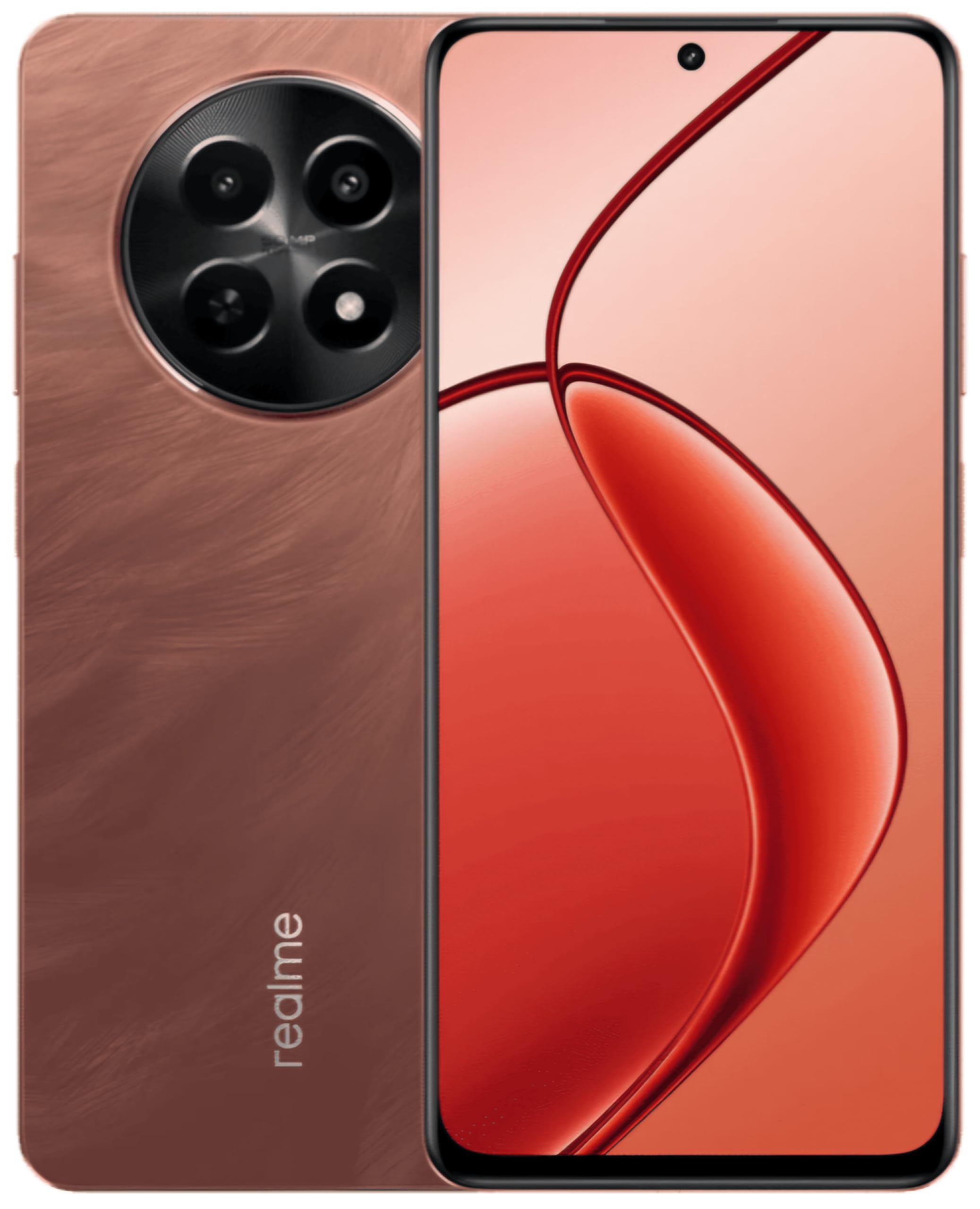
This image displays the realme C65 5G smartphone, highlighting its vibrant Speedy Red finish and the design of its screen and camera setup.
1. Sąrankos vadovas
1.1. SIM ir atminties kortelių įdėjimas
Your realme C65 5G supports a single Nano SIM card and a microSD card for expandable storage up to 2 TB.
- Suraskite SIM kortelės dėklą savo įrenginio šone.
- Įkiškite SIM kortelės išstūmimo įrankį į mažą skylutę šalia dėklo ir švelniai stumkite, kol dėklas iššoks.
- Place your Nano SIM card into the designated slot with the gold contacts facing down. If using a microSD card, place it in its respective slot.
- Atsargiai stumkite dėklą atgal į telefoną, kol jis bus lygiai su įrenginio korpusu.
1.2. Įrenginio įjungimas
Press and hold the Power button (usually on the right side) until the realme logo appears on the screen. The device will then boot up.
1.3. Pradinė sąranka
Follow the on-screen prompts to complete the initial setup process. This includes selecting your language, connecting to a Wi-Fi network, setting up your Google account, and configuring security features like fingerprint recognition.
2. Naudojimo instrukcijos
2.1. Pagrindinė navigacija
Your realme C65 5G uses a touch-sensitive display for navigation. Swipe up from the bottom to go to the home screen, swipe left or right to switch between home screens, and swipe down from the top for notifications and quick settings.
2.2. Kameros naudojimas
The realme C65 5G features a 50MP rear camera and an 8MP front camera.
- Atidarykite programėlę „Kamera“ iš pagrindinio ekrano arba programėlių stalčiaus.
- Pasirinkite norimą režimą (nuotrauka, vaizdo įrašas, portretas ir kt.).
- Palieskite užrakto mygtuką, kad nufotografuotumėte arba pradėtumėte / sustabdytumėte vaizdo įrašymą.
- Naudokite ekrane esančius valdiklius, kad priartintumėte, perjungtumėte priekinę ir galinę kameras bei pritaikytumėte filtrus.
2.3. Ryšys
- „Wi-Fi“: Eikite į Nustatymai > Tinklas ir internetas > „Wi-Fi“, kad prisijungtumėte prie galimų tinklų.
- Bluetooth: Eikite į Nustatymai > Prijungti įrenginiai > „Bluetooth“, kad susietumėte su kitais „Bluetooth“ įrenginiais.
- Mobilieji duomenys (5G/4G): Ensure your SIM card is active and mobile data is enabled in Quick Settings or Network & internet settings.
- USB: Connect your phone to a computer using a USB cable for file perkėlimas arba įkrovimas.
2.4. Pirštų atspaudų atpažinimas
The device features fingerprint recognition for secure unlocking. Set up your fingerprint by going to Settings > Security > Fingerprint. Follow the instructions to register your fingerprint(s).
3. Priežiūra
3.1. Įrenginio valymas
Telefono ekraną ir korpusą valykite minkšta, nepūkuota šluoste. Venkite naudoti stiprias chemines medžiagas ar abrazyvines medžiagas. Iš prievadų dulkes švelniai pašalinkite minkštu šepetėliu.
3.2. Programinės įrangos atnaujinimai
Reguliariai tikrinkite, ar yra programinės įrangos atnaujinimų, ir juos įdiekite, kad jūsų įrenginyje būtų naujausios funkcijos, saugos pataisymai ir našumo patobulinimai. Eikite į Nustatymai > Apie telefoną > Programinės įrangos atnaujinimas.
3.3. Akumuliatoriaus priežiūra
Your realme C65 5G is equipped with a 5000 mAh battery. To maximize battery life:
- Venkite ekstremalių temperatūrų.
- Do not let the battery drain completely too often.
- Use the original charger and cable provided with your device.
- Tvarkykite foninių programų naudojimą ir ekrano ryškumą.
4. Problemų sprendimas
4.1. Įrenginys neįsijungia
Ensure the battery is charged. Connect the phone to its charger and wait a few minutes before attempting to power it on again. If it still doesn't turn on, try holding the Power button for an extended period (10-15 seconds).
4.2. Programėlių strigimas arba užstrigimas
Try force-closing the app and reopening it. If the issue persists, clear the app's cache and data (Settings > Apps > [App Name] > Storage > Clear cache/Clear data). As a last resort, uninstall and reinstall the app.
4.3. Tinklo ryšio problemos
Check if Airplane Mode is off. Restart your device. Verify your SIM card is properly inserted. If using Wi-Fi, restart your router. For mobile data, ensure your plan is active and you have signal coverage.
4.4. Neveikia pirštų atspaudų jutiklis
Ensure your finger is clean and dry. Re-register your fingerprint in the settings. If the issue continues, try restarting your device.
5. Specifikacijos
| Funkcija | Specifikacija |
|---|---|
| Modelis | „Realme C65 5G“ |
| RAM | 8 GB |
| Vidinė saugykla | 128 GB (išplečiama iki 2 TB per „microSD“) |
| Procesorius | Mediatek Dimensity 6300 |
| Ekranas | 6.67 inch HD+ LCD (1604 x 720 Pixels) |
| Galinė kamera | 50 MP |
| Priekinė kamera | 8 MP |
| Baterijos talpa | 5000 mAh |
| SIM kortelės tipas | Single Nano SIM |
| Biometrinis saugumas | Pirštų atspaudų atpažinimas |
| Atsparumas vandeniui | Atsparus vandeniui |
| Ausinės Jack | 3.5 mm |
| Korinio ryšio technologija | 5G, 4G |
| Belaidis ryšys | Wi-Fi, Bluetooth, LTE |
6. Informacija apie garantiją
For detailed warranty information, please refer to the warranty card included in your product packaging or visit the official realme websvetainėje. Garantijos sąlygos gali skirtis priklausomai nuo regiono ir pirkimo datos.
7. Pagalba klientams
If you encounter issues not covered in this manual or require further assistance, please contact realme customer support. You can find contact details on the official realme websvetainėje arba per savo įrenginio nustatymų pagalbos skyrių.
Norėdami rasti internetinių išteklių, apsilankykite „Realme“ parduotuvė „Amazon“ platformoje.
8. Oficialūs produktų vaizdo įrašai
No relevant official product videos with 'Seller' as creator type and m3u8 format were found in the provided product data for embedding.