
1. Įvadas
The APC Smart-UPS SMT750C is an Uninterruptible Power Supply (UPS) designed to provide reliable power and surge protection for critical electronic equipment. This unit offers 750VA/500W of line-interactive pure sine wave power, making it suitable for servers, storage systems, network closets, business VoIP setups, desktop computers, and retail POS systems. It features Automatic Voltage reguliavimas (AVR) tūrio korekcijaitage fluctuations and a SmartConnect Ethernet Port for cloud-based remote monitoring. This manual provides essential information for the safe and efficient installation, operation, and maintenance of your SMT750C UPS.
2. Saugos informacija
WARNING: Risk of electric shock. Refer to bottom of unit for warnings.
- Prieš montuodami ir naudodami atidžiai perskaitykite visas instrukcijas.
- Šiame UPS yra vidinės baterijos, todėl gali kilti elektros smūgio pavojus net ir atjungus jį nuo kintamosios srovės maitinimo šaltinio.
- Neatidarykite ir neišardykite UPS. Viduje nėra jokių dalių, kurias galėtų aptarnauti vartotojas, išskyrus bateriją.
- UPS junkite tik prie įžeminto lizdo.
- Nenaudokite UPS tiesioginiuose saulės spinduliuose, šalia šilumos šaltinių arba vietose, kuriose yra per didelė drėgmė.
- Ensure proper ventilation around the UPS. Do not block any ventilation openings.
3. Pakuotės turinys
Išpakuodami patikrinkite, ar yra visi daiktai:
- APC Smart-UPS SMT750C Unit
- 16 GB USB 3.0 diskas
- Vartotojo vadovas (šis dokumentas)
- USB ryšio kabelis
- Maitinimo laidas

Image: Included 16GB USB 3.0 Drive. This USB drive provides additional storage or file perdavimo galimybės.
4. Produktas baigtasview
Priekinis skydelis
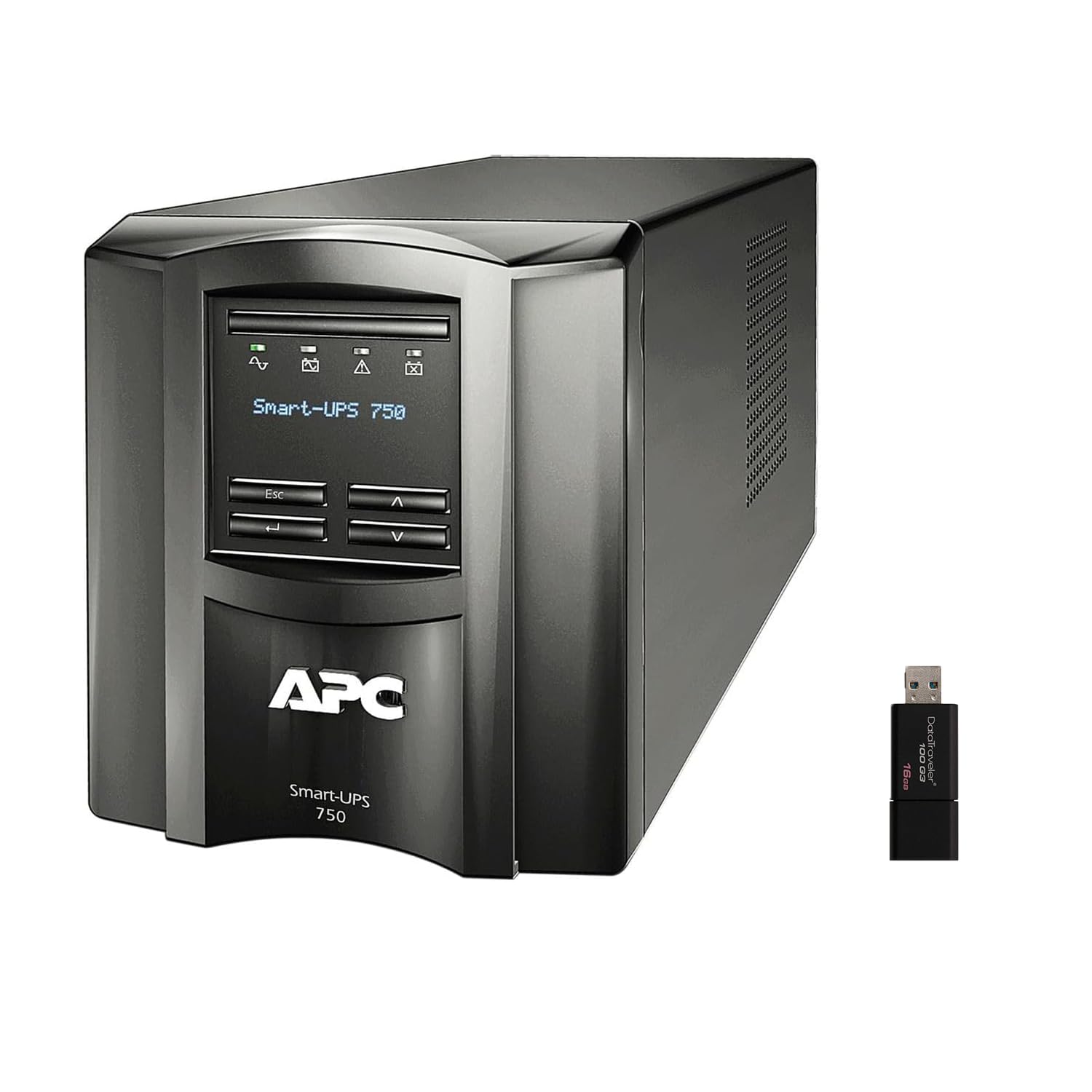
Vaizdas: Priekinė ir šoninė view of the APC Smart-UPS SMT750C. This image displays the compact tower design of the UPS unit.
- Maitinimo mygtukas: Valdo pagrindinį UPS maitinimą.
- LCD ekranas: Provides real-time status information, load levels, battery charge, and estimated runtime.
- Naršymo mygtukai: Used to scroll through display menus and adjust settings.
Galinis skydelis
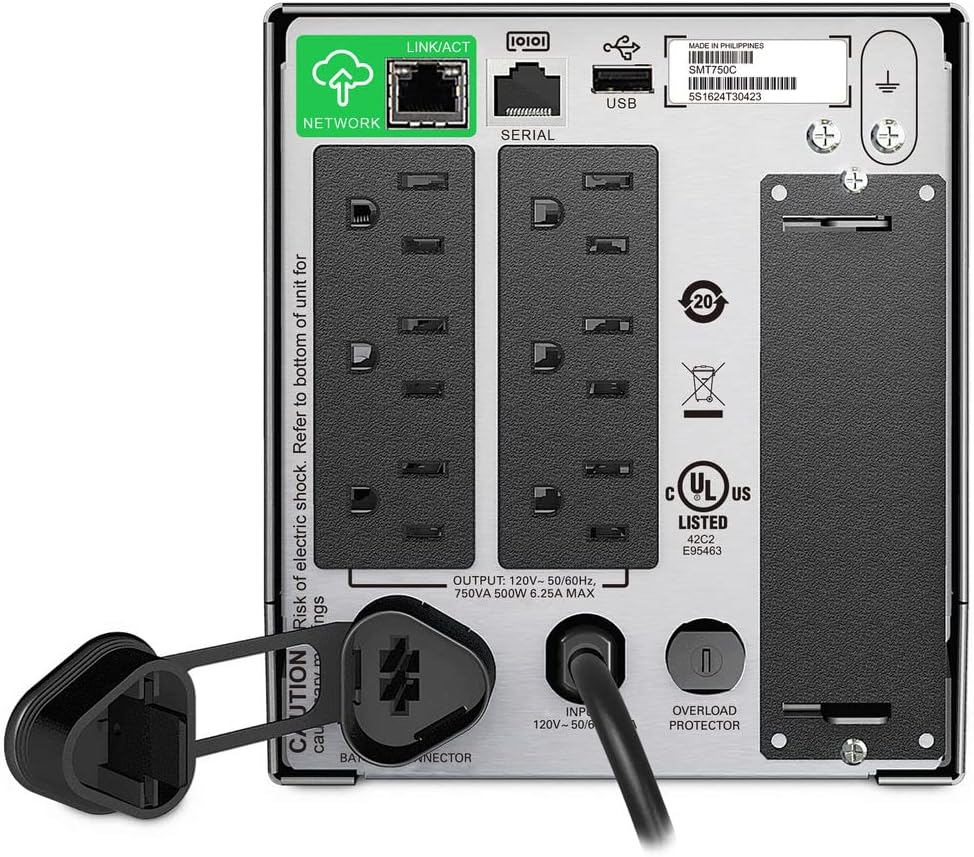
Image: Rear panel of the APC Smart-UPS SMT750C. This view highlights the various input/output ports, including NEMA 5-15R outlets, SmartConnect port, USB, and serial ports.
- NEMA 5-15R Outlets: Six outlets for connecting protected equipment.
- „SmartConnect“ eterneto prievadas: For cloud-based remote monitoring and management.
- USB prievadas: For communication with a computer for graceful shutdown via PowerChute Serial Shutdown software.
- Nuoseklusis prievadas: Alternative communication port for graceful shutdown.
- Išmanusis lizdas: For optional Network Management Card (sold separately).
- Įvesties maitinimo laidas: Prijungia UPS prie elektros tinklo.
- Perkrovos apsauga: Resettable circuit breaker.
5. Sąranka
5.1 Initial Battery Connection
Prieš pirmą kartą naudojant, reikia prijungti vidinę bateriją. Įrenginys siunčiamas su atjungta baterija, kad būtų užtikrintas saugumas transportavimo metu.
- Padėkite UPS ant stabilaus paviršiaus.
- Locate the battery compartment cover, typically on the bottom or rear of the unit.
- Remove the cover to access the battery.
- Connect the red battery cable to the positive (+) terminal and the black battery cable to the negative (-) terminal. Ensure a secure connection.
- Uždėkite akumuliatoriaus skyriaus dangtelį.
5.2 Prijungimas prie elektros tinklo
- Plug the UPS power cord into a grounded 3-prong AC outlet.
- Prieš prijungdami svarbiausią įrangą, leiskite UPS įkrauti bent 24 valandas, kad užtikrintumėte pilną akumuliatoriaus įkrovą.
5.3 Įrangos prijungimas
- Connect your critical equipment (e.g., computer, monitor, network devices) to the NEMA 5-15R outlets on the rear panel.
- For graceful shutdown capabilities, connect the provided USB cable from the UPS to your computer and install the PowerChute Serial Shutdown software (available for download from APC's websvetainė).
- For remote monitoring, connect an Ethernet cable to the SmartConnect port and follow the instructions for cloud-based setup.
6. Operacija
6.1 Įjungimas / išjungimas
- To power on the UPS, press and hold the power button on the front panel until the unit beeps and the display illuminates.
- To power off the UPS, press and hold the power button until the unit beeps and the display turns off.
6.2 Automatinis ttage reglamentas (AVR)
The SMT750C features AVR, which automatically corrects minor voltage fluctuations (sags and surges) without switching to battery power. This protects connected equipment from voltage irregularities and extends battery life.
6.3 Atsarginio maitinimo iš akumuliatoriaus veikimas
Per galios outage, the UPS will automatically switch to battery power, providing continuous power to connected equipment. The LCD display will show the estimated remaining runtime. When utility power returns, the UPS will automatically switch back to utility power and recharge its battery.
6.4 Remote Monitoring (SmartConnect)
The SmartConnect port allows for cloud-based remote monitoring of your UPS. This feature enables IT professionals and network administrators to:
- Monitor UPS status and performance.
- Perform firmware upgrades.
- Conduct remote diagnostics.
- Receive proactive email notifications with recommended actions.
7. Priežiūra
7.1 Akumuliatoriaus keitimas
The internal battery is a user-replaceable component. When the battery reaches the end of its service life, the UPS will indicate a battery fault. To replace the battery:
- Ensure the UPS is powered off and disconnected from utility power.
- Nuimkite akumuliatoriaus skyriaus dangtelį.
- Disconnect the battery cables (red and black).
- Carefully slide out the old battery.
- Insert a genuine APC replacement battery (model RBC154, sold separately).
- Connect the battery cables, ensuring correct polarity (red to positive, black to negative).
- Uždėkite akumuliatoriaus skyriaus dangtelį.
- Recycle the old battery responsibly.
7.2 Valymas
Periodiškai valykite UPS išorę minkštu, sausu skudurėliu. Nenaudokite skystų ar aerozolinių valiklių. Įsitikinkite, kad ventiliacijos angose nėra dulkių ir šiukšlių.
8. Problemų sprendimas
| Problema | Galima priežastis | Sprendimas |
|---|---|---|
| UPS neįsijungia | Baterija neprijungta arba žemas įkrovos lygis | Ensure battery cables are connected. Plug UPS into AC outlet and allow to charge. |
| UPS nuolat pypsi | Overload or on battery power | Reduce connected load. Check utility power. |
| Battery symbol blinking | Battery needs to be flipped (initial setup) or is failing | For new units, ensure battery is correctly oriented and connected. For older units, consider battery replacement. |
| Nėra maitinimo į lizdus | UPS is off, circuit breaker tripped, or utility power lost | Turn on UPS. Reset circuit breaker. Check utility power. |
9. Specifikacijos
- Modelis: SMT750C
- Išėjimo galia: 500 vatų / 750 VA
- Išvesties jungtys: 6 x NEMA 5-15R
- Įvesties jungtys: NEMA 5-15P
- Nominalusis įėjimas ttage: 120 V
- Nominalus išėjimas ttage: 120 V
- Baterijos tipas: Švino rūgštis
- Formos faktorius: Bokštas
- Matmenys (A x P x G): 6.34 colio (16.1 cm) x 5.43 colio (13.8 cm) x 14.53 colių (36.9 cm)
- Grynasis svoris: 27.56 svarai (12.5 kg)
- Spalva: Juoda
- Medžiaga: Metalas
- Pridedami priedai: 16 GB USB 3.0 diskas
10. Garantija ir palaikymas
APC suteikia standartinę šio produkto garantiją. Dėl konkrečių garantijos sąlygų žr. prie produkto pridėtą garantijos kortelę arba apsilankykite oficialioje APC svetainėje. website. For technical support, product registration, or to purchase replacement parts, please visit www.apc.com arba susisiekite su APC klientų aptarnavimo tarnyba.
Protection plans are available for extended coverage. For example, a 3-Year Protection Plan is available.