
1. Produktas baigtasview
The GEYA GPS8-01-U-40A is an AC220V Din Rail mounted overvoltage ir undervoltage protective device designed for household equipment. It provides essential protection against voltage fluctuations, ensuring the safety and longevity of connected appliances. This device features real-time voltage monitoring, self-reset capabilities after a fault, and clear LED indicators for fault status.

1.1 vaizdas: priekis view of the GEYA GPS8-01 Overvoltage Undervoltage Protective Device.
2. Saugos informacija
Please read this manual carefully before installation and operation. Incorrect installation or use may result in electric shock, fire, or damage to the device and connected equipment. Always adhere to local electrical codes and standards.
- Montuoti turėtų tik kvalifikuotas personalas.
- Ensure the main power supply is disconnected before any wiring or maintenance.
- Nenaudokite prietaiso, jei jis pažeistas arba veikia netinkamai.
- Verify correct wiring connections to prevent short circuits or improper operation.
- Keep the device away from moisture, dust, and corrosive environments.
3. Produkto ypatybės
- ttage (True RMS) monitoring and protection.
- Adjustable overvoltage ir undervoltage vertybes.
- Double bus wiring design for enhanced capability.
- Automatic reset after fault conditions.
- Skaitmeninis ekranas ttage values and LED indicators for fault status.
- Compact 1-MODULE design for DIN rail mounting.
4. Sąranka ir diegimas
4.1 Sujungimo schema
The GPS8-01 device supports both upper and down wiring configurations. Ensure the neutral (N) and incoming line (IN) connections are correctly made as per the diagram below.

Image 4.1: Comparison of upper and down wiring for GPS8-01 and GPS8-02 models. For GPS8-01, connect N to N and IN to 1 for upper incoming line, and N to N and IN to 1 for down incoming line.
4.2 diegimo žingsniai
- Mount the device onto a standard DIN rail.
- Connect the incoming neutral (N) and live (IN) wires to the corresponding terminals on the device.
- Connect the load wires (neutral and live) from the device's output terminals to the equipment requiring protection.
- Ensure all connections are secure and tightened appropriately.
- Once wiring is complete, restore power to the circuit.
Video 4.2: Demonstration of connecting the GEYA protective device to a load and power supply. The video illustrates accessing the load, connecting to the power supply, and turning on electricity to show the device's operation.
5. Naudojimo instrukcijos
5.1 Panel Diagram and Indicators
The device features a digital display and LED indicators to show operating status and fault conditions.
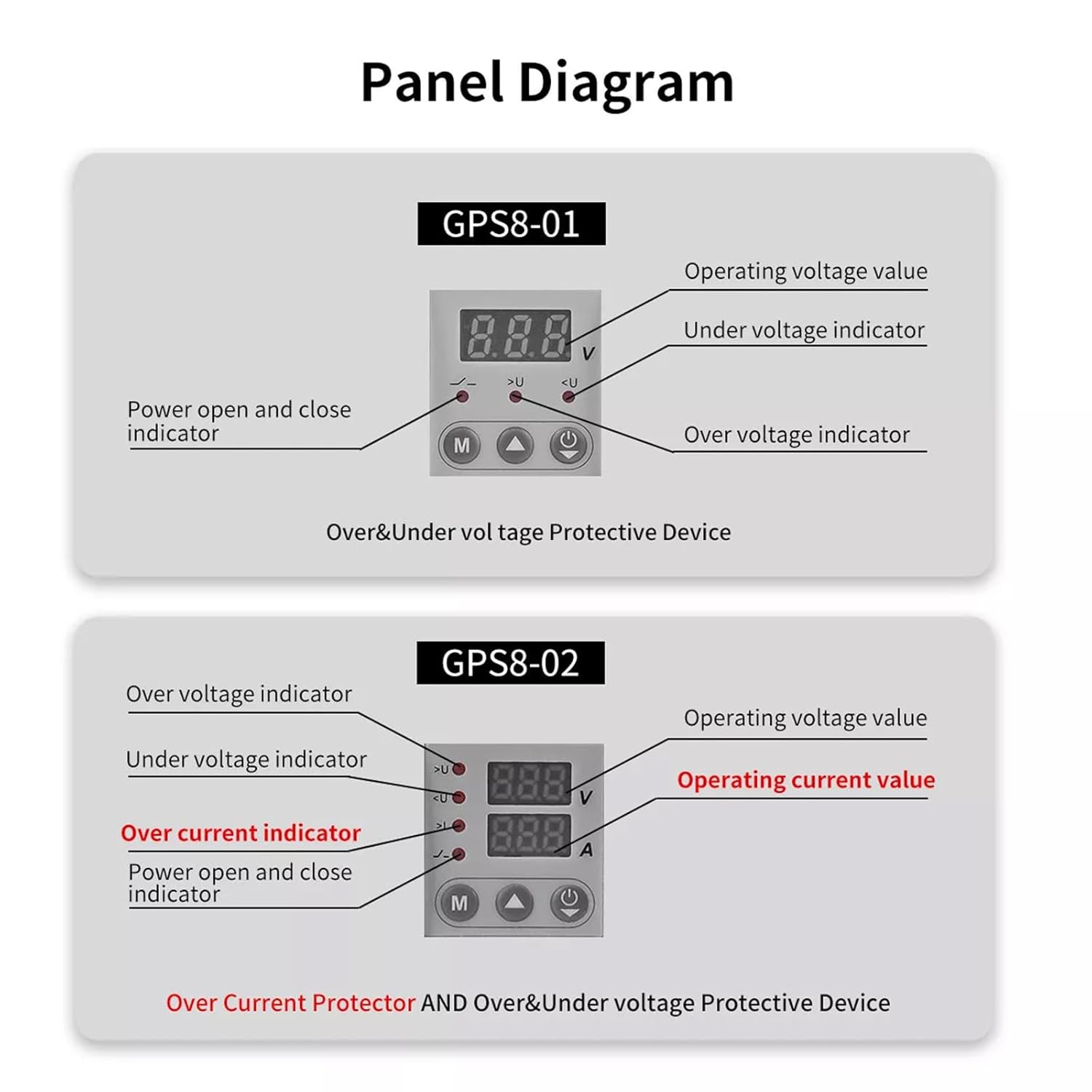
Image 5.1: Panel layout for GPS8-01 and GPS8-02. GPS8-01 displays operating voltage, pagal ttage indicator, over voltage indicator, and power open/close indicator. GPS8-02 adds over current indicator and operating current value.
- Veiklos ttage reikšmė: Rodo esamą tūrįtage.
- Per ttage Indicator (>U): Lights up when overvoltagaptikta būklė.
- Pagal ttage Indicator (
- Power Open and Close Indicator: Nurodo įrenginio maitinimo būseną.
5.2 Parametrų nustatymas
To adjust the protection parameters, press and hold the 'M' button for 3 seconds to enter the parameter setting interface. Use the up and down arrow buttons to navigate and adjust values. Short presses of the arrow buttons can quickly add and drop parameters. If no key is operated for 60 seconds, the device will automatically exit the setting mode.

Image 5.2: Parameter setting flow for GPS8-01 and GPS8-02. For GPS8-01, settings include Overvoltage (230V-300V), Undervoltage (145V-210V), and Reset Time (2s-900s).
GPS8-01 Adjustable Parameters:
- Overvoltage Nustatymas: Range 230V-300V (Factory default: 275V).
- Undervoltage Nustatymas: Range 145V-210V (Factory default: 175V).
- Reset Time Setting: Range 2s-900s (Time before the device automatically resets after a fault).
6. Matmenys
The compact design of the GPS8-01 allows for easy integration into electrical panels.
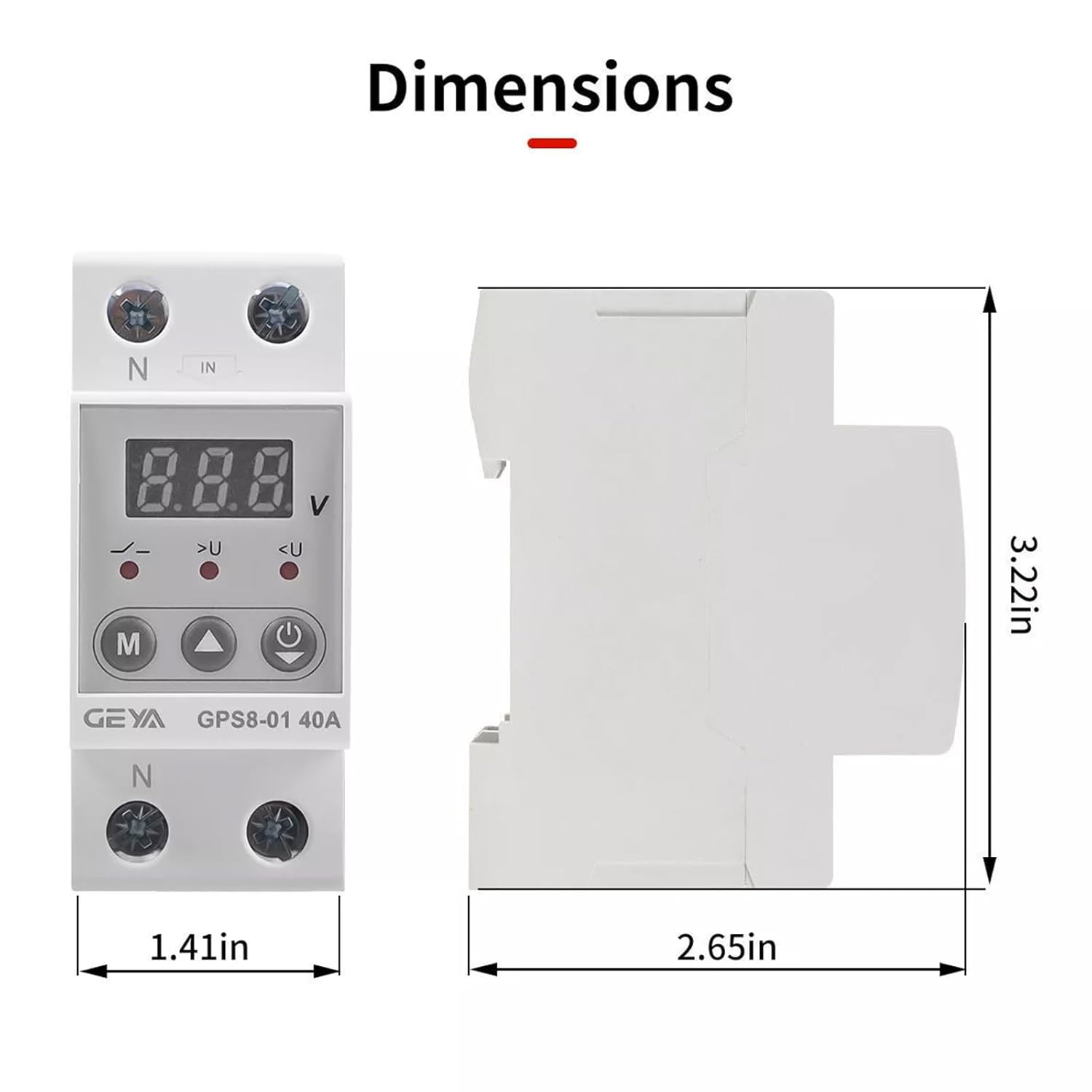
Image 6.1: Dimensions of the GEYA GPS8-01 device. Width: 1.41in (36mm), Height: 3.22in (82mm), Depth: 2.65in (68mm).
7. Techninės specifikacijos
Detailed technical parameters for the GEYA GPS8-01 protective device.
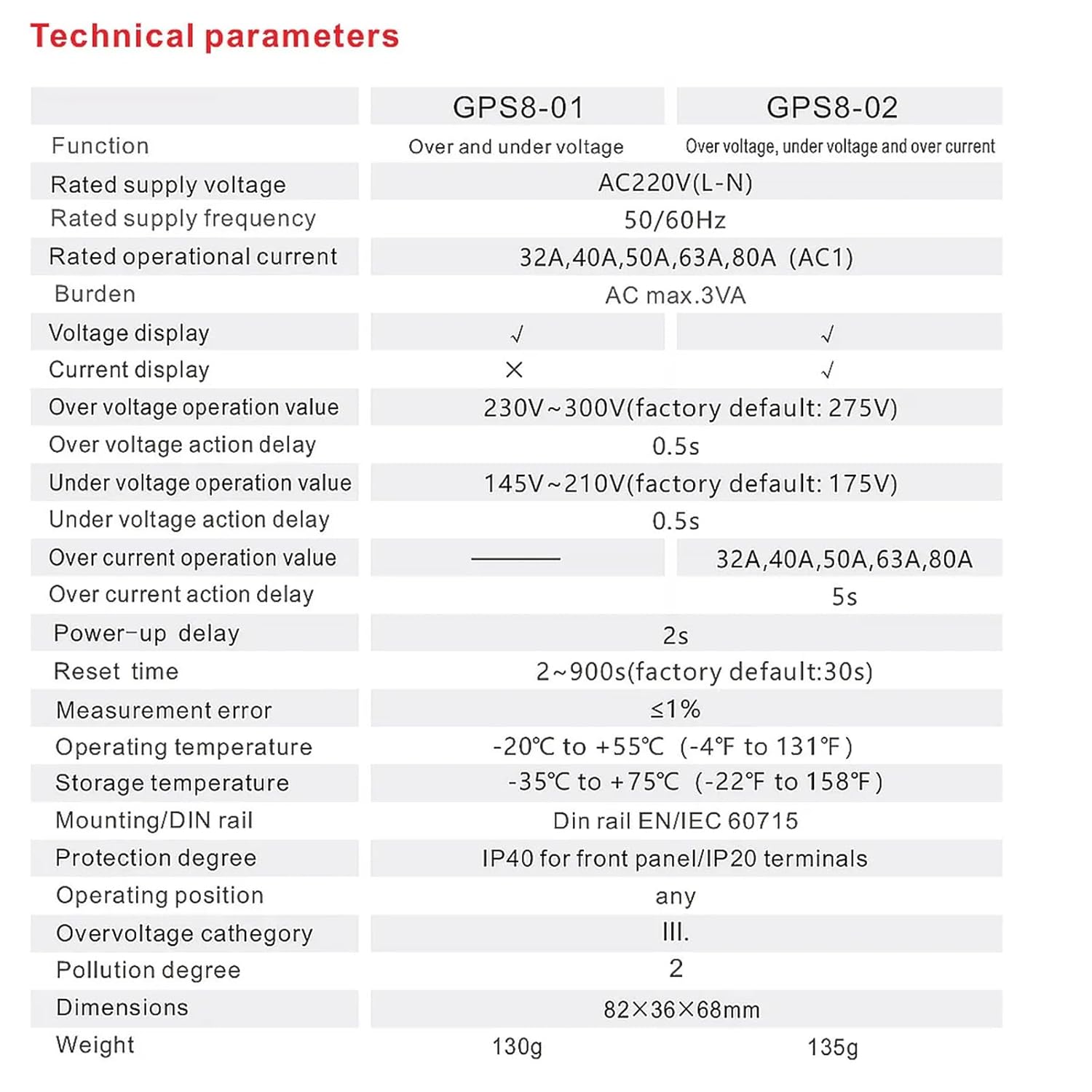
Image 7.1: Technical specifications table comparing GPS8-01 and GPS8-02 models.
| Parametras | GPS8-01 (Over and Under Voltage) |
|---|---|
| Nominali tiekimo ttage | AC220V (L-N) |
| Vardinis tiekimo dažnis | 50/60Hz |
| Nominali veikimo srovė | 32A, 40A, 50A, 63A, 80A (AC1) |
| Našta | Kintamoji srovė maks. 3 VA |
| ttage ekranas | ✓ |
| Dabartinis ekranas | ✗ |
| Per ttage operation value | 230V~300V (factory default: 275V) |
| Per ttage action delay | 0.5 s |
| Pagal ttage operation value | 145V~210V (factory default: 175V) |
| Pagal ttage action delay | 0.5 s |
| Over current operation value | — |
| Over current action delay | — |
| Power-up delay | 2s |
| Nustatyti laiką iš naujo | 2~900s (factory default: 30s) |
| Matavimo klaida | ≤1 % |
| Darbinė temperatūra | -20°C iki +55°C (nuo -4°F iki 131°F) |
| Laikymo temperatūra | -35°C iki +75°C (nuo -22°F iki 158°F) |
| Montavimas/DIN bėgis | Din bėgis EN/IEC 60715 |
| Apsaugos laipsnis | IP40 priekiniam skydeliui / IP20 gnybtams |
| Darbo padėtis | bet koks |
| Overvoltage kategorija | III. |
| Užterštumo laipsnis | 2 |
| Matmenys | 82×36×68 mm |
| Svoris | 130g |
8. Problemų sprendimas
If the device is not functioning as expected, consider the following:
- Nėra ekrano / maitinimo: Patikrinkite pagrindinį maitinimo šaltinį ir įsitikinkite, kad visos laidų jungtys yra tvirtos.
- Dažnas kelionės: Verify that the set overvoltage/undervoltage thresholds are appropriate for your electrical system. Excessive voltage fluctuations in your area might require consultation with an electrician.
- Device Not Resetting: Check the 'Reset Time Setting' parameter. If the fault condition persists, the device will not reset until the condition is cleared.
- Neteisingas ttage Skaitymas: Ensure proper wiring and that the device is correctly rated for your supply voltage.
For issues not resolved by these steps, contact qualified technical support.
9. Priežiūra
The GEYA GPS8-01 device requires minimal maintenance. Regular checks can help ensure optimal performance:
- Reguliariai tikrinkite įrenginį, ar nėra matomų pažeidimų ar atsilaisvinusių jungčių.
- Keep the device clean and free from dust and debris. Use a dry, soft cloth for cleaning.
- Nenaudokite abrazyvinių valiklių ar tirpiklių.
10. Garantija ir palaikymas
GEYA products are manufactured to high-quality standards. For warranty information and technical support, please refer to the official GEYA websvetainėje arba susisiekite su vietiniu platintoju. Išsaugokite pirkimo kvitą kaip pirkimo įrodymą.