
Assark PH970G
Assark Cellular Trail Camera User Manual
Model: PH970G
For Cellular Trail Camera with Solar Panel, 2K Live Video, Colorful Night Vision, 4G LTE SIM Card, 64G SD Card, 0.2S Trigger Motion Actived, Smart Alerts, GPS, IP66 Waterproof
1. Įvadas
Thank you for choosing the Assark Cellular Trail Camera. This advanced trail camera is designed for reliable outdoor monitoring, featuring 2K live video, 48MP photos, colorful night vision, and 4G LTE connectivity. Its integrated solar panel ensures continuous operation, making it ideal for wildlife observation, property surveillance, and hunting preparation. This manual provides detailed instructions for setup, operation, and maintenance to ensure optimal performance.

Image: The Assark Cellular Trail Camera, showcasing its compact design with an integrated solar panel and antenna, alongside a smartphone displaying live video feed and a 64GB SD card.
2. Kas yra dėžutėje
Atidarę pakuotę, patikrinkite, ar yra visi šie komponentai:
- Cellular Trail Camera (x1)
- USB Type C Cable (x1)
- SIM Card (x1)
- 64GB TF Card (x1)
- Wall Mount Kit (x1)
- Adjustable Strap (x1)
- Varžtų pakuotė (x1)
- Pincetas (x1)
- SIM Eject Tool (x1)
- Instrukcijų vadovas (1x)

Image: A visual representation of all items included in the Assark Cellular Trail Camera package, laid out neatly on a surface.
3. Sąrankos vadovas
3.1. SIM kortelės ir atminties kortelės įdėjimas
- Locate the rubber cover at the bottom of the camera. Carefully open it to reveal the SD card slot and SIM card slot.
- Insert the provided 64GB TF (Micro SD) card into the memory card slot until it clicks into place. The camera supports up to 128GB TF cards.
- Insert the provided 4G LTE SIM card into the SIM card slot. Ensure the SIM card is correctly oriented as indicated by the diagram near the slot. Use the SIM eject tool if needed.
- Close the rubber cover firmly to ensure waterproof sealing (IP66 rated).

Vaizdas: Stambus planas view of the camera's bottom compartment, showing the slots for the 64GB TF card and the 4G SIM card, along with the SIM eject tool.
3.2. Įjungimas ir pradinis įkrovimas
- The camera features an integrated 4W solar panel and a built-in 5200mAh battery.
- For initial setup, it is recommended to fully charge the camera using the provided USB Type-C cable. Connect the cable to the charging port located under the rubber cover.
- Once charged, the solar panel will continuously recharge the battery, eliminating the need for frequent battery swaps.

Image: The trail camera mounted on a tree, illustrating its solar panel charging capability and long battery life, with cows grazing in the background.
3.3. Programėlės diegimas ir prijungimas
- Download the "UCon" app from your smartphone's app store (iOS or Android).
- Follow the in-app instructions to register an account and add your new camera device.
- The app will guide you through connecting the camera to the 4G LTE network. The included SIM card supports Verizon, T-Mobile, and AT&T networks. A trial data plan of 300MB is provided for 30 days. Subsequent data plans can be topped up via the app.
- No Wi-Fi is required for camera operation or remote access, as it uses cellular data.

Image: The trail camera mounted on a tree, with a user viewing live video on a smartphone, highlighting 4G LTE connectivity and compatibility with Verizon, T-Mobile, and AT&T networks.
4. Fotoaparato valdymas
4.1. Live Video and Night Vision
- Access 2K live video with audio directly through the UCon app.
- The camera features a Starlight Class Image Sensor for superior low-light performance.
- It automatically switches between traditional black and white infrared night vision and colorful night vision. Colorful night vision is active when ambient brightness exceeds 0.5 lux.
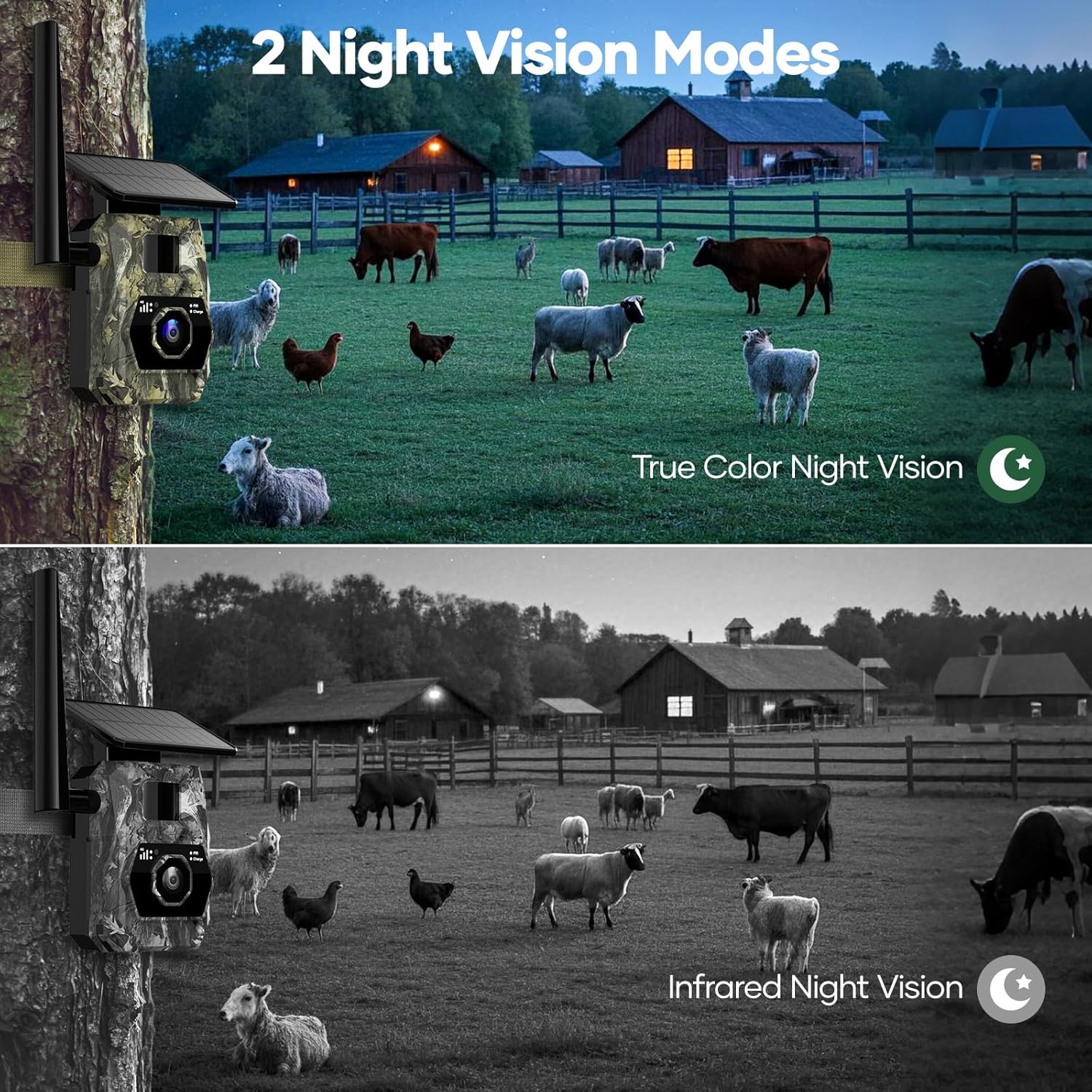
Image: A comparison showing the camera's two night vision modes: true color night vision in low light and infrared black and white night vision in complete darkness, with farm animals in a field.
4.2. Motion Detection and Smart Notifications
- The motion-activated sensor (PIR) triggers the camera in 0.2 seconds to capture fast-moving targets.
- The UCon app sends instant notifications to your phone when a picture or video is captured.
- The camera captures stunning 48MP photos and 2K FHD videos.

Image: A smartphone screen displaying a real-time alert from the trail camera, showing a deer detected at 65 feet, with a notification pop-up.
4.3. Remote Access and Sharing
- Tvarkyti kameros nustatymus, view footage, and access GPS positioning, real-time temperature, and personalized working modes remotely via the UCon app.
- Utilize the "My friend" function within the app to communicate and share experiences with family and friends in real-time.
- Cloud storage is available with a 30-day free trial. After the trial, you can view stored photos/videos on the built-in 64GB memory card or subscribe to cloud storage.

Image: A global map illustrating how the camera's live view can be shared with multiple users, enabling real-time communication and shared experiences.
5. Priežiūra
- Neperšlampamas dizainas: The camera is IP66 waterproof, designed to withstand rain, snow, and dust. Ensure the bottom rubber cover is securely closed after accessing the ports to maintain its waterproof integrity.
- Saulės skydelio priežiūra: Keep the integrated solar panel clean and free from debris (leaves, dirt, snow) to ensure efficient charging. Periodically wipe it with a soft, damp audinys.
- Objektyvo valymas: Gently clean the camera lens with a microfiber cloth to prevent smudges or dirt from affecting image quality. Avoid abrasive materials.
- Firmware atnaujinimai: Check the UCon app periodically for any available firmware updates to ensure your camera has the latest features and performance improvements.

Image: The trail camera mounted on a tree in various weather conditions (sunny, rainy, snowy), demonstrating its IP66 waterproof rating and ability to operate in temperatures from -4°F to 140°F.
6. Problemų sprendimas
| Problema | Galima priežastis / sprendimas |
|---|---|
| Kamera neįsijungia. | Ensure the battery is charged. Connect to a power source using the USB-C cable. Check the on/off switch at the bottom of the camera. |
| No cellular signal / Cannot connect to app. | Verify SIM card is correctly inserted. Check your data plan status in the UCon app. Ensure you are in an area with 4G LTE coverage for Verizon, T-Mobile, or AT&T. Try restarting the camera. |
| Prasta vaizdo / vaizdo kokybė. | Clean the camera lens. Ensure there are no obstructions in front of the camera. Check lighting conditions; colorful night vision requires at least 0.5 lux. |
| Judesio aptikimas neveikia. | Ensure the PIR sensor is clear of obstructions. Adjust motion sensitivity settings in the UCon app. Verify the camera is in an active recording mode. |
| Saulės baterija neįsikrauna. | Ensure the solar panel is clean and exposed to direct sunlight. Check for any physical damage to the panel or its connection. |
7. Specifikacijos
| Funkcija | Detalė |
|---|---|
| Prekės ženklas | Assark |
| Modelis | PH970G |
| Ryšio protokolas | Mobilusis ryšys (4G LTE) |
| Suderinami tinklai | Verizon, T-Mobile, AT&T |
| Vaizdo įrašymo raiška | 2K (2560 x 1440) |
| Veiksminga nejudančioji raiška | 48 MP |
| Trigerio greitis | 0.2 sekundžių |
| Naktinis matymas | Colorful Night Vision (Starlight Sensor) & Infrared Night Vision |
| Naktinio matymo diapazonas | Iki 65 pėdų |
| Maitinimo šaltinis | Solar Powered (Integrated 4W Solar Panel) & Built-in 5200mAh Battery |
| Sandėliavimas | 64GB Built-in Memory Card (expandable up to 128GB), Cloud Storage (30-day free trial) |
| Atsparumo vandeniui įvertinimas | IP66 |
| Darbinė temperatūra | -4°F iki 140°F |
| Viewing kampas | 100 laipsnių |
| Prekės svoris | 1.15 svaro |
| Matmenys | 7.68 x 4.21 x 3.03 colio |
8. Garantija ir palaikymas
The Assark Cellular Trail Camera comes with a 1 metų garantija nuo pirkimo datos, apimanti gamybos defektus. Prašome išsaugoti pirkimo įrodymą garantiniams reikalavimams.
For technical support, troubleshooting assistance, or warranty inquiries, please contact Assark customer service through the UCon app or visit the official Assark website for contact information. Our support team is dedicated to providing prompt and helpful assistance.
Ask a question about this manual
Ask about setup, troubleshooting, compatibility, parts, safety, or missing instructions. Manuals+ will review the question and use this page’s manual context to help answer it.