
1. Įvadas
The PEKOKKO L4Pro is a portable handheld laser marking machine designed for versatile and precise marking applications. It features a 5-inch color touchscreen, proprietary software, and a user-friendly interface, making it suitable for various tasks such as marking QR codes, barcodes, text, serial numbers, dates, characters, images, and logos. Its lightweight and compact design, combined with a removable 9000 mAh battery, ensures portability and extended use.

Figure 1: PEKOKKO L4Pro highlighting its 5-inch touch screen, fast engraving, compact design, multiple applications, and removable battery.
2. Saugos informacija
Please read and understand all safety instructions before operating the PEKOKKO L4Pro laser marking machine. Failure to follow these instructions may result in serious injury or property damage.
- Akių apsauga: Always wear appropriate laser safety glasses when operating the device to protect your eyes from laser radiation.
- Odos apsauga: Venkite tiesioginio lazerio spindulio poveikio odai.
- Medžiagų sauga: Do not mark highly reflective, flammable, or explosive materials. Ensure proper ventilation when marking materials that may produce fumes.
- Leidžiamas naudojimas: Only trained and authorized personnel should operate the laser marking machine.
- Vaikai ir augintiniai: Prietaisą laikykite vaikams ir naminiams gyvūnėliams nepasiekiamoje vietoje.
- Maitinimas: Use only the provided power adapter and ensure the power source matches the device's requirements.
- Priežiūra: Nebandykite patys išardyti ar taisyti įrenginio. Kreipkitės pagalbos į klientų aptarnavimo tarnybą.
3. Produktas baigtasview
3.1 Įrenginio komponentai
Familiarize yourself with the main components of your L4Pro laser marking machine:

Figure 2: L4Pro device components diagram.
- Priegloba: The main body of the marking machine.
- Baterija: Removable power source for portable operation.
- Protection Shield: Orange shield covering the laser output area.
- Ventiliatorius: Cooling fan for internal components.
- USB sąsaja: Port for data transfer and connectivity.
- Trigerio mygtukas: Activates the laser for marking.
- Main Control Screen: 5-inch color touchscreen for operation.
- Maitinimo jungiklis: Mygtukas įrenginiui įjungti arba išjungti.
3.2 Pakuotės turinys
Išpakuodami įsitikinkite, kad yra visi toliau išvardyti daiktai:
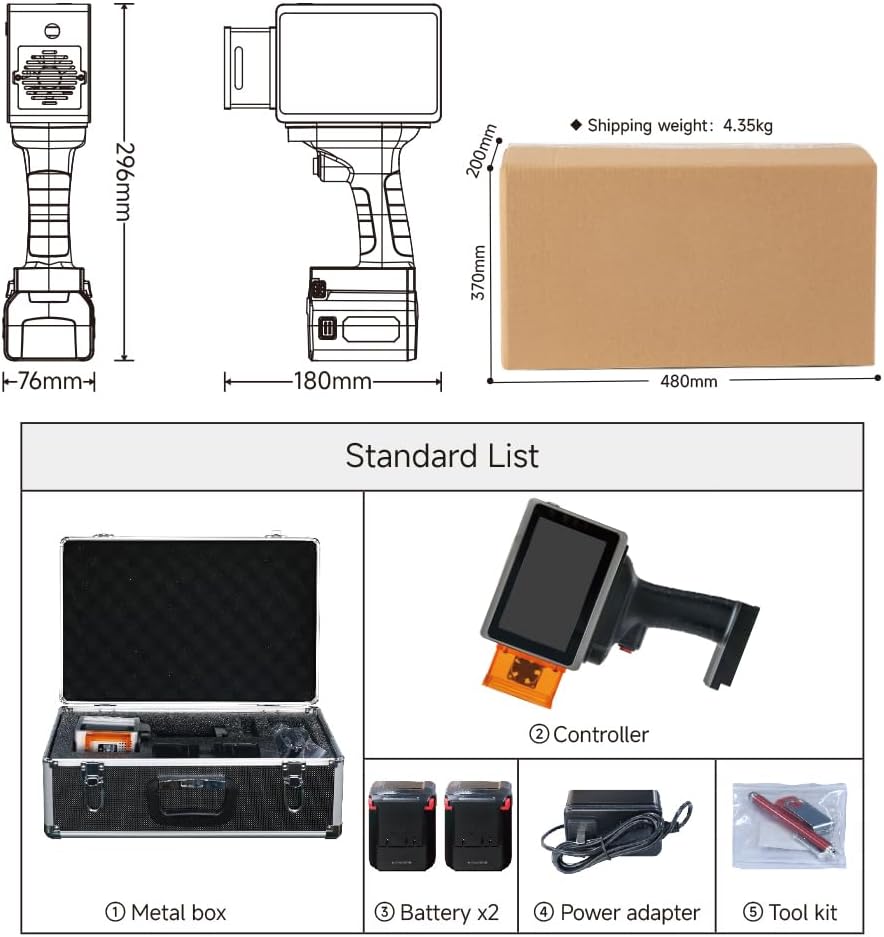
Figure 3: Standard package contents of the L4Pro.
- Metal Storage Box
- L4Pro Controller (Main Unit)
- Baterija x2
- Maitinimo adapteris
- Įrankių rinkinys
4. Sąranka
4.1 Akumuliatoriaus įdėjimas
The L4Pro uses a removable battery for convenience. To install or remove the battery:
- Align the battery with the slot at the bottom of the main unit.
- Švelniai įstumkite bateriją į vietą, kol ji tvirtai spragtelės.
- Norėdami išimti, paspauskite akumuliatoriaus atleidimo mygtuką ir išstumkite jį.

4 pav.: Baterijos įdėjimo procesas.
4.2 Įjungimas / išjungimas
To power on the device, press and hold the Power Switch (8) until the screen illuminates. To power off, press and hold the Power Switch again until the device shuts down.
5. Operacija
5.1 Vartotojo sąsajos navigacija
The L4Pro features a 5-inch color touchscreen with an intuitive interface. Navigate through menus and options by tapping on the screen. The main screen provides access to various marking functions and settings.
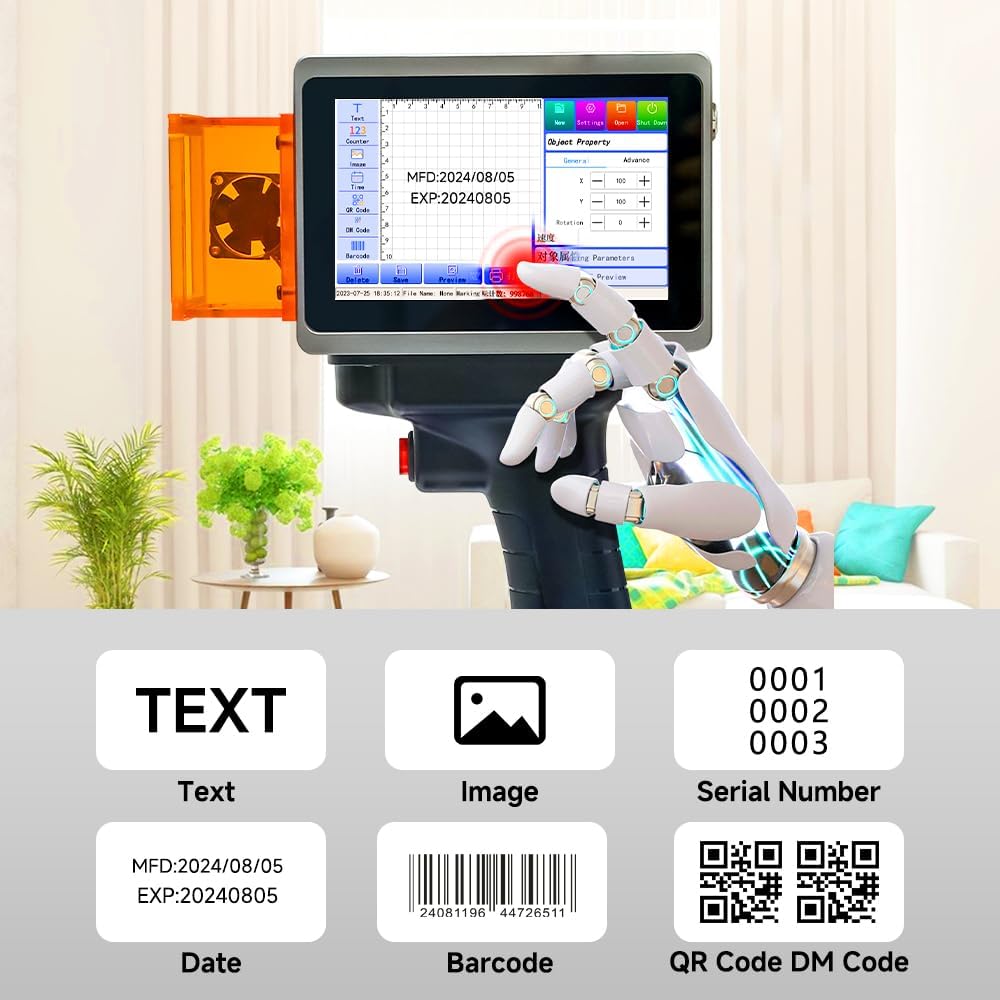
Figure 5: Main control screen interface with various marking options.
5.2 Creating Marking Content
The L4Pro supports various content types for marking:
- Tekstas: Input custom text using the on-screen keyboard.
- Vaizdas: Upload images or logos via the USB interface.
- Serijos numeris: Generate sequential numbers for batch marking.
- Data: Automatically insert current date or expiration dates.
- Barcode/QR Code/DM Code: Create various types of scannable codes.
Use the touchscreen to select the desired content type, input your data, and adjust parameters such as size, font, and position.
5.3 Pasirengimasview Funkcija
The device offers dual preview modes (projected edge and graphic outline) to accurately determine the marking position before engraving. This allows for quick adjustments and ensures precise placement of your design.
- Projected Edge: Displays a red light outline of the marking area on the target surface.
- Graphic Outline: Shows the full graphic outline for detailed positioning.
Access the preview function from the main control screen to verify your design's placement.
5.4 Marking Process
- Prepare the material to be marked, ensuring it is clean and stable.
- Create or load your desired marking content on the L4Pro's screen.
- Naudokite išankstinįview function to align the marking area precisely on the material.
- Hold the device firmly, ensuring the protection shield is close to the surface.
- Press the Trigger Button (6) to initiate the laser marking process.
- Move the device smoothly across the surface if marking a larger area, or hold steady for static marking.
5.5 Palaikomos medžiagos
The L4Pro is capable of marking on a wide range of materials, including but not limited to:
- Painted Cosmetics
- Mediena
- Kraftpopierius
- Dažytas metalas
- Dėžutė
- Drobė
- Gyvūnas Tags (plastic)
- Cans (metal)
- Mobile Phone Cases (plastic)

6 pav. Pvzamples of materials suitable for marking with the L4Pro.
6. Priežiūra
6.1 Valymas
Regular cleaning helps maintain the performance and longevity of your device:
- Išorė: Mašinos išorę nuvalykite minkštu, sausu skudurėliu. Nenaudokite abrazyvinių valiklių ar tirpiklių.
- Ekranas: Use a microfiber cloth specifically designed for electronic screens to clean the touchscreen.
- Laser Output Area: Ensure the laser output area and protection shield are free from dust and debris. Use a soft brush or compressed air if necessary.
6.2 Akumuliatoriaus priežiūra
Proper battery care extends battery life:
- Įkrovimas: Charge the battery fully before first use and whenever the battery level is low. Use only the provided power adapter.
- Saugykla: Jei įrenginį ketinate laikyti ilgesnį laiką, įkraukite akumuliatorių maždaug iki 50 % ir laikykite jį vėsioje, sausoje vietoje.
- Pakeitimas: If battery performance significantly degrades, consider replacing it with an official PEKOKKO replacement battery.
7. Problemų sprendimas
This section addresses common issues you might encounter with your L4Pro. If you experience problems not covered here, please contact customer support.
| Problema | Galima priežastis | Sprendimas |
|---|---|---|
| Įrenginys neįsijungia | Low or depleted battery; Loose battery connection; Faulty power switch | Charge the battery; Reinstall the battery securely; Contact support if switch is faulty. |
| Prasta žymėjimo kokybė | Incorrect laser settings; Unsuitable material; Dirty laser lens; Improper distance from material | Adjust laser power/speed settings; Ensure material compatibility; Clean the laser lens; Maintain correct focal distance. |
| Lazeris nešauna | Safety interlock engaged; Trigger button not pressed correctly; System error | Ensure protection shield is correctly positioned; Press trigger firmly; Restart the device. |
| Jutiklinis ekranas nereaguoja | Programinės įrangos triktis; Ekrano pažeidimas | Restart the device; If issue persists, contact support. |
8. Specifikacijos
| Funkcija | Specifikacija |
|---|---|
| Prekės ženklas | PEKOKO |
| Modelio pavadinimas | L4pro |
| Ryšio technologija | USB |
| Spausdinimo technologija | Lazeris |
| Ypatinga funkcija | Lightweight, Touch Screen |
| Spalva | Juoda |
| Išvesties tipas | Vienspalvis |
| Maksimalus spausdinimo greitis (vienspalvis) | 12000 puslapių per minutę |
| Prekės svoris | 1.1 kilogramo |
| Prekės matmenys (G x P x A) | 9.8 x 18.1 x 17.7 centimetro |
| Kontrolės metodas | Palieskite |
| Suderinama laikmena | Etiketės |
| Baterijos talpa | 9000 mAh (up to 6+ hours continuous use) |
| Maksimali spausdinimo raiška (spalvota) | 1200 x 1200 XNUMX DPI |
| Maksimali spausdinimo raiška (juodai balta) | 1200 DPI |
| Dvipusis spausdinimas | Ne (vienpusis) |
| UPC | 721587321912 |
| Kilmės šalis | Kinija |
9. Garantija ir palaikymas
9.1 Gaminio garantija
The PEKOKKO L4Pro laser marking machine comes with a vienerių metų garantija nuo įsigijimo datos. Ši garantija taikoma gamybos defektams ir gedimams įprasto naudojimo metu. Ji netaikoma žalai, atsiradusiai dėl netinkamo naudojimo, nelaimingų atsitikimų, neleistinų modifikacijų ar netinkamos priežiūros.
9.2 Pagalba klientams
For technical assistance, troubleshooting, warranty claims, or any other inquiries, please contact PEKOKKO customer support through your retailer or the official PEKOKKO website. Please have your product model (L4pro) and purchase information ready when contacting support.