
1. Įvadas
This manual provides essential information for the safe and efficient operation of your Phomemo M834 Portable Thermal Printer. Please read it thoroughly before using the device and retain it for future reference. The Phomemo M834 is an inkless thermal printer designed for portable use, offering high-resolution printing for various documents and notes.

Image: The Phomemo M834 printer highlights its key advantages such as Bluetooth wireless connectivity, inkless printing, portability, ease of setup, lightweight design, and multi-size thermal paper support, contrasting with common limitations of other printers like wired connections, ink requirements, and bulkiness.
2. Saugos informacija
Observe the following safety precautions to prevent damage to the printer or personal injury:
- Do not disassemble, repair, or modify the printer yourself.
- Laikykite spausdintuvą atokiau nuo vandens, drėgmės ir tiesioginių saulės spindulių.
- Use only Phomemo-approved thermal paper. Using other paper types may damage the print head.
- Ensure the printer is placed on a stable surface during operation.
- Laikyti vaikams nepasiekiamoje vietoje.
- Do not touch the print head immediately after printing, as it may be hot.
- Įkrovimui naudokite pridedamą USB-C laidą.
3. Pakuotės turinys
Patikrinkite, ar pakuotėje yra visi reikalingi daiktai:
- Phomemo M834 Portable Printer
- Printer Carry Case
- USB-C kabelis
- USB-C į USB adapteris
- Vartotojo vadovas
- Thermal Paper Roll (8.5" width)
- Additional Thermal Paper Rolls (4.33", 3.14", 2.08" widths)

Image: The package contents include the Phomemo M834 portable printer, a printer case, a USB-C cable, a USB-C to USB adapter, a user guide, and multiple rolls of thermal paper in various widths (8.5", 4.33", 3.14", 2.08").
4. Produktas baigtasview
The Phomemo M834 is a compact and versatile thermal printer. It features a 300 dpi print resolution for clear output and supports various thermal paper sizes and types. Its inkless technology eliminates the need for cartridges, reducing operational costs.
Pagrindinės funkcijos:
- High Print Clarity: 300 dpi resolution for sharp text and images.
- Universalus popieriaus palaikymas: Compatible with US Letter, A4, 4.33'', 3.14'', 2.08'' paper sizes, and roll, fold, or ordinary thermal paper types.
- Pailgintas akumuliatoriaus veikimo laikas: 2600mAh rechargeable battery supports over 160 pages of continuous printing.
- Platus įrenginių suderinamumas: Connects via Bluetooth to smartphones (Android, iOS) and USB to PCs (Windows 10/11, Linux, ChromeOS, macOS).
- Be rašalo technologija: Uses thermal printing, requiring no ink, toner, or ribbons.

Image: The Phomemo M834 portable thermal printer is shown with its carrying case, various sizes of thermal paper rolls, and a smartphone displaying the Phomemo app, illustrating its wireless connectivity and portability.

Image: A visual comparison demonstrates the superior clarity of 300 DPI printouts from the Phomemo M834 compared to standard 203 DPI prints, highlighting the enhanced detail and readability.

Image: This graphic illustrates the Phomemo M834's 2600mAh large capacity battery, emphasizing its USB-C fast charging capability and the ability to print over 160 sheets on a full charge.
5. Sąrankos instrukcijos
5.1 Spausdintuvo įkrovimas
- Prijunkite pridėtą USB-C laidą prie spausdintuvo įkrovimo prievado.
- Plug the other end into a USB power adapter (not included) or a computer's USB port.
- The indicator light will show charging status. A full charge typically takes a few hours.
5.2 Terminio popieriaus įdėjimas
- Atidarykite spausdintuvo popieriaus dangtį.
- Insert the thermal paper roll or folded paper, ensuring the printable side faces the print head.
- Adjust the paper guides to fit the paper width snugly.
- Saugiai uždarykite popierinį dangtelį.

Image: The Phomemo M834 printer is depicted with its paper compartment open, showcasing support for five paper sizes (US Letter, A4, 4.33'', 3.14'', 2.08'') and four types: single sheet, continuous folding, inner roll, and stickers.
6. Naudojimo instrukcijos
6.1 Maitinimo įjungimas/išjungimas
Press and hold the power button for 3 seconds to turn the printer on or off.
6.2 Prisijungimas prie įrenginio
6.2.1 Bluetooth Connection (Smartphones/Tablets)
- Download the Phomemo app from your device's app store.
- Įsitikinkite, kad jūsų išmaniajame telefone arba planšetiniame kompiuteryje įjungtas „Bluetooth“ ryšys.
- Open the Phomemo app and follow the on-screen instructions to search for and connect to your M834 printer.
6.2.2 USB Connection (PC/Laptop)
- Prijunkite spausdintuvą prie kompiuterio naudodami pridėtą USB-C laidą.
- Install the appropriate printer driver from the official Phomemo websvetainę.
- Once the driver is installed, the printer will be recognized by your operating system.
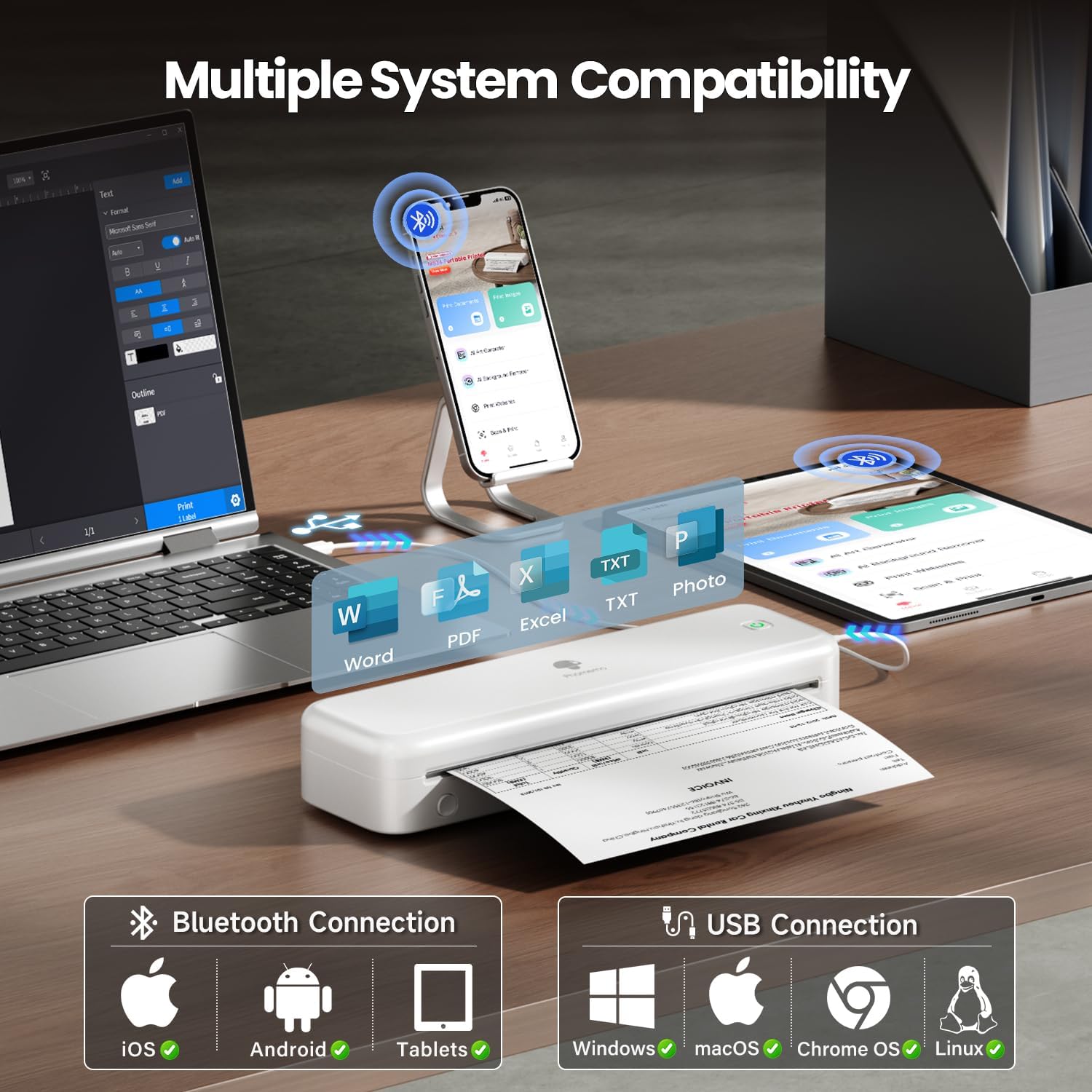
Image: The Phomemo M834 printer demonstrates its broad compatibility, connecting via Bluetooth to iOS, Android, and Tablets, and via USB to Windows, macOS, Chrome OS, and Linux systems, supporting various document formats like Word, PDF, Excel, and text files.
6.3 Spausdinimas
- Atidarykite dokumentą arba vaizdą, kurį norite spausdinti, prijungtame įrenginyje.
- Programoje pasirinkite spausdinimo parinktį.
- Choose the Phomemo M834 as your printer.
- Adjust print settings (e.g., paper size, density) as needed.
- Pradėkite spausdinimo užduotį.
7. Priežiūra
7.1 Spausdinimo galvutės valymas
Regular cleaning of the print head ensures optimal print quality.
- Išjunkite spausdintuvą ir atjunkite jį nuo maitinimo šaltinio.
- Atidarykite popierinį dangtelį.
- Švelniai nuvalykite spausdinimo galvutę vatos tamponu, lengvai dampsu izopropilo alkoholiu.
- Prieš uždarydami dangtį ir įjungdami spausdintuvą, leiskite spausdinimo galvutei visiškai išdžiūti.
7.2 Saugykla
Store the printer in a cool, dry place away from direct sunlight and extreme temperatures. If storing for an extended period, ensure the battery is partially charged (around 50%) to prolong its lifespan.
8. Problemų sprendimas
| Problema | Galima priežastis | Sprendimas |
|---|---|---|
| Spausdintuvas neįsijungia | Išsikrovęs akumuliatorius; netinkamai paspaustas maitinimo mygtukas | Charge the printer; Press and hold the power button for 3 seconds |
| Prasta spausdinimo kokybė | Print head dirty; Incorrect paper type; Low battery | Clean the print head; Use Phomemo thermal paper; Charge the printer |
| Nepavyksta prisijungti per Bluetooth | „Bluetooth“ išjungtas; spausdintuvo nepavyksta aptikti; programėlės problema | Ensure Bluetooth is on; Restart printer and app; Re-pair device |
| Popieriaus strigtis | Paper loaded incorrectly; Damaged paper | Open cover, remove jammed paper, reload correctly; Use undamaged paper |
| Spausdintuvo neatpažįsta kompiuteris | Driver not installed; Loose USB connection | Install latest driver from Phomemo website; Check USB cable connection |
9. Specifikacijos
| Funkcija | Detalė |
|---|---|
| Modelis | M834 |
| Spausdinimo technologija | Šiluminis |
| Spausdinimo raiška | 300 x 300 XNUMX DPI |
| Ryšys | Bluetooth, USB |
| Suderinamos operacinės sistemos | Android, iOS, Windows 10/11, Linux, ChromeOS, macOS |
| Baterijos talpa | 2600mAh ličio polimeras |
| Maksimali įvesties lapo talpa | 160 pages (continuous printing) |
| Maksimalus vienspalvio spausdinimo greitis | 6 ppm |
| Palaikomi popieriaus dydžiai | US Letter, A4, 4.33'', 3.14'', 2.08'' |
| Gaminio matmenys | 29 x 11.2 x 9.8 cm |
| Prekės svoris | 1.23 kg |
10. Garantija ir palaikymas
For warranty information and customer support, please refer to the official Phomemo websvetainėje arba susisiekite tiesiogiai su jų klientų aptarnavimo tarnyba. Išsaugokite pirkimo kvitą kaip pirkimo įrodymą garantijos pretenzijoms.
Phomemo oficialus Websvetainė: www.phomemo.com