
1. Įvadas
Thank you for choosing the Sunforce 90007 Outdoor Solar Color Changing LED String Lights. This product is designed to provide versatile and energy-efficient outdoor lighting. Powered by solar energy, these lights feature color-changing modes and are controlled via a remote, making them suitable for various outdoor settings. This manual provides essential information for the safe and effective installation, operation, and maintenance of your lighting set.
2. Saugos informacija
Prieš montuodami ir naudodami atidžiai perskaitykite visas instrukcijas. Išsaugokite šį vadovą ateičiai.
- Tik lauke: This product is designed for outdoor use and is weather-resistant.
- Saulės kolektorių išdėstymas: Kad saulės baterija būtų optimaliai įkrauta, įsitikinkite, kad ji yra pastatyta ten, kur bent 6–8 valandas per dieną gauna tiesioginių saulės spindulių.
- Baterijos sauga: The product contains lithium-ion rechargeable batteries. Do not attempt to replace batteries with non-approved types. Do not expose batteries to extreme heat or fire.
- Montavimas: Mount the solar panel and string lights securely to prevent damage from wind or other environmental factors.
- Valymas: Naudokite minkštą, damp cloth to clean the solar panel and light bulbs. Avoid abrasive cleaners.
- Vaikai ir augintiniai: Laikykite pakavimo medžiagas ir smulkius komponentus vaikams ir naminiams gyvūnams nepasiekiamoje vietoje.
3. Pakuotės turinys
Įsitikinkite, kad pakuotėje yra visi komponentai:
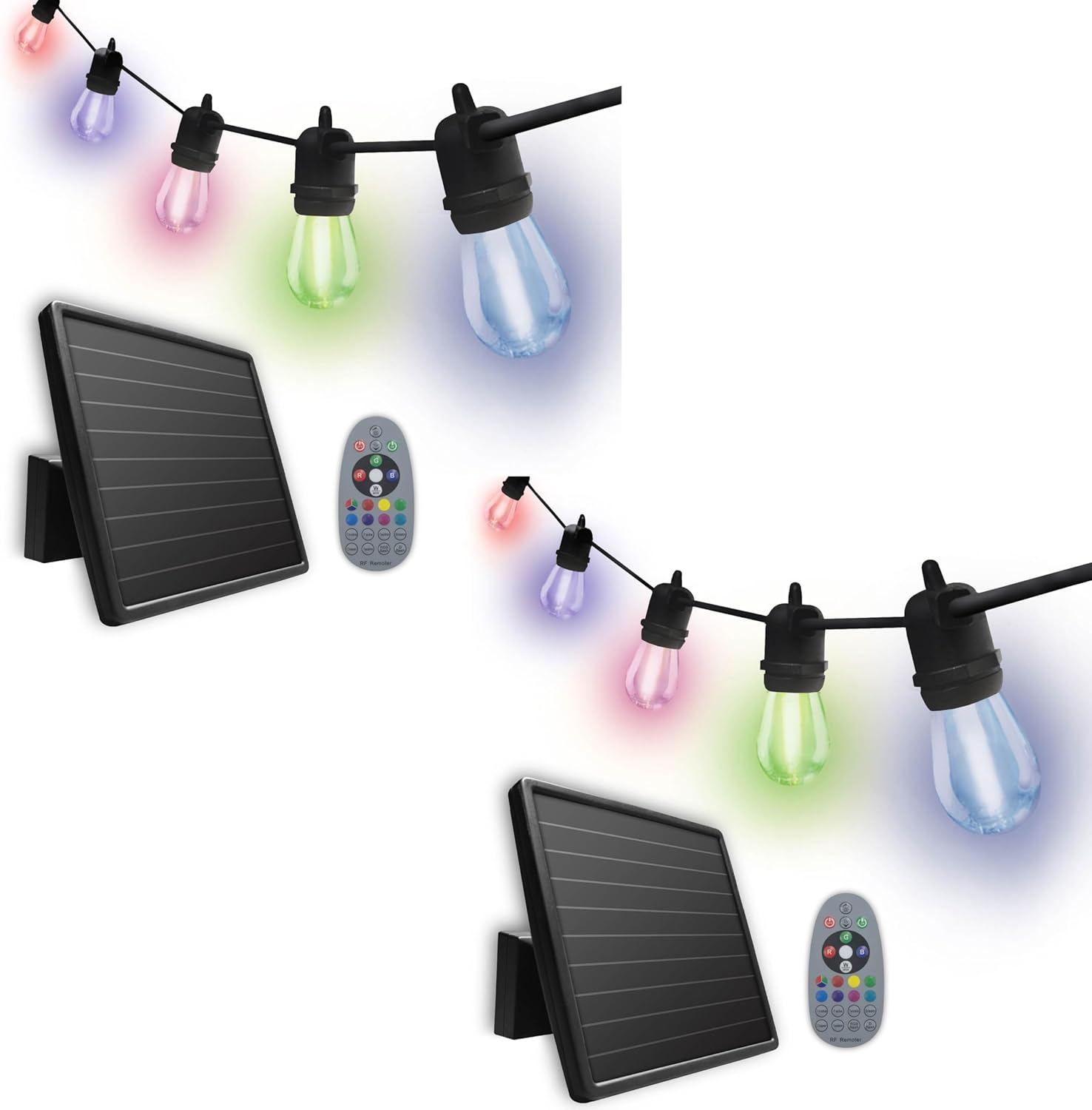
- 2 x 12 LED Color Changing Solar String Lights (each with 12 LED bulbs)
- 2 x Amorphous Solar Panels (one per light string)
- 4 x Lithium-ion Rechargeable Batteries (3.7 V, 2000 mAh, two per light string, pre-installed)
- 2 x Mounting Brackets (one per solar panel)
- 2 x Ground Stakes (one per solar panel)
- 2 x Control Remotes (one per light string)
- Tvirtinimo detalės (varžtai, inkarai)

4. Sąranka ir diegimas
Follow these steps to install your solar string lights:
- Pasirinkite vietą: Select an outdoor area for the solar panel that receives at least 6-8 hours of direct sunlight daily. Avoid shaded areas.
- Sumontuokite saulės kolektorių:
- Antžeminio stulpo montavimas: Attach the ground stake to the mounting bracket and firmly insert it into the ground in your chosen sunny location.
- Montavimas ant sienos: Use the provided mounting hardware (screws and anchors) to secure the mounting bracket to a wall or fence. Adjust the angle of the solar panel to maximize sun exposure.
- Išdėstykite girliandų lemputes: Drape the string lights in your desired location, such as along a patio, deck, pergola, or gazebo. Ensure the cable length of 30ft (9.14m) is sufficient and the bulb spacing of 2ft (60.9cm) is appropriate for your aesthetic.
- Prijunkite saulės kolektorių: Ensure the string lights are securely connected to the solar panel.
- Pradinis mokestis: Allow the solar panel to charge the batteries for a full day (6-8 hours) in direct sunlight before first use. The lights will automatically activate at dusk once sufficiently charged.


5. Naudojimo instrukcijos
Your Sunforce solar string lights offer both automatic dusk-to-dawn activation and remote control functionality.
5.1 Automatic Dusk-to-Dawn Operation
Once the solar panel has charged sufficiently, the lights will automatically turn on at dusk and turn off at dawn. Ensure the solar panel is clean and unobstructed for optimal performance.

5.2 Nuotolinio valdymo pulto funkcijos
Use the provided remote control to manually operate the lights and select various color-changing modes and effects.
- Maitinimo mygtukas: Turns the lights ON or OFF.
- Spalvos pasirinkimas: Rinkitės iš įvairių statinių spalvų.
- Režimo pasirinkimas: Cycle through different light effects (e.g., fade, jump, flash).
- Ryškumo reguliavimas: Padidinkite arba sumažinkite šviesos intensyvumą.
6. Priežiūra
Regular maintenance ensures optimal performance and longevity of your solar string lights.
- Saulės baterijų valymas: Periodiškai nuvalykite saulės bateriją minkšta šluosteamp šluoste, kad pašalintumėte dulkes, nešvarumus ir šiukšles. Švarus skydelis užtikrina efektyvų įkrovimą.
- Lemputės keitimas: The 12 LED bulbs are replaceable. If a bulb fails, carefully unscrew it and replace it with a compatible LED bulb.
- Akumuliatoriaus priežiūra: The lithium-ion batteries are designed for long life. If the lights' performance significantly degrades over time, the batteries may need replacement. Contact Sunforce customer support for compatible replacement batteries.
- Bendra apžiūra: Regularly check the wiring and connections for any signs of wear or damage. Ensure all mounting hardware remains secure.
7. Problemų sprendimas
If you experience issues with your solar string lights, refer to the following common problems and solutions:
| Problema | Galima priežastis | Sprendimas |
|---|---|---|
| Šviesos naktį neįsijungia. |
|
|
| Šviesos pritemdytos arba dega tik trumpą laiką. |
|
|
| Nuotolinio valdymo pultas neveikia. |
|
|
8. Specifikacijos
| Funkcija | Detalė |
|---|---|
| Modelio numeris | 90007 |
| Šviesos šaltinis | 12 LED Color Changing Bulbs per string |
| Maitinimo šaltinis | Varomas saulės energija |
| Saulės skydo tipas | Amorfinis |
| Baterijos tipas | Lithium-ion (3.7 V, 2000 mAh) |
| Kabelio ilgis | 30 pėdos (9.14 m) |
| Tarpai tarp lempučių | 2 pėdos (60.9 cm) |
| Ypatingos savybės | Color Changing, Water Resistant, Dusk-to-Dawn, Remote Control |
| Naudojimas viduje / lauke | Lauke |
| Medžiaga | Plastikiniai |
| ttage | 3.7 voltų |
| Vattage | 2 vatų |
| Prekės svoris | 10.63 svaro (visas paketas) |
| Gaminio matmenys | 11 x 13 x 17 colių (pakuotė) |
9. Garantija ir palaikymas
Garantija: This Sunforce product comes with a 1-year limited warranty from the date of purchase. This warranty covers defects in materials and workmanship under normal use. It does not cover damage caused by misuse, accident, unauthorized modification, or improper installation.
Klientų aptarnavimas: For technical assistance, warranty claims, or to inquire about replacement parts, please contact Sunforce customer support. Refer to the product packaging or the official Sunforce websvetainę, kurioje rasite naujausią kontaktinę informaciją.
Kreipdamiesi į palaikymo tarnybą, turėkite paruoštą modelio numerį (90007) ir pirkimo įrodymą.