
STINGER 10.1" - IX210
Stinger HORIZON10 10.1" Universal Car Stereo
Instrukcijų vadovas
Įvadas
The Stinger HORIZON10 is a state-of-the-art 10.1-inch universal car stereo designed to enhance your in-vehicle entertainment and connectivity. Featuring a 1280x800 HD weather-resistant touchscreen, wireless Apple CarPlay and Android Auto, advanced audio controls, and multiple camera inputs, the HORIZON10 provides a comprehensive and intuitive user experience. This manual provides detailed instructions for setting up, operating, maintaining, and troubleshooting your new car stereo.

Image: The Stinger HORIZON10 Infotainment System, showcasindėl savo elegantiško dizaino ir vartotojo sąsajos.
Kas yra dėžutėje
Upon unboxing your Stinger HORIZON10, please verify that all the following components are included:
- 10.1" Multimedia Touchscreen Display
- Radijo modulis
- Ekrano laikiklis
- Nosies laikiklis - radijo laikiklis
- LVDS jungties galinis dangtelis
- Varžtai
- Vandeniui atsparus kištukas
- 16 kontaktų AV laidai
- 12 kaiščių išankstinio išėjimo diržai
- 14 kontaktų duomenų laidai
- 26 Pin Power Harness LVDS Display Cable
- Išorinis mikrofonas
- GPS antena
- GPS tvirtinimo plokštė
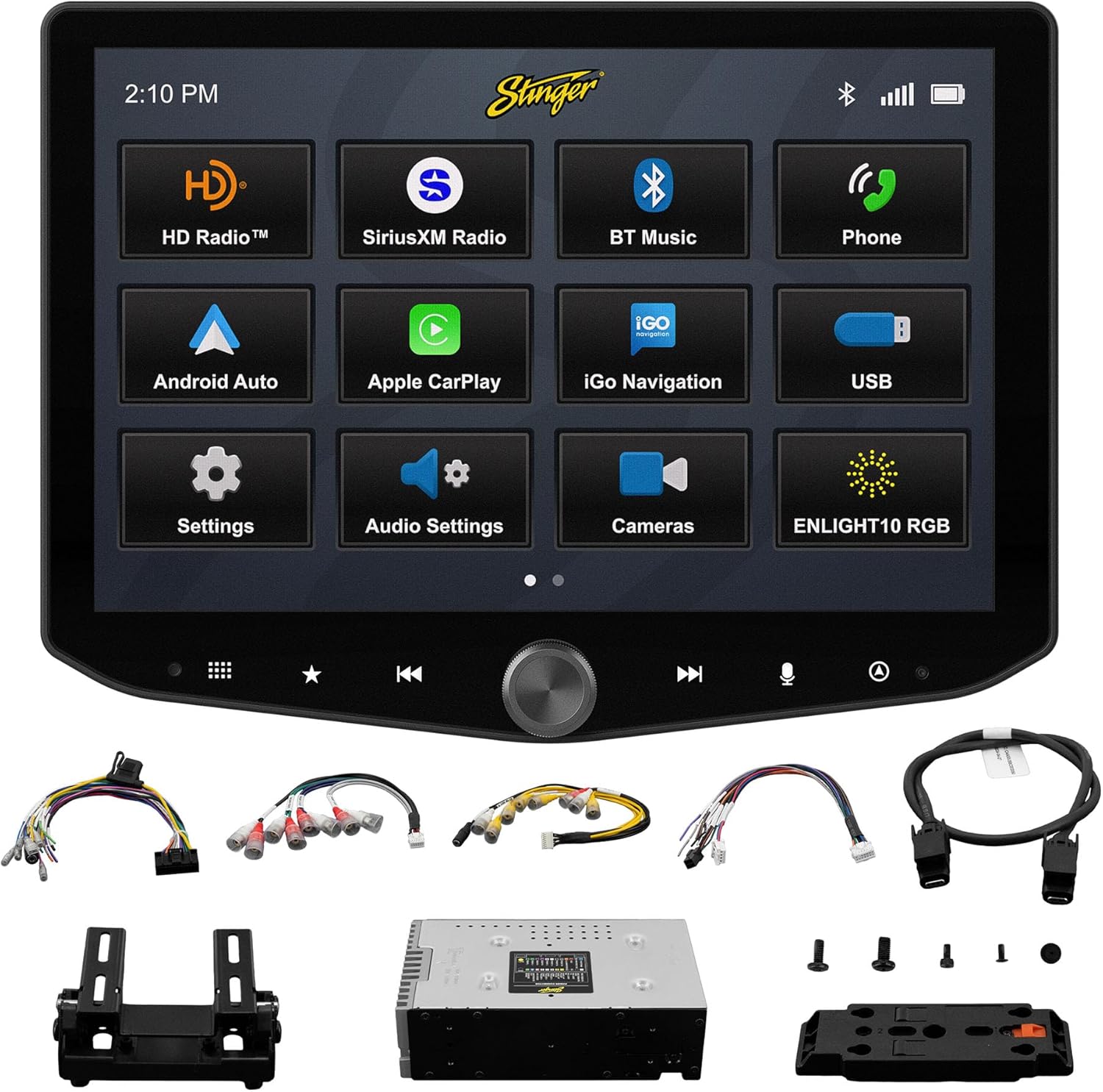
Image: All components included with the Stinger HORIZON10 car stereo system.
Sąranka ir diegimas
Professional installation is highly recommended for the Stinger HORIZON10 to ensure proper functionality and integration with your vehicle's electrical system. This unit is designed for universal compatibility, but specific vehicle dash kits, wiring harness interfaces, or antenna adapters may be required and are sold separately.
Pradiniai sąrankos žingsniai:
- Montavimas: Securely mount the display and radio module using the provided brackets and screws. Ensure proper ventilation around the unit.
- Laidai: Connect the 16-pin AV harness, 12-pin pre-out harness, 14-pin data harness, and 26-pin power harness LVDS display cable to the corresponding ports on the radio module and your vehicle's wiring system. Refer to your vehicle's specific wiring diagram if necessary.
- Išorinės jungtys: Connect the external microphone for hands-free calling and the GPS antenna for navigation functionality.
- Maitinimas: Once all connections are secure, power on your vehicle to initiate the stereo. The unit should boot up and display the Stinger logo.
- Pradinė konfigūracija: Follow any on-screen prompts for initial setup, such as language selection and time zone.
Naudojimo instrukcijos
Jutiklinio ekrano sąsaja
The HORIZON10 features a large 10.1" 1280x800 HD floating touchscreen with anti-glare and anti-fingerprint film protection. Navigate through menus and applications by tapping, swiping, and pinching on the screen. The capacitive touch panel buttons and machined aluminum anodized knob provide additional tactile control.

Vaizdas: Išsamus view of the Stinger HORIZON10 touchscreen, highlighting its capacitive touch buttons and anodized knob.
Belaidis Apple CarPlay ir Android Auto
Connect your iPhone or Android phone wirelessly to access navigation, calls, messages, music, and more directly on the HORIZON10 display. Wired connections are also supported via the USB-C input, which also provides fast 3A phone charging.

Image: The Stinger HORIZON10 displaying the Apple CarPlay interface wirelessly connected to an iPhone.

Image: The Stinger HORIZON10 displaying the Android Auto interface wirelessly connected to an Android phone.
Bluetooth 5.1 & Wi-Fi Connectivity
The unit supports dual phone connections for fast hands-free calling and music streaming via Bluetooth 5.1 A2DP. Wi-Fi connectivity enables additional features and updates.
Išplėstinės garso funkcijos
Customize your sound experience with the 15-band adjustable EQ, 6 user EQ presets, and built-in crossover with HPF & LPF. The system offers 4.5 Vrms & 8ch RCA outputs with subwoofer control, and a Toslink (optical) audio output (48 kHz variable) for high-fidelity sound.

Image: Screenshot of the Stinger HORIZON10's advanced audio settings, showing the 15-band equalizer.
Kameros įėjimai
Integrate up to four cameras (front/rear dashcam, blind spot cameras, backup camera) for enhanced safety and visibility. The system supports both AHD 720p and CVBS 480p camera inputs.

Image: The Stinger HORIZON10 displaying multiple camera views, illustrating its 4 camera input capability.
Radijo imtuvas
Enjoy a wide variety of audio content with the built-in HD AM/FM radio tuner. The unit is also SiriusXM-Ready (SiriusXM Tuner Sold Separately).

Image: The Stinger HORIZON10 displaying the HD Radio interface, showing available stations.
USB & HDMI Inputs
The unit includes two USB-A inputs, one USB-C input (with 3A charging), and one HDMI input for media playback or mirroring.
Tinkinimas
Personalize your experience by changing the background image and rearranging Home screen icons for easier access to your most used features.
onX Offroad App
The HORIZON10 includes a free 3-month trial of the onX GPS navigation off-roading map app. Register on the Stinger website to activate your trial.
Produkto vaizdo įrašasview
Vaizdo įrašas: pareigūnas viršview of the Stinger HORIZON10's key features and capabilities.
Priežiūra
To ensure the longevity and optimal performance of your Stinger HORIZON10, follow these maintenance guidelines:
- Ekrano valymas: Jutiklinį ekraną švelniai nuvalykite minkšta, nepūkuota šluoste. Įsisenėjusias dėmes šiek tiek nuvalykiteampNuvalykite šluostę vandeniu arba ekranui saugiu valikliu. Venkite abrazyvinių medžiagų ar stiprių cheminių medžiagų.
- Atsparumas oro sąlygoms: While the display is IP65 weather-resistant, the radio chassis is not. Avoid direct exposure of the main unit to water or excessive moisture.
- Bendra priežiūra: Keep the unit free from dust and debris. Ensure all connections remain secure.

Image: The Stinger HORIZON10 display with water droplets, demonstrating its IP65 weather-resistant feature.
Trikčių šalinimas
If you encounter issues with your Stinger HORIZON10, refer to the following common problems and solutions:
| Problema | Galima priežastis | Sprendimas |
|---|---|---|
| Nėra galios | Atsilaisvinęs maitinimo laidas, perdegęs saugiklis, automobilio akumuliatoriaus problema. | Check all power connections. Inspect vehicle fuses. Ensure vehicle battery is charged. |
| Nėra garso išvesties | Neteisingi garso nustatymai, atsilaisvinę garsiakalbių laidai, ampkeltuvo problema. | Verify audio settings (volume, mute, source). Check speaker wire connections. Consult an audio specialist if using an external ampgyvesnis. |
| „CarPlay“ / „Android Auto“ neprisijungia | Bluetooth/Wi-Fi off on phone, incorrect pairing, phone software issue. | Ensure Bluetooth and Wi-Fi are enabled on your phone. Re-pair the device. Restart both the phone and the HORIZON10 unit. Update phone OS. |
| Jutiklinis ekranas nereaguoja | Temporary software glitch, excessive dirt/moisture on screen. | Perform a soft reset (refer to device settings for reset option). Clean the screen thoroughly. If persistent, contact support. |
| Prastas radijo priėmimas | Antena neprijungta, pažeista, silpno signalo zona. | Check antenna connection. Consider a signal booster if in a weak reception area. |
If the problem persists after attempting these solutions, please contact Stinger customer support.
Specifikacijos
| Funkcija | Detalė |
|---|---|
| Modelio numeris | 10.1 colio – IX210 |
| Gaminio matmenys | 12.75 x 7.5 x 9.75 colio |
| Prekės svoris | 6.98 svaro |
| Ekrano dydis | 10.1 colių |
| Ekrano raiška | 1280x800 HD |
| Atsparumas oro sąlygoms | IP65 (Display only) |
| Ryšio technologija | Bluetooth 5.1 A2DP, Wi-Fi |
| Valdiklio tipas | Išmanusis telefonas, jutiklinis ekranas |
| USB įėjimai | 2x USB-A, 1x USB-C (3A charging) |
| HDMI prievadai | 1 |
| Kameros įėjimai | 4 (AHD 720p / CVBS 480p compatible) |
| Garso išvesties režimas | Stereo |
| Erdvinio garso kanalo konfigūracija | 7.1 |
| Kanalų skaičius | 8 |
| EQ | 15-band adjustable EQ, 6 user presets |
| RCA išėjimai | 4.5 Vrms & 8ch with subwoofer control |
| Optinė garso išvestis | Toslink (48 kHz variable) |
Informacija apie garantiją
For detailed warranty information regarding your Stinger HORIZON10, please refer to the warranty card included with your product or visit the official STINGER websvetainėje. Garantijos sąlygos gali skirtis ir joms taikoma gamintojo politika.
Pagalba klientams
Should you require further assistance, technical support, or have questions not covered in this manual, please contact STINGER customer service through their official websvetainėje arba kontaktinę informaciją, pateiktą kartu su jūsų produkto dokumentais.
STINGER Official Websvetainė: www.stinger.com
Ask a question about this manual
Ask about setup, troubleshooting, compatibility, parts, safety, or missing instructions. Manuals+ will review the question and use this page’s manual context to help answer it.