
1. Įvadas
This manual provides essential information for the proper use and care of your SUAAT S3 10-inch Android 14 Tablet. Please read this manual thoroughly before operating the device to ensure optimal performance and longevity. Keep this manual for future reference.
2. Pakuotės turinys
Patikrinkite, ar pakuotėje yra visi toliau išvardyti daiktai. Jei kurių nors daiktų trūksta arba jie pažeisti, susisiekite su klientų aptarnavimo tarnyba.
- SUAAT S3 planšetė
- Planšetinio kompiuterio dėklas
- Ekrano apsauginė plėvelė
- Klaviatūra
- Pelė
- Type-C to USB Adapter (OTG)
- C tipo kabelis
- European Standard Charger
- SIM išstūmimo kaištis
- Vartotojo vadovas

2.1 vaizdas: All items included in the SUAAT S3 Tablet package.
3. Produktas baigtasview
The SUAAT S3 tablet features a sleek design with a 10-inch display and a robust set of accessories to enhance your user experience.

3.1 vaizdas: SUAAT S3 Tablet and its accessories.
Pagrindinės funkcijos:
- Operacinė sistema: Android 14
- Procesorius: Octa-core 1.8 GHz (A523)
- RAM: 20 GB (6 GB fizinė + 14 GB išplėtimo kortelė)
- ROM: 128 GB
- Ekranas: 10.1 colio IPS, 1280 x 800 pikselių
- Ryšys: Dual-band WiFi (2.4G/5G), Bluetooth 5.0
- Baterija: 6000 mAh
- Sertifikavimas: GMS Certified, Widevine L1
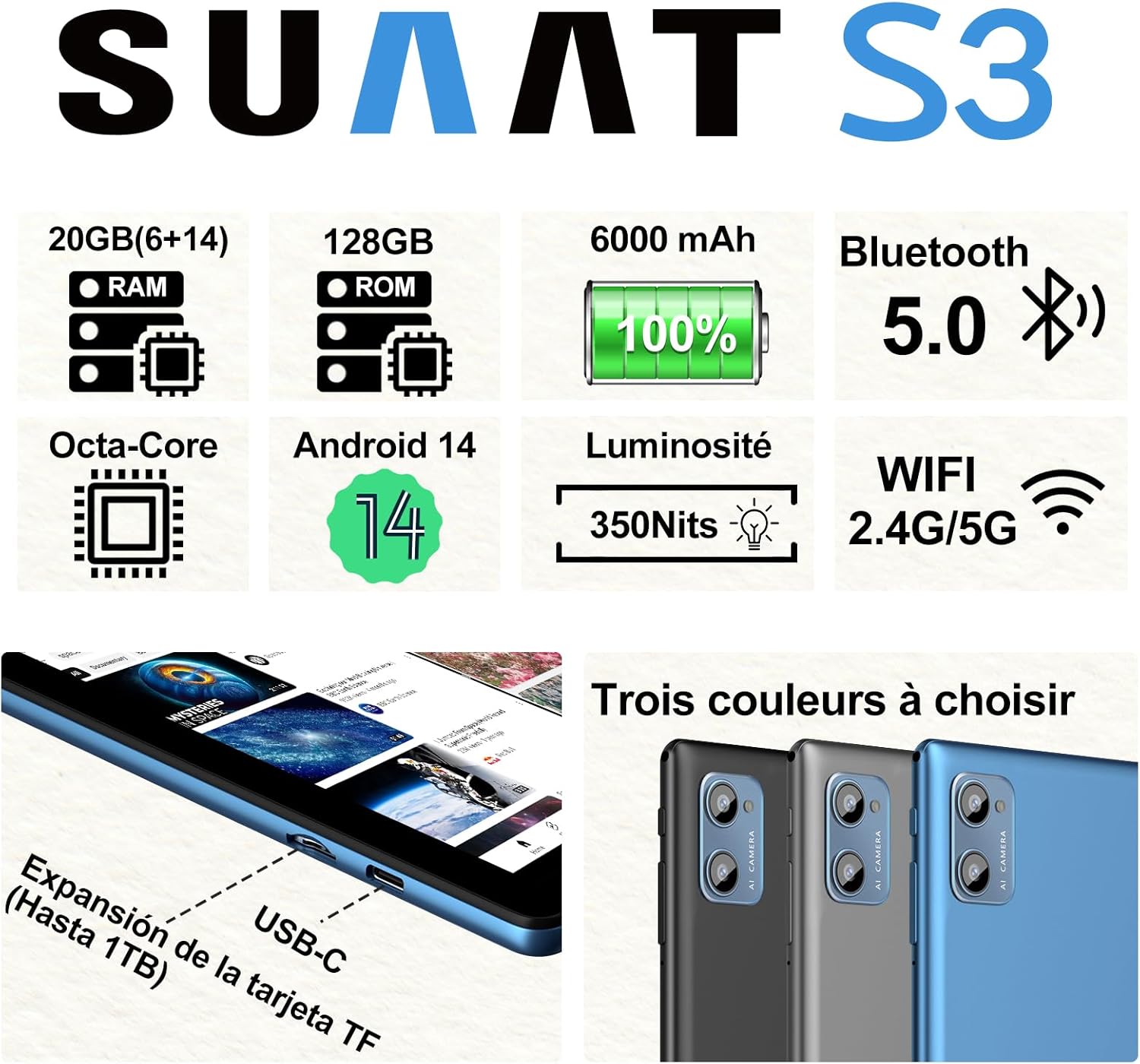
3.2 vaizdas: SUAAT S3 Tablet key specifications.
4. Pradinė sąranka
4.1 Planšetinio kompiuterio įkrovimas
Before first use, fully charge the tablet using the provided Type-C cable and European standard charger. The charging port is located on the side of the tablet.

4.1 vaizdas: Tablet charging via USB-C.
4.2 Įjungimas / išjungimas
- Norėdami įjungti: Paspauskite ir palaikykite maitinimo mygtuką, kol užsidegs ekranas.
- Norėdami išjungti: Paspauskite ir palaikykite maitinimo mygtuką, tada ekrane rodomoje parinkčių sąraše pasirinkite „Išjungti“.
- Norėdami paleisti iš naujo: Paspauskite ir palaikykite maitinimo mygtuką, tada iš parinkčių pasirinkite „Paleisti iš naujo“.
4.3 Pradinė konfigūracija
Upon first power-on, follow the on-screen prompts to set up your tablet. This includes selecting your language, connecting to a Wi-Fi network, setting up your Google account, and configuring security options.
5. Naudojimo instrukcijos
5.1 „Android 14“ funkcijos
Your SUAAT S3 tablet runs on Android 14, offering enhanced privacy, customization, and productivity features:
- Tėvų kontrolė: Manage screen time, app access, and content filters for children.
- Multi-Account Mode: Sukurti atskirą vartotojo profilįfiles for different users, each with their own apps, settings, and data.
- Padalinto ekrano režimas: Use two applications simultaneously by dividing the screen.
- Custom Themes: Personalize your tablet's appearance with various themes and wallpapers.
- Valdikliai: Add calendar, weather, and other widgets to your home screen for quick information access.

5.1 vaizdas: Tablet in split-screen mode.
5.2 Pagrindinė navigacija
- Pagrindinis ekranas: Braukite kairėn arba dešinėn, kad naršytumėte tarp pagrindinių ekranų.
- Programėlių stalčius: Braukite aukštyn nuo ekrano apačios, kad pasiektumėte visas įdiegtas programas.
- Pranešimai ir greitieji nustatymai: Braukite žemyn nuo ekrano viršaus iki view pranešimus ir greitųjų nustatymų perjungiklius.
- Naujausios programos: Tap the square navigation button (or swipe up and hold from the bottom if using gesture navigation) to see recently opened applications.
6. Ryšys
6.1 „Wi-Fi“ ryšys
The tablet supports dual-band Wi-Fi (2.4G and 5G) for faster and more stable internet connectivity.
- Eikite į Nustatymai > Tinklas ir internetas > Wi-Fi.
- Perjungti „Wi-Fi“ On.
- Iš sąrašo pasirinkite norimą tinklą ir, jei reikia, įveskite slaptažodį.
6.2 „Bluetooth“ įrenginiai
Connect Bluetooth accessories like the included keyboard and mouse, or headphones, using Bluetooth 5.0.
- Eikite į Nustatymai > Prijungti įrenginiai > Bluetooth.
- Perjungti Bluetooth On.
- Įsitikinkite, kad jūsų „Bluetooth“ įrenginys veikia susiejimo režimu.
- Select the device from the 'Available devices' list to pair.
6.3 Ausinių lizdas
A 3.5mm headphone jack is provided for wired audio connections.
7. Display and Multimedia
7.1 10.1-inch IPS Display
The tablet features a 10.1-inch IPS display with a resolution of 1280 x 800 pixels, offering clear and vibrant visuals with wide viewkampų.

7.1 vaizdas: 10.1-inch IPS Display.
7.2 „Widevine“ 1 lygio palaikymas
With Widevine L1 support, the tablet can stream high-definition content from popular streaming services, providing a clear and immersive viewpatirtį.
7.3 GMS Certification
The tablet is GMS (Google Mobile Services) certified, ensuring full access to the Google Play Store and all Google applications, along with robust security and privacy features.
8. Saugojimas ir našumas
8.1 RAM and ROM
The SUAAT S3 comes with 20GB of RAM (6GB physical + 14GB virtual expansion) and 128GB of internal storage (ROM). This ample memory allows for smooth multitasking and storage of numerous applications, videos, images, and files.

8.1 vaizdas: Tablet showcasing large memory for apps and media.
8.2 Octa-Core Processor
Equipped with an Octa-core 1.8 GHz A523 processor, the tablet delivers stable and responsive performance for everyday tasks, gaming, and multimedia consumption.
8.3 Išplečiama saugykla
The tablet supports expandable storage via a TF (microSD) card, allowing you to increase storage capacity up to 1TB for even more files ir žiniasklaida.
9. Baterijos valdymas
9.1 baterijos talpa
The SUAAT S3 is powered by a 6000 mAh battery, providing extended usage time. Actual battery life may vary based on usage patterns and settings.
9.2 Įkrovimo gairės
- Use only the original charger and cable provided with the tablet.
- Avoid exposing the tablet to extreme temperatures during charging.
- Do not leave the tablet charging for excessively long periods after it has reached 100% to prolong battery health.
10. Priežiūra
10.1 Planšetinio kompiuterio valymas
- Planšetinio kompiuterio ekraną ir korpusą valykite minkštu, nepūkuotu audiniu.
- Įsisenėjusioms dėmėms šiek tiek pamirkykiteampNuvalykite šluostę vandeniu arba ekrano valikliu. Venkite stiprių cheminių medžiagų.
- Prieš valydami įsitikinkite, kad planšetinis kompiuteris yra išjungtas ir atjungtas nuo elektros tinklo.
10.2 Saugykla
When not in use for extended periods, store the tablet in a cool, dry place. Avoid direct sunlight and extreme temperatures.
10.3 Programinės įrangos naujiniai
Reguliariai tikrinkite, ar yra programinės įrangos atnaujinimų, ir juos įdiekite, kad jūsų planšetiniame kompiuteryje būtų įdiegtos naujausios funkcijos, saugos pataisymai ir našumo patobulinimai. Eikite į Nustatymai > Sistema > Sistemos atnaujinimas.
11. Problemų sprendimas
If you encounter issues with your SUAAT S3 tablet, refer to the following common solutions:
| Problema | Galimas sprendimas |
|---|---|
| Planšetinis kompiuteris neįsijungia | Įsitikinkite, kad akumuliatorius įkrautas. Prijunkite įkroviklį ir palaukite kelias minutes, prieš bandydami vėl įjungti. |
| Ekranas nereaguoja | Paleiskite planšetinį kompiuterį iš naujo. Jei problema išlieka, atlikite gamyklinių parametrų atkūrimą (duomenys bus prarasti). |
| Nepavyksta prisijungti prie „Wi-Fi“. | Check if Wi-Fi is enabled in settings. Restart your router. Ensure you are entering the correct password. |
| „Bluetooth“ įrenginys nesuporuojamas | Ensure Bluetooth is enabled on both devices and the accessory is in pairing mode. Try restarting both devices. |
| Programėlės stringa arba veikia lėtai | Close background apps. Clear app cache (Settings > Apps > [App Name] > Storage > Clear cache). Ensure sufficient storage space. |
| Baterija greitai išsikrauna | Reduce screen brightness. Disable unused features like Wi-Fi or Bluetooth. Close background apps. Check for power-intensive apps. |
If these solutions do not resolve the issue, please contact SUAAT customer support.
12. Specifikacijos
| Funkcija | Detalė |
|---|---|
| Prekės ženklas | SUAAT |
| Modelio numeris | S3 |
| Operacinė sistema | Android 14 |
| Procesorius | A523 Octa-core 1.8 GHz |
| RAM | 20 GB (6GB installed) |
| Saugykla (ROM) | 128 GB |
| Išplečiama saugykla | Iki 1 TB per TF kortelę |
| Ekrano dydis | 10.1 colių |
| Ekrano raiška | 1280 x 800 pikselių |
| Belaidis ryšys | Wi-Fi (802.11n, 2.4G/5G Dual-band) |
| Bluetooth | Bluetooth 5.0 |
| Jungties tipas | USB-C |
| Ausinių lizdas | 3.5 mm |
| Baterijos talpa | 6000 mAh |
| Matmenys (I x P x A) | 17 x 12 x 0.8 cm |
| Svoris | 1.28 kilogramo |
| Pridedami priedai | Keyboard, Mouse, Protective Case, Screen Protector |
13. Garantija ir palaikymas
SUAAT provides professional technical support and customer service for your S3 tablet. If you require assistance, have questions, or encounter any issues not covered in this manual, please contact our customer support team. Refer to your purchase documentation for specific warranty terms and contact information.