
1. Produktas baigtasview
The CAPOXO Wired 1080p Full HD Video Recording Camera is designed for discreet surveillance and recording. This device captures high-definition video with audio, features motion detection, and includes a night lamp for low-light conditions. It operates without Wi-Fi, storing recordings directly onto a memory card for easy access.
This manual provides detailed instructions for setting up, operating, and maintaining your CAPOXO camera to ensure optimal performance.
2. Pakuotės turinys
Patikrinkite, ar pakuotėje yra visi reikalingi daiktai:
- CAPOXO Wired 1080p Full HD Video Recording Camera
- USB kabelis
- Vartotojo vadovas
Pastaba: A Micro SD card (16GB, 32GB, or 64GB Class 10 recommended) and a 5V/1A charger are not included and must be purchased separately.
3. Produkto ypatybės
- Vaizdo įrašymas „Full HD 1080p“ raiška: Captures clear, high-definition video footage.
- Garso įrašymas: Įrašo garsą kartu su vaizdo įrašu.
- Judesio aptikimas: Automatically triggers video recording when motion is detected.
- Naktis Lamp Galimybės: Equipped with white LED lights for recording in low-light or dark conditions.
- Nepertraukiamas įrašymas: Records directly to a Micro SD card (not included).
- Lengvas nustatymas: Wired operation, no complex Wi-Fi configuration required.
- Nešiojamas dizainas: Compact and easy to carry or clip.
- Pasukamas objektyvas: 90° rotatable lens for wider viewkampų.

Image: The CAPOXO camera featuring its 90-degree rotatable lens, allowing for flexible recording angles.

Vaizdas: Stambus planas view of the CAPOXO camera's rotatable lens mechanism, highlighting its design for wider field of view.
4. Sąrankos vadovas
4.1 Kameros įkrovimas
- Before first use, charge the camera for at least 1 hour.
- Connect the camera to a 5V/1A charger (not included) using the provided USB cable.
- Įkrovimo indikatoriaus lemputė užsidegs įkrovimo metu ir užges, kai bus visiškai įkrauta.
- A full charge provides up to 3 hours of continuous operation. The camera can also be used while charging for extended recording.
4.2 Micro SD kortelės įdėjimas
- Įsitikinkite, kad fotoaparatas išjungtas.
- Raskite „Micro SD“ kortelės lizdą kameros šone.
- Gently insert a Class 10 Micro SD card (16GB, 32GB, or 64GB) into the slot until it clicks into place.
- Norėdami išimti, švelniai stumkite kortelę atgal, kol ji iššoks.

Image: Diagram showing the CAPOXO camera's various components, including the Micro SD card slot, ON/OFF switch, and recording buttons.
5. Naudojimo instrukcijos
5.1 Įjungimas / išjungimas
- Norėdami įjungti, pastumkite ĮJUNGTA/IŠJUNGTA perjunkite į padėtį „ĮJUNGTA“.
- Norėdami išjungti, pastumkite ĮJUNGTA/IŠJUNGTA perjunkite į padėtį „IŠJUNGTA“.

Image: A hand demonstrating how to operate the CAPOXO camera, highlighting the easy-to-use ON/OFF switch for one-button recording.
5.2 Vaizdo įrašymas
- Įsitikinkite, kad kamera įjungta ir įdėta „Micro SD“ kortelė.
- Slide the "SAVE -> VIDEO" switch to the "VIDEO" position to start recording.
- The indicator light will flash to confirm recording is in progress.
- To stop recording, slide the "SAVE -> VIDEO" switch back to the "SAVE" position. The video file bus įrašytas į Micro SD kortelę.
5.3 Judesio aptikimo įrašymas
The camera automatically records 1080p HD videos when motion is detected. This feature is active when the camera is powered on and in recording mode.
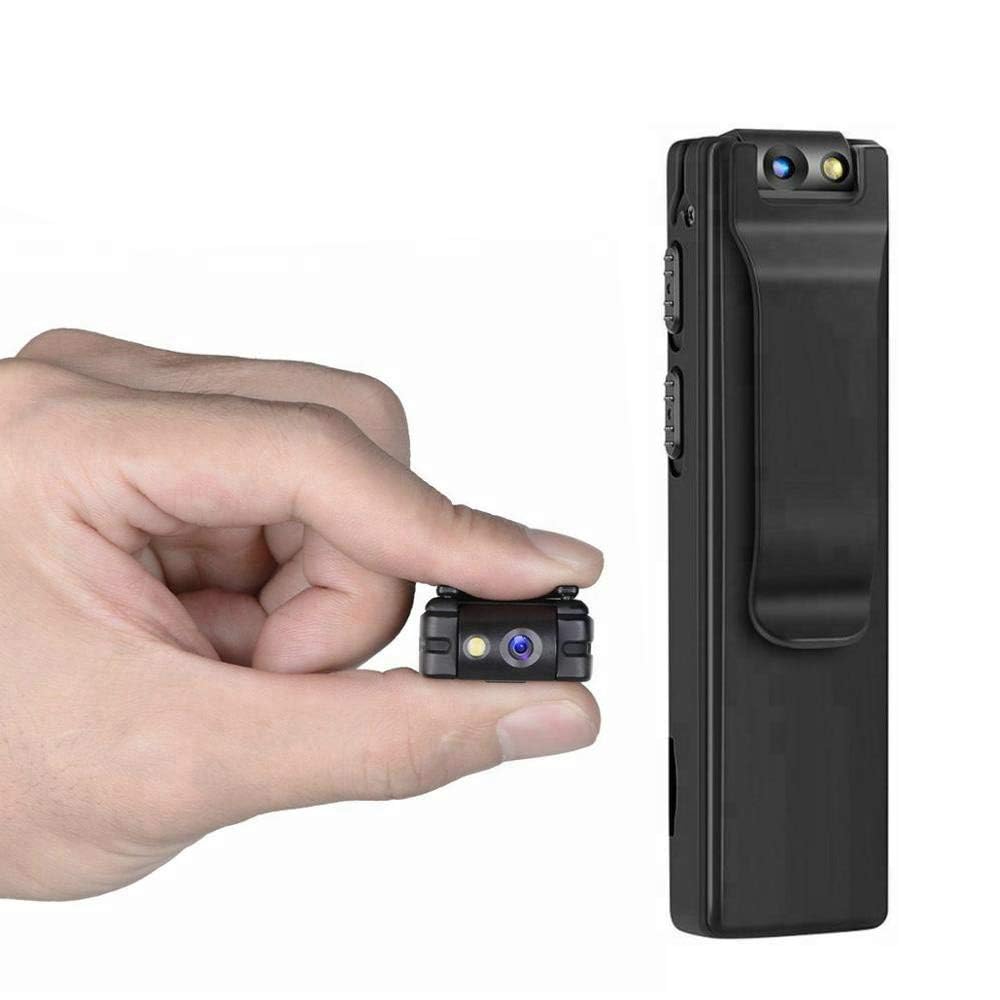
Image: Illustration of the CAPOXO camera's motion detection feature, showing it capturing activity in a room.
5.4 Night Lamp Režimas
The camera is equipped with white LED lights to enhance visibility and recording quality in low-light or dark environments.
- To activate the night lamp, slide the "ON -> LAMP" switch to the "LAMP"pozicija.
- To deactivate, slide the switch back to the "ON" position.
5.5 Fotografavimas
- Įsitikinkite, kad fotoaparatas įjungtas.
- Press the "PHOTO" button once to take a still image. The indicator light may flash briefly.
- Photos are saved to the Micro SD card.
5.6 Viewįrašai
- Išjunkite fotoaparatą.
- Išimkite „Micro SD“ kortelę iš fotoaparato.
- Insert the Micro SD card into a computer's card reader or a compatible device.
- Prisijunkite prie files on the Micro SD card to view your recorded videos and photos.

Image: The CAPOXO camera shown in different usage environments, including an office, car, laboratory, and home, demonstrating its versatility.

Image: The CAPOXO camera depicted in diverse settings such as business meetings, family gatherings, children playing, and outdoor adventures, illustrating its broad application.
6. Priežiūra
- Valymas: Use a soft, dry cloth to clean the camera body. Do not use liquid cleaners or solvents.
- Objektyvo priežiūra: Gently wipe the lens with a microfiber cloth designed for optics. Avoid touching the lens with bare fingers.
- Saugykla: Fotoaparatą laikykite vėsioje, sausoje vietoje, toliau nuo tiesioginių saulės spindulių ir ekstremalių temperatūrų.
- Baterijos veikimo laikas: Norėdami pailginti akumuliatoriaus veikimo laiką, venkite dažnai visiškai jį iškrauti. Reguliariai jį įkraukite, net jei ilgą laiką nenaudojate.
- SD kortelės tvarkymas: Regularly back up important recordings and format the Micro SD card periodically to maintain optimal performance and prevent data corruption.
7. Problemų sprendimas
Kamera neįsijungia
- Ensure the battery is charged. Connect the camera to a charger for at least 1 hour.
- Patikrinkite, ar įjungimo/išjungimo jungiklis yra „Įjungta“ padėtyje.
Negalima įrašyti vaizdo įrašo
- Check if a Micro SD card is properly inserted.
- Įsitikinkite, kad „Micro SD“ kortelėje yra pakankamai laisvos vietos.
- Verify the Micro SD card is Class 10 and within the supported capacity (16GB, 32GB, 64GB).
- Format the Micro SD card if it's a new card or if you encounter issues.
Prasta vaizdo kokybė
- Įsitikinkite, kad fotoaparato objektyvas yra švarus ir be dėmių ar dulkių.
- Check lighting conditions. Use the night lamp esant silpnam apšvietimui.
Neveikia judesio aptikimas
- Ensure the camera is powered on and in recording mode.
- Įsitikinkite, kad nėra kliūčių, kurios užstotų kameros view.
Camera Unresponsive (Reset)
- If the camera becomes unresponsive, locate the "RESET" button (often a small pinhole).
- Use a thin object (like a paperclip) to gently press and hold the reset button for a few seconds.
- The camera should restart.
8. Specifikacijos
| Prekės ženklas | CAPOXO |
| Modelio numeris | Capoxo-A-Cctv-Camera |
| Vaizdo įrašymo raiška | 1080p „Full HD“ |
| Ryšio technologija | Wired (USB for charging/data transfer) |
| „Flash“ atminties tipas | Micro SD (supports 16GB, 32GB, 64GB Class 10) |
| Vaizdo įrašymo formatas | AVI |
| Palaikomas garso formatas | AAC |
| Ypatingos savybės | Motion Detection, Night Lamp, HD Resolution, 90° Rotatable Lens |
| Baterijos veikimo laikas | Iki 3 valandų (po pilno įkrovimo) |
| Įkrovimo įvestis | 5V/1A (charger not included) |
| Matmenys (IxPxH) | 9x2.5x1 cm |
| Prekės svoris | 250 g |
| Įtraukti komponentai | Camera, USB Cable, Manual |
9. Garantija ir palaikymas
For warranty information or technical support, please refer to the contact details provided with your purchase documentation or visit the official CAPOXO websvetainę.
Prašome išsaugoti pirkimo įrodymą bet kokiems garantiniams reikalavimams.