
1. Produktas baigtasview
The GUOANVISION S100 is an advanced outdoor PTZ (Pan-Tilt-Zoom) security camera featuring a unique dual-lens system. It combines a fixed wide-angle lens with a rotatable tracking lens to provide comprehensive surveillance without blind spots. Equipped with 6MP resolution, AI human detection, automatic tracking, two-way audio, and IP66 waterproofing, this camera is designed for robust outdoor monitoring.

Figure 1: GUOANVISION S100 Dual Lens Outdoor PTZ Security Camera
2. Pakuotės turinys
Prieš tęsdami diegimą, patikrinkite, ar pakuotėje yra visi komponentai:
- GUOANVISION S100 Outdoor PTZ Camera
- Mounting Bracket
- Maitinimo adapteris (laidinis elektrinis)
- Tvirtinimo varžtai ir sieniniai kaiščiai
- Waterproof Caps for Connectors
- Vartotojo vadovas
Video 1: Unboxing and Package Contents of the GUOANVISION S100 Camera.
3. Sąrankos vadovas
3.1 Fizinis įrengimas
The GUOANVISION S100 camera supports both wall and ceiling mounting. Choose a location that provides optimal coverage and a stable Wi-Fi signal.
- Pritvirtinkite montavimo laikiklį: Secure the mounting bracket to the camera using the provided screws.
- Gręžimo taškų žymėjimas: Hold the camera with the attached bracket against the desired installation surface. Mark the drilling points.
- Gręžimo skylės: Pažymėtose vietose išgręžkite skyles ir įstatykite sieninius kaiščius.
- Pritvirtinkite kamerą: Align the bracket with the drilled holes and secure the camera using the mounting screws.
- Prijunkite maitinimą: Connect the power adapter to the camera and plug it into a power outlet. Ensure the connection is secure and protected from weather using the waterproof caps.

Figure 2: Illustration of wall and ceiling mounting options.
3.2 Programėlės diegimas ir susiejimas
To control and monitor your camera, download the iCSee app from your smartphone's app store (available for Android and iOS).
- Atsisiųsti programą: Scan the QR code in the included user manual or search for 'iCSee' in your app store.
- Registruoti paskyrą: Open the iCSee app and follow the on-screen instructions to register a new account or log in if you already have one.
- Įjunkite „Bluetooth“ ir „Wi-Fi“: Ensure your smartphone's Bluetooth and 2.4GHz Wi-Fi are enabled.
- Pridėti įrenginį: In the app, tap the '+' icon to add a new device. The app should automatically detect the camera via Bluetooth. Confirm the device.
- Prisijunkite prie „Wi-Fi“: Select your 2.4GHz Wi-Fi network and enter the password. The camera will connect to your network.
- Įdėkite „MicroSD“ kortelę (neprivaloma): For local recording, insert a MicroSD card (up to 128GB) into the designated slot on the camera.

Figure 3: Visual guide for iCSee app installation and device pairing.
Video 2: Detailed steps for connecting the camera to the iCSee app.
4. Naudojimo instrukcijos
4.1 Tiesiogiai View ir dviejų ekranų stebėjimas
Access the live feed from your camera through the iCSee app. The S100 features a dual-screen display, allowing you to view both the fixed wide-angle lens and the rotatable PTZ lens simultaneously.

Figure 4: Simultaneous display of both camera lenses in the iCSee app.
4.2 PTZ valdymas
The lower lens of the camera can be controlled remotely via the app, offering a horizontal pan of 350° and a vertical tilt of 90°.
- Stumti / pakreipti: Use the directional controls in the app to adjust the camera's viewing kampas.
- Iš anksto nustatytos pozicijos: Save frequently monitored areas as preset positions for quick navigation.

Figure 5: Diagram illustrating the 350° pan and 90° tilt functionality.
4.3 AI Human Detection & Auto-Tracking
The camera utilizes AI to accurately detect human movement and automatically track the subject within its field of view. This minimizes false alarms from animals or environmental factors.
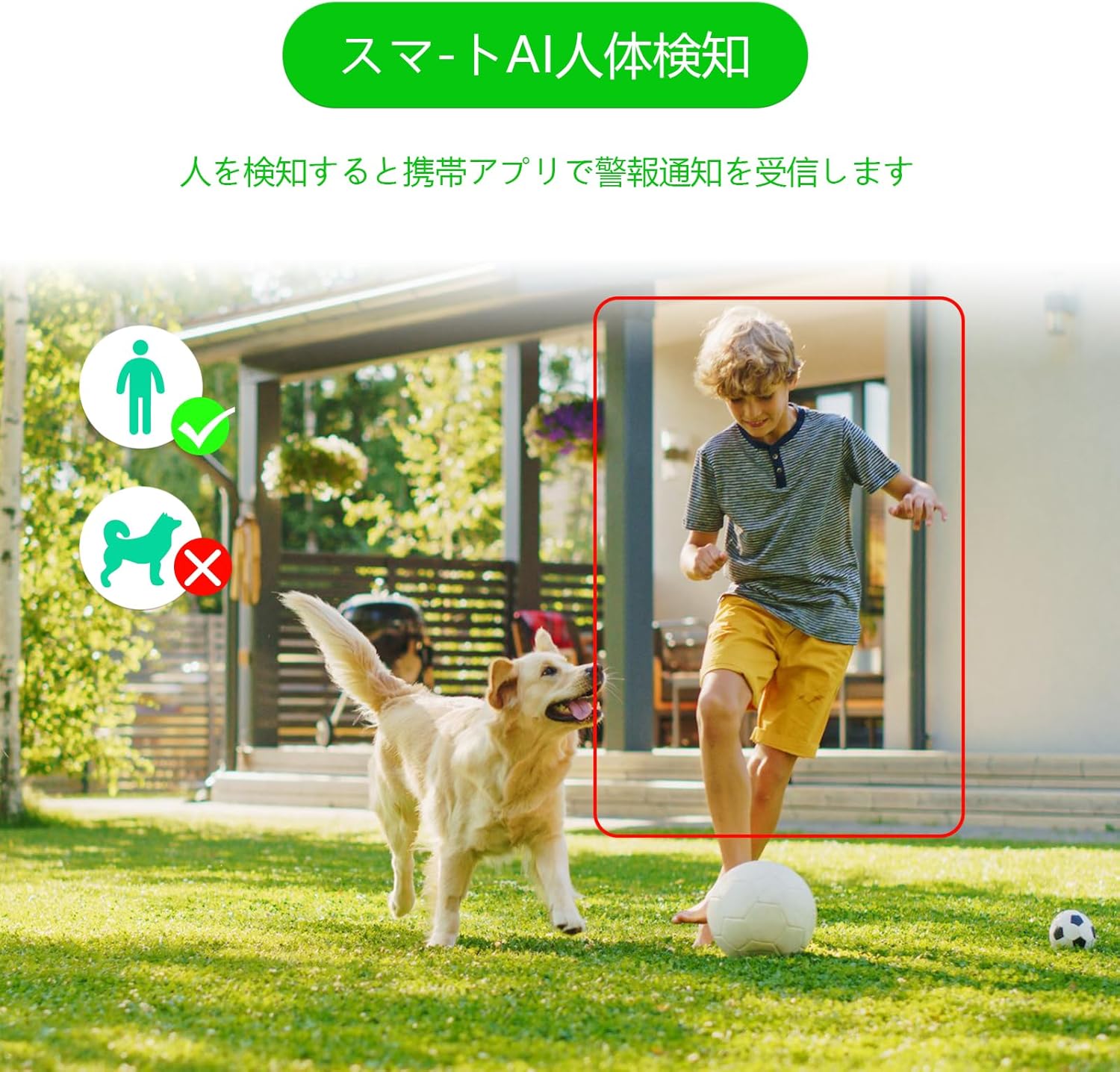
Figure 6: AI human detection feature, focusing on human figures.
Video 3: Demonstration of the camera's automatic motion tracking feature.
4.4 Naktinio matymo režimai
The S100 offers multiple night vision modes to suit different lighting conditions:
- Infraraudonųjų spindulių režimas: Standartinis juodai baltas naktinis matymas.
- Spalvotas režimas: Utilizes built-in lights to provide color images even in low light.
- "Smart Mode": Automatically switches between infrared and color night vision based on detected motion.

Figure 7: Comparison of infrared, smart, and full-color night vision modes.
Video 4: Demonstration of the camera's night vision capabilities in various settings.
4.5 Two-Way Audio & Alarm Functions
Communicate with visitors or deter intruders using the built-in microphone and speaker. The camera also features a light and sound alarm that can be triggered upon detection of suspicious activity.
- Dvipusis pokalbis: Use the app to speak through the camera's speaker and listen through its microphone.
- Light & Sound Alarm: Configure the camera to activate flashing blue/red lights and an audible siren when human motion is detected at night.

Figure 8: Illustrates the two-way audio feature for remote communication.
5. Priežiūra
Regular maintenance ensures optimal performance and longevity of your GUOANVISION S100 camera.
- Valymas: Periodiškai nuvalykite fotoaparato objektyvą ir korpusą minkšta,amp šluoste dulkėms ir nešvarumams pašalinti. Venkite abrazyvinių valiklių.
- Firmware atnaujinimai: Check the iCSee app regularly for available firmware updates. Keeping the firmware updated ensures you have the latest features and security enhancements.
- Ryšio patikrinimas: Periodically verify the power and network connections to ensure they are secure and free from damage.
- SD kortelės tvarkymas: If using a MicroSD card, ensure it is functioning correctly and has sufficient storage space. Format the card through the app if necessary.
6. Problemų sprendimas
Jei kyla problemų dėl fotoaparato, žr. toliau pateiktas dažniausiai pasitaikančias problemas ir sprendimus:
- Fotoaparatas neprisijungęs:
- Check power supply: Ensure the camera is properly connected to power.
- Check Wi-Fi connection: Verify your Wi-Fi network is active and the camera is within range. Re-pair the camera if necessary.
- Router settings: Ensure your router is broadcasting a 2.4GHz Wi-Fi signal.
- No Recording/SD Card Not Detected:
- Ensure MicroSD card is correctly inserted.
- Check if the MicroSD card is damaged or full. Format it via the app or replace it.
- Verify recording settings in the iCSee app.
- Prasta vaizdo kokybė:
- Nuvalykite fotoaparato objektyvą.
- Ensure adequate lighting, especially for color night vision.
- Check network stability; a weak Wi-Fi signal can affect streaming quality.
- Klaidingi pavojaus signalai:
- Adjust AI human detection sensitivity in the app.
- Ensure the camera is positioned to minimize detection of non-human movement (e.g., swaying branches).
7. Specifikacijos
| Funkcija | Detalė |
|---|---|
| Prekės ženklas | GUOANVIZIJA |
| Modelio pavadinimas | S100 |
| Rekomenduojamas naudojimas | Baby Monitor, Pet Monitor, Indoor Security, Outdoor Security |
| Ryšys | Wired, Wi-Fi (2.4GHz) |
| Savybės | HD Resolution, Dual Lens, PTZ, AI Human Detection, Auto-Tracking, Two-Way Audio, Light/Sound Alarm |
| Naudojimas viduje / lauke | Viduje, Lauke |
| Suderinami įrenginiai | Išmanusis telefonas („iOS“, „Android“) |
| Maitinimo šaltinis | Su laidu elektra |
| Ryšio protokolas | ONVIF |
| Montavimo tipas | Wall Mount, Ceiling Mount (Screw-in) |
| Product Exterior Material | Plastikiniai |
| Atsparumo vandeniui įvertinimas | IP66 |
| Signalo tipas | Audio & Motion (Light & Sound) |
| Veiksminga nejudančioji raiška | 6 MP (2x 3MP lenses) |
| Valdymo metodas | App (iCSee) |
| Reikalingos baterijos | Nr |
| Vaizdo įrašų kodavimo formatas | MPEG-4 |
| Vaizdo įrašymo formatas | MP4 |
| Naktinio matymo diapazonas | 15 metrų |
| Naktinis matymas | Color Night Vision, Infrared, Smart Mode |
| IR diodai | 8 |
| Produkto dydis | 22.9 x 12.7 x 22.9 cm |
| Max Flash Memory Support | 128 GB (MicroSD) |
8. Garantija ir palaikymas
GUOANVISION is committed to providing high-quality products and excellent customer service. If you have any questions, concerns, or encounter product defects during the warranty period, please do not hesitate to contact us.
8.1 Kontaktinė informacija
- Pagalba el. paštu: support@guoanvision.net (24-hour response)
- „Amazon“ klientų aptarnavimas: Navigate to 'Customer Service' > 'Your Orders' > 'Sold by' > 'Ask a question' for assistance with your purchase.
We will respond promptly to provide warranty service and support.