
1. Įvadas
The Comet CFX-324A Triplexer is a high-performance RF filtering and combining device designed for amateur radio operators and RF professionals. It allows for the efficient combination or separation of radio frequency signals across three distinct frequency bands: 1.3–150 MHz (HF/VHF Low), 200–320 MHz (VHF Mid), and 390–500 MHz (UHF High). This device enables multiple radios or antennas to share a single coaxial cable run, simplifying complex setups and reducing cable infrastructure.
2. Saugos informacija
Please read and understand all safety instructions before installing or operating the CFX-324A Triplexer. Failure to follow these guidelines may result in equipment damage, personal injury, or improper operation.
- Galios valdymas: Do not exceed the maximum power rating of 600 W PEP per band. Exceeding this limit can damage the triplexer and connected equipment.
- Diegimo aplinka: While robust, the CFX-324A is designed for indoor or sheltered outdoor installations. Protect it from direct exposure to rain, snow, and extreme temperatures.
- RF ekspozicija: Always adhere to local and national regulations regarding RF exposure when operating radio equipment. Ensure antennas are installed at a safe distance from personnel.
- Jungtys: Ensure all coaxial cable connections are secure and properly terminated to prevent signal loss and potential RF leakage.
- Įžeminimas: Proper grounding of your antenna system and radio equipment is essential for safety and optimal performance.
3. Produktas baigtasview
The Comet CFX-324A Triplexer is engineered to provide superior isolation and minimal insertion loss, ensuring clean signal paths for multi-band operations. It features a common port for connection to a single antenna or radio, and three distinct band-specific ports for connecting multiple radios or antennas.
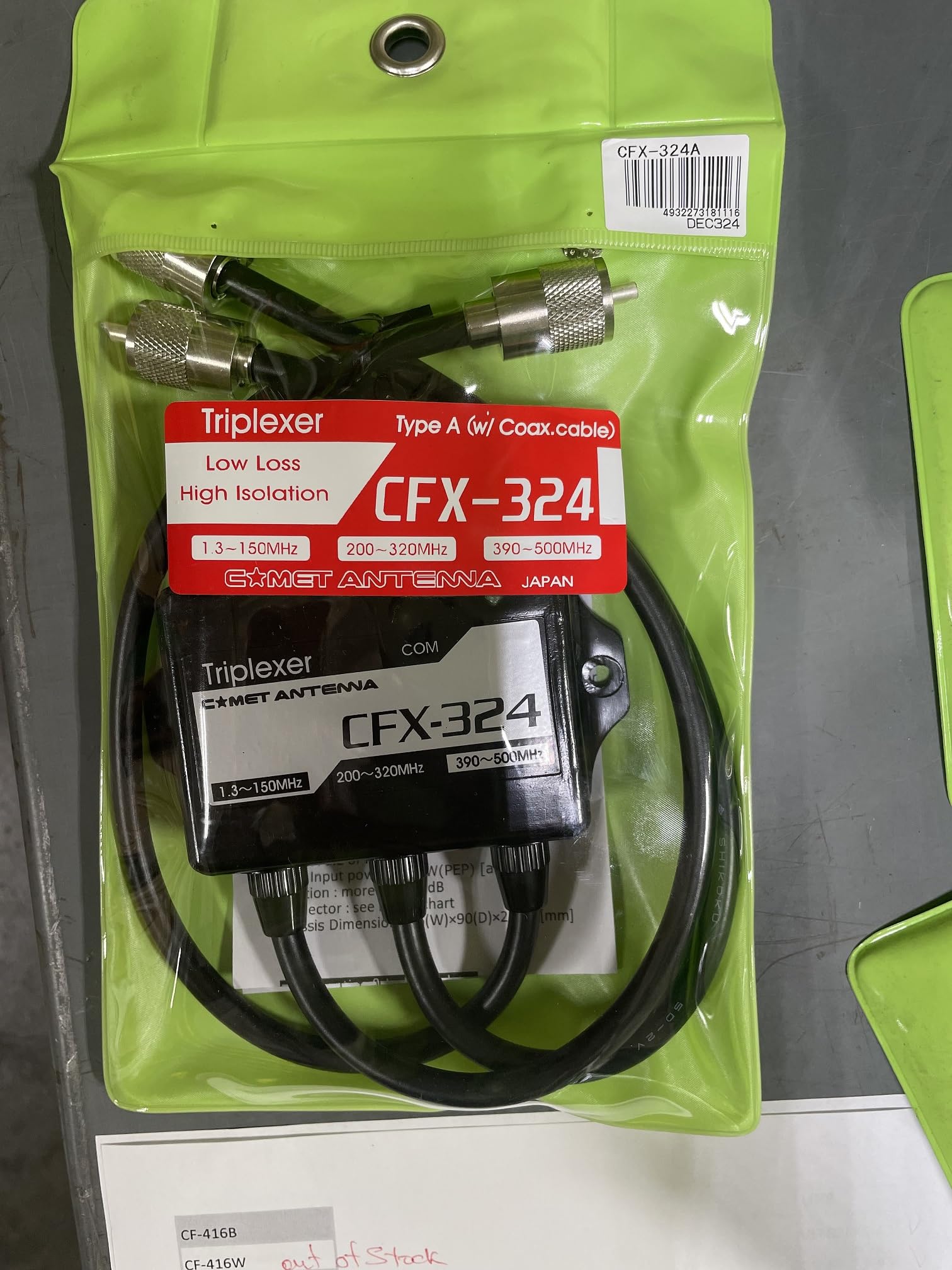
Figure 1: Comet CFX-324A Triplexer. This image shows the device with its main SO-239 common port and the three distinct PL-259 coax leads, each designated for a specific frequency band.
Pagrindinės funkcijos:
- Triple Band Operation: Combines or splits signals for 1.3–150 MHz, 200–320 MHz, and 390–500 MHz.
- Didelės galios valdymas: Supports up to 600 W PEP on each band.
- Puiki izoliacija: Provides a minimum of 40 dB isolation between bands to prevent interference.
- Mažas įterpties nuostolis:
- 1.3–150 MHz: 0.2 dB
- 200–320 MHz: 0.25 dB
- 390–500 MHz: 0.3 dB
- Robust Connectors: Features one SO-239 female common port and three PL-259 male coax leads for band-specific connections.
4. Sąranka
The CFX-324A can be configured in two primary ways: combining multiple radios to a single multi-band antenna, or splitting a multi-band radio to multiple single-band antennas.
Prisijungimo procedūra:
- Nustatyti uostus:
- The single SO-239 female connector is the Bendras uostas.
- The three PL-259 male coax leads are the Band-Specific Ports, typically labeled or color-coded for their respective frequency ranges (1.3-150 MHz, 200-320 MHz, 390-500 MHz). Refer to the product label for exact identification.
- Connecting to a Single Multi-Band Antenna (Combining Mode):
- Connect your multi-band antenna's coaxial cable to the Bendras uostas (SO-239).
- Connect your HF/VHF Low radio to the 1.3–150 MHz PL-259 coax lead.
- Connect your VHF Mid radio to the 200–320 MHz PL-259 coax lead.
- Connect your UHF High radio to the 390–500 MHz PL-259 coax lead.
- Connecting a Single Multi-Band Radio to Multiple Antennas (Splitting Mode):
- Connect your multi-band radio's coaxial cable to the Bendras uostas (SO-239).
- Connect your 1.3–150 MHz antenna to the corresponding PL-259 coax lead.
- Connect your 200–320 MHz antenna to the corresponding PL-259 coax lead.
- Connect your 390–500 MHz antenna to the corresponding PL-259 coax lead.
- Saugūs ryšiai: Ensure all connectors are hand-tightened. Avoid over-tightening, which can damage connectors.
- Montavimas: Mount the triplexer in a stable, dry location, away from direct sunlight and moisture. Ensure adequate ventilation if used in an enclosed space.
5. Operacinis
Once properly installed, the Comet CFX-324A operates passively, requiring no external power. It functions by using internal band-pass filters to direct signals to their appropriate ports.
- Dažnio atitikimas: Always ensure that the operating frequency of your radio or antenna matches the designated frequency range of the connected triplexer port. Operating outside these ranges may result in poor performance or damage.
- Galios ribos: Adhere strictly to the 600 W PEP maximum power rating per band. Transmitting at higher power levels can cause irreversible damage to the triplexer's internal components.
- Vienalaikis veikimas: The high isolation between bands allows for simultaneous operation of multiple radios on different bands without significant interference, provided power limits are respected.
- SWR aspektai: Ensure that the antennas connected to the triplexer have a low Standing Wave Ratio (SWR) on their respective bands for optimal performance and to prevent reflected power from damaging your equipment.
6. Priežiūra
The Comet CFX-324A Triplexer is designed for long-term, maintenance-free operation. However, periodic checks can help ensure continued optimal performance.
- Vizuali apžiūra: Periodically inspect the triplexer and its connections for any signs of physical damage, corrosion, or loose cables.
- Valymas: Jei reikia, švelniai nuvalykite įrenginio išorę minkštu, sausu skudurėliu. Nenaudokite abrazyvinių valiklių ar tirpiklių.
- Aplinkos apsauga: Ensure the installation environment remains sheltered from harsh weather conditions. If installed outdoors, verify that any protective enclosures are intact and sealed.
7. Problemų sprendimas
If you experience issues with your CFX-324A Triplexer, consider the following troubleshooting steps:
- Poor Signal or High SWR:
- Check all coaxial cable connections for tightness and proper termination.
- Verify that the correct antenna is connected to the appropriate band-specific port.
- Ensure your antenna is tuned for the operating frequency.
- Inspect coaxial cables for damage or kinks.
- Interference Between Bands:
- While the triplexer offers 40 dB isolation, extreme power levels or very close frequencies might still cause minor issues. Ensure you are not exceeding the power limits.
- Verify that all connections are secure and properly shielded.
- Nėra signalo:
- Confirm that the triplexer is connected correctly between your radio(s) and antenna(s).
- Bypass the triplexer temporarily to determine if the issue lies with the triplexer or other components in your setup.
If problems persist after performing these checks, contact Comet customer support or your authorized dealer for further assistance.
8. Specifikacijos
| Funkcija | Specifikacija |
|---|---|
| Modelis | CFX-324A |
| Dažnio diapazonai |
|
| Power Handling (PEP) | 600 W per band |
| Isolation | Mažiausiai 40 dB |
| Įdėjimo praradimas |
|
| Common Port Connector | SO-239 (moteris) |
| Band-Specific Port Connectors | PL-259 (Male) Coax Leads (x3) |
| Matmenys | (Not provided in source) |
| Svoris | (Not provided in source) |
9. Garantija ir palaikymas
The Comet CFX-324A Triplexer is backed by a vienerių metų gamintojo garantija nuo pirkimo datos. Ši garantija apima medžiagų ir gamybos defektus normaliai naudojant.
For warranty claims, technical support, or service inquiries, please contact your authorized Comet dealer or Comet customer service directly. Please have your proof of purchase and product model number (CFX-324A) available when contacting support.
Note: The warranty does not cover damage caused by misuse, unauthorized modifications, exceeding power limits, or improper installation.