
1. Produktas baigtasview
The TACAHE Dynamic Wave Wall Light (Model TCH-WWL02-B) is an indoor ambient lighting fixture designed to create dynamic visual effects on walls and ceilings. It features RGB and 6000K solid color options, various light effects, and music synchronization capabilities. Control is available via a dedicated mobile application and an included remote control.

Image 1.1: The TACAHE Dynamic Wave Wall Light creating ambient lighting in a living room.
2. Svarbios saugos instrukcijos
- Ensure the product is used indoors only. Do not expose to water or high humidity.
- Use only with the provided power adapter. Using an incompatible adapter may damage the product or pose a safety risk.
- Laikyti vaikams ir naminiams gyvūnėliams nepasiekiamoje vietoje.
- Prieš valydami ar atlikdami bet kokią techninę priežiūrą, atjunkite maitinimą.
- Do not attempt to disassemble or modify the light. This will void the warranty.
3. Pakuotės turinys
Patikrinkite, ar pakuotėje yra visi reikalingi daiktai:
- 1 x TACAHE Dynamic Wave Wall Light (Model TCH-WWL02-B)
- 1x nuotolinio valdymo pultas
- 1x maitinimo adapteris
- 1 x Vartotojo vadovas
4. Diegimo vadovas
The TACAHE Dynamic Wave Wall Light is designed for wall mounting. Follow these steps for installation:
- Pasirinkite vietą: Choose a suitable indoor location on a stable wall surface. Ensure the area is dry and free from obstructions.
- Išmatuokite ir pažymėkite: The light measures approximately 38.5 inches (L) x 3.1 inches (W) x 4.3 inches (H). Mark the desired mounting points on the wall, ensuring the light will be level.
- Įdiekite tvirtinimo įrangą: Use appropriate screws and wall anchors (not included) suitable for your wall type to secure the light. Ensure the light is firmly attached to prevent accidental falls.
- Prijunkite maitinimą: Plug the power adapter into the light's power input port, then connect the adapter to a standard electrical outlet.
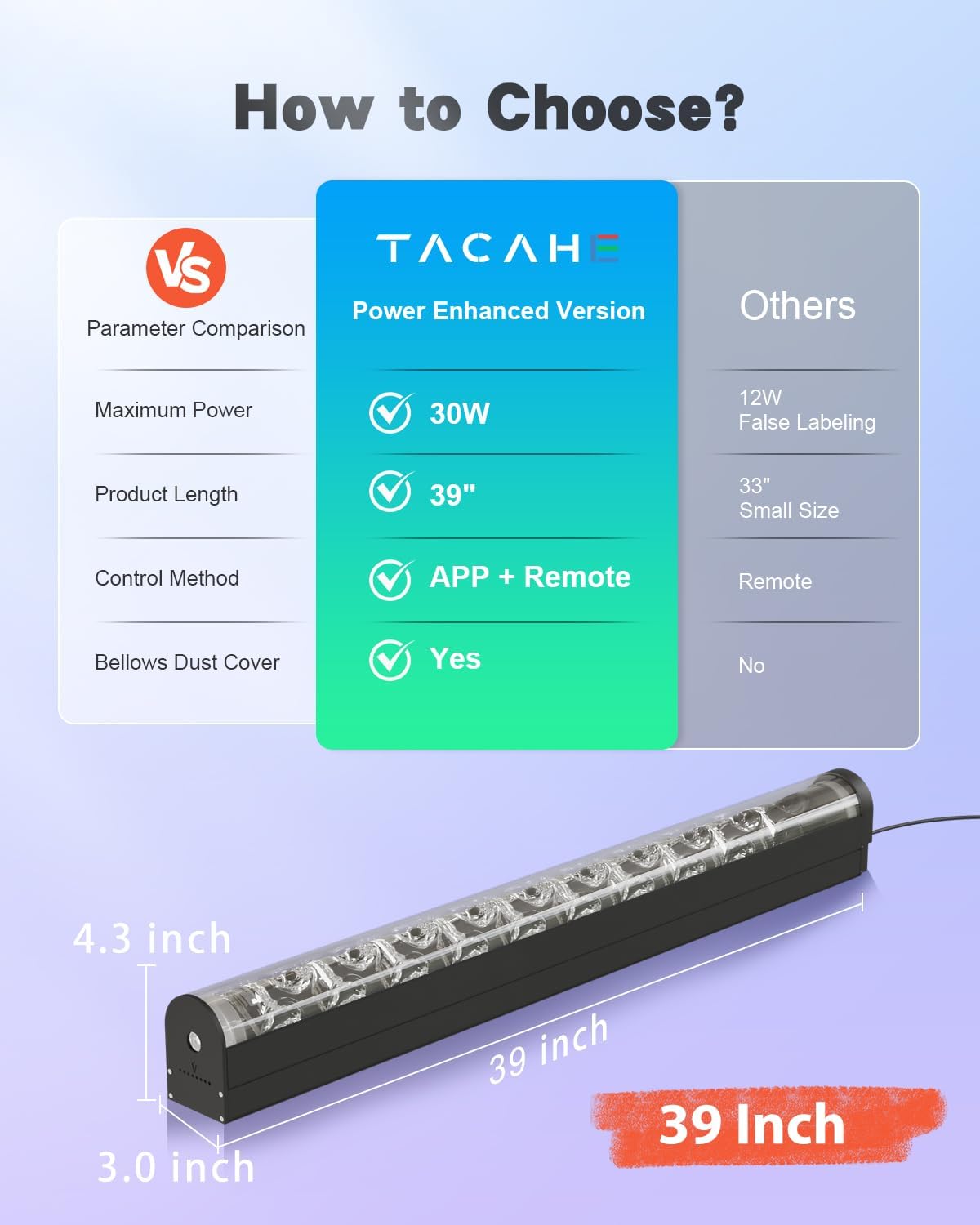
4.1 pav.: Gaminio matmenys, skirti montavimo planavimui.
5. Naudojimo instrukcijos
5.1 Įjungimas / išjungimas
Once connected to power, the light can be turned on or off using either the remote control or the 'LotusLamp X' mobile application.
5.2 APP Control (LotusLamp X)
For advanced control and features, use the dedicated mobile application:
- Atsisiųsti programą: Ieškokite and download the 'LotusLamp X' application from your smartphone's app store (iOS or Android).
- Suporuoti įrenginį: Open the app and ensure Bluetooth is enabled on your smartphone. The app will guide you through the pairing process to connect with your TACAHE Dynamic Wave Wall Light.
- Valdymo funkcijos: Within the app, you can access a color wheel for precise color selection, choose from various dynamic effects, enable music synchronization, and set custom schedules for the light to turn on/off.

Image 5.1: Controlling the light via the LotusLamp X mobile application.
5.3 Nuotolinis valdymas
The included remote control provides convenient access to basic functions:
- Akumuliatoriaus montavimas: If not pre-installed, insert the required batteries into the remote control, observing polarity.
- Veikimas: Point the remote control directly towards the light. Use the buttons to power on/off, select preset colors, choose dynamic effect modes, and adjust brightness levels.

Image 5.2: The included remote control for the wall light.
5.4 Light Effects and Music Sync
The light offers a variety of visual experiences:
- Dynamic Visuals: Choose from effects such as flowing water, aurora projection, and flame visuals to create different atmospheres.
- Vientisos spalvos: Select from a full spectrum of RGB colors or a 6000K cool white light.
- Muzikos sinchronizavimas: When enabled via the app, the light effects will respond to ambient music or sounds, enhancing the immersive experience.

Image 5.3: Various dynamic effects available with the wall light.
Video 5.4: Official product video demonstrating the TACAHE Wave Wall Lamp 2.0 in operation.
6. Priežiūra ir priežiūra
To ensure the longevity and optimal performance of your TACAHE Dynamic Wave Wall Light, follow these maintenance guidelines:
- Valymas: Gently wipe the surface of the light with a soft, dry, lint-free cloth. Do not use abrasive cleaners, solvents, or chemical sprays, as these can damage the finish or internal components.
- Maitinimo atjungimas: Always unplug the light from the power outlet before cleaning or performing any maintenance.
- Aplinkos sąlygos: Avoid exposing the light to extreme temperatures, direct sunlight for prolonged periods, or high humidity.
7. Problemų sprendimas
If you encounter issues with your TACAHE Dynamic Wave Wall Light, refer to the following common problems and solutions:
| Problema | Galima priežastis | Sprendimas |
|---|---|---|
| Šviesa neįsijungia. | No power connection. Faulty power outlet. | Check power adapter connection to both the light and the wall outlet. Test the outlet with another device. Try using both the remote and the app to power on. |
| Nuotolinio valdymo pultas nereaguoja. | Dead batteries. Obstruction. Remote out of range. | Replace remote batteries. Ensure a clear line of sight between the remote and the light. Move closer to the light. |
| Programėlė negali prisijungti prie šviestuvo. | Bluetooth off. Light out of range. App error. | Ensure Bluetooth is enabled on your smartphone. Move your phone closer to the light. Restart the 'LotusLamp X' app and the light. |
| Unusual noise from the light. | Obstruction in the motor mechanism. | Ensure the light is properly mounted and nothing is obstructing the internal components. If the noise persists and is louder than the specified ≤20dB, contact customer support. |
8. Gaminio specifikacijos
| Specifikacija | Detalė |
|---|---|
| Prekės ženklas | TACAHE |
| Modelio numeris | TCH-WWL02-B |
| Medžiaga | Akrilas |
| Šviesos šaltinis | LED |
| Šviesios spalvos | RGB+W (6000K) |
| Vattage | 30 vatų |
| ttage | 12 voltų |
| Ryškumas | 1500 liumenų |
| Kontrolės metodas | Programėlė, nuotolinio valdymo pultas |
| Ryšio protokolas | Bluetooth |
| Prekės matmenys (I x P x A) | 38.5" x 3.1" x 4.3" |
| Prekės svoris | 5.5 svaro |
| Naudojimas viduje / lauke | Vidinis |
| Ypatingos savybės | Dimmable, Dynamic Light Effects, RGBW Color Changing, Music Sync |
9. Garantija ir klientų aptarnavimas
This TACAHE product is covered by a 1 metų garantija from the date of purchase, as specified by the manufacturer. This warranty covers defects in materials and workmanship under normal use.
For warranty claims, technical assistance, or any product-related inquiries, please contact TACAHE customer support. You can typically find contact information through the retailer where the product was purchased or by visiting the official TACAHE websvetainę.