
1. Įvadas
Thank you for choosing the Kaschun CT-60S 6-Channel Professional Audio Mixer. This mixer is designed to provide versatile audio control for various applications, including live performances, studio recording, streaming, podcasting, and karaoke. It features 6 input channels, 48V phantom power, 3-band EQ, Bluetooth connectivity, and USB recording/playback capabilities. This manual provides detailed instructions for setup, operation, and maintenance to ensure optimal performance and longevity of your device.
2. Svarbi saugos informacija
Please read and understand all safety instructions before operating the device. Retain this manual for future reference.
- Elektros sauga: To reduce the risk of electric shock, do not open the casing. Visus techninės priežiūros darbus patikėkite kvalifikuotiems darbuotojams.
- Drėgmė: Do not expose this equipment to rain or moisture. Keep liquids away from the device.
- Vėdinimas: Užtikrinkite tinkamą vėdinimą. Neužblokuokite ventiliacijos angų.
- Maitinimo šaltinis: Naudokite tik pateiktą maitinimo adapterį. Įsitikinkite, kad įtampatage atitinka jūsų vietinį maitinimo šaltinį.
- Vieta: Place the mixer on a stable, flat surface. Avoid placing it near heat sources or in direct sunlight.
3. Pakuotės turinys
Patikrinkite, ar pakuotėje yra visi toliau išvardyti daiktai:
- Kaschun CT-60S Audio Mixer
- Maitinimo adapteris
- Vartotojo vadovas

Image: Contents of the Kaschun CT-60S package, including the audio mixer, power adapter, and user manual.
Video: An unboxing demonstration of the Kaschun CT-60S mixer, showing the mixer, power adapter, and user manual being removed from the box.
4. Produktas baigtasview
The Kaschun CT-60S mixer features a comprehensive layout for intuitive control over your audio. Below is a diagram highlighting the main components and their functions.
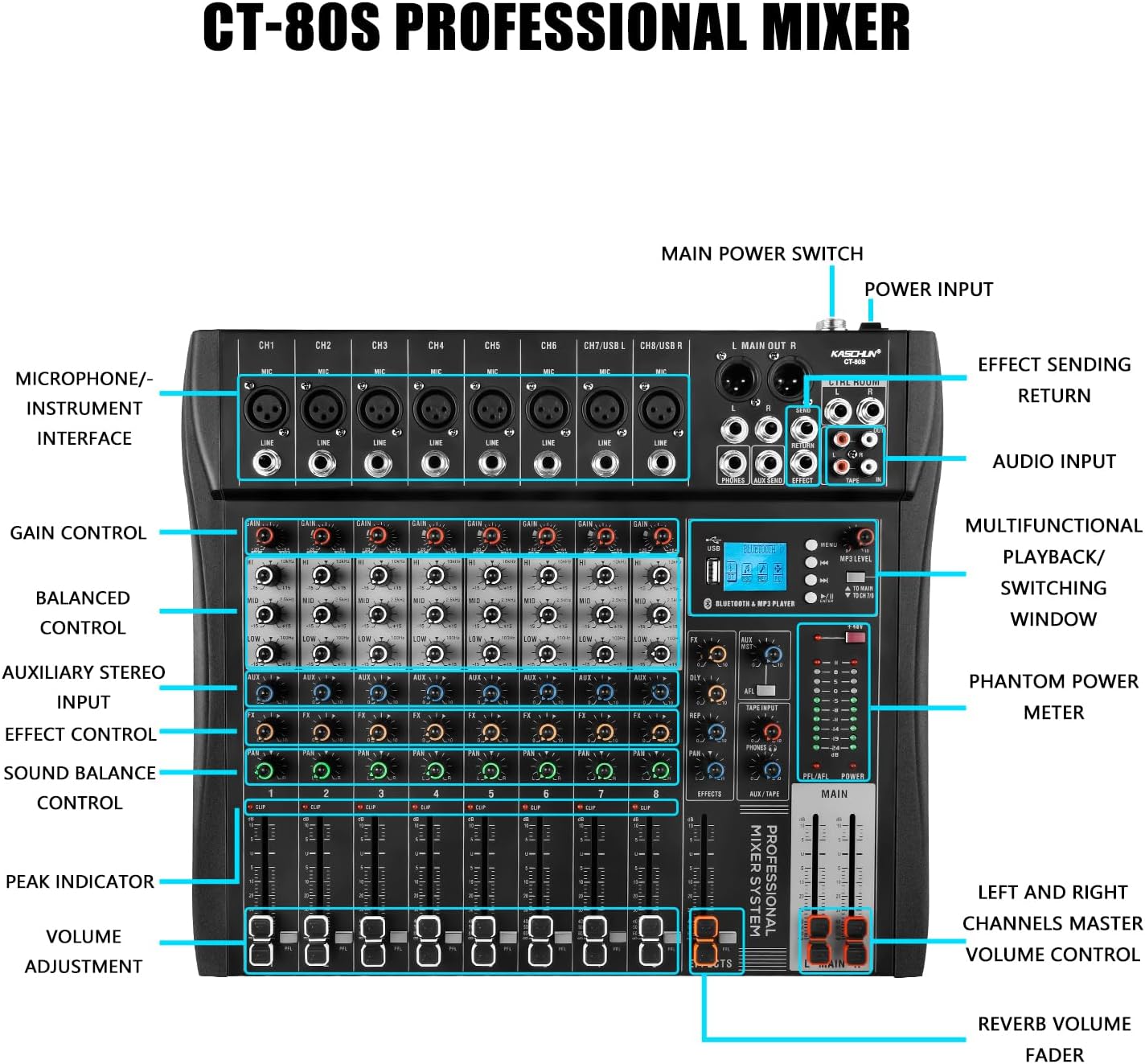
Image: Detailed diagram of the Kaschun CT-60S mixer, illustrating the location and labels of all input/output ports, control knobs, and faders.
4.1. Priekinio skydelio valdikliai
- 1–6 kanalai (CH1–CH6): Individual mono input channels with XLR (Mic) and 1/4" (Line) jacks. Channels 5/USB L and 6/USB R also serve as USB input channels.
- Perimti kontrolę: Reguliuoja kiekvieno kanalo įvesties jautrumą.
- EQ (aukštas, vidutinis, žemas): 3-band equalizer for adjusting the treble, midrange, and bass frequencies of each channel.
- AUX valdymas: Sends signal to an external effects processor or monitor mix.
- FX valdymas: Adjusts the level of the internal effects for each channel.
- PAN valdymas: Positions the channel's sound in the stereo field (left to right).
- Garsumo reguliatorius: Valdo kiekvieno atskiro kanalo išvesties lygį.
- CLIP indikatorius: Lights up when the input signal is too high, indicating potential distortion.
- +48 V fantominio maitinimo jungiklis: Activates phantom power for condenser microphones.
- Bluetooth & MP3 Player Section: Includes a display, USB port, and controls for Bluetooth pairing, MP3 playback, and recording functions.
- MAIN Faders: Valdo pagrindinio stereo mikso bendrą išvesties lygį.
- EFFECTS Fader: Controls the overall level of the internal effects.
4.2. Galinio skydelio jungtys
- L MAIN OUT R (XLR/1/4"): Main stereo outputs for connecting to power ampkeltuvai arba aktyvūs garsiakalbiai.
- CTRL ROOM (1/4"): Control room outputs for connecting to studio monitors.
- PHONES (1/4"): Ausinių išvestis.
- AUX SEND (1/4"): Output for sending signals to external effects units.
- EFFECT RETURN (1/4"): Input for returning signals from external effects units.
- TAPE IN/OUT (RCA): Stereo RCA inputs and outputs for connecting to recording devices or playback sources.
- AC ĮVESTIS: Power input for the provided power adapter.
- Maitinimo jungiklis: Įjungia arba išjungia maišytuvą.
5. Sąrankos vadovas
5.1. Maitinimo prijungimas
- Ensure the mixer's POWER switch is in the OFF position.
- Connect the provided power adapter to the AC INPUT on the rear panel of the mixer.
- Įkiškite maitinimo adapterį į tinkamą elektros lizdą.
- Pasukite POWER jungiklį į ON padėtį. Užsidegs maitinimo indikatoriaus lemputė.

Image: The Kaschun CT-60S mixer with its power cable properly connected to the AC input.
5.2. Connecting Audio Inputs
The mixer supports various audio input sources:
- Mikrofonai: Connect microphones to the XLR (MIC) inputs on channels 1-6. For condenser microphones, ensure the +48V phantom power is activated (see Section 6.2).
- Linijinio lygio įrenginiai: Prijunkite instrumentus (klavišinius, gitaras su išankstiniaisamps), CD players, or other line-level devices to the 1/4" (LINE) inputs on channels 1-6.
- USB garsas: Connect a computer via USB to channels 5/USB L and 6/USB R for digital audio input/output.
- Tape/RCA Input: Use the TAPE IN RCA jacks for stereo input from devices like media players.

Image: An illustrative diagram detailing how to connect various audio sources such as microphones, instruments, and external devices to the mixer's input channels.
5.3. Garso išėjimų prijungimas
- Pagrindinė išvestis: Prijunkite pagrindinius garsiakalbius arba maitinimo šaltinį amplifier to the L MAIN OUT R XLR or 1/4" jacks.
- Valdymo kambarys: Connect studio monitors to the CTRL ROOM 1/4" outputs.
- Ausinės: Plug your headphones into the PHONES 1/4" jack.
- Recording Devices: Use the TAPE OUT RCA jacks to send the stereo mix to a recording device.
6. Naudojimo instrukcijos
6.1. Basic Channel Operation
- Stiprinimo reguliavimas: Set the GAIN knob for each active channel to an appropriate level. The CLIP indicator should only flash occasionally during the loudest parts of the signal.
- Išlyginimas (EQ): Use the HI, MID, and LOW knobs to shape the tone of each channel. Adjust to achieve desired clarity and balance.
- Garsumo valdymas: Use the channel faders to set the individual volume levels.
- Pagrindinis mišinys: Adjust the MAIN faders to control the overall output volume.

Vaizdas: Stambus planas view of the mixer's 3-band EQ controls, demonstrating the adjustable frequency ranges for High, Mid, and Low tones.
6.2. Using 48V Phantom Power
The CT-60S provides +48V phantom power for condenser microphones. This power is supplied to all XLR inputs simultaneously.
- Connect your condenser microphone(s) to the XLR inputs.
- Locate the +48V PHANTOM POWER switch on the mixer.
- Press the switch to activate phantom power. The indicator light will turn on.
- Atsargiai: Do not activate phantom power when dynamic microphones or other non-phantom powered devices are connected via XLR, as this may cause damage. Always ensure connections are secure before activating.

Image: A visual representation of the 48V phantom power switch on the mixer, indicating its function for powering condenser microphones.
6.3. Bluetooth ryšys
The mixer features built-in Bluetooth for wireless audio streaming from compatible devices.
- On the mixer's display, navigate to the Bluetooth mode using the menu buttons.
- Išoriniame įrenginyje (pvz., išmaniajame telefone, planšetiniame kompiuteryje) įjunkite „Bluetooth“ ir ieškokite galimų įrenginių.
- Select "Kaschun CT-60S" (or similar name) from the list to pair.
- Once paired, you can stream audio wirelessly to the mixer. Adjust the MP3 LEVEL knob to control the Bluetooth audio volume.

Image: A visual demonstration of the mixer's Bluetooth playback feature, showing a smartphone wirelessly connected and streaming audio.
6.4. USB atkūrimas ir įrašymas
The USB port allows for MP3 playback from a USB drive and direct recording to a computer.
- USB atkūrimas: Insert a USB flash drive containing MP3, WAV, or WMA files into the USB port. Use the display and control buttons to navigate and play tracks.
- USB Recording (to PC): Connect the mixer to your computer via a USB cable. The mixer will be recognized as an audio interface. You can then use your preferred digital audio workstation (DAW) software to record the mixed audio.

Image: An illustration demonstrating the USB connectivity of the mixer, showing how it connects to a laptop for audio input and output, supporting lossless audio playback.
6.5. Language Switching
The mixer's display supports multiple languages. To switch between Chinese and English:
- Press the 'MENU' button to access the system settings.
- Use the navigation buttons (left/right arrows) to scroll through the options until you find 'Language' or a similar setting.
- Press the 'ENTER' button (often the play/pause button) to select the language option.
- Use the navigation buttons to select your desired language (e.g., 'English').
- Paspauskite „ENTER“, kad patvirtintumėte savo pasirinkimą.
Video: A short demonstration showing the steps to change the display language on the mixer from Chinese to English using the menu buttons.
7. Priežiūra
Tinkama priežiūra užtikrina maišytuvo ilgaamžiškumą ir optimalų veikimą.
- Valymas: Maišytuvo išorę valykite minkšta, sausa šluoste. Venkite abrazyvinių valiklių ar tirpiklių. Įsisenėjusiam purvui naudokite šiek tiek sausą šluostę.amp galima naudoti šluostę, po to – sausą šluostę.
- Apsauga nuo dulkių: Kai nenaudojate, uždenkite maišytuvą, kad apsaugotumėte jį nuo dulkių ir šiukšlių.
- Saugykla: Store the mixer in a cool, dry place away from extreme temperatures and humidity.
- Kabelių valdymas: Ensure all cables are neatly organized and not under tension to prevent damage to connectors and ports.
8. Problemų sprendimas
If you encounter issues with your Kaschun CT-60S mixer, refer to the following common problems and solutions:
| Problema | Galima priežastis | Sprendimas |
|---|---|---|
| Nėra garso išvesties | Power off, incorrect connections, faders down, mute engaged. | Check power, ensure all cables are correctly connected, raise channel and main faders, check for mute buttons. |
| Iškraipytas garsas | Input gain too high, output level too high. | Reduce GAIN for individual channels or lower MAIN faders. Check CLIP indicators. |
| Mikrofonas neveikia (kondensatorinis mikrofonas) | 48V phantom power not activated. | Activate the +48V phantom power switch. |
| Bluetooth neprisijungia | Device not in pairing mode, out of range, interference. | Ensure mixer is in Bluetooth mode, device is discoverable, and within 15 ft range. Try re-pairing. |
| USB diskas neatpažintas | Nepalaikoma file format, corrupted drive, incorrect mode. | Užtikrinti files are MP3/WAV/WMA. Try a different USB drive. Check mixer's USB mode. |
Jei problema išlieka ir išbandžius šiuos sprendimus, susisiekite su klientų aptarnavimo tarnyba.
9. Specifikacijos
| Funkcija | Detalė |
|---|---|
| Modelio numeris | CT-60S |
| Kanalų skaičius | 6 |
| Prekės svoris | 10.12 svaro (4.6 kilogramo) |
| Gaminio matmenys | 3.5 "D x 10.9" P x 14" A |
| Pakuotės matmenys | 17 x 15 x 4 colio |
| Maitinimo šaltinis | Su laidu elektra |
| Ryšio technologija | Bluetooth, USB |
| Fantomo galia | +48V (perjungiamas) |
| EQ | 3-band (High, Mid, Low) per channel |
| MP3 grotuvas | Built-in, supports MP3/WAV/WMA |
| USB įrašymas | Direct to computer |
10. Garantija ir klientų aptarnavimas
Kaschun products are designed for reliability and performance. For warranty information, please refer to the documentation included with your purchase or visit the official Kaschun website. If you require technical assistance, have questions about your product, or need to report an issue, please contact Kaschun customer support through the retailer where you purchased the product or via the contact information provided on the official Kaschun websvetainę.
Internetiniai ištekliai:
- Aplankykite Kaschun Store on Amazon dėl produktų atnaujinimų ir papildomos informacijos.