
STN28
STN-28 Colorful Cat Ear Luminous Wireless Bluetooth Headset User Manual
Model: LX-B39C | Brand: Generic
Įvadas
This manual provides detailed instructions for the operation, maintenance, and troubleshooting of your new STN-28 Colorful Cat Ear Luminous Wireless Bluetooth Headset. Please read this manual thoroughly before using the product to ensure proper function and longevity.

Image: The STN-28 Colorful Cat Ear Luminous Wireless Bluetooth Headset in light purple, featuring glowing cat ears and a paw print design on the ear cup.
Produkto savybės
- Stilingas dizainas: Features unique cat ear design with luminous accents.
- Belaidis ryšys: Bluetooth 5.0+EDR for seamless pairing.
- Patogus prigludimas: Padded ear cups and adjustable headband.
- Garso valdikliai: Integrated buttons for music, volume, and calls.
- Nešiojami: Lightweight and foldable head-mounted design.
- TF kortelės atkūrimas: Supports playing songs from an external TF card.
Pakuotės turinys
Patikrinkite pakuotę, ar joje yra šie daiktai:
- STN-28 Wireless Headset Body
- USB įkrovimo laidas
- Vartotojo vadovas (šis dokumentas)
Sąranka
Ausinių įkrovimas
Before first use, fully charge the headset. Connect the provided USB charging cable to the headset's USB charging port and to a compatible USB power source (e.g., computer USB port, USB wall adapter).
- The indicator light will show red during charging.
- Įkrovimo laikas yra maždaug 2 valandos.
- The red light will turn off once the headset is fully charged.
The headset is equipped with a rechargeable 3.7V/400MAH polymer A-grade lithium battery with overcharge and over-discharge protection.
Maitinimo įjungimas/išjungimas
- Norėdami įjungti: Press and hold the power button until the indicator lights flash red and blue.
- Norėdami išjungti: Paspauskite ir palaikykite maitinimo mygtuką, kol indikatoriaus lemputės užges.
Naudojimo instrukcijos
"Bluetooth" poravimas
- Įsitikinkite, kad ausinės yra visiškai įkrautos ir išjungtos.
- Press and hold the power button for approximately 3-5 seconds until the indicator lights flash red and blue alternately. This indicates the headset is in pairing mode.
- Savo įrenginyje (išmaniajame telefone, planšetiniame kompiuteryje, kompiuteryje) įjunkite „Bluetooth“ ir ieškokite galimų įrenginių.
- Select "STN-28" or "LX-B39C" from the list of found devices.
- Once successfully paired, the indicator light on the headset will flash blue slowly.
- The headset supports Bluetooth 5.0+EDR and modes A2DP 1.2, AVRCP 1.0, HSP, HSF 1.5.
The transmission range is up to 10 meters (33 feet) in an open environment.
Muzikos atkūrimas ir skambučių valdymas
The headset features integrated controls for media and calls. Specific button functions may vary slightly, but generally include:
- Leisti / pristabdyti: Vieną kartą paspauskite daugiafunkcį mygtuką.
- Kitas takelis: Ilgai paspauskite mygtuką „+“.
- Ankstesnis takelis: Ilgai paspauskite mygtuką „-“.
- Pagarsink: Trumpai paspauskite mygtuką „+“.
- Patildyti: Trumpai paspauskite mygtuką „-“.
- Atsiliepti / Baigti skambutį: Įeinančio skambučio metu vieną kartą paspauskite daugiafunkcį mygtuką.
- Atmesti skambutį: Įeinančio skambučio metu ilgai paspauskite daugiafunkcį mygtuką.

Paveikslėlis: detalus view of the headset's right ear cup, highlighting the control buttons for media playback and calls, as well as the charging port and TF card slot.
TF kortelės atkūrimas
The headset supports playing audio files directly from an external TF (microSD) card. Insert a TF card with your desired music into the designated slot on the headset. The headset will automatically switch to TF card playback mode.
Priežiūra
- Reguliariai valykite ausines minkštu, sausu skudurėliu. Nenaudokite abrazyvinių valiklių ar tirpiklių.
- Venkite ausinių laikymo ekstremaliose temperatūrose, drėgmėje ar tiesioginiuose saulės spinduliuose.
- Laikykite ausines vėsioje, sausoje vietoje, kai nenaudojate.
- Nebandykite patys ardyti ar taisyti ausinių, nes tai panaikins garantiją.
- Laikykite įkrovimo prievadą švarų nuo dulkių ir šiukšlių.
Trikčių šalinimas
| Problema | Galima priežastis | Sprendimas |
|---|---|---|
| Ausinės neįsijungia. | Senka baterija. | Kraukite ausines bent 2 valandos. |
| Nepavyksta susieti su įrenginiu. | Ausinės neįjungtos susiejimo režimu; įrenginyje išjungtas „Bluetooth“ ryšys; įrenginys per toli. | Ensure headset is flashing red/blue; enable Bluetooth on device; move device closer (within 10M). |
| Atkūrimo metu nėra garso. | Per mažas garsumas; neprijungtos ausinės; įrenginyje pasirinkta neteisinga garso išvestis. | Increase headset/device volume; re-pair headset; check device's audio settings. |
| Prasta garso kokybė arba ryšio sutrikimai. | Interference; device too far; low headset battery. | Move away from sources of interference; move closer to device; charge headset. |
Specifikacijos
| Funkcija | Detalė |
|---|---|
| Modelis | LX-B39C (STN-28) |
| Dėvėjimo būdas | Head-mounted, Folding |
| Bluetooth versija | 5.0+EDR |
| Supported Bluetooth Modes | A2DP 1.2, AVRCP 1.0, HSP, HSF 1.5 |
| Baterijos talpa | 400mAh polimerų ličio baterija |
| Garsiakalbio dydis / varža | 40mm / 32Ω |
| Jautrumo priėmimas | -84dBm |
| Maksimali perdavimo galia | 6dBm |
| Transmisijos diapazonas | ≤10 metrai |
| Įkrovimo prievadas | USB |
| Įkrovimo laikas | apytiksliai 2 valandas |
| Muzikos atkūrimo laikas | Iki 6 valandų |
| Pokalbių laikas | Iki 6 valandų |
| Budėjimo laikas | 200 valandos |
| Triukšmo valdymas | Aktyvus triukšmo slopinimas |
| Kontrolės metodas | Touch / Media Control Buttons |
| Spalva | Šviesiai violetinė |
| Ausų išdėstymas | Virš ausies |
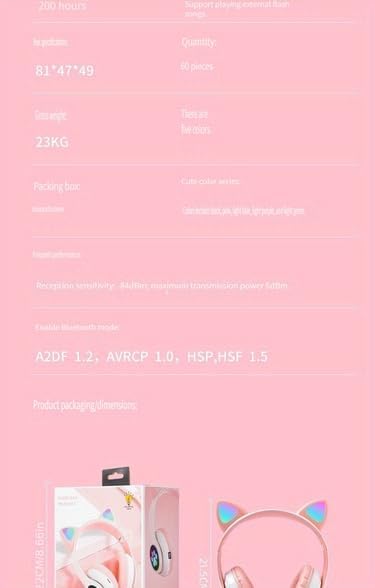
Image: A visual representation of the headset's dimensions and some technical specifications, including model number and battery capacity.
Garantija ir palaikymas
For warranty information or technical support, please refer to the retailer where you purchased this product. Keep your proof of purchase for any warranty claims.
Manufacturer: Shantou Chaoyang District Gurao Lanxin Electronics Factory
Ask a question about this manual
Ask about setup, troubleshooting, compatibility, parts, safety, or missing instructions. Manuals+ will review the question and use this page’s manual context to help answer it.