Įvadas
This manual provides instructions for the Generic Replacement Remote Control, Model N2QAYB000672. This remote is designed to be compatible with various Panasonic Viera TV models, including but not limited to TX-P42G30B, TX-P42G30E, TX-P42G30J, TX-P42G30Y, TX-P42GW30, TX-P42GW30J, TX-P42S30B, TX-P42S30Y, TX-P42S31B, TX-P46G30E, TX-P46G30J, TX-P46G30Y, TX-P46GW30, TX-P46GW30J, TX-P50G30B, TX-P50G30E, TX-P50G30J, TX-P50G30Y, TX-P50GW30, TX-P50S30B, TX-PF42G30, TX-PF42S30, and TX-PF50G30. No programming is required; simply insert batteries for immediate use.
Sąranka
Akumuliatoriaus montavimas
The remote control requires two (2) AAA batteries for operation. Batteries are not included with the remote control.
- Nuotolinio valdymo pulto gale raskite baterijų skyrių.
- Baterijų skyriaus dangtelį stumkite žemyn arba paspauskite skląstį ir pakelkite, kad atidarytumėte.
- Įdėkite dvi AAA tipo baterijas, užtikrindami, kad teigiamas (+) ir neigiamas (-) poliai teisingai sutaptų su žymėjimais baterijų skyriuje.
- Uždėkite baterijų skyriaus dangtelį, stumdami jį atgal į vietą, kol jis tvirtai užsifiksuos.

1 paveikslas: Back of the remote control with the battery compartment open, illustrating the correct orientation for AAA battery insertion.
After installing the batteries, the remote control is ready for use with your compatible Panasonic Viera TV.
Naudojimo instrukcijos
This remote control provides comprehensive command over your Panasonic Viera TV's functions. Point the remote control directly at the TV's infrared sensor for optimal performance.
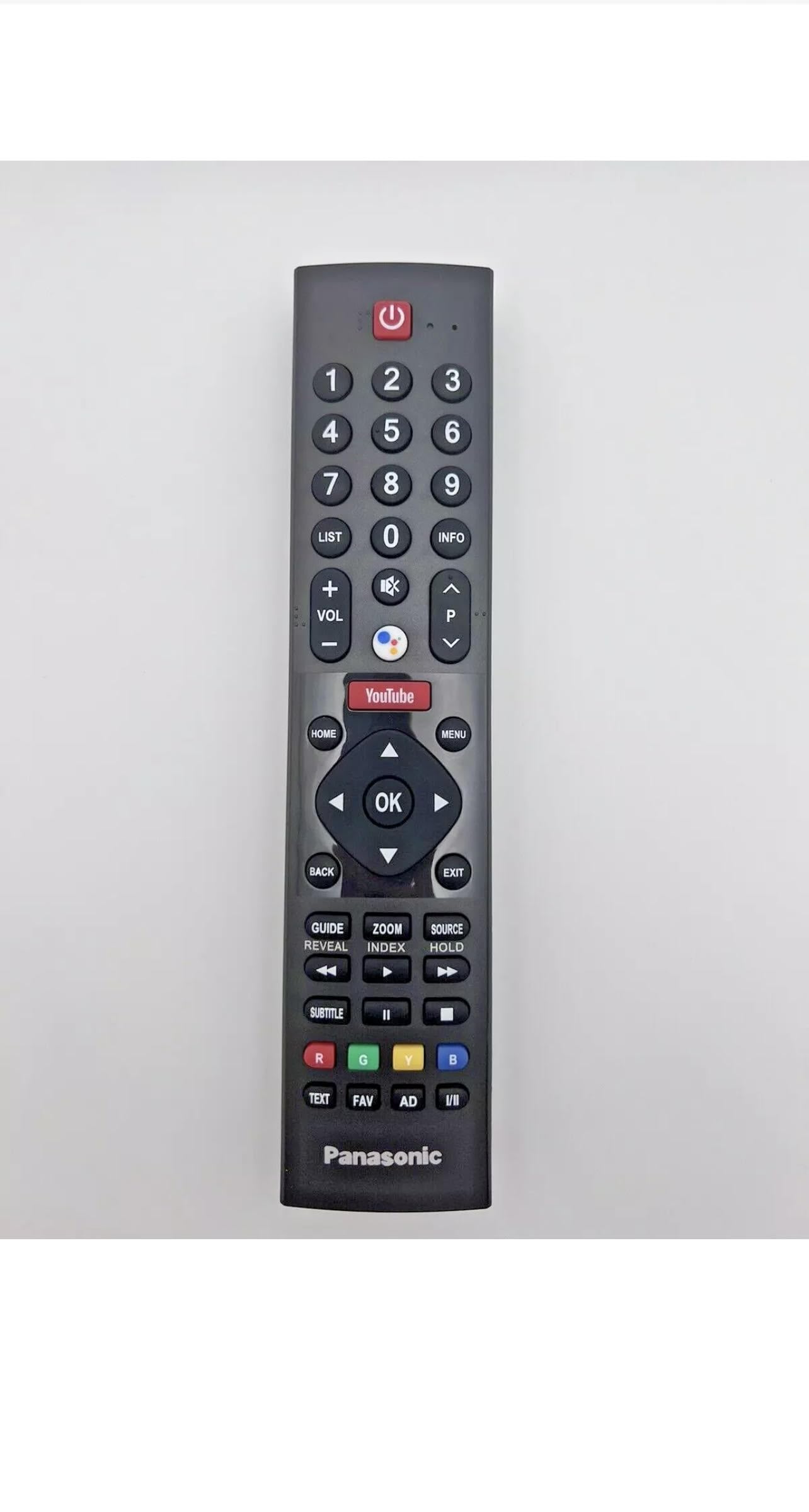
2 paveikslas: Priekyje view of the remote control, displaying the full array of buttons.
Pagrindinės funkcijos:
- Maitinimo mygtukas: Located at the top, typically red, to turn the TV on or off.
- Garsumo valdymas (+/-): Reguliuoja garso išvesties lygį.
- Channel Navigation (CH +/-): Nuosekliai keičia televizijos kanalus.
- Skaičių klaviatūra (0–9): Directly input channel numbers or other numerical selections.
- Meniu / Pagrindinis mygtukas: Accesses the TV's main menu or smart TV interface.
- Navigation Buttons (Up, Down, Left, Right, OK/Enter): Naudojamas naršyti meniu ir patvirtinti pasirinkimus.
- Įvesties / šaltinio mygtukas: Switches between different input sources (e.g., HDMI 1, AV, Component).
- Specialūs spartieji mygtukai: Buttons like 'YouTube' provide quick access to popular streaming services or smart TV features, if supported by your TV model.
For specific functions, refer to your Panasonic Viera TV's user manual.
Priežiūra
Tinkama priežiūra ir remontas prailgins jūsų nuotolinio valdymo pulto tarnavimo laiką.
- Valymas: Nuotolinio valdymo pultą valykite minkšta, sausa šluoste. Jei nešvarumai sunkiai įveikiami, šiek tiek nuvalykite.ampNuvalykite šluostę vandeniu arba švelniu, neabrazyviniu valikliu. Venkite naudoti stiprias chemines medžiagas ar tirpiklius.
- Baterijos keitimas: Replace batteries when the remote's responsiveness decreases or it stops functioning. Always replace both batteries at the same time with new ones of the same type (AAA). Do not mix old and new batteries or different battery types.
- Saugykla: Nuotolinio valdymo pultą laikykite vėsioje, sausoje vietoje, toliau nuo tiesioginių saulės spindulių, ekstremalių temperatūrų ir didelės drėgmės. Jei nuotolinio valdymo pulto ilgesnį laiką nenaudosite, išimkite baterijas, kad išvengtumėte elektrolito pratekėjimo.
- Venkite kritimų ir smūgių: Protect the remote from physical damage by avoiding drops and impacts.

3 paveikslas: Atgal view of the remote control, illustrating its overall design.
Trikčių šalinimas
Jei kyla problemų dėl nuotolinio valdymo pulto, pabandykite atlikti šiuos trikčių šalinimo veiksmus:
- Nuotolinio valdymo pultas nereaguoja:
- Patikrinkite baterijas. Įsitikinkite, kad jos įdėtos teisingai, tinkamu poliškumu (+/-).
- Pakeiskite senas baterijas naujomis AAA baterijomis.
- Ensure there is a clear line of sight between the remote control and the TV's infrared sensor. Remove any obstructions.
- Confirm the TV's infrared sensor is not blocked or dirty.
- Neveikiantys mygtukai:
- Tvirtai paspauskite mygtuką.
- Clean the remote control, especially around the unresponsive buttons, to remove any dirt or debris that might be interfering.
- Trumpas veikimo diapazonas:
- Įsitikinkite, kad baterijos yra šviežios.
- Verify there are no strong light sources (like direct sunlight or bright fluorescent lights) interfering with the infrared signal.
Jei problema išlieka ir išbandžius šiuos veiksmus, gali būti sugedęs nuotolinio valdymo pultas. Dėl papildomos pagalbos kreipkitės į pardavėją.
Specifikacijos
| Funkcija | Specifikacija |
|---|---|
| Prekės ženklas | Bendras |
| Modelio pavadinimas | Panasonic nuotolinio valdymo pultas |
| Modelio numeris | N2QAYB000672 |
| Ryšio technologija | Infraraudonųjų spindulių |
| Suderinami įrenginiai | Television (Panasonic Viera TV models) |
| Palaikomų įrenginių skaičius | 1 |
| Mygtukų skaičius | 46 |
| Didžiausias diapazonas | 10 pėdos (maždaug 3 metrai) |
| Baterijos tipas | AAA (2 required, not included) |
| Spalva | Juoda |
| Prekės matmenys (I x P x A) | 2"L x 1"W x 8"H (approximately) |
| Prekės svoris | 5 uncijos (maždaug 142 gramo) |
Informacija apie garantiją
No specific warranty information is provided for this product. Please refer to the seller's return policy or contact the seller directly for details regarding returns or defects.
Palaikymas
For any questions, issues, or further assistance regarding this remote control, please contact the seller through the platform where the purchase was made. Provide your order details and a clear description of the issue for prompt support.