
1. Įvadas
The IMIKI FRAME LITE ST2 is a versatile smartwatch designed for daily use, offering a blend of style and functionality. It features a 1.96-inch IPS display, Bluetooth connectivity, and various health monitoring capabilities. This manual provides essential information for operating and maintaining your device.
2. Pakuotės turinys
Prašome patikrinti, ar pakuotėje yra visi reikalingi daiktai:
- IMIKI FRAME LITE ST2 Smartwatch
- Magnetinis įkrovimo laidas
- Vartotojo vadovas
3. Įrenginys baigtasview
Familiarize yourself with the main components of your smartwatch.
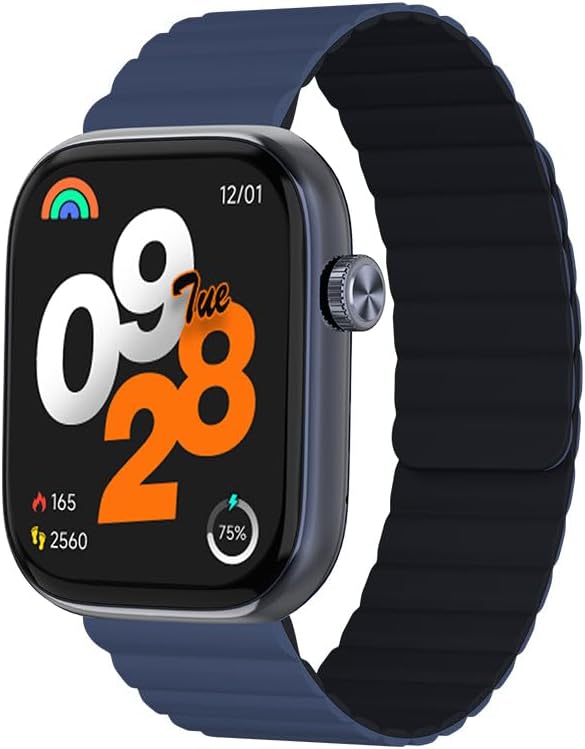
1 vaizdas: Priekyje view of the IMIKI FRAME LITE ST2 Smartwatch, displaying the time, date, and activity metrics on its 1.96-inch IPS screen. The watch features a blue case and a blue magnetic strap.

2 vaizdas: Šoninė view of the IMIKI FRAME LITE ST2 Smartwatch, highlighting its slim profile and the integrated crown button for navigation and control.
4. Sąranka
4.1 Išmaniojo laikrodžio įkrovimas
Before initial use, fully charge your IMIKI FRAME LITE ST2 Smartwatch.
- Prijunkite magnetinį įkrovimo laidą prie įkrovimo taškų išmaniojo laikrodžio gale.
- Prijunkite laido USB galą prie standartinio USB maitinimo adapterio (nepridedamas) arba kompiuterio USB prievado.
- The watch display will indicate charging status. A full charge takes approximately 2 hours.
A fully charged 250 mAh battery provides up to 15 days of typical use or 5 days of intensive use.
4.2 Papildomos programėlės diegimas
To unlock the full features of your smartwatch, download and install the companion application on your smartphone.
- Scan the QR code provided in the quick start guide or search for the official IMIKI app in the Apple App Store (for iOS) or Google Play Store (for Android).
- Įdiekite programą savo išmaniajame telefone.
- Vykdykite ekrane pateikiamus nurodymus, kad sukurtumėte paskyrą ir nustatytumėte savo profesionalą.file.
4.3 Susiejimas su išmaniuoju telefonu
Ensure Bluetooth is enabled on your smartphone and the smartwatch is sufficiently charged.
- Open the IMIKI companion app on your smartphone.
- Navigate to the 'Device' or 'Add Device' section within the app.
- The app will search for available devices. Select 'IMIKI FRAME LITE ST2' from the list.
- Jei būsite paraginti, patvirtinkite susiejimo užklausą tiek išmaniajame telefone, tiek išmaniajame laikrodyje.
- Susiejus išmanųjį laikrodį, jis sinchronizuos duomenis su jūsų telefonu.
5. Išmaniojo laikrodžio valdymas
5.1 Pagrindinė navigacija
- Jutiklinis ekranas: Braukite kairėn, dešinėn, aukštyn arba žemyn, kad naršytumėte meniu ir pranešimus. Palieskite, kad pasirinktumėte elementus.
- Šoninis mygtukas / karūnėlė: Press to wake the screen, return to the home screen, or access the app list. Rotate (if applicable) to scroll through lists.
5.2 Skambučių valdymas
With Bluetooth 5.3 connectivity, you can manage calls directly from your smartwatch when paired with your smartphone.
- Atsiliepimas į skambučius: Kai rodomas įeinantis skambutis, laikrodžio ekrane palieskite žalią piktogramą.
- Skambučių atmetimas: Tap the red icon to reject an incoming call.
- Padėjėjas balsu: Access your smartphone's voice assistant directly from the watch for hands-free commands.
5.3 Sveikatos ir fizinio pasirengimo stebėjimas
The IMIKI FRAME LITE ST2 is equipped with sensors to track your health and fitness activities.
- Širdies ritmo stebėjimas: The optical sensor continuously monitors your heart rate. View realaus laiko duomenys laikrodyje arba programėlėje.
- Kraujo deguonies (SpO2) matavimas: Measure your blood oxygen saturation levels. Ensure the watch is worn snugly on your wrist for accurate readings.
- Treniruočių režimai: Choose from 105 supported workout modes to track specific activities. The watch records statistics such as duration, calories burned, and heart rate during exercise.
- Miego stebėjimas: Monitor your sleep patterns, including deep sleep, light sleep, and wake times.
NIEKADA nepritaikymas
Personalize your smartwatch experience through the companion app.
- Laikrodžių veidai: Select from a variety of watch faces or create custom ones using the app.
- Pranešimų nustatymai: Manage which app notifications appear on your smartwatch.
6. Priežiūra
6.1 Valymas
Regular cleaning helps maintain the smartwatch's appearance and functionality.
- Nuvalykite ekraną ir laikrodžio korpusą minkštu, nepūkuotu skudurėliu.
- Įsisenėjusiam purvui šiek tiek pamirkykiteampNuvalykite šluostę vandeniu. Venkite naudoti stiprias chemines medžiagas ar abrazyvines medžiagas.
- Reguliariai valykite įkrovimo kontaktus, kad užtikrintumėte tinkamą įkrovimą.
6.2 Atsparumas vandeniui
The IMIKI FRAME LITE ST2 has an IP68 water resistance rating, meaning it is protected against dust ingress and can withstand immersion in water up to 1.5 meters for 30 minutes. It is suitable for daily use, such as hand washing or light rain. However, it is not recommended for swimming, diving, or exposure to high-pressure water.
6.3 Saugykla
When not in use for extended periods, store the smartwatch in a cool, dry place. Ensure it has some charge to prevent deep discharge of the battery.
7. Problemų sprendimas
Jei kyla problemų dėl išmaniojo laikrodžio, žr. šiuos dažniausiai pasitaikančius sprendimus:
- Laikrodis neįsijungia: Įsitikinkite, kad laikrodis yra visiškai įkrautas. Prijunkite jį prie įkroviklio bent 10 minučių.
- Nepavyksta susieti su išmaniuoju telefonu:
- Įsitikinkite, kad jūsų telefone įjungtas „Bluetooth“.
- Įsitikinkite, kad laikrodis yra jūsų telefono diapazone.
- Iš naujo paleiskite išmanųjį laikrodį ir išmanųjį telefoną.
- Išvalykite „Bluetooth“ talpyklą telefone (jei taikoma).
- Netikslūs sveikatos duomenys: Įsitikinkite, kad laikrodis tvirtai uždėtas ant riešo – ne per stipriai ar per laisvai. Nuvalykite jutiklį laikrodžio gale.
- Pranešimai nerodomi: Check notification settings in the companion app and on your smartphone. Ensure the app is running in the background.
- Ekranas nereaguoja: Try restarting the smartwatch by pressing and holding the side button for several seconds.
8. Specifikacijos
| Funkcija | Specifikacija |
|---|---|
| Prekės ženklas | IMIKI |
| Modelio pavadinimas | IMIKI FRAME LITE ST2 |
| Ekrano dydis | 1.96 colių |
| Ekrano tipas | IPS |
| Ryšio technologija | Bluetooth 5.3 |
| Suderinami įrenginiai | Išmanusis telefonas („Android“ ir „iOS“) |
| Baterijos talpa | 250 mAh |
| Įprastas naudojimas Baterijos veikimo laikas | Iki 15 dienų |
| Intensive Usage Battery Life | Iki 5 dienų |
| Įkrovimo laikas | Maždaug 2 val |
| Atsparumo vandeniui įvertinimas | IP68 |
| Sveikatos stebėjimas | Blood Oxygen, Heart Rate |
| Treniruočių režimai | 105 |
| Dirželio tipas | Magnetinis |
9. Garantija ir palaikymas
For warranty information and customer support, please refer to the warranty card included in your product packaging or visit the official IMIKI websvetainėje. Išsaugokite pirkimo kvitą kaip pirkimo įrodymą.
If you require further assistance or have questions not covered in this manual, please contact IMIKI customer service through their official channels.