
1. Įvadas
This manual provides detailed instructions for the installation, operation, and maintenance of your INQMEGA 2.4G WiFi 20X Optical Zoom 6MP Solar Security Camera. This outdoor camera features dual lenses, 20X optical zoom, 6MP resolution, color night vision, and is powered by a solar panel for continuous operation. Please read this manual thoroughly before use to ensure proper setup and functionality.

1.1 vaizdas: Baigtaview of the INQMEGA Solar Security Camera system.
2. Gaminio komponentai
Carefully unpack the box and verify that all the following components are included:
- 1 x INQMEGA Solar Security Camera
- 1 x saulės skydelis
- 1 x montavimo kronšteinas
- 1 x maitinimo laidas (USB)
- 1 x Extension Cord
- 1 x User Manual (Printed)
- Set of Mounting Screws and Wall Plugs

2.1 pav.: Visi pakuotėje esantys komponentai.
3. Sąranka
3.1 Komponento identifikavimas
Familiarize yourself with the camera's parts before installation.
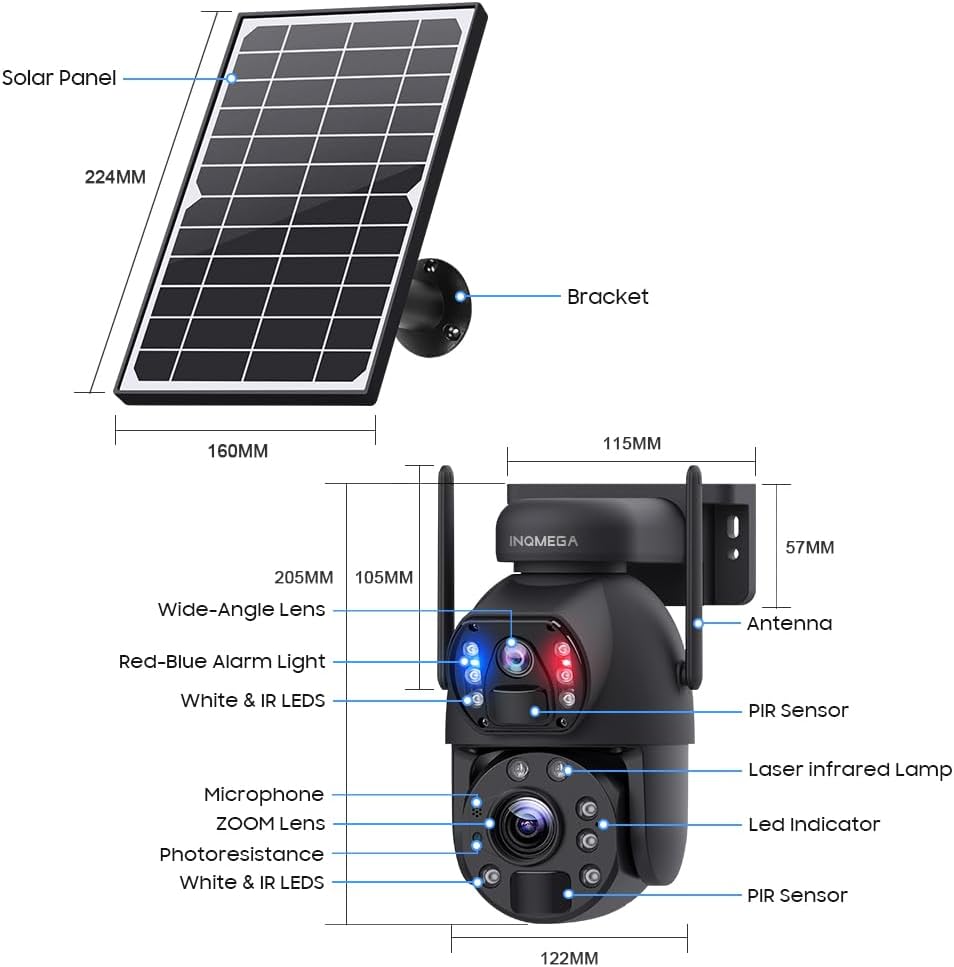
Image 3.1: Camera and Solar Panel Dimensions and Key Components.
3.2 Pradinis įkrovimas
Before first use, ensure the camera's internal battery is fully charged. Connect the solar panel to the camera and place the solar panel in direct sunlight for several hours. Alternatively, you can use the provided power cable to charge the camera via a USB power adapter (not included).
3.3 Programėlės atsisiuntimas ir paskyros sukūrimas
- Atsisiųskite UBOX app from your smartphone's app store (iOS App Store or Google Play Store).
- Open the UBOX app and follow the on-screen instructions to create a new account or log in if you already have one.
3.4 Kameros susiejimas
- Įsitikinkite, kad jūsų išmanusis telefonas yra prijungtas prie 2.4 GHz „Wi-Fi“ tinklasŠi kamera nepalaiko 5 GHz „Wi-Fi“.
- Power on the camera. The camera will enter pairing mode, indicated by a specific LED status (refer to the app for exact indications).
- In the UBOX app, tap the "Add Device" or "+" icon.
- Follow the app's instructions to scan the QR code on the camera or manually select the device type.
- Enter your 2.4GHz Wi-Fi network name (SSID) and password when prompted.
- The camera will attempt to connect to your Wi-Fi network. Once connected, the app will confirm successful pairing.
3.5 Diegimo metodai
The camera supports both wall mounting and ceiling hanging. Choose the method that best suits your installation environment.

3.2 pav.: pvz.amples of Ceiling Hanging and Wall Mounting installations.
- Pasirinkite vietą: Choose an outdoor location with good Wi-Fi signal strength and sufficient direct sunlight exposure for the solar panel.
- Laikiklio montavimas: Use the provided screws and wall plugs to securely attach the mounting bracket to the desired surface.
- Pritvirtinkite fotoaparatą: Tvirtai pritvirtinkite fotoaparatą prie tvirtinimo kronšteino.
- Padėkite saulės kolektorių: Adjust the solar panel's angle to maximize sunlight exposure throughout the day. Ensure the cable connecting the solar panel to the camera is securely fastened and protected from the elements.
4. Naudojimo instrukcijos
4.1 Tiesiogiai View and Dual Screen
Open the UBOX app and select your camera to access the live view. The camera features a dual-lens system, allowing for a dual-screen display within the app to monitor different areas simultaneously.
4.2 Pasukimo, pakreipimo ir priartinimo (PTZ) valdymas
The camera supports 355° horizontal pan and 90° vertical tilt. Use the controls within the UBOX app to adjust the camera's viewing angle. The camera also features a 20X optinis priartinimas, allowing you to magnify distant objects without significant loss of clarity.

Image 4.1: Demonstration of 20X Optical Zoom capability.
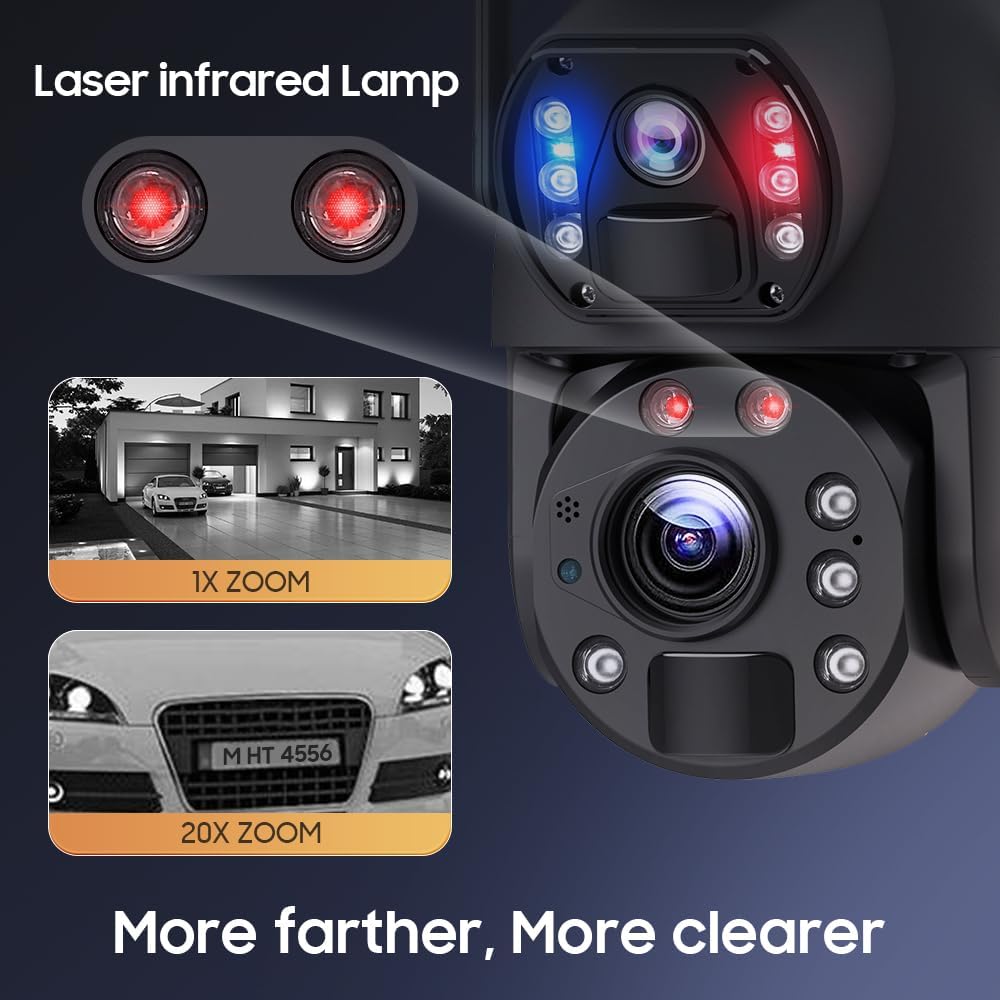
Image 4.2: Enhanced clarity with 20X zoom and laser infrared lamps.
4.3 Naktinio matymo režimai
Kamera turi tris naktinio matymo režimus:
- Infraraudonųjų spindulių nakties vizija: Užtikrina aiškius nespalvotus vaizdus esant prastam apšvietimui.
- Spalvotas naktinis matymas: Utilizes built-in white lights to provide full-color video even in darkness.
- Pažangus naktinis matymas: Automatiškai perjungia infraraudonųjų spindulių ir spalvotus režimus pagal aptiktą judesį ar apšvietimo sąlygas.
4.4 Judesio aptikimas ir įspėjimai
The camera features PIR (Passive Infrared) human detection. When motion is detected, the camera will:
- Send an alert notification to your smartphone via the UBOX app.
- Begin recording a short video clip (continuous recording is not supported to conserve battery).
- Activate the siren alarm (if enabled in settings).
You can adjust the sensitivity of motion detection and customize alert settings within the app.
4.5 Dvipusis garsas
Utilize the built-in microphone and speaker to communicate with visitors or deter intruders directly through the UBOX app.
4.6 Įrašymas ir saugojimas
Recorded video clips are stored on a local TF card (up to 128GB, not included) or in the Amazon Cloud (subscription may be required). The camera records only when motion is detected to optimize battery life.
4.7 Preset Points and Guards
You can set specific preset points within the app to quickly navigate the camera to important areas. The 'Guards' function allows the camera to patrol between these preset points.

Image 4.3: Setting preset points for monitoring specific areas.
5. Priežiūra
5.1 Valymas
- Kameros objektyvai: Gently wipe the camera lenses with a soft, clean, lint-free cloth. Avoid abrasive materials or harsh chemicals.
- Saulės skydas: Periodically clean the surface of the solar panel to remove dust, dirt, or debris that may reduce charging efficiency. Use a soft cloth and water if necessary.
- Kameros korpusas: Nuvalykite kameros korpusą reklaminiu valikliuamp šluoste, kad pašalintumėte susikaupusius nešvarumus.
5.2 Akumuliatoriaus priežiūra
The camera is equipped with a built-in 12000mAh battery. To maximize battery life:
- Ensure the solar panel receives adequate direct sunlight daily.
- Minimize unnecessary live view access and frequent motion detections if not critical, as these consume battery power.
- In prolonged periods of low sunlight, consider manually charging the camera via USB if battery levels become critically low.
5.3 Firmware atnaujinimai
Check the UBOX app periodically for available firmware updates. Keeping your camera's firmware up-to-date ensures optimal performance, security, and access to new features.
6. Problemų sprendimas
- Kamera neprisijungia prie „Wi-Fi“:
– Įsitikinkite, kad jūsų „Wi-Fi“ tinklas yra 2.4 GHz dažnio. Kamera nepalaiko 5 GHz „Wi-Fi“.
– Patikrinkite, ar teisingas „Wi-Fi“ slaptažodis.
- Check the camera's proximity to the Wi-Fi router (within 15m range).
- Restart your router and the camera. - Prasta vaizdo kokybė:
- Nuvalykite fotoaparato objektyvus.
- Įsitikinkite, kad kameros matymo lauke nėra jokių kliūčių. view.
- Check your Wi-Fi signal strength; a weak signal can affect streaming quality. - Judesio aptikimas neveikia arba yra per jautrus:
- Adjust PIR sensitivity settings in the UBOX app.
- Ensure the camera's PIR sensor is not obstructed.
- Avoid placing the camera in areas with constant movement (e.g., tree branches swaying in the wind) if false alarms are an issue. - Baterija nekraunama:
- Įsitikinkite, kad saulės baterijos yra švarios ir gauna tiesioginių saulės spindulių.
- Check the connection cable between the solar panel and the camera.
- Verify the solar panel is not shaded by trees or buildings. - Siren alarm not activating:
- Check if the siren alarm feature is enabled in the UBOX app settings.
- Ensure the camera has sufficient battery power. - No continuous video recording:
- This camera is designed for event-based recording (motion detection) to conserve battery power. Continuous recording is not supported. - No automatic tracking:
- The camera supports motion detection alerts but does not feature automatic object tracking. Pan and tilt adjustments must be made manually via the app.
7. Specifikacijos
| Funkcija | Specifikacija |
|---|---|
| Modelio numeris | ST-598-6M-20X-WIFI-914 |
| Naudojimas viduje / lauke | Lauke |
| Vaizdo įrašymo raiška | 6 MP |
| Optinis priartinimas | 20x |
| Ryšio technologija | Belaidis ryšys (2.4 G „Wi-Fi“) |
| Maitinimo šaltinis | Solar Powered (with 12000mAh Lithium Ion battery) |
| Valdiklio tipas | UBOX App |
| Montavimo tipas | Sieninis laikiklis |
| Kreipimo / pakreipimo kampas | 355° horizontaliai, 90° vertikaliai |
| Naktinis matymas | Infrared, Full Color, Intelligent Night Color |
| Judesio aptikimas | PIR Human Detection (Max 12M) |
| Sandėliavimas | TF Card (Max 128GB, not included), Amazon Cloud |
| Atsparumo vandeniui lygis | IP66 |
| Medžiaga | Metalas |
| Prekės svoris | 0.16 uncijos |
8. Informacija apie garantiją
Please refer to the warranty card included with your product or contact INQMEGA customer support for detailed warranty terms and conditions. Typically, products are covered against manufacturing defects for a specified period from the date of purchase.
9. Parama
If you encounter any issues or have questions not covered in this manual, please contact INQMEGA customer support through the following channels:
- El. paštas: Refer to your product packaging or the INQMEGA official webpalaikymo el. pašto adresų svetainė.
- Internetiniai ištekliai: Visit the INQMEGA official websvetainė, kurioje rasite DUK, trikčių šalinimo vadovus ir programinės įrangos atsisiuntimus.
- Pagalba programėlėje: Some support options may be available directly within the UBOX application.