1. Produktas baigtasview & Pagrindiniai bruožai
The 1MORE S31 Open Ear Bluetooth Headphones are designed for comfort and situational awareness, providing a high-quality audio experience without blocking ambient sounds. They feature a lightweight design, secure fit, and advanced audio technologies for clear sound and calls.

Image: The 1MORE S31 Open Ear Bluetooth Headphones with their charging case, showcasindėl jų elegantiško juodo dizaino.
Pagrindinės funkcijos:
- Featherweight Comfort: Designed 50% slimmer for an open-ear listening experience that eliminates discomfort during prolonged use, allowing sound to flow freely.
- Locked-In Stability: Equipped with innovative, gravity-balanced ear hooks that adapt to your ear shape, ensuring the headphones remain secure during any activity.

Image: A person wearing the 1MORE S31 headphones securely while cycling, demonstrating their stable fit during movement.
- Rich Soundscapes: Features a large 14.2 mm dynamic driver, directional sound technology, and an advanced DBB bass enhancement algorithm for enhanced audio quality.
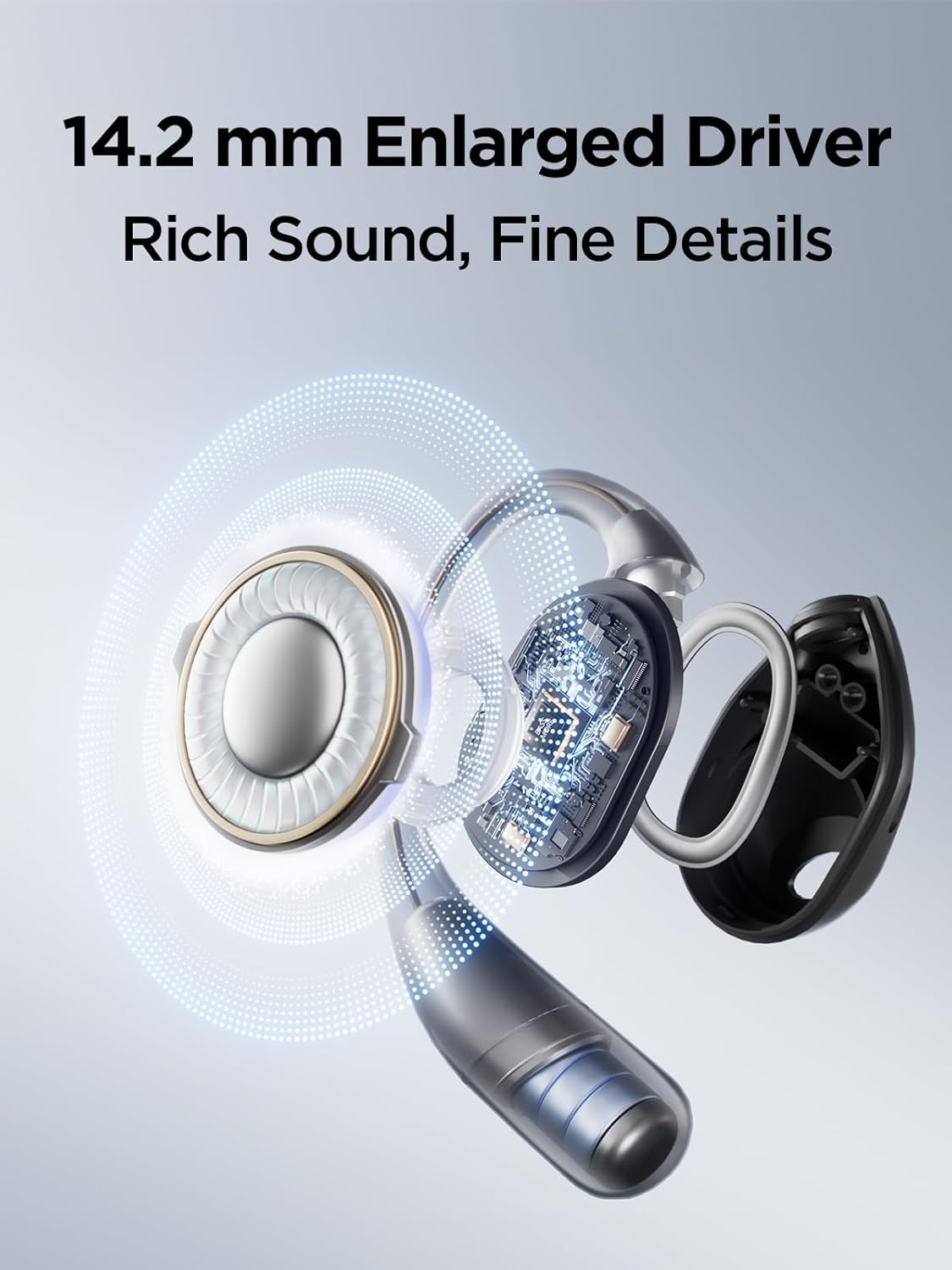
Paveikslėlis: sprogęs view diagram highlighting the 14.2mm dynamic driver and internal components of the 1MORE S31 headphone, illustrating its sound technology.
- Precision Audio Control: Offers four studio-grade EQ settings accessible via the 1MORE app, allowing users to tailor audio for various music genres.
- All-Weather Audio: Boasts an IPX5 waterproof rating and durable construction, making them suitable for training, climbing, biking, and other activities regardless of weather conditions.

Image: A 1MORE S31 headphone being splashed with water, visually representing its IPX5 water resistance for outdoor and active use.
2. Pakuotės turinys
Įsitikinkite, kad pakuotėje yra visi daiktai:
- 1MORE S31 Open Ear Bluetooth Headphones (Left and Right earbuds)
- Įkrovimo dėklas
- Vartotojo vadovas
Note: The package includes the headphones, charging case, and this user manual. Other accessories like a charging cable are typically included but not explicitly detailed in the provided "whats_in_the_box" data.

Image: The 1MORE S31 headphones resting inside their open charging case, ready for use or charging.
3. Sąrankos vadovas
3.1 Pradinis įkrovimas
Before first use, fully charge the headphones and the charging case. Place the earbuds into the charging case. Connect the charging case to a power source using a USB-C cable (not included in the provided "whats_in_the_box" but typically required). The indicator light on the case will show charging status.

Image: The 1MORE S31 headphones in their charging case, illustrating the extended battery life of up to 30 hours with the case and 8 hours on a single charge.
3.2 Bluetooth poravimas
- Įsitikinkite, kad ausinės yra įkrautos.
- Atidarykite įkrovimo dėklą. Ausinės automatiškai įsijungs susiejimo režimu (indikatoriaus lemputės mirksės).
- Savo įrenginyje (išmaniajame telefone, planšetiniame kompiuteryje, kompiuteryje) įjunkite „Bluetooth“.
- Ieškokite "1MORE S31" in the list of available Bluetooth devices.
- Select "1MORE S31" to connect. Once connected, a voice prompt will confirm, and the indicator lights will turn off or show a steady light.
If pairing fails, place the earbuds back into the case, close it, and then reopen to re-enter pairing mode. Refer to your device's Bluetooth settings for specific instructions.
4. Naudojimo instrukcijos
4.1 Pagrindiniai valdikliai
The 1MORE S31 headphones feature intuitive touch controls. Specific functions may vary slightly based on firmware updates or app settings.
- Leisti / pristabdyti: Vieną kartą bakstelėkite bet kurią ausinę.
- Kitas takelis: Dukart palieskite dešinįjį ausinės antgalį.
- Ankstesnis takelis: Dukart palieskite kairįjį ausinės antgalį.
- Atsiliepti / Baigti skambutį: Vieną kartą bakstelėkite bet kurią ausinę.
- Atmesti skambutį: Paspauskite ir 2 sekundes palaikykite bet kurią ausinę.
- Padėjėjas balsu: Tris kartus palieskite bet kurią ausinę.
4.2 1MORE MUSIC App
For advanced features and customization, download the 1MORE MUSIC app from your device's app store. The app allows you to:
- Adjust EQ settings (4 studio-grade presets available).
- Jutiklinių valdiklių tinkinimas.
- Atnaujinkite programinę-aparatinę įrangą.
- View akumuliatoriaus būsena.
5. Priežiūra
Proper care ensures the longevity and performance of your 1MORE S31 headphones.
- Valymas: Ausinėms ir įkrovimo dėklui valyti naudokite minkštą, sausą, nepūkuotą šluostę. Nenaudokite abrazyvinių valiklių ar tirpiklių.
- Atsparumas vandeniui: The headphones have an IPX5 water-resistant rating, meaning they can withstand splashes and sweat. They are not designed for submersion in water. Dry them thoroughly before placing them back in the charging case.
- Saugykla: Kai nenaudojate, laikykite ausines įkrovimo dėkle, kad apsaugotumėte jas nuo dulkių ir pažeidimų. Laikykite vėsioje, sausoje vietoje, toliau nuo ekstremalių temperatūrų.
- Akumuliatoriaus priežiūra: Norėdami taupyti akumuliatoriaus veikimo laiką, venkite dažnai visiškai iškrauti ausines. Reguliariai jas įkraukite, net jei nenaudojate nuolat.
6. Problemų sprendimas
If you encounter issues with your 1MORE S31 headphones, refer to the following common solutions:
6.1 Nėra garso arba ryšys nutrūksta
- Įsitikinkite, kad abi ausinės yra įkrautos.
- Patikrinkite, ar jūsų įrenginyje įjungtas „Bluetooth“ ryšys ir ar ausinės prijungtos.
- Kad išvengtumėte trukdžių, priartėkite prie savo įrenginio.
- Pabandykite ausines su savo įrenginiu atjungti ir vėl susieti.
- Iš naujo paleiskite įrenginį.
6.2 Įkrovimo problemos
- Įsitikinkite, kad įkrovimo laidas yra tvirtai prijungtas tiek prie dėklo, tiek prie maitinimo šaltinio.
- Patikrinkite, ar maitinimo šaltinis yra aktyvus.
- Ausinių ir dėklo vidaus įkrovimo kontaktus nuvalykite sausu vatos tamponėliu.
6.3 Prasta skambučių kokybė
- Įsitikinkite, kad mikrofonai nėra uždengti.
- Jei įmanoma, persikelkite į ramesnę aplinką.
Video: This video demonstrates the 1MORE S31 Open Ear Headphones, highlighting features such as open-ear design, 14.2mm dynamic driver, gravity balance technology, IPX5 water resistance, UFT 3.0 directional audio, four-microphone AI ENC smart call noise cancellation, and 30 hours of extended battery life. It shows the product in use during exercise and work, emphasizing comfort, sound quality, and clear communication in various environments.
- Check the microphone settings on your connected device.
7. Specifikacijos
| Funkcija | Detalė |
|---|---|
| Prekės ženklas | DAR 1 |
| Modelio pavadinimas | S31 |
| Ryšio technologija | Belaidis ryšys („Bluetooth“) |
| Bluetooth versija | 5.0 |
| Garso tvarkyklės tipas | Dinaminis vairuotojas |
| Atsparumo vandeniui lygis | IPX5 (atsparus vandeniui) |
| Kontrolės metodas | Programėlė |
| Prekės svoris | 0.14 kilogramo (4.9 uncijos) |
| Suderinami įrenginiai | Nešiojamieji kompiuteriai, stacionarūs kompiuteriai, planšetiniai kompiuteriai, telefonai, išmanieji garsiakalbiai, televizoriai, automobilių garso sistemos, mobilieji telefonai |
| Baterijos | Reikalingos 3 ličio jonų baterijos (pridedamos) |
8. Garantija ir palaikymas
1MORE products are designed and manufactured to the highest quality standards. For detailed warranty information, product registration, or technical support, please visit the official 1MORE websvetainėje arba susisiekite su jų klientų aptarnavimo tarnyba. Išsaugokite pirkimo kvitą kaip pirkimo įrodymą garantijos pretenzijoms.
For further assistance, you may also refer to the 1MORE Store on Amazon: