
1. Įvadas
The Qubo Car Dash Camera Pro GPS (Model HCA02) is designed to record your journeys in Full HD 1080p, providing a reliable witness on the road. Equipped with a 130-degree ultra-wide-angle lens, G-Sensor for emergency recording, and built-in GPS for location logging, this dashcam offers enhanced safety and peace of mind. This manual provides detailed instructions for installation, operation, and maintenance of your device.
2. Pakuotės turinys
Prašome patikrinti, ar pakuotėje yra visi reikalingi daiktai:
- Dashcam (1 unit)
- Double Sided Adhesive Tape (1 unit)
- Automobilinis įkroviklis (1 vnt.)
- Maitinimo kabelis (1 vnt.)
- Pry Tool (1 unit)
- Garantinė kortelė (1 vnt.)

Image: The Qubo Car Dash Camera Pro GPS with its included accessories: car charger, power cable, adhesive tape, and pry tool.
3. Sąrankos vadovas
3.1 „MicroSD“ kortelės įdėjimas
The dashcam supports MicroSD cards up to 256 GB. A high-endurance Class 10 or U3 card is recommended for optimal performance. Insert the MicroSD card into the designated slot until it clicks into place. Ensure the card is inserted correctly to avoid damage.

Image: A MicroSD card, illustrating the type of storage required for the dashcam.
3.2 Vaizdo registratoriaus montavimas
- Nuvalykite priekinio stiklo vietą, kurioje ketinate montuoti vaizdo registratorių. Įsitikinkite, kad ji be dulkių ir riebalų.
- Attach the double-sided adhesive tape to the dashcam mount.
- Firmly press the mount onto the chosen spot on your windshield, ensuring a clear view of the road and minimal obstruction to your driving view.
- Sureguliuokite fotoaparato kampą, kad užfiksuotumėte norimą lauką view.
3.3 Maitinimo jungtis
- Prijunkite maitinimo kabelį prie prietaisų skydelio.
- Prijunkite automobilio įkroviklį prie automobilio 12 V maitinimo lizdo (cigarečių degiklio lizdo).
- Route the power cable neatly along the windshield and dashboard using the provided pry tool to tuck it under trim panels, ensuring it does not interfere with driving.

Image: The Qubo Car Dash Camera Pro GPS, showing its compact design and dimensions, suitable for discreet windshield mounting.
3.4 Qubo Pro App Installation and Pairing
- Atsisiųskite Qubo Pro App from the Apple App Store (iOS) or Google Play Store (Android).
- Įjunkite automobilio degimą, kad įjungtumėte vaizdo registratorių.
- Open the Qubo Pro App on your smartphone and follow the on-screen instructions to connect to the dashcam via Wi-Fi. The app will guide you through the pairing process.
- Once connected, you can access live footage, review recordings, and adjust settings.

Image: The Qubo Car Dash Camera Pro GPS positioned next to a smartphone displaying the Qubo Pro App interface, showing live view and map data.
4. Naudojimo instrukcijos
4.1 Automatinis įrašymas
The dashcam automatically powers on and begins recording when your vehicle's ignition is turned on. It will automatically power off shortly after the ignition is turned off.
4.2 Ciklo įrašymas
The dashcam utilizes loop recording, continuously recording video in short segments (e.g., 1, 3, or 5 minutes). When the MicroSD card is full, the oldest unprotected files are automatically overwritten by new recordings. This ensures uninterrupted recording without manual deletion.
4.3 Avarinis įrašymas (G jutiklis)
The built-in G-Sensor detects sudden impacts or collisions. When an event is detected, the current recording segment is automatically locked and saved to a protected folder on the MicroSD card, preventing it from being overwritten by loop recording. These files are crucial for accident evidence.
4.4 GPS Logging
The integrated GPS module records your vehicle's speed, location, and route data. This information is embedded in the video files ir gali būti viewed via the Qubo Pro App, providing valuable context for your recordings.
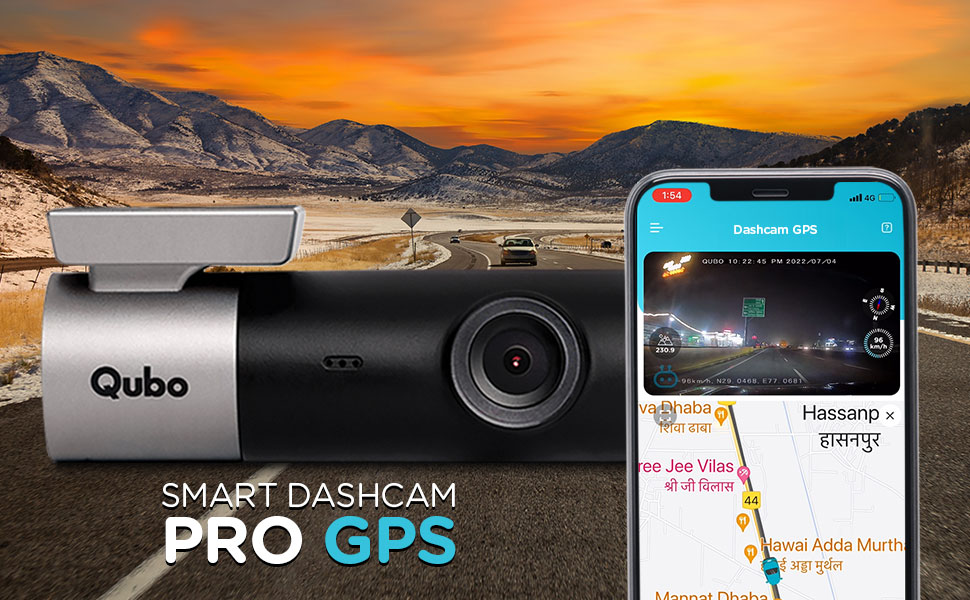
Image: A dashcam view of a road with an overlay showing GPS coordinates, speed, and distance, indicating the built-in GPS logging feature.
4.5 Qubo Pro App Functions
The Qubo Pro App provides comprehensive control and access to your dashcam's features:
- Tiesioginis tiekimas: View real-time video from your dashcam on your smartphone.
- Vaizdo įrašų atkūrimas ir atsisiuntimas: Access recorded videos, play them back, and download important clips directly to your phone.
- Nustatymai: Adjust various dashcam settings, including video resolution, G-Sensor sensitivity, and Wi-Fi password.
- Journey Time-Lapse: Create condensed time-lapse videos of your entire drives.
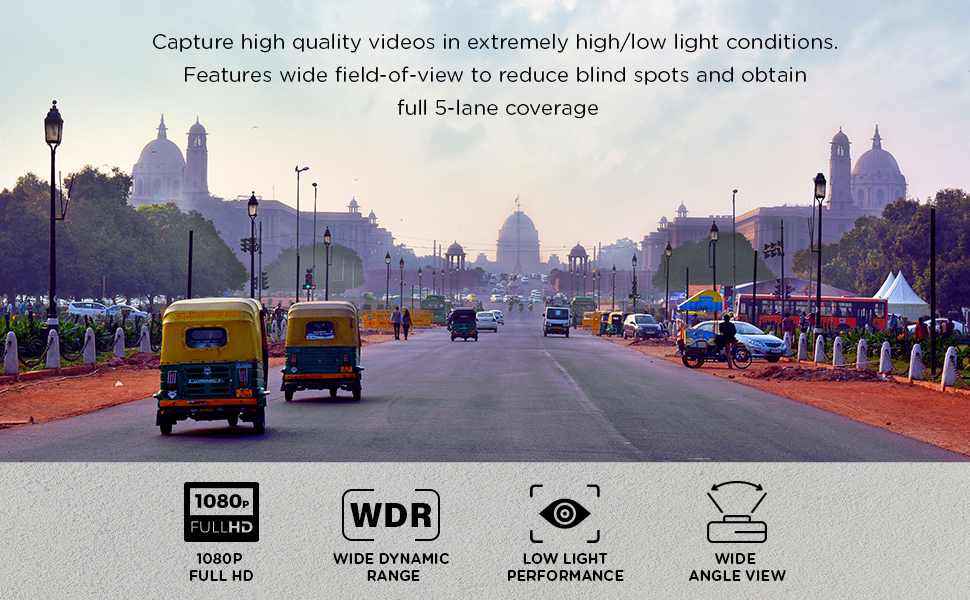
Image: The Qubo Dashcam Pro GPS shown alongside a smartphone displaying the Qubo Pro App, which features a live video feed and a map with route tracking.
5. Pagrindinės savybės
- 1080p Full HD Clarity: Įrašo aiškius ir išsamius maisto įrašustage with a 2-megapixel lens.
- 130° Ultra-Wide Angle: Provides extensive road coverage, capturing multiple lanes.
- Naktinio pulso matymas: Features 3D DNR (Digital Noise Reduction) and WDR (Wide Dynamic Range) for enhanced performance in low-light and nighttime conditions.
- Supercapacitor Powered: Designed without a lithium battery, using a supercapacitor for improved durability and resistance to extreme temperatures (-20°C to 85°C), preventing swelling or failure in harsh climates.
- Išplečiama saugykla: Supports MicroSD cards up to 256 GB for extensive recording capacity. Note: While some promotional materials may indicate 1TB support, the official specifications confirm support up to 256 GB.

Image: A split image demonstrating the superior low-light performance of the dashcam with Wide Dynamic Range (WDR) enabled compared to when it is off.

Image: A visual guide indicating various brands and capacities of MicroSD cards that are compatible and incompatible with Qubo Dashcams, highlighting supported storage up to 1TB in this graphic.
6. Priežiūra
6.1 „MicroSD“ kortelių valdymas
Regularly format your MicroSD card (at least once a month) using the Qubo Pro App or directly on a computer. This helps maintain card health and prevents data corruption. Back up any important recordings before formatting.
6.2 Vaizdo registratoriaus valymas
Use a soft, dry cloth to clean the dashcam lens and body. Avoid using abrasive cleaners or solvents, which can damage the device. Ensure the lens is clean for optimal video clarity.
7. Problemų sprendimas
| Problema | Galima priežastis | Sprendimas |
|---|---|---|
| Vaizdo registratorius neįsijungia. | Nėra maitinimo iš automobilinio įkroviklio; sugedęs laidas; atsilaisvinęs prijungimas. | Check car charger connection and vehicle's 12V outlet. Ensure power cable is securely connected to dashcam and charger. Test charger with another device if possible. |
| Įrašymas sustoja arba footage yra sugadintas. | MicroSD card full; incompatible or faulty MicroSD card; card not formatted. | Format the MicroSD card regularly. Ensure you are using a high-endurance Class 10 or U3 MicroSD card. Replace the MicroSD card if issues persist. |
| Wi-Fi connectivity issues with Qubo Pro App. | Incorrect Wi-Fi password; interference; app malfunction. | Ensure correct Wi-Fi password. Restart both dashcam and smartphone. Reinstall the Qubo Pro App. Move away from other Wi-Fi sources. |
| Vaizdo įrašo kokybė prasta arba vaizdas neryškus. | Nešvarus objektyvas; apsauginė plėvelė vis dar ant objektyvo; neteisingi raiškos nustatymai. | Clean the dashcam lens with a soft cloth. Remove any protective film. Check video resolution settings in the Qubo Pro App and ensure it is set to 1080p. |
| GPS data is inaccurate or not recorded. | Poor GPS signal; dashcam mounted in an obstructed location. | Įsitikinkite, kad vaizdo registratorius turi aiškų vaizdą view of the sky. Avoid mounting near metallic objects or tinted areas that might block GPS signals. |
8. Specifikacijos
| Funkcija | Detalė |
|---|---|
| Prekės ženklas | Qubo |
| Modelio pavadinimas | Dashcam Pro GPS |
| Modelio numeris | HCA02 |
| Vaizdo įrašymo raiška | 1080p „Full HD“ |
| Laukas View | 130 Degrees (Ultra-Wide Angle) |
| Ryšio technologija | USB, Wi-Fi |
| Ypatingos savybės | App Control, Built-In GPS, G-Sensor, NightPulse Vision (3D DNR + WDR), Supercapacitor |
| Montavimo tipas | Priekinio stiklo kalnas |
| Max Flash Memory Supported Size | 256 GB |
| Kadrų dažnis | 30 FPS |
| Kontrolės metodas | Programėlė |
| Maitinimo šaltinis | Automobilinis įkroviklis (superkondensatorius energijos stabilumui užtikrinti) |
| Elemento matmenys (D x P x A) | 7 gylio x 14 pločio x 11 aukščio centimetrų |
| Prekės svoris | 300 gramų |
| Gamintojas | Hero Electronix Pvt. Ltd. |
9. Garantija ir palaikymas
9.1 Informacija apie garantiją
The Qubo Car Dash Camera Pro GPS comes with a 1 metų gamintojo garantija from the date of purchase. Please retain your purchase receipt for warranty claims. The warranty covers manufacturing defects but does not cover damage caused by misuse, accidents, unauthorized repairs, or normal wear and tear.
9.2 Pagalba klientams
For any technical assistance, troubleshooting, or warranty-related queries, please contact Qubo customer support:
- Toll-free helpline number: 9319095757
- Refer to the official Qubo website for the latest support information and resources.


