
BVTVRemote-01
Universalus televizoriaus nuotolinio valdymo pultas Naudotojo vadovas
Model: BVTVRemote-01
1. Įvadas
This manual provides comprehensive instructions for the setup, operation, maintenance, and troubleshooting of your new Universal TV Remote Control. Designed for ease of use, this remote is compatible with a wide range of major TV brands, offering a convenient replacement for your original remote.
Prieš naudodami nuotolinio valdymo pultą, atidžiai perskaitykite šį vadovą, kad užtikrintumėte optimalų veikimą ir ilgaamžiškumą.

Figure 1: Universal TV Remote Control

Figure 2: Compatible with Major TV Brands
2. Sąrankos instrukcijos
Before first use, insert two AAA batteries into the remote control. Ensure correct polarity (+/-) as indicated inside the battery compartment.
2.1. Brand Setting (Recommended Method)
This method is recommended for major TV brands that have a dedicated button on the remote control (e.g., Samsung, LG, Sony, TCL, Vizio, Hisense, Sanyo, Insignia, Philips, Panasonic, Sharp, Toshiba, Hitachi, JVC, Vestel, Seiki, RCA, Magnavox, Westinghouse, Haier).
- Identify the button on the remote control corresponding to your TV brand.
- Press and hold the corresponding brand button for approximately 3 seconds.
- The LED indicator on the remote will flash three times, indicating that the setting is complete.

Figure 3: Brand Setting Method
Naudingas patarimas: Under the Initial Setting Mode, this remote can directly control many TV brands, including LG, SAMSUNG, PHILIPS, SONY, PANASONIC, SHARP and other TV brands listed on the remote control.
2.2. Code Setting Method
Use this method for TV brands that do not have a dedicated brand button on the remote, or if the Brand Setting method does not work.
- Paspauskite ir palaikykite Nutildyti mygtuką ir Galia vienu metu paspauskite mygtuką kelias sekundes.
- Release both buttons when the LED indicator light illuminates.
- Refer to the provided code list in the physical manual (not included here) and enter the 3 or 4-digit code for your TV brand using the number buttons.
- If the code is correct, the LED will turn off, indicating successful setup. If the code is incorrect, the LED will remain lit, and you will need to re-enter the code.

Figure 4: Code Setting Method
Pastaba: The new chip provides stronger power-off memory. Once set up, the TV brand memory will be maintained permanently, even after power off.
3. Naudojimo instrukcijos
Once set up, your universal remote control functions similarly to your original TV remote. Below are some common button functions:

Figure 5: Other Button Functions
- Maitinimo mygtukas: Įjungia arba išjungia televizorių.
- Įvesties mygtukas: Cycles through video input sources (HDMI, AV, etc.).
- CC (Closed Caption) Button: Įjungia arba išjungia subtitrus.
- Išmanusis mygtukas: Accesses the Smart TV hub or home screen.
- NETFLIX mygtukas: Tiesioginė prieiga prie „Netflix“ programėlės.
- 3D mygtukas: Įjungia arba išjungia 3D režimą (jei televizorius jį palaiko).
- Navigacijos skydelis (aukštyn, žemyn, kairėn, dešinėn, gerai): Naudojamas meniu naršymui ir pasirinkimui.
- Meniu mygtukas: Atidaro pagrindinį televizoriaus meniu.
- Programėlių mygtukas: Accesses the TV's application list.
- Vol +/- Buttons: Reguliuoja garsumo lygį.
- Ch +/- Buttons: Keičia kanalą.
- Nutildymo mygtukas: Nutildo arba įjungia televizoriaus garsą.
- Skaičių mygtukai (0–9): Tiesioginis kanalo įėjimas.
- Išėjimo mygtukas: Išeina iš dabartinio meniu arba programos.
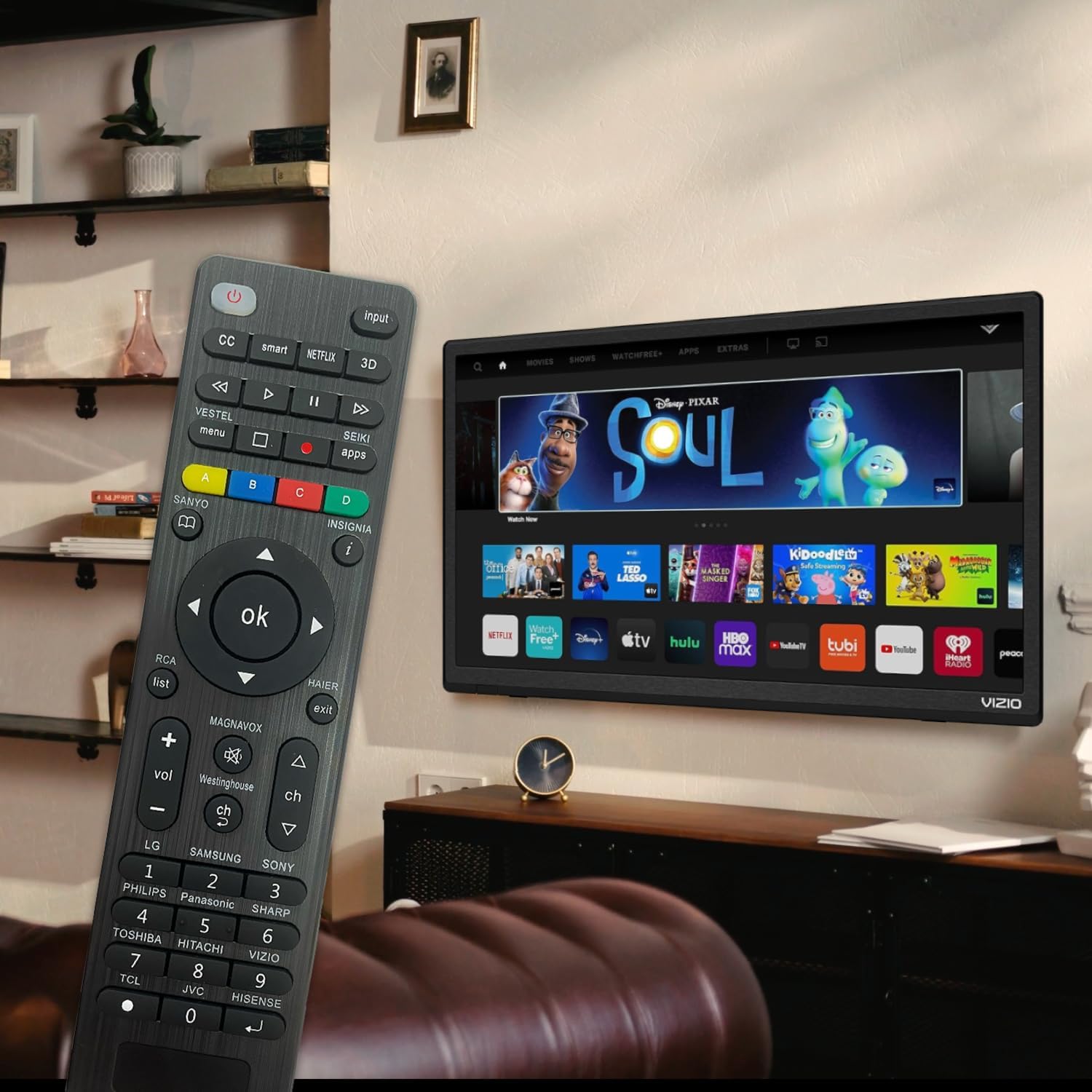
Figure 6: Remote in use with a Smart TV
4. Priežiūra
- Valymas: Nuotolinio valdymo pultą valykite minkšta, sausa šluoste. Nenaudokite skystų valiklių ar abrazyvinių medžiagų, nes jos gali pažeisti paviršių ar vidinius komponentus.
- Baterijos keitimas: Replace batteries when the remote's response becomes sluggish or the LED indicator does not light up. Always replace both batteries at the same time with new AAA batteries. Do not mix old and new batteries or different types of batteries.
- Saugykla: If the remote will not be used for an extended period, remove the batteries to prevent leakage and potential damage. Store the remote in a cool, dry place away from direct sunlight and extreme temperatures.
- Patvarumas: The remote features upgraded material with a metal dome added to the control buttons for enhanced flexibility and extended life. Avoid dropping the remote or exposing it to excessive force.
5. Problemų sprendimas
| Problema | Galima priežastis | Sprendimas |
|---|---|---|
| Nuotolinio valdymo pultas neveikia. | Batteries are dead or inserted incorrectly. Remote is not paired with the TV. Obstruction between remote and TV. | Check and replace batteries, ensuring correct polarity. Re-attempt Brand Setting or Code Setting. Ensure clear line of sight to TV's IR receiver. |
| Kai kurie mygtukai neveikia. | Incorrect code or partial pairing. TV does not support certain functions. | Try a different code from the manual's code list. Verify if your TV model supports the specific function. |
| Remote is slow to respond. | Low battery power. Interference. | Replace batteries. Ensure no strong light sources or other IR devices are interfering. |
| LED indicator keeps lighting up during code setting. | Įvestas neteisingas kodas. | Re-enter the correct 3 or 4-digit code from the manual's code list. |
| Cannot find my TV brand button. | Brand not listed on dedicated buttons. | Use the Code Setting Method (Section 2.2) with the provided code list. |
If issues persist, please refer to the original product packaging for customer support contact information or visit the manufacturer's websvetainę.
6. Specifikacijos
- Modelio numeris: BVTVRemote-01
- Gaminio matmenys: 1.38 x 0.6 x 6.5 colio
- Prekės svoris: 2.39 uncijos
- Reikalingos baterijos: 2 x AAA (neįtraukta)
- Spalva: Juoda
- Ypatinga funkcija: Programmable, Power-off Memory
- Maksimalus palaikomų įrenginių skaičius: 3 (typically for TV, DVD/Blu-ray Player, though primarily designed for TV)
- Suderinami įrenginiai: Television, DVD/Blu-ray Player (Universal compatibility with major TV brands)
- Gamintojas: BoostVision
- Kilmės šalis: Kinija
7. Garantija ir palaikymas
For warranty information, please refer to the documentation included with your purchase or contact the seller directly. This product is typically covered by a standard manufacturer's warranty against defects in materials and workmanship.
For technical support or further assistance, please contact BoostVision customer service through their official websvetainėje arba kontaktiniais duomenimis, pateiktais ant produkto pakuotės.
Pardavėjas: BoostVision TV Remote
„Amazon“ produkto puslapis: https://www.amazon.com/dp/B0DHCZB2DT
Ask a question about this manual
Ask about setup, troubleshooting, compatibility, parts, safety, or missing instructions. Manuals+ will review the question and use this page’s manual context to help answer it.