
Įvadas
This instruction manual provides detailed guidance for the Anderic RR787T Replacement Remote Control. Designed as a direct replacement for RH787T and UC787T remotes, it offers comprehensive control for Casablanca DC motor ceiling fans and other compatible high-end models. Features include six fan speeds, reverse airflow, and dimmable light control (for incandescent bulbs). This remote is specifically engineered for ceiling fans utilizing receivers with 4 dip switches, including those originally paired with the RH786R receiver.
Pakuotės turinys
Patikrinkite, ar pakuotėje yra visi reikalingi daiktai:
- Anderic RR787T Remote Control
- Sienos laikiklis
- Tvirtinimo varžtai ir sieniniai inkarai
- Pastaba: Reikalingos dvi AAA baterijos, kurios nepridedamos.

Image: Anderic RR787T remote control securely placed in its wall mount holder.
Sąranka
Follow these steps to set up your new remote control:
- Įdėkite baterijas: Open the battery compartment on the back of the remote. Insert two AAA batteries (not included), ensuring correct polarity.
- Set Dip Switches: Locate the 4 dip switches inside the battery compartment. Match the dip switch settings on your new Anderic RR787T remote to the settings on your existing ceiling fan receiver or old remote. This step is crucial for proper communication between the remote and the fan.
- Sieninis laikiklis: Use the provided screws and wall anchors to securely mount the wall bracket in a convenient location.
- Insert Remote: Slide the remote control into the mounted wall bracket.

Vaizdas: Galinis view of the Anderic RR787T remote, highlighting the battery compartment and dip switches for configuration.
Demonstracinio vaizdo įrašo sąranka
Video: A demonstration of a similar Anderic remote (UC7225T) showing its features and operation, which can provide general guidance for setup and use. Note that this video is for a different model (UC7225T) but from the same brand.
Naudojimo instrukcijos
The Anderic RR787T remote offers intuitive control over your ceiling fan and light:
- Maitinimo įjungimas/išjungimas: Norėdami įjungti arba išjungti ventiliatorių ir apšvietimą, paspauskite maitinimo mygtuką.
- Ventiliatoriaus greičio valdymas: Use the fan speed buttons (typically marked I, II, III, IV, V, VI or Low, Med, High) to adjust the fan's rotation speed. The RR787T supports 6 fan speeds.
- Atbulinis oro srautas: Press the reverse button to change the direction of the fan blades, allowing for seasonal comfort (downward airflow for cooling, upward for circulating warm air).
- Šviesos valdymas:
- Norėdami įjungti arba išjungti šviesą, paspauskite šviesos mygtuką.
- To dim the light (with incandescent bulbs), press and hold the light button. Release when the desired brightness is reached.
- Note: For LED, CFL, or other non-incandescent bulbs, the dimming function can be disabled inside the battery compartment to prevent issues.
- Laikmačio funkcija: The remote includes timer buttons (e.g., 1H, 2H, 4H, 8H) to set the fan to operate for a specific duration before automatically turning off.
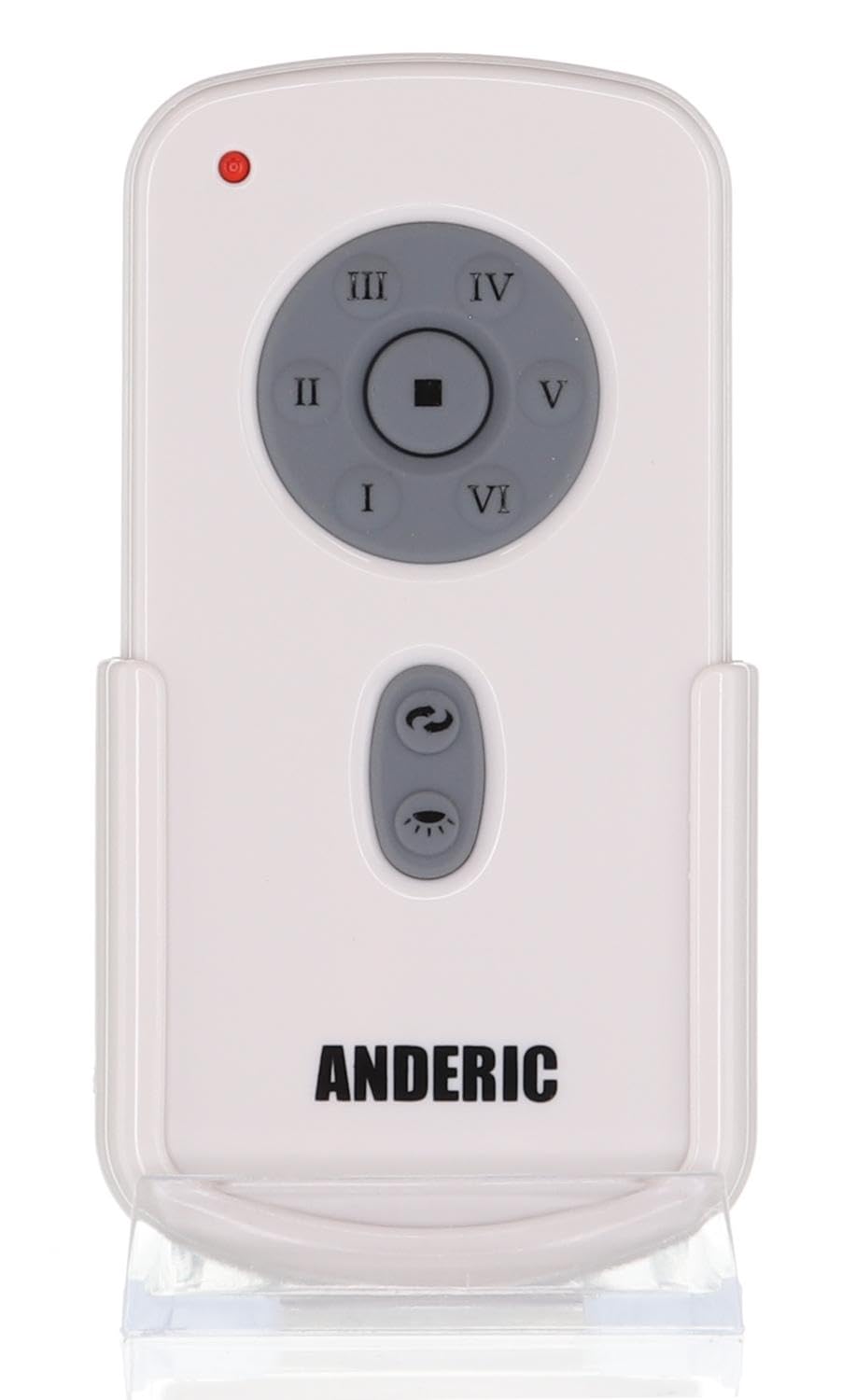
Vaizdas: priekis view of the Anderic RR787T remote control, displaying its intuitive button layout for easy operation.
Suderinamumas
The Anderic RR787T is designed for broad compatibility with specific ceiling fan systems:
- Imtuvai: Designed for ceiling fans that use receivers with 4 dip switches, including models originally paired with RH786R, RH787T, and UC787T remotes.
- Fan Brands: Compatible with high-end ceiling fans from brands such as Casablanca, Monte Carlo, Fanimation, Regency, and Home Decorators Collection.
- Palaikomi modeliai: Includes Casablanca Panama, Stealth, Stingray, Fellini, and Monte Carlo Vision, Arcade, Hicks, and Dover series.
- Svarbi pastaba: Not compatible with Fanimation Slinger fans (especially newer models), fans requiring 5 dip switch receivers, or 315 MHz systems like Harbor Breeze ZJF-HH-YK-A008. Always verify your fan's receiver type before purchase.
Priežiūra
Norėdami užtikrinti nuotolinio valdymo pulto ilgaamžiškumą ir optimalų veikimą, laikykitės šių priežiūros nurodymų:
- Baterijos keitimas: Replace batteries when the remote's performance diminishes. Ensure correct battery type (2 AAA) and polarity.
- Valymas: Nuotolinio valdymo pultą valykite minkštu, sausu skudurėliu. Venkite naudoti stiprias chemines medžiagas ar abrazyvinius valiklius.
- Saugykla: Nuotolinio valdymo pultą laikykite vėsioje, sausoje vietoje, apsaugotoje nuo tiesioginių saulės spindulių ir ekstremalių temperatūrų.
Trikčių šalinimas
Jei kyla problemų dėl nuotolinio valdymo pulto, žr. šiuos dažniausiai pasitaikančius sprendimus:
- Nuotolinio valdymo pultas nereaguoja:
- Patikrinkite akumuliatoriaus lygį ir, jei reikia, pakeiskite.
- Ensure the dip switch settings on the remote match the receiver.
- Verify the fan's power supply is active.
- Šviesa netamsėja:
- Confirm that incandescent bulbs are being used.
- Check if the dimming function is enabled inside the battery compartment.
- Fan Not Changing Speed/Direction:
- Ensure the remote is within range of the receiver.
- Re-check dip switch settings.
Specifikacijos
| Prekės ženklas | Anderikas |
| Modelio numeris | RR787T (replaces RH787T) |
| Pakuotės matmenys | 4.96 x 4.92 x 2.8 colio |
| Prekės svoris | 3.2 uncijos |
| Baterijos | 2 AAA baterijos (į komplektą neįeina) |
| Ypatinga funkcija | Sieninis kalnas pridedamas |
| Spalva | Baltas |
| Maksimalus palaikomų įrenginių skaičius | 1 |
| Suderinami įrenginiai | Ventiliatorius |
Garantija ir palaikymas
For warranty information or technical support, please refer to the product packaging or contact Anderic customer service directly. Keep your proof of purchase for any warranty claims.