
Ebitcam B0DHX2WK2T
„Ebitcam“ vidaus kameros naudotojo vadovas
Model: B0DHX2WK2T
Prekės ženklas: Ebitcam
1. Įvadas
The Ebitcam Indoor Camera is a versatile home security device designed to provide comprehensive monitoring with its 360° pan/tilt capabilities, 1080P HD video, and advanced features like color night vision and two-way audio. This camera is ideal for monitoring pets, babies, or for general home security. It operates on 2.4GHz WiFi networks.

Figure 1.1: Ebitcam Indoor Camera and its mobile application interface.
2. Kas yra dėžutėje
Patikrinkite pakuotės turinį, kad įsitikintumėte, jog yra visi reikalingi daiktai:
- 1x Ebitcam Smart Security Camera
- 1x USB adapteris
- 1x kabelis
- 1x greito montavimo vadovas
- 1x montavimo priedai
3. Sąrankos vadovas
- Įjunkite fotoaparatą: Connect the camera to a power source using the provided USB adapter and cable. The camera will power on automatically.

Figure 3.1: Connect the camera to power.
- Download the EbitCam App: Scan the QR code in the Quick Installation Guide or search for "EbitCam" in your mobile app store (iOS or Android) to download and install the application.

Figure 3.2: Download the EbitCam mobile application.
- Pridėti įrenginį programėlėje: Open the EbitCam app, create an account if you don't have one, and log in. Tap the "+" icon to add a new device. Follow the on-screen instructions to connect the camera to your 2.4GHz Wi-Fi network. Ensure your phone is connected to the same 2.4GHz Wi-Fi network during setup.

Figure 3.3: Steps to add the camera in the EbitCam app.
- View Tiesioginis tiekimas: Once successfully connected, you can view the live video feed from your camera through the EbitCam app.

3.4 pav.: Tiesiogiai view of the camera feed on a smartphone.
4. Naudojimo instrukcijos
4.1. Pakreipimo ir pasukimo valdymas
The Ebitcam Indoor Camera offers a 355° horizontal and 115° vertical rotation range, allowing you to monitor a wide area. Control the camera's movement directly from the EbitCam app by swiping on the live video feed.
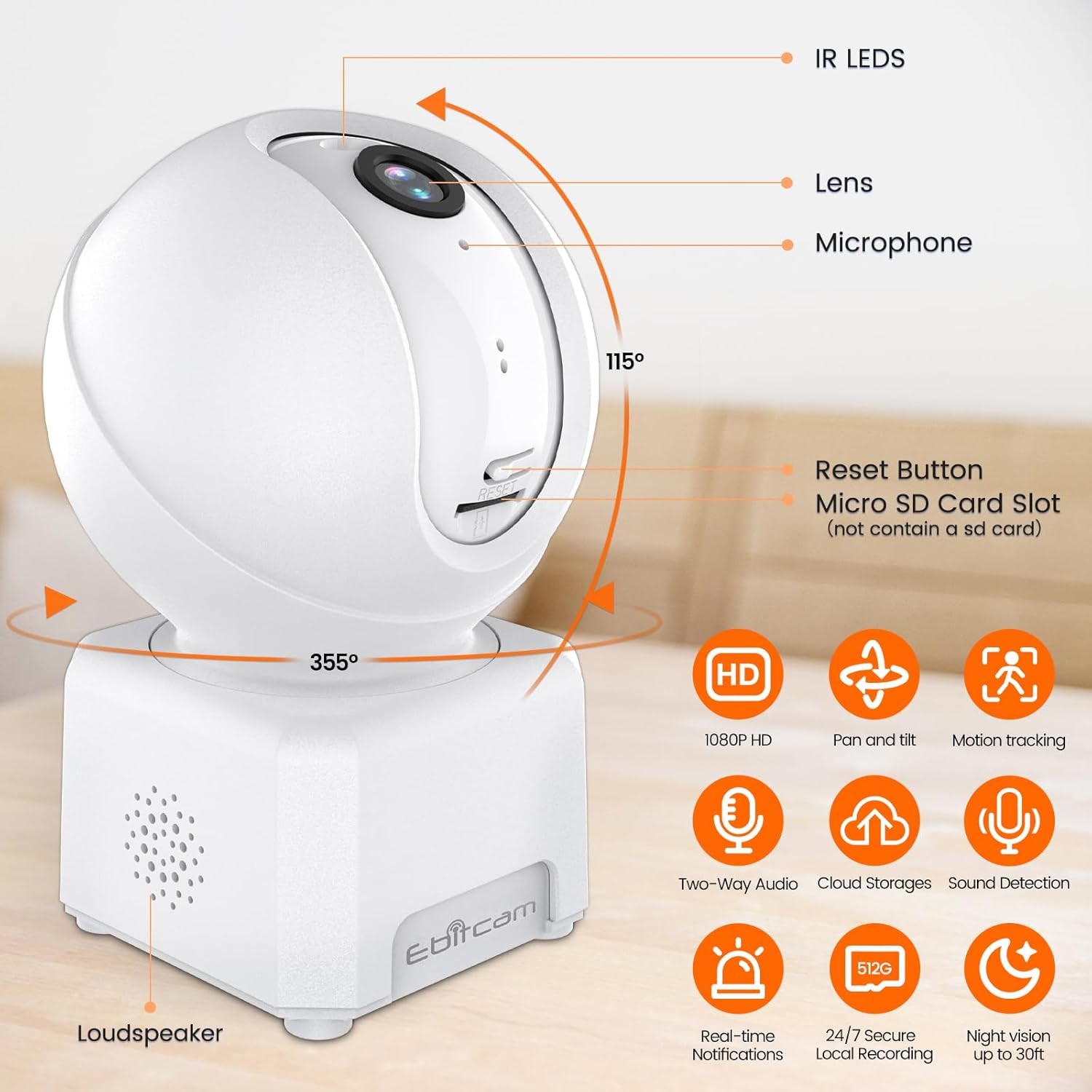
4.1 pav.: Kameros panoraminio ir pakreipimo galimybės.
4.2. 1080P HD Color Night Vision
The camera provides sharp 1080P HD resolution and features advanced color night vision technology with a dual-source lighting system. Equipped with 1 PIR LED, it offers clear visibility up to 20 feet in low-light conditions. You can select between vivid full-color night vision or traditional infrared night vision modes within the app.

Figure 4.2: Clear day and night vision capabilities.
4.3. AI Human/Sound/Motion Detection
The camera is equipped with advanced motion sensors and intuitive analytics. It can detect human movement and unusual sounds, sending timely notifications to your EbitCam app. This feature helps minimize unnecessary alerts while ensuring important events are captured.

Figure 4.3: Motion detection and tracking in action.
4.4. Two-Way Audio & Alexa Integration
With a built-in microphone and speaker, the camera supports two-way audio communication, allowing you to speak with and listen to your baby, pet, or family members remotely. The camera also works with Alexa; simply ask Alexa to display the camera's view suderinamuose įrenginiuose.
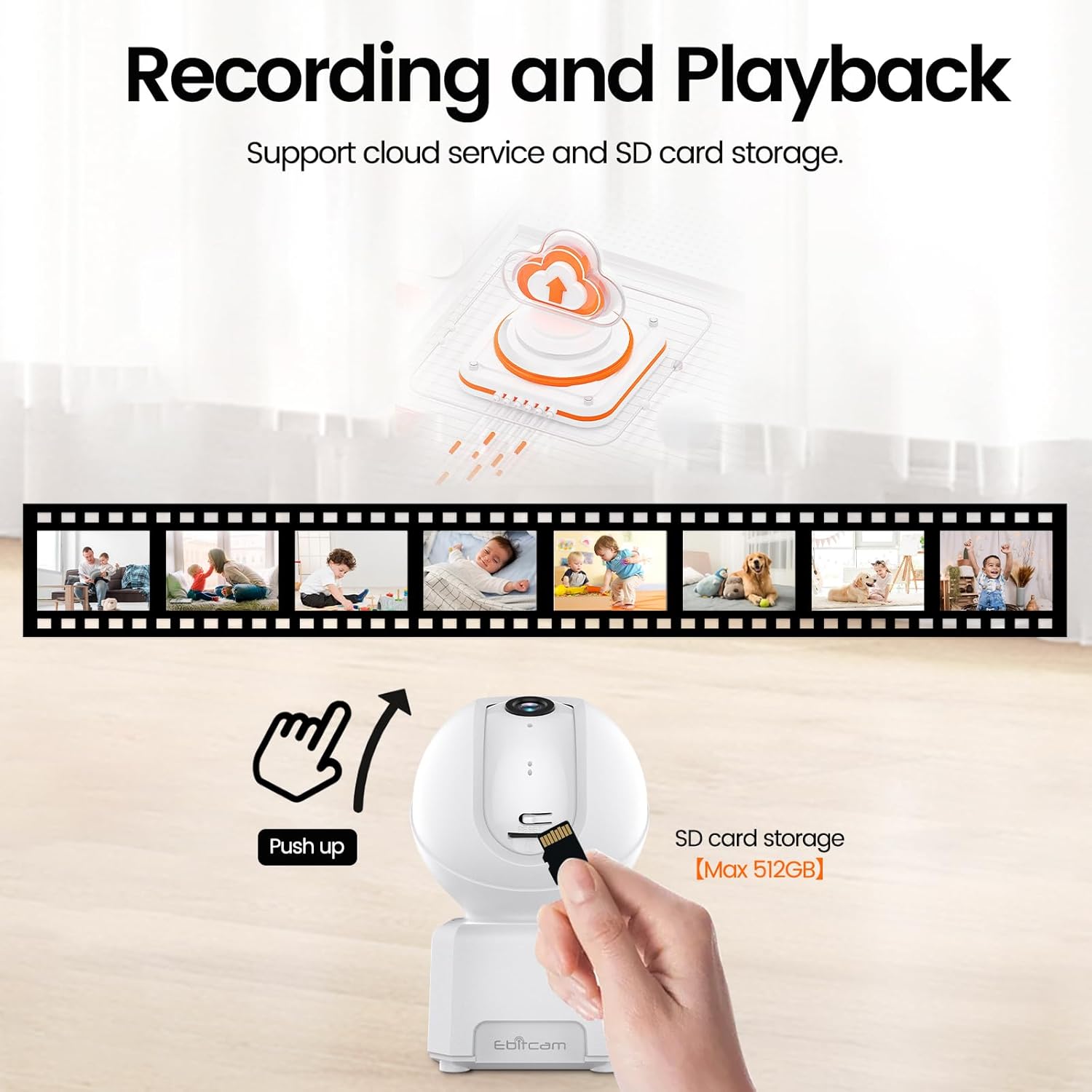
Figure 4.4: Camera integration with Alexa for voice control.
4.5. Kelių vartotojų palaikymas
The EbitCam mobile application allows multiple users to control and view the camera simultaneously on both iOS and Android devices. You can easily share access to the camera with friends and family members.

Figure 4.5: Multiple users can access the camera feed.
4.6. Įrašymas ir saugojimas
The camera supports two storage options for continuous 24/7 recording:
- Saugykla debesyje: Financial encryption video storage technology allows private recording in the EbitCam cloud storage (sold separately). A 30-day free cloud trial is available for first-time users.
- Vietinė SD kortelės saugykla: The camera supports a Micro SD card up to 512GB (not included) for local storage, providing continuous recording without a subscription fee. To access the Micro SD card slot, gently push the camera head upwards.

Figure 4.6: Cloud and local SD card storage options.
5. Priežiūra
To ensure optimal performance and longevity of your Ebitcam Indoor Camera, follow these maintenance guidelines:
- Valymas: Use a soft, dry cloth to clean the camera's exterior. For the lens, use a microfiber cloth specifically designed for optics. Avoid using harsh chemicals or abrasive cleaners.
- Vieta: Place the camera in a stable location, away from direct sunlight, heat sources, and excessive moisture. Ensure proper ventilation around the device.
- Firmware atnaujinimai: Regularly check the EbitCam app for available firmware updates to ensure your camera has the latest features and security enhancements.
6. Problemų sprendimas
If you encounter issues with your Ebitcam Indoor Camera, refer to the following common problems and solutions:
| Problema | Galima priežastis | Sprendimas |
|---|---|---|
| Kamera neįsijungia | Maitinimo adapterio arba laido problema; maitinimo lizdo problema. | Ensure the power adapter is securely connected to the camera and a working power outlet. Try a different outlet. |
| Nepavyksta prisijungti prie „Wi-Fi“. | Neteisingas „Wi-Fi“ slaptažodis; 5 GHz „Wi-Fi“ tinklas; kamera per toli nuo maršrutizatoriaus. | Verify Wi-Fi password. Ensure you are connecting to a 2.4GHz Wi-Fi network. Move the camera closer to the router. |
| Prasta vaizdo kokybė | Silpnas „Wi-Fi“ signalas; nešvarus objektyvas. | Check your Wi-Fi signal strength in the app. Clean the camera lens with a soft cloth. |
| Judesio aptikimas neveikia | Detection settings disabled or sensitivity too low. | Check the motion detection settings in the EbitCam app and adjust sensitivity as needed. |
| SD kortelė neįrašo | SD card not inserted correctly; card full or corrupted; incorrect format. | Ensure the SD card is inserted correctly. Check card capacity and format (FAT32 recommended). Try reformatting the card via the app or replacing it. |
7. Techninės specifikacijos
| Funkcija | Specifikacija |
|---|---|
| Modelis | B0DHX2WK2T |
| Vaizdo įrašymo raiška | 1080p |
| Viewing kampas | 360 Degrees (355° horizontal, 115° vertical) |
| Ryšio technologija | „Wi-Fi“ (2.4 GHz) |
| Naktinio matymo diapazonas | 6 Meters (approx. 20 ft) |
| Sandėliavimas | „Micro SD“ (iki 512 GB), debesies saugykla |
| Dvipusis garsas | Taip |
| Judesio aptikimas | AI Human/Sound/Motion Detection |
| Suderinami įrenginiai | Amazon Alexa, Android, Apple HomeKit (via app) |
| Maitinimo šaltinis | Laidinis elektrinis (5 voltų nuolatinė srovė, 5 vatų) |
| Matmenys (I x P x A) | 3.15 x 4.21 x 2.83 colio |
| Prekės svoris | 9.9 uncijos |
| Medžiaga | Akrilnitrilo butadieno stirenas (ABS) |
8. Garantija ir palaikymas
Ebitcam is committed to customer satisfaction. Your Ebitcam Indoor Camera comes with a vienerių metų garantija from the date of purchase. Additionally, Ebitcam offers visą gyvenimą trunkanti techninė pagalba už produktą.
If you encounter any problems or have questions regarding your camera, please contact Ebitcam customer service. They aim to reply within 24 hours for assistance with returns, refunds, or technical queries.
For support, please refer to the contact information provided in your Quick Installation Guide or visit the official Ebitcam websvetainę.
Ask a question about this manual
Ask about setup, troubleshooting, compatibility, parts, safety, or missing instructions. Manuals+ will review the question and use this page’s manual context to help answer it.