
1. Įvadas
This manual provides comprehensive instructions for the safe and efficient operation of your HTVRONT Auto Heat Press 2. Please read this manual thoroughly before using the device to ensure proper function and to prevent damage or injury. Keep this manual for future reference.
2. Saugos informacija
ĮSPĖJIMAS: Nesilaikant šių saugos nurodymų, gali kilti gaisras, elektros smūgis arba būti kitaip sužalota ar apgadinta.
- Terminį presą visada naudokite ant stabilaus, karščiui atsparaus paviršiaus.
- Keep hands and fingers clear of the heating plate during operation to avoid burns.
- Nemerkite mašinos į vandenį ar kitus skysčius.
- Įsitikinkite, kad maitinimo laidas nėra pažeistas ir tinkamai įjungtas į įžemintą lizdą.
- Išjunkite mašiną, kai jos nenaudojate arba prieš valydami.
- Darbo metu nepalikite mašinos be priežiūros.
- The machine features an automatic shut-off function after 15 minutes of inactivity to prevent overheating.
- Laikyti vaikams nepasiekiamoje vietoje.
3. Produktas baigtasview
The HTVRONT Auto Heat Press 2 is designed for efficient and precise heat transfer applications. Familiarize yourself with its main components:
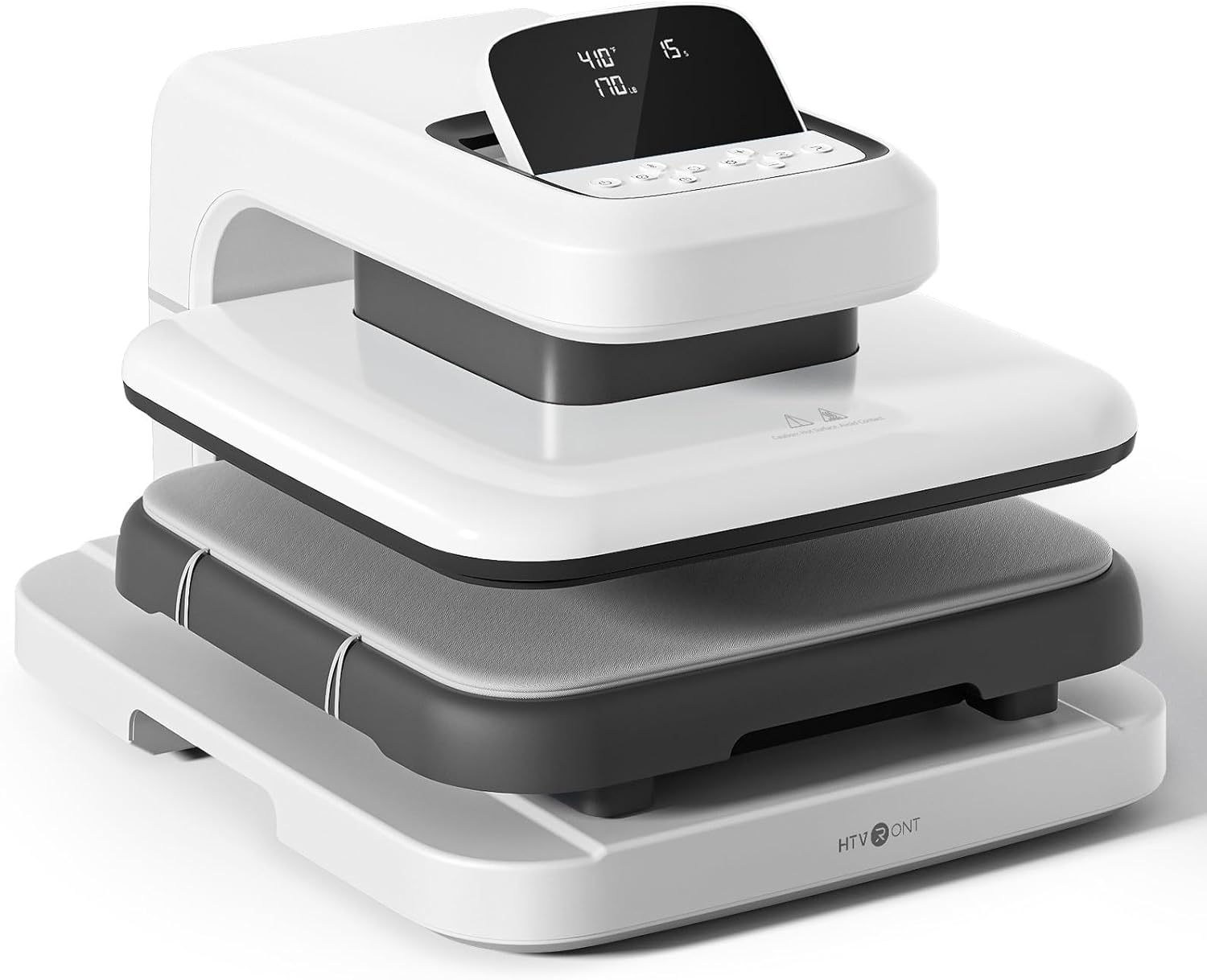

- Šildymo plokštė: The upper heating element that applies heat and pressure.
- Lyginimo lenta (apatinė plokštuma): The surface where materials are placed for pressing. Features a fully pull-out drawer design.
- Bazė: Užtikrina mašinos stabilumą.
- LED ekranas: Displays temperature, time, and pressure settings.
- Valdymo mygtukai: Used to adjust settings and initiate operations.
4. Sąranka
Follow these steps to set up your HTVRONT Auto Heat Press 2 for first use:
- Išpakuokite mašiną: Carefully remove the heat press from its packaging. Retain all packaging materials for potential future transport or storage.
- Vieta: Place the machine on a flat, stable, and heat-resistant surface. Ensure there is adequate clearance around the machine for ventilation and safe operation.
- Maitinimo jungtis: Connect the power cord to the machine and then plug it into a standard 110V (DC) grounded electrical outlet.
- Pradinis įjungimas: Press the power button to turn on the machine. The LED screen will illuminate.

5. Naudojimo instrukcijos
5.1. Įjungimas/išjungimas
- Norėdami įjungti, paspauskite maitinimo mygtuką.
- Norėdami išjungti, paspauskite ir palaikykite maitinimo mygtuką, kol ekranas išsijungs.
5.2. Setting Parameters (Temperature, Time, Pressure)
The HTVRONT Auto Heat Press 2 allows for precise control over temperature, time, and pressure to suit various materials and transfer types.
- Temperatūros diapazonas: 100–210 °C (210–410 °F)
- Laiko diapazonas: 1–999 sekundžių
- Slėgio diapazonas: 50 - 170 LB (adjustable)

Use the control buttons on the LED screen to adjust these settings. The machine heats up quickly, reaching 410°F within 5 minutes and 30 seconds.

5.3. Automatic Pressing Cycle
Once parameters are set and the material is in place, the automatic pressing function simplifies operation:
- Place your substrate and transfer material on the ironing board.
- Press the "R" button to initiate the automatic pressing cycle. The heat plate will descend and apply pressure.
- The machine will buzz when the set time is complete and automatically release the heat plate.

5.4. Using the Fully Pull-out Drawer
The ironing board features a fully pull-out drawer, allowing for safe and easy placement of materials without contact with the hot heat plate.
- Pull the drawer completely out before placing or adjusting your items.
- Push the drawer back in before starting the pressing cycle.
5.5. Adjusting Screen Angle
The LED screen can be adjusted to 7 levels within a 0-75° range for improved visibility and ergonomic comfort during operation.

5.6. Material Compatibility and Higher Heating Height
The HTVRONT Auto Heat Press 2 is compatible with various heat transfer materials and features an increased heating height for thicker items.
- Suderinamos medžiagos: HTV (Heat Transfer Vinyl), Sublimation Paper, DTF (Direct to Film), Heat Transfer Paper, Puff Heat Transfer Vinyl, Glitter Heat Transfer Vinyl.
- Increased Heating Height: Up to 4.5 cm (1.77 inches), allowing for pressing on thicker items such as hoodies, canvas bags, and pillows, in addition to t-shirts.


6. Priežiūra
Tinkama priežiūra užtikrina jūsų šiluminio preso ilgaamžiškumą ir optimalų veikimą.
- Šildymo plokštės valymas: Leiskite prietaisui visiškai atvėsti. Naudokite minkštą, sausą šluostę.amp cloth to wipe the heat plate. For stubborn residue, a specialized heat press cleaner can be used, following the cleaner's instructions. Avoid abrasive materials.
- Cleaning the Ironing Board: Wipe the ironing board with a damp audinys. Prieš kitą naudojimą įsitikinkite, kad jis yra sausas.
- Bendras valymas: Mašinos išorę nuvalykite minkštu, sausu skudurėliu.
- Saugykla: Nenaudojamą terminį presą laikykite sausoje, be dulkių aplinkoje.
7. Problemų sprendimas
If you encounter issues with your HTVRONT Auto Heat Press 2, refer to the following common troubleshooting steps:
| Problema | Galima priežastis | Sprendimas |
|---|---|---|
| Aparatas neįsijungia. | Maitinimo laidas netinkamai prijungtas; problema su maitinimo lizdu. | Ensure the power cord is securely plugged into both the machine and a working grounded outlet. Test the outlet with another device. |
| Mašina nešildo. | Temperature not set; machine in standby mode. | Verify temperature settings on the LED screen. Allow sufficient time for preheating. If the machine has been idle for 15 minutes, it may have entered auto shut-off mode; power cycle the machine. |
| Uneven heat transfer results. | Incorrect pressure; uneven material placement; faulty transfer material. | Adjust pressure settings as needed (50-170 LB). Ensure material is laid flat and evenly. Test with new transfer material. |
| Automatic press not engaging/releasing. | "R" button not pressed; obstruction. | Ensure the "R" button is pressed firmly. Check for any obstructions preventing the heat plate from moving freely. |
If the problem persists after attempting these solutions, please refer to the support section for further assistance.
8. Specifikacijos
| Funkcija | Detalė |
|---|---|
| Modelio numeris | SG-RYJ-0521-US |
| Šildymo plokštės dydis | 15 x 15 colio (38.1 x 38.1 cm) |
| Temperatūros diapazonas | 100–210 °C (210–410 °F) |
| Laiko diapazonas | 1–999 sekundžių |
| Slėgio diapazonas | 50 - 170 LB |
| Increased Heating Height | Iki 4.5 cm (1.77 colio) |
| Galia | 1500W |
| Įvesties tomastage | 110 volto (DC) |
| Prekės svoris | 47.4 svaro (21.54 kg) |
| Gaminio matmenys | Maždaug 20.9 cm ilgio x 17.1 cm pločio x 13 cm aukščio |
| Automatinis išjungimas | Po 15 minučių neveikimo |
| Ekrano kampo reguliavimas | 0-75 laipsnių |
9. Garantija ir palaikymas
For warranty information, please refer to the documentation included with your purchase or visit the official HTVRONT website. For technical support, product inquiries, or assistance with troubleshooting beyond this manual, please contact HTVRONT customer service through their official channels. Details can typically be found on the manufacturer's websvetainėje arba jūsų pirkimo platformoje.
Note: The manufacturer is committed to providing support; however, specific contact methods may vary. Always check the latest information on the official HTVRONT websvetainę.