
1. Įvadas
The Groov-e Lisbon Portable DAB & FM Digital Radio offers a versatile listening experience with its dual-band radio capabilities and Bluetooth connectivity. Designed for portability, it features an intuitive LCD display, a built-in alarm clock, and a headphone jack for private listening. This manual provides detailed instructions for setup, operation, and maintenance of your Lisbon radio.

Vaizdas: Viršview of the Groov-e Lisbon radio highlighting its key features like DAB/FM, Bluetooth, LCD display, alarm clock, and headphone socket.
2. Produkto ypatybės
- DAB/FM Digital Stations & Bluetooth Streaming: This portable digital radio comes with DAB & FM technology, so tune into preset stations with auto-scan and manual tuning. Plus use Bluetooth to turn your radio into a speaker and stream your music on the go.
- Blue LCD Display: The LCD screen features a blue background light that notifies you of the radio station that you're tuned into and can be dimmed or turned off, while the easy front-on buttons are simple to use for easy tuning and navigation.
- Built-In Alarm Clock: The handy built-in alarm clock allows you to set your alarm clock as to when you want it to go off so you can stay organised and also features a snooze and timer function.
- 3.5 mm ausinių įvestis: Thanks to the 3.5mm jack input you can easily plug in your own earphones so you can listen quietly and in peace while the expanding telescopic antenna allows for crystal clear signal.
- Designed to Travel: Portable, sleek, and sized to fit on a shelf or table, this radio can be powered using a USB cable or batteries (not included); a convenient travel companion that can be easily carried or tucked into your backpack or luggage.
3. Pakuotės turinys
Prašome patikrinti, ar yra visi daiktai:
- Groov-e Lisbon Portable DAB & FM Digital Radio
- USB maitinimo laidas
- Vartotojo vadovas (šis dokumentas)
4. Valdikliai ir ekranas
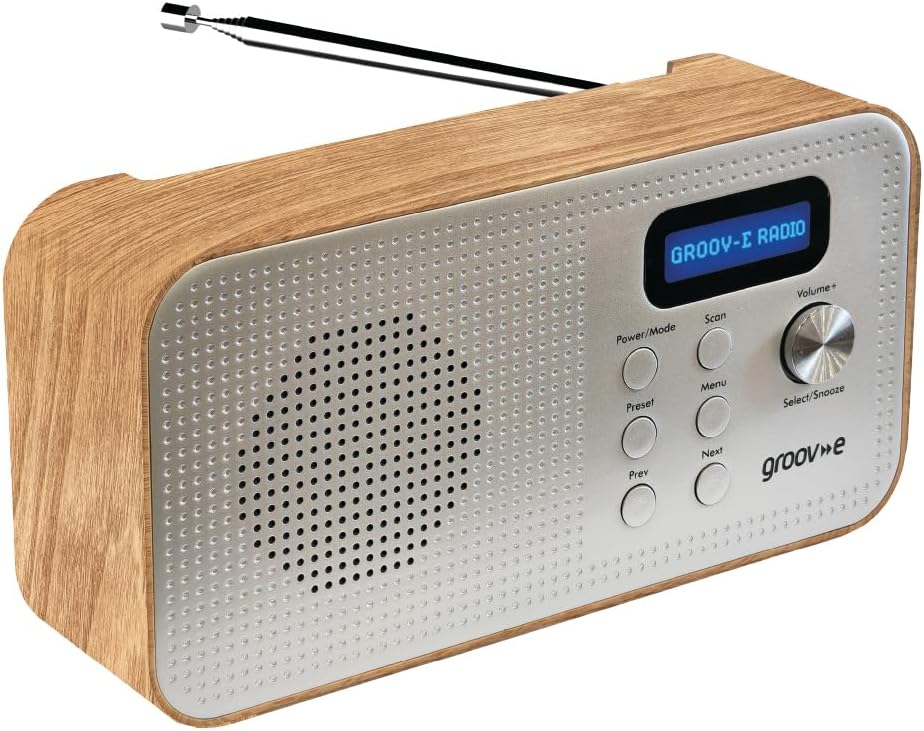
Image: Front panel of the Groov-e Lisbon radio, detailing the layout of buttons, the volume knob, and the LCD screen.
Priekinio skydelio valdikliai:
- Maitinimo / režimo mygtukas: Press to turn the radio on or off. Press repeatedly to cycle through DAB, FM, and Bluetooth modes.
- Nuskaitymo mygtukas: Initiates an auto-scan for available radio stations in DAB or FM mode.
- Meniu mygtukas: Accesses the menu options for the current mode.
- Iš anksto nustatytas mygtukas: Used to save and recall your favorite radio stations.
- Prev Button: Navigates to the previous station, menu option, or track.
- Kitas mygtukas: Navigates to the next station, menu option, or track.
- Volume+ / Select/Snooze Knob: Rotate to adjust volume. Press to select a menu option or to activate the snooze function when an alarm sounds.
LCD ekranas:
The blue backlit LCD display shows current station information, time, alarm status, and menu options. It can be dimmed or turned off to conserve power or for nighttime use.

Image: A graphic icon symbolizing an LCD display, indicating the presence of a digital screen on the radio.
5. Sąranka
Powering Your Radio:
The Groov-e Lisbon radio can be powered in two ways:
- USB maitinimas: Connect the supplied USB cable to the radio's USB port and plug the other end into a compatible USB power adapter (not included) or a powered USB port.
- Baterijos galia: For portable use, insert 4 x AA batteries (not included) into the battery compartment located on the back of the unit. Ensure correct polarity.
Antena:
Extend the telescopic antenna fully for optimal DAB and FM radio reception.

Image: A woman enjoying the Groov-e Lisbon radio outdoors, illustrating its portable design and ease of use for travel.
6. Naudojimo instrukcijos
6.1 Įjungimas / išjungimas ir režimo pasirinkimas
- To turn on the radio, press the Maitinimas / režimas mygtuką.
- Norėdami išjungti radiją, paspauskite ir palaikykite Maitinimas / režimas mygtuką.
- To switch between DAB, FM, and Bluetooth modes, press the Maitinimas / režimas mygtuką pakartotinai.
6.2 DAB radijo veikimas
- Automatinis nuskaitymas: DAB režimu paspauskite Nuskaityti button to automatically search for and store all available DAB stations.
- Rankinis derinimas: Naudokite Ankstesnis or Kitas buttons to browse through available stations.
- Išankstinių nustatymų išsaugojimas: Nustatykite norimą stotį. Paspauskite ir palaikykite Iš anksto nustatytas button until "Preset Store" appears. Use Ankstesnis/Kitas , kad pasirinktumėte iš anksto nustatytos stoties numerį (1–20), tada paspauskite Select/Snooze patvirtinimo mygtuku.
- Išankstinių nustatymų atšaukimas: Trumpai paspauskite Iš anksto nustatytas mygtuką. Naudokite Ankstesnis/Kitas , kad pasirinktumėte norimą iš anksto nustatyto nustatymo numerį, tada paspauskite Select/Snooze patvirtinimo mygtuku.
6.3 FM radijo veikimas
- Automatinis nuskaitymas: FM režimu paspauskite Nuskaityti mygtuką, kad automatiškai ieškotumėte ir išsaugotumėte galimas FM stotis.
- Rankinis derinimas: Naudokite Ankstesnis or Kitas mygtukais, kad tiksliai sureguliuotumėte dažnį.
- Išankstinių nustatymų išsaugojimas: Nustatykite norimą stotį. Paspauskite ir palaikykite Iš anksto nustatytas button until "Preset Store" appears. Use Ankstesnis/Kitas , kad pasirinktumėte iš anksto nustatytos stoties numerį (1–20), tada paspauskite Select/Snooze patvirtinimo mygtuku.
- Išankstinių nustatymų atšaukimas: Trumpai paspauskite Iš anksto nustatytas mygtuką. Naudokite Ankstesnis/Kitas , kad pasirinktumėte norimą iš anksto nustatyto nustatymo numerį, tada paspauskite Select/Snooze patvirtinimo mygtuku.

Image: The Groov-e Lisbon radio displayed with text emphasizing its DAB/FM digital station capabilities and Bluetooth streaming functionality.
6.4 „Bluetooth“ ryšys
- Perjunkite radiją į Bluetooth režimas naudojant Maitinimas / režimas button. The display will show "Bluetooth Pairing".
- On your Bluetooth-enabled device (smartphone, tablet, etc.), search for "Groov-e Lisbon" in the Bluetooth settings.
- Select "Groov-e Lisbon" to pair. Once connected, the radio will indicate successful pairing.
- You can now stream audio from your device to the radio. Use the Ankstesnis/Kitas buttons on the radio to skip tracks, and the Apimtis+ rankenėlę garsumui reguliuoti.
6.5 Žadintuvo funkcija
- Signalo nustatymas: Paspauskite Meniu mygtuką, tada naudokite Ankstesnis/Kitas to navigate to "Alarm Setup". Press Select/Snooze to enter. Follow the on-screen prompts to set the alarm time, source (DAB/FM/Buzzer), and volume.
- Snausti: Kai skamba žadintuvas, paspauskite Select/Snooze knob to activate snooze. The alarm will temporarily stop and sound again after a set interval.
- Signalo sustabdymas: Press any other button (except Snooze) to turn off the alarm for the day.
- Miego laikmatis: Paspauskite Meniu button, then navigate to "Sleep Timer". Use Ankstesnis/Kitas to set the desired sleep duration (e.g., 15, 30, 60 minutes). The radio will automatically turn off after the set time.

Image: A graphic icon symbolizing an alarm clock, indicating the radio's built-in alarm functionality.
6.6 Ausinių naudojimas
- Plug any standard 3.5mm headphones into the headphone jack located on the side or back of the radio.
- Prijungus ausines, radijo vidinis garsiakalbis automatiškai nutildomas.
- Reguliuokite garsumą naudodami Apimtis+ rankenėlė.

Image: A graphic icon symbolizing headphones, indicating the radio's headphone jack for private listening.
7. Priežiūra
- Valymas: Radijo paviršių valykite minkštu, sausu skudurėliu. Nenaudokite abrazyvinių valiklių ar tirpiklių.
- Akumuliatoriaus priežiūra: If using batteries, remove them if the radio will not be used for an extended period to prevent leakage.
- Saugykla: Radijo imtuvą laikykite vėsioje, sausoje vietoje, toliau nuo tiesioginių saulės spindulių ir ekstremalių temperatūrų.
- Antena: Handle the telescopic antenna with care to avoid bending or breaking.
8. Problemų sprendimas
| Problema | Galima priežastis | Sprendimas |
|---|---|---|
| Radijas neįsijungia. | No power, flat batteries, or USB cable not connected properly. | Ensure USB cable is securely connected or replace batteries. |
| Prastas radijo signalo priėmimas (DAB/FM). | Antenna not extended, weak signal area, or interference. | Fully extend the telescopic antenna. Try repositioning the radio. Avoid placing near other electronic devices. |
| Nėra garso. | Volume too low, headphones connected, or incorrect mode. | Increase volume. Disconnect headphones if not needed. Ensure correct mode (DAB/FM/Bluetooth). |
| „Bluetooth“ susiejimas nepavyksta. | Radijas neįjungtas susiejimo režimu, įrenginys per toli arba jau susietas. | Ensure radio is in Bluetooth mode and "Pairing" is displayed. Move device closer. Unpair from other devices if necessary. |
| Signalizacija neskamba. | Žadintuvas nenustatytas, žadintuvo garsumas per mažas arba žadintuvas išjungtas. | Verify alarm settings (time, source, volume) in the menu. Ensure alarm is enabled. |
9. Specifikacijos
- Modelis: Lisbon (5060108299435)
- Gaminio matmenys: 18.1L x 7W x 10H centimetrai
- Svoris: 360 g
- Ryšio technologija: Bluetooth
- Tuner technologija: DAB, FM
- Maitinimo šaltinis: Battery Powered (4 x AA, not included), AC Adapter (via USB cable)
- Palaikomos radijo juostos: DAB, FM
- Ypatingos savybės: Portable, Headphone Socket, Alarm Clock, Bluetooth Connectivity, LCD Display
- Spalva: Ruda
- Gamintojas: Rashmian Ltd.
10. Garantija ir palaikymas
For warranty information and technical support, please refer to the documentation provided at the time of purchase or visit the official Groov-e websvetainėje. Taip pat galite kreiptis pagalbos į savo pardavėją.
Groov-e Official Websvetainė: www.groov-e.co.uk