
Įvadas
Thank you for choosing the AWEI T36 Bluetooth Earbuds. This manual provides detailed instructions on how to set up, operate, and maintain your new earbuds. Please read this manual carefully before use to ensure optimal performance and longevity of your device.
Pakuotės turinys
- AWEI T36 belaidės ausinės (kairė ir dešinė)
- Įkrovimo dėklas
- USB-C įkrovimo laidas
- Ausų antgaliai (įvairių dydžių)
- Vartotojo vadovas
Produktas baigtasview
Susipažinkite su AWEI T36 ausinių ir įkrovimo dėklo komponentais.
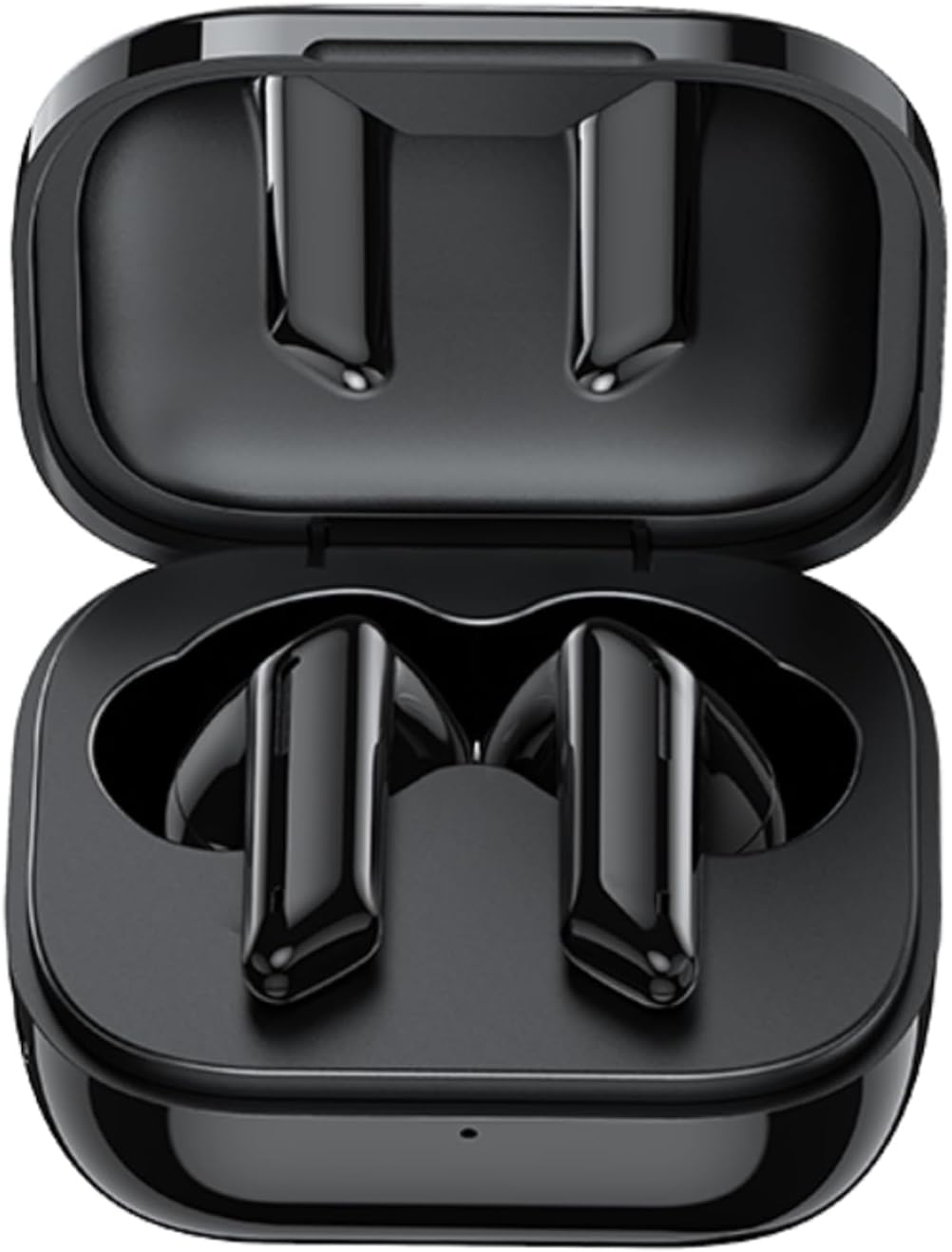
Image: AWEI T36 earbuds securely placed inside their open charging case, showcasing the sleek black design of both the earbuds and the case interior.
Ausinių komponentai
- Lietimo valdymo sritis: Skirta muzikos atkūrimui, skambučiams ir balso asistentui valdyti.
- Mikrofonas: For clear call performance.
- Įkrovimo kontaktai: Located at the bottom of each earbud.
- LED indikatorius: Rodo susiejimo būseną ir akumuliatoriaus lygį.
Įkrovimo dėklo komponentai
- Ausinių įkrovimo lizdai: Tvirtai laikykite ir įkraukite ausines.
- USB-C įkrovimo prievadas: Dėklo įkrovimui.
- LED indikatorius: Rodo dėklo įkrovimo būseną.
Sąranka
1. Ausinių ir dėklo įkrovimas
Prieš pirmą kartą naudodami, visiškai įkraukite ir ausines, ir įkrovimo dėklą.
- Place the earbuds into the charging case, ensuring they are correctly seated. The earbuds' LED indicators will light up to show they are charging.
- Prijunkite USB-C įkrovimo laidą prie dėklo įkrovimo prievado, o kitą galą – prie USB maitinimo adapterio (nepridedamas) arba kompiuterio USB prievado.
- The charging case LED indicator will show charging progress. A full charge takes approximately 1.5 hours for the case.

Image: AWEI T36 earbuds and their charging case resting on a circular charging pad, illustrating the product's battery life and charging capabilities. The image indicates a 320mAh charging case, 4-5 hours playtime, and 1.5 hours charging time.
Note: The product specifications indicate 7 hours of continuous use per charge for earbuds and 35 hours of playback with the charging case.
2. Susiejimas su jūsų įrenginiu
The earbuds support Bluetooth 5.3 for a stable and fast connection.
- Poravimas pirmą kartą:
- Atidarykite įkrovimo dėklą. Ausinės automatiškai įsijungs ir pradės veikti susiejimo režimu.
- Savo įrenginyje (išmaniajame telefone, planšetiniame kompiuteryje, nešiojamajame kompiuteryje) įjunkite „Bluetooth“.
- Ieškokite „AWEI T36“ galimų „Bluetooth“ įrenginių sąraše ir pasirinkite jį, kad prisijungtumėte.
- Prisijungus išgirsite patvirtinimo signalą, o ausinių LED indikatoriai užges arba lėtai mirksės.
- Tolesnis poravimas:
- Once paired, the earbuds will automatically connect to the last paired device when taken out of the charging case, provided Bluetooth is enabled on the device.

Image: A smartphone displaying a game, with the AWEI T36 earbuds and their charging case in the foreground, illustrating the Bluetooth connection. The image highlights "Bluetooth 5.1 Faster & More Stable" (Note: Product specifications state Bluetooth 5.3 for this model, which offers improved performance.)

Image: Two AWEI T36 earbuds, one in its open charging case and one outside, demonstrating that both earbuds can function independently as "hosts" or "main engines" for flexible use.
Naudojimo instrukcijos
The AWEI T36 earbuds feature smart touch controls for easy operation.
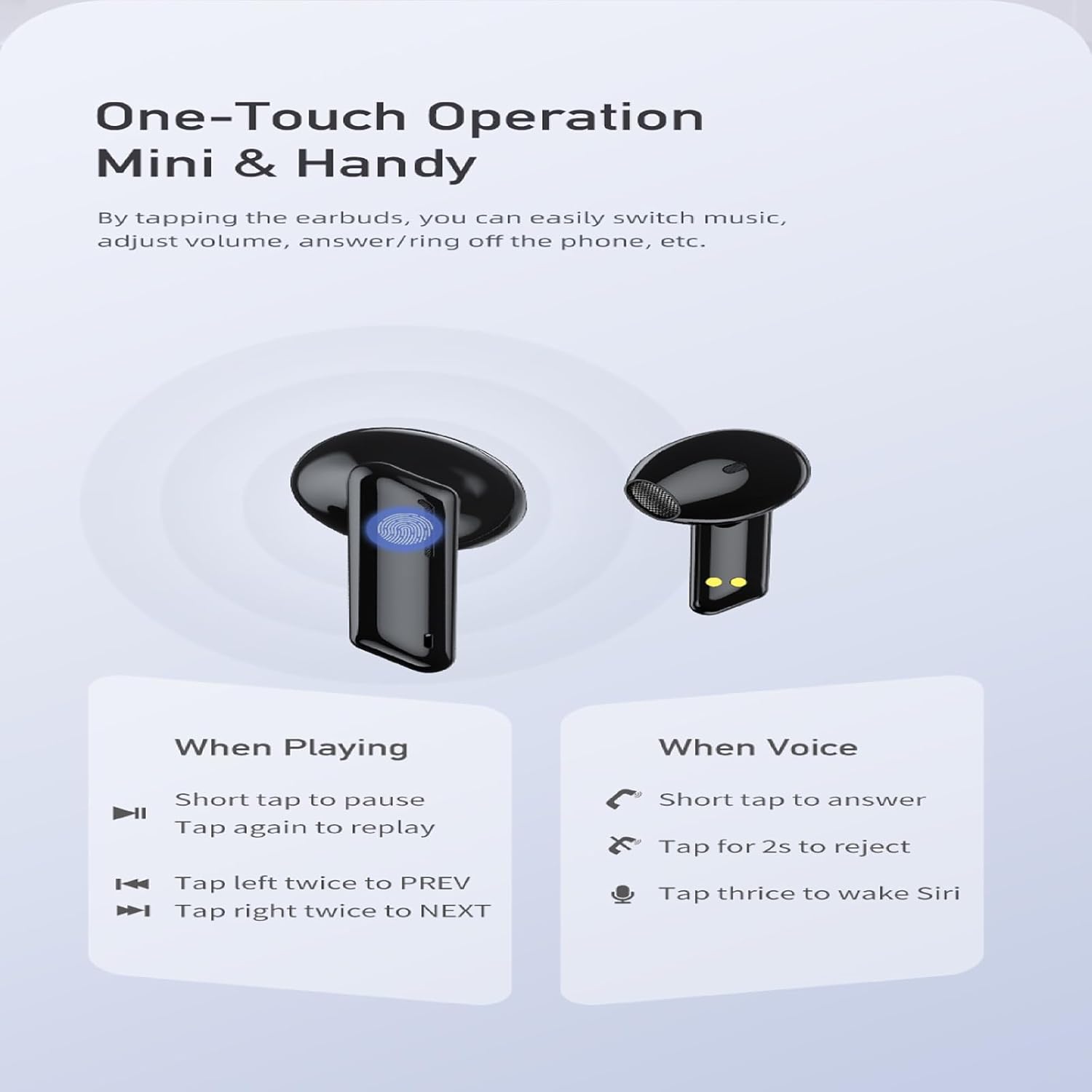
Image: A visual guide to the one-touch operation of the AWEI T36 earbuds, detailing touch commands for music playback (pause/play, previous/next song) and call management (answer/reject, activate voice assistant).
Muzikos atkūrimas
- Leisti / pristabdyti: Trumpai bakstelėkite bet kurią ausinę.
- Kita daina: Dukart palieskite dešinįjį ausinės antgalį.
- Ankstesnė daina: Dukart palieskite kairįjį ausinės antgalį.
- Garsumo valdymas: (Specific gesture not detailed in image, typically long press or multiple taps. Refer to device settings if not working as expected.)
Skambučių valdymas
- Atsiliepti į skambutį: Trumpai bakstelėkite bet kurią ausinę.
- Atmesti skambutį: Bakstelėkite ir 2 sekundes palaikykite bet kurią ausinę.
- Baigti skambutį: Short tap on either earbud during a call.
Balso asistentas
- Įjunkite balso asistentą („Siri“ / „Google“ asistentas): Tris kartus palieskite bet kurią ausinę.
Maitinimo įjungimas/išjungimas
- Maitinimas: Ausinės automatiškai įsijungia, kai išimamos iš įkrovimo dėklo.
- Išjungti: Ausinės automatiškai išsijungia, kai įdedamos atgal į įkrovimo dėklą ir uždaromas dangtelis.
Priežiūra
Valymas
- Reguliariai valykite ausines ir įkrovimo dėklą minkštu, sausu, nepūkuotu skudurėliu.
- Švelniai nuvalykite vatos tamponuampened with isopropyl alcohol to clean the charging contacts on both the earbuds and inside the case.
- Nenaudokite abrazyvinių valiklių ir nemerkite ausinių ar dėklo į vandenį.
Sandėliavimas
- Kai nenaudojate, laikykite ausines įkrovimo dėkle, kad apsaugotumėte ir liktų įkrautos.
- Venkite laikyti įrenginį ekstremalioje temperatūroje (karštyje arba šaltyje) arba labai drėgnoje aplinkoje.
Akumuliatoriaus priežiūra
- Norėdami taupyti akumuliatoriaus veikimo laiką, reguliariai įkraukite ausines ir dėklą, net jei nenaudojate dažnai.
- Prieš įkrovimą venkite visiškai iškrauti bateriją.

Image: AWEI T36 earbuds and their charging case with water droplets on them, emphasizing their IPX4 waterproof rating, which protects against sweat and light rain during exercise.
Trikčių šalinimas
Jei kyla problemų dėl „AWEI T36“ ausinių, žr. šiuos dažniausiai pasitaikančius sprendimus:
- Ausinės nesusijungia su įrenginiu:
- Įsitikinkite, kad ausinės yra visiškai įkrautos.
- Make sure Bluetooth is enabled on your device and the earbuds are within range (up to 10 meters).
- Pamirškite „AWEI T36“ iš savo įrenginio „Bluetooth“ sąrašo ir bandykite susieti dar kartą.
- Place both earbuds back into the charging case, close the lid, wait a few seconds, then open the lid to reset them.
- Veikia tik viena ausinė:
- Įsitikinkite, kad abi ausinės yra įkrautos.
- Place both earbuds back into the charging case, close the lid, then open it again. This often re-syncs them.
- Nuvalykite įkrovimo kontaktus abiejose ausinėse ir dėklo viduje.
- Ausinės neįkraunamos:
- Patikrinkite, ar įkrovimo laidas yra tvirtai prijungtas tiek prie dėklo, tiek prie maitinimo šaltinio.
- Įsitikinkite, kad ausinių ir dėklo viduje esantys įkrovimo kontaktai yra švarūs ir be šiukšlių.
- Išbandykite kitą USB-C laidą arba maitinimo adapterį.
- Mažas garsumas arba prasta garso kokybė:
- Sureguliuokite garsumą tiek savo įrenginyje, tiek ausinėse.
- Ensure the eartips are properly seated in your ears to create a good seal. Try different sized eartips.
- Clean any earwax or debris from the earbud speaker mesh.
Specifikacijos
| Funkcija | Aprašymas |
|---|---|
| Modelio pavadinimas | T36 |
| Prekės ženklas | AWEI |
| Ryšio technologija | Belaidis ryšys („Bluetooth 5.3“) |
| Bluetooth diapazonas | Iki 10 metrų (33 pėdų) |
| Ausinių baterijos veikimo laikas | Iki 7 valandų (vienas įkrovimas) |
| Bendras grojimo laikas (su dėklu) | Iki 35 valandų |
| Įkrovimo laikas (dėklas) | apytiksliai 1.5 valandas |
| Atsparumas vandeniui | IPX4 (Sweat and splash proof) |
| Valdymo tipas | Palieskite valdymą |
| Ausinės forma | Į ausis |
| Medžiaga | Silicone (Eartips) |
| Įtraukti komponentai | Earbuds, Charging Case, USB-C Cable, Eartips, User Manual |
Garantija ir palaikymas
AWEI products are manufactured to the highest quality standards. For information regarding warranty coverage, technical support, or customer service, please refer to the warranty card included in your package or visit the official AWEI websvetainę.
For further assistance, please contact AWEI customer support with your product model number (T36) and purchase details.