
Įvadas
This manual provides comprehensive instructions for the setup, operation, maintenance, and troubleshooting of your HUAYU RM-DS909 Replacement TV Remote Control. Designed for seamless compatibility with DSTV LCD/LED televisions, this remote offers intuitive control and reliable performance. Please read this manual carefully to ensure optimal use of your new remote control.
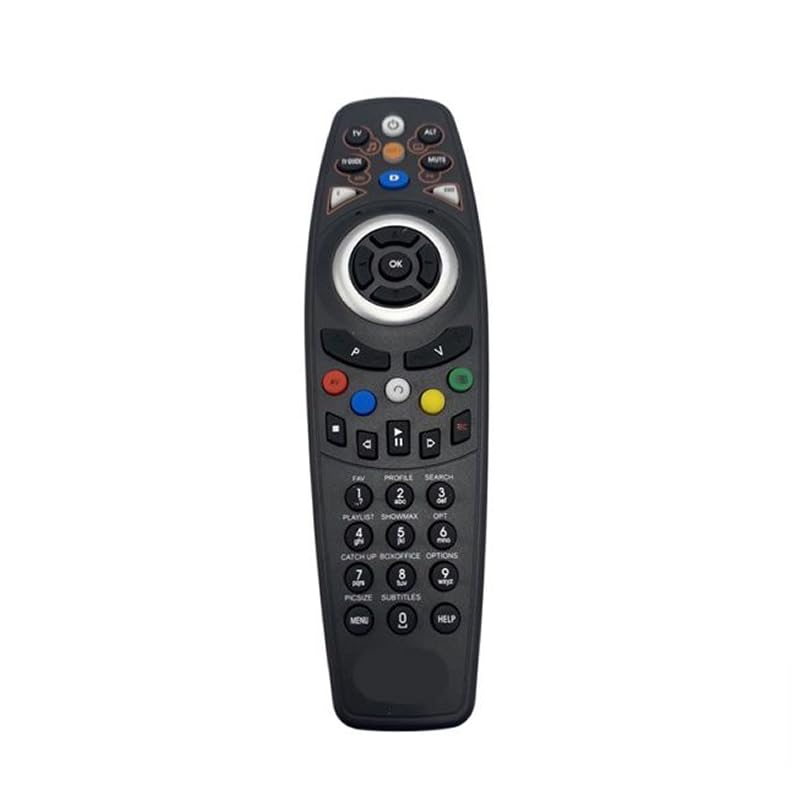
Vaizdas: priekis view of the HUAYU RM-DS909 Replacement TV Remote Control.
Sąranka
1. Akumuliatoriaus įdėjimas
- Nuotolinio valdymo pulto gale raskite baterijų skyrių.
- Nustumkite baterijų skyriaus dangtelį žemyn ir jį nuimkite.
- Insert two (2) AAA batteries (not included) into the compartment, ensuring the positive (+) and negative (-) terminals align correctly with the indicators inside.
- Uždėkite baterijų skyriaus dangtelį, stumdami jį atgal į vietą, kol jis tvirtai užsifiksuos.

Image: Battery compartment with cover removed, showing AAA battery slots.
2. Pradinis naudojimas
The HUAYU RM-DS909 remote control is designed for direct use with compatible DSTV LCD/LED televisions. No complex programming or pairing is required. Once batteries are installed, the remote is ready to operate your television.
Naudojimo instrukcijos
This remote control provides access to all standard functions of your DSTV LCD/LED television. Below is a general guide to common button functions:
- Maitinimo mygtukas: Įjungia arba išjungia televizorių.
- Kanalas aukštyn/žemyn: Keičia televizijos kanalą.
- Garsumo didinimas / sumažinimas: Reguliuoja garso garsumą.
- Nutildymo mygtukas: Silences or restores the audio.
- Navigacijos (rodyklių) mygtukai ir OK: Naudojamas naršyti meniu ir patvirtinti pasirinkimus.
- Meniu / Pagrindinis mygtukas: Pasiekia pagrindinį televizoriaus meniu arba išmaniąsias funkcijas.
- TV Guide Button: Rodo elektroninį programų gidą.
- Spalvoti mygtukai (raudoni, žali, geltoni, mėlyni): These buttons typically correspond to specific functions within menus or interactive services, as indicated on your TV screen.
- Playback Controls (Play, Pause, Stop, Rewind, Fast Forward, Record): Used for media playback functions, often with PVR or connected devices.
- Skaičių klaviatūra (0–9): Tiesioginiam kanalo įvedimui.
For specific functions related to your DSTV decoder or TV model, refer to your television's or decoder's user manual.
Priežiūra
- Valymas: Nuotolinio valdymo pultą valykite minkšta, sausa šluoste. Nenaudokite skystų valiklių ar abrazyvinių medžiagų, nes jos gali pažeisti paviršių ar vidinius komponentus.
- Baterijos keitimas: Replace batteries when the remote's response becomes sluggish or stops working. Always replace both batteries simultaneously with new AAA batteries. Do not mix old and new batteries, or different types of batteries.
- Saugykla: If the remote will not be used for an extended period, remove the batteries to prevent leakage and potential damage. Store the remote in a cool, dry place away from direct sunlight and extreme temperatures.
Trikčių šalinimas
- Nuotolinis nereaguoja:
- Įsitikinkite, kad baterijos įdėtos teisingai, tinkamu poliškumu.
- Pakeiskite senas baterijas naujomis AAA baterijomis.
- Patikrinkite, ar nėra kliūčių tarp nuotolinio valdymo pulto ir televizoriaus infraraudonųjų spindulių jutiklio.
- Ensure you are within the effective operating range and pointing the remote towards the TV.
- Ribotas veikimo diapazonas:
- Weak batteries can reduce the remote's range. Replace them if necessary.
- Bright light sources (e.g., direct sunlight, fluorescent lights) can interfere with the infrared signal.
- Neveikia tam tikri mygtukai:
- Ensure the remote is clean and there is no debris obstructing the buttons.
- Jei neveikia tik tam tikri mygtukai, tai gali reikšti vidinius gedimus. Apsvarstykite galimybę pakeisti nuotolinio valdymo pultą.
Specifikacijos
| Modelio numeris | RM-DS909 (Internal Model: 930) |
| Prekės ženklas | HUAYU |
| Ryšio technologija | Infraraudonųjų spindulių (IR) |
| Suderinami įrenginiai | DSTV LCD/LED Televisions |
| Baterijos tipas | 2 x AAA (neįtraukta) |
| Medžiaga | ABS |
| Spalva | Juoda |
| Ypatinga funkcija | Išmanusis funkcionalumas |
| Maksimalus palaikomų įrenginių skaičius | 1 |
Garantija ir palaikymas
Gamintojo garantija
This HUAYU remote control comes with a 1 metų gamintojo garantija from the date of purchase. This warranty covers defects in materials and workmanship under normal use. It does not cover damage caused by misuse, accidents, unauthorized modifications, or battery leakage.
Pagalba klientams
For further assistance, troubleshooting not covered in this manual, or warranty claims, please contact your retailer or the point of purchase. Please have your purchase receipt and product model number (RM-DS909) available when seeking support.