
Spigen SA-TW P20
Spigen SA-TW P20 True Wireless Earbuds Instruction Manual
Model: SA-TW P20
Įvadas
Thank you for choosing the Spigen SA-TW P20 True Wireless Earbuds. This manual provides essential information for setting up, operating, maintaining, and troubleshooting your new earbuds. Please read it carefully to ensure optimal performance and longevity of your device.
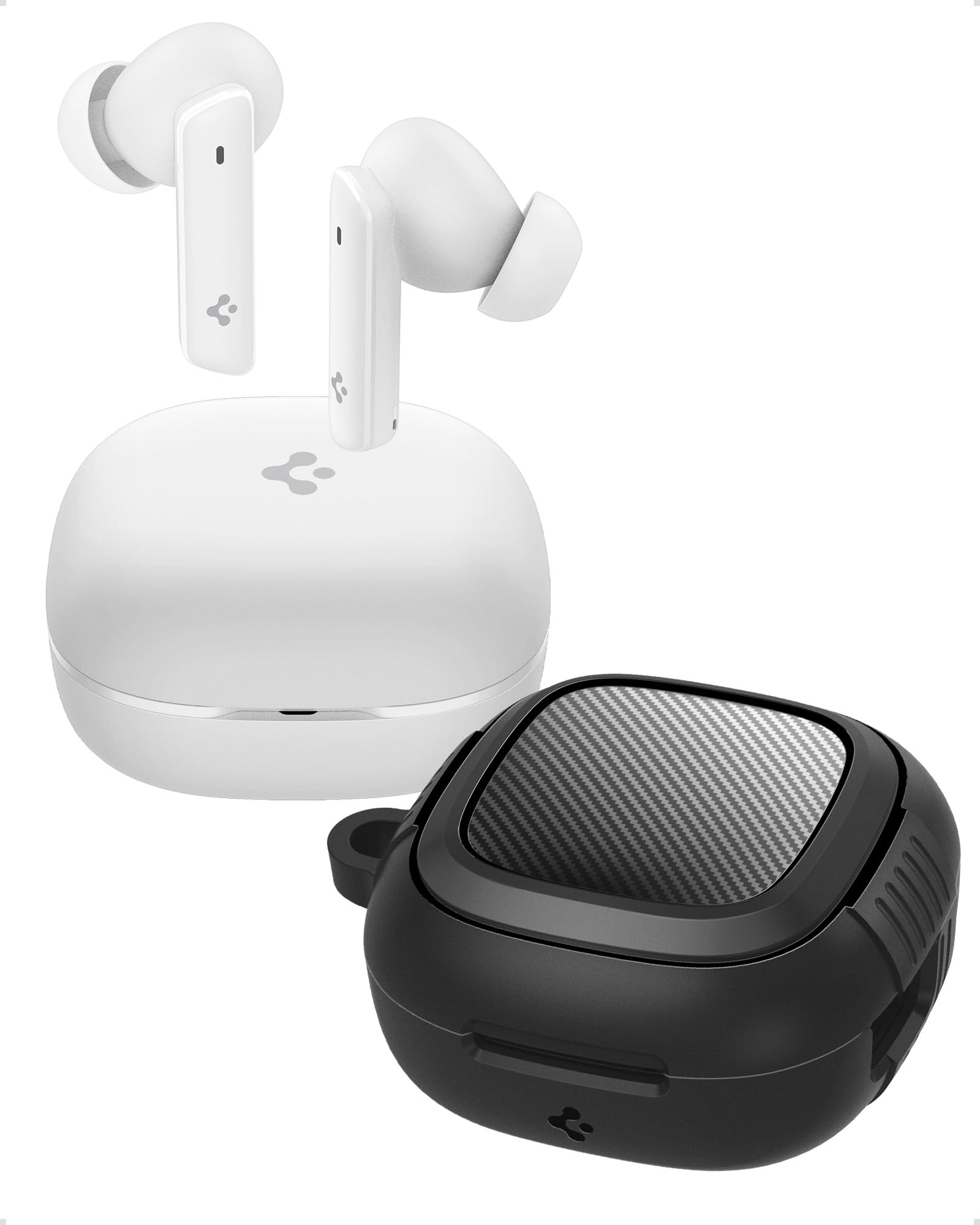
Image: Spigen SA-TW P20 True Wireless Earbuds in white, shown with their charging case.
Kas yra dėžutėje
The Spigen SA-TW P20 package includes the following items:
- 1 SA-TW P20 True Wireless Earbuds (White)
- 1 Charging Case for SA-TW P20
- 1 Rugged Armor Case for SA-TW P20
- 1 USB įkrovimo laidas
- 1 Set of Eartips (S/M - installed/L)

Image: The Spigen SA-TW P20 earbuds, their white charging case, and the included black Rugged Armor protective case.
Produktas baigtasview
The SA-TW P20 earbuds are designed for high-fidelity audio and clear communication. They feature 10mm LCP Graphene Dynamic Drivers for precise sound reproduction and 6 high-sensitivity microphones for clear calls. The included Rugged Armor case provides enhanced protection for your charging case.
Rugged Armor Case
The Rugged Armor case is designed to safeguard your charging case from daily drops and scratches. It incorporates Air-Cushion Technology, an advanced corner system that absorbs impacts, turning drops into harmless bumps. The case also features a carbon fiber accent and includes a strap for easy portability.

Paveikslėlis: detalus view of the Spigen Rugged Armor case, highlighting its Air-Cushion Technology for impact protection.

Image: An illustration showing the internal components of the 10mm LCP Graphene drivers, the touch control area on an earbud, and the Bluetooth v5.2 logo.
Sąranka
1. Pradinis įkrovimas
- Įdėkite abi ausines į įkrovimo dėklą.
- Prijunkite USB įkrovimo laidą prie dėklo įkrovimo prievado ir prie maitinimo šaltinio.
- Allow the earbuds and case to fully charge before first use. The LED indicator on the case will show charging status.
2. „Bluetooth“ poravimas
- Atidarykite įkrovimo dėklą. Ausinės automatiškai įsijungs susiejimo režimu.
- Savo įrenginyje (išmaniajame telefone, planšetiniame kompiuteryje, nešiojamajame kompiuteryje) įjunkite „Bluetooth“.
- Ieškokite "Spigen SA-TW P20" in the list of available devices.
- Select "Spigen SA-TW P20" to connect. A voice prompt will confirm successful pairing.
3. Spigen Audio App Installation
- Download the "Spigen Audio" app from your device's app store (Google Play Store for Android, Apple App Store for iOS).
- Įdiekite ir atidarykite programą.
- Ensure your SA-TW P20 earbuds are connected via Bluetooth. The app will automatically detect and connect to your earbuds, allowing for customization.

Image: Screenshot of the Spigen Audio App interface, showing options for sound effects, noise change modes (Indoor, Commuting, Noisy), and channel balance.
Naudojimo instrukcijos
1. Palieskite Valdikliai
The SA-TW P20 earbuds feature intuitive touch controls. Specific functions can be customized via the Spigen Audio App.
- Vienas palietimas: Groti / pristabdyti muziką, atsiliepti / baigti skambutį.
- Dukart bakstelėjimas (kairioji ausinė): Ankstesnis takelis.
- Dukart bakstelėjimas (dešinė ausinė): Kitas takelis.
- „Triple Tap“: Suaktyvinkite balso asistentą.
- Ilgas paspaudimas: Switch between ANC modes (ANC On, Transparency, Normal).
2. Aktyvaus triukšmo slopinimo (ANC) režimai
The earbuds offer up to 40dB of active noise cancellation with 3 Multi-Mode Hybrid Adaptive ANC settings.
- ANC Pro: Sumažina aplinkos triukšmą iki 40 dB, kad klausymosi patirtis būtų įtraukianti.
- Skaidrumo režimas: Allows you to hear your surroundings while listening to audio, enhancing awareness.
- Įprastas režimas: Disables ANC and Transparency for standard audio playback.

Image: Black Spigen SA-TW P20 earbuds illustrating 40dB ANC Pro, Transparency Mode, 3 Multi-Mode Hybrid Adaptive ANC, and Clear Calls with 6 MICs.
3. Žaidimų režimas (mažas delsos laikas)
Activate Gaming Mode for crystal-clear, low-latency audio transmission, ensuring an uninterrupted and synchronized gaming experience. This mode minimizes audio delay between your device and the earbuds.

Image: Spigen SA-TW P20 earbuds positioned near a smartphone displaying a game, emphasizing low latency for gaming.
4. Skambinimo funkcijos
Equipped with 6 high-sensitivity microphones, the SA-TW P20 ensures crystal-clear calls. Advanced noise-cancellation technology helps remove ambient noise, allowing your voice to be heard clearly in various environments.

Image: A close-up diagram of the Spigen SA-TW P20 earbuds, indicating the locations of the three microphones on each earbud (MIC 1, MIC 2, MIC 3).
5. Sound Customization (Spigen Audio App)
The Spigen Audio App allows you to personalize your listening experience. You can choose from 5 preset sound profiles or use the customizable equalizer to adjust audio settings to your preferences. The app also provides control over ANC modes and touch functions.
6. Baterijos veikimo laikas
Enjoy up to 7.5 hours of playtime on a single charge. The charging case extends the total playtime to a generous 30 hours, allowing for multiple recharges on the go.

Image: White Spigen SA-TW P20 earbuds and their open charging case, with a prominent display of "30 HRS" indicating total battery life.
Priežiūra
1. Valymas
- Švelniai nuvalykite ausines ir įkrovimo dėklą minkštu, sausu, nepūkuotu skudurėliu.
- Nenaudokite stiprių cheminių medžiagų, valymo tirpiklių ar stiprių ploviklių.
- Nuimkite ausų antgalius ir, jei reikia, atskirai nuvalykite juos vandeniu ir švelniu muilu, prieš vėl įdėdami, įsitikinkite, kad jie yra visiškai sausi.
- Reguliariai valykite ausinių ir dėklo įkrovimo kontaktus sausu vatos tamponėliu, kad užtikrintumėte tinkamą įkrovimą.
2. Atsparumas vandeniui (IPX5)
The SA-TW P20 earbuds are IPX5 water-resistant, meaning they are protected against low-pressure water jets from any direction. This makes them suitable for workouts and light rain. However, they are not designed for submersion in water or exposure to heavy rain. Do not wear them while swimming or showering.
3. Akumuliatoriaus priežiūra
- Venkite dažnai visiškai iškrauti akumuliatorių.
- Ausines ir dėklą, kai nenaudojate, laikykite vėsioje, sausoje vietoje.
- Reguliariai kraukite įrenginį, net jei jis ilgą laiką nenaudojamas, kad palaikytumėte akumuliatoriaus veikimo laiką.
Trikčių šalinimas
1. Ausinės nesusijungia
- Įsitikinkite, kad abi ausinės yra visiškai įkrautos.
- Place earbuds back into the charging case, close the lid, wait a few seconds, then open it again to re-enter pairing mode.
- Išjunkite ir įjunkite „Bluetooth“ savo įrenginyje.
- Forget "Spigen SA-TW P20" from your device's Bluetooth list and attempt to pair again.
2. Nėra garso arba garsas per mažas
- Patikrinkite garsumo lygį tiek savo įrenginyje, tiek ausinėse.
- Įsitikinkite, kad ausinės tinkamai įstatytos į ausis.
- Nuvalykite visas šiukšles nuo ausinių antgalių ir ausų antgalių.
- Try resetting the earbuds (refer to the Spigen Audio App or manufacturer's webkonkrečias nustatymo iš naujo instrukcijas rasite svetainėje).
3. Įkrovimo problemos
- Įsitikinkite, kad įkrovimo laidas yra tvirtai prijungtas tiek prie dėklo, tiek prie maitinimo šaltinio.
- Išbandykite kitą USB įkrovimo laidą ir maitinimo adapterį.
- Nuvalykite ausinių ir dėklo vidaus įkrovimo kontaktus.
- Įsitikinkite, kad įkrovimo dėklas turi pakankamai įkrovos.
Specifikacijos
| Modelio pavadinimas | SA-TW P20 |
| Triukšmo valdymas | Aktyvus triukšmo slopinimas (iki 40 dB) |
| Ryšio technologija | Belaidis ryšys („Bluetooth 5.2“) |
| Garso tvarkyklės tipas | 10mm LCP Graphene Dynamic Driver |
| Mikrofonai | 6 (aiškiems skambučiams) |
| Baterijos veikimo laikas (ausinės) | Iki 7.5 valandų |
| Bendras grojimo laikas (su dėklu) | Iki 30 valandų |
| Atsparumas vandeniui | IPX5 (atsparus prakaitui, atsparus vandeniui) |
| Kontrolės metodas | Palieskite |
| Suderinami įrenginiai | Cellphones, Tablets, Laptops, Gaming Consoles |
| Medžiaga | Plastikas, Silikonas |
| Gaminio matmenys | 5.5 x 5.51 x 2.9 cm |
| Prekės svoris | 91.1 g |
| Kilmės šalis | Kinija |
Saugos informacija
- Nelaikykite ausinių ar įkrovimo dėklo ekstremaliose temperatūrose.
- Saugokitės, kad prietaisas nenumestų arba nenaudokite per didelės jėgos.
- Laikyti vaikams ir naminiams gyvūnėliams nepasiekiamoje vietoje.
- Nebandykite ardyti ar modifikuoti gaminio. Tai panaikins garantiją.
- Naudokite tik pridedamą įkrovimo laidą arba sertifikuotą lygiavertį laidą.
- Ilgalaikis garsaus garso poveikis gali pažeisti klausą. Sureguliuokite garsumą iki saugaus lygio.
Garantija ir palaikymas
Garantijos politika
Refunds or exchanges are not allowed after shrink wrap removal. For products with shrink wrapping already removed upon receipt, please request an immediate exchange.
Pagalba klientams
For further assistance, technical support, or warranty inquiries, please contact Spigen customer support:
- El. paštas: spigen.support@spigen.com
- Gamintojas: Spigen Korea Co.,Ltd.
- Importuotojas / Pakuotojas (Indija): Spigen India Pvt. Ltd., No.295-296, Ecotech-1, Extension, Greater Noida, UP
Ask a question about this manual
Ask about setup, troubleshooting, compatibility, parts, safety, or missing instructions. Manuals+ will review the question and use this page’s manual context to help answer it.