
1. Įvadas
This manual provides comprehensive instructions for the JHS Pedals Flight Delay Pedal. It covers setup, operation, maintenance, and troubleshooting to ensure optimal performance and longevity of your device. Please read this manual thoroughly before using the pedal.
The JHS Flight Delay pedal is designed to offer essential delay types with user-friendly controls. It features three distinct delay modes: Analog, Reverse, and Digital, alongside modulation options including Chorus and Vibrato. This pedal aims to provide versatile delay effects without complex menu navigation.
2. Saugos informacija
- Maitinimas: Use only a regulated 9V DC, center-negative power supply with a minimum current rating of 85mA. Incorrect power supplies can damage the unit and void the warranty.
- Aplinka: Do not expose the pedal to water, moisture, excessive heat, or direct sunlight. Operate in a clean, dry environment.
- Tvarkymas: Avoid dropping the pedal or subjecting it to strong impacts. Do not attempt to open the enclosure or modify the internal circuitry, as this will void the warranty.
- Kabeliai: Ensure all audio cables are in good condition to prevent unwanted noise or signal loss.
3. Pakuotės turinys
- JHS Pedals Flight Delay Pedal (Model FDBL)
- Vartotojo vadovas (šis dokumentas)
4. Produktas baigtasview
The JHS Flight Delay Pedal features a straightforward control layout designed for intuitive use. Below is an illustration of the pedal and a description of its controls.

1 pav.: priekis view of the JHS Pedals Flight Delay Pedal (Blue variant).
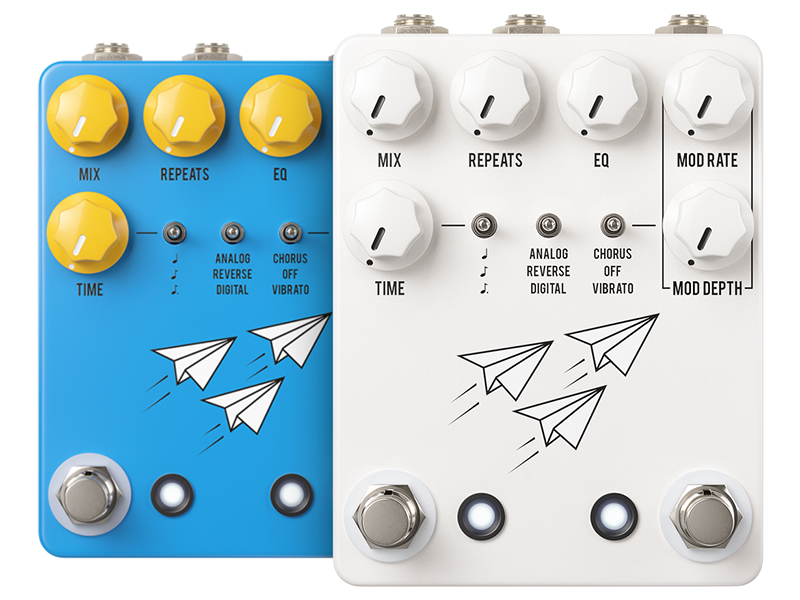
Figure 2: JHS Pedals Flight Delay Pedal shown in both blue and white color options.
Valdikliai:
- MIX rankenėlė: Adjusts the balance between the dry (unaffected) signal and the wet (effected) delay signal. Turning clockwise increases the delay effect's presence.
- REPEATS Knob: Controls the number of delay repetitions. From a single repeat to self-oscillation.
- EQ rankenėlė: Shapes the tone of the delay repeats, allowing for brighter or darker echoes.
- MOD RATE Knob: Determines the speed of the modulation effect (Chorus or Vibrato).
- MOD DEPTH Knob: Valdo moduliacijos efekto intensyvumą arba gylį.
- LAIKO rankenėlė: Sets the delay time, from short slap-back to long, ambient delays.
- Left Toggle Switch (Delay Mode): Selects between Analog, Reverse, and Digital delay types. Musical note symbols indicate notation intervals for tap tempo.
- Right Toggle Switch (Modulation Type): Selects between Chorus, Off (no modulation), and Vibrato.
- Kairysis kojinis jungiklis: Įjungia arba apeina uždelsimo efektą.
- Dešinysis kojinis jungiklis: Typically used for Tap Tempo functionality, allowing you to set the delay time by tapping the switch.
5. Sąranka
Follow these steps to integrate your Flight Delay Pedal into your audio setup:
- Maitinimo jungtis: Connect a regulated 9V DC, center-negative power supply (not included) to the power input jack on the pedal. Ensure the power supply meets the specified requirements (85mA minimum).
- Įvesties jungtis: Connect your instrument (e.g., guitar) or the output of a preceding effects pedal to the INPUT jack on the Flight Delay Pedal using a standard 1/4-inch instrument cable.
- Išvesties jungtis: Connect the OUTPUT jack of the Flight Delay Pedal to your amplifier's input or the input of the next effects pedal in your signal chain using a standard 1/4-inch instrument cable.
- Maitinimas: Once all connections are secure, connect your power supply to a wall outlet. The pedal is now ready for use.
6. Naudojimo instrukcijos
6.1 Basic Delay Operation
- Efekto įtraukimas: Press the left footswitch to toggle the delay effect on or off. The LED indicator will illuminate when the effect is active.
- Delsos laiko reguliavimas: Naudokite LAIKAS knob to set the duration between repeats. Rotate clockwise for longer delay times, counter-clockwise for shorter times.
- Setting Repeats: The KARTOJA knob controls the number of echoes. Turn clockwise for more repeats, reaching self-oscillation at maximum settings.
- Blending the Effect: Naudokite MIX knob to adjust the volume balance between your dry signal and the delayed signal.
- Shaping Delay Tone: The EQ knob allows you to brighten or darken the tone of the delay repeats.

Figure 3: Detail of the TIME knob, used to adjust delay duration.

Figure 4: Detail of the REPEATS knob, controlling the number of delay echoes.

Figure 5: Detail of the MIX knob, used to blend dry and wet signals.

Figure 6: Detail of the EQ knob, for tonal adjustment of delay repeats.
6.2 Delay Modes
Naudokite left toggle switch to select one of three distinct delay modes:
- Analoginis: Emulates classic analog delays, providing warm, darker, and decaying repeats.
- Atvirkščiai: Plays the delay repeats backward, creating unique textural effects.
- Skaitmeninis: Offers clear, pristine, and accurate repeats, ideal for modern sounds.
6.3 Moduliavimo efektai
The Flight Delay Pedal includes built-in modulation. Use the right toggle switch to select the modulation type:
- Choras: Adds a swirling, thickening effect to the delay repeats.
- Išjungta: Disables the modulation effect.
- Vibracija: Introduces a pitch-bending effect to the delay repeats.
Sureguliuokite MODE RATE ir MOD GYLIS knobs to fine-tune the speed and intensity of the selected modulation effect.

Figure 7: Detail of the delay mode (left) and modulation type (right) toggle switches.
6.4 Tap Tempo and Notation Intervals
The right footswitch typically functions as a Tap Tempo control. Tap it two or more times to set the delay time. The left toggle switch also features musical note symbols, indicating options for notation intervals (e.g., quarter notes, dotted eighth notes) when using tap tempo. Refer to the official JHS Pedals website or product page for specific tap tempo subdivision instructions.

Figure 8: Detail of the two footswitches, for bypass and tap tempo control.
7. Priežiūra
- Valymas: Pedalo išorę valykite minkšta, sausa šluoste. Venkite abrazyvinių valiklių ar tirpiklių.
- Saugykla: When not in use for extended periods, store the pedal in a cool, dry place, away from extreme temperatures and humidity.
- Kabelio apžiūra: Regularly check all audio and power cables for signs of wear or damage. Replace faulty cables immediately.
8. Problemų sprendimas
- Nėra garso:
- Įsitikinkite, kad maitinimo šaltinis yra tinkamai prijungtas ir veikia.
- Patikrinkite visus garso kabelius, ar jie tinkamai prijungti ir ar jie vientisi.
- Verify that the pedal is engaged (LED illuminated).
- Confirm that the MIX knob is not set to fully dry.
- Nepageidaujamas triukšmas / ūžesys:
- Naudokite aukštos kokybės, izoliuotą maitinimo šaltinį.
- Check for faulty or unshielded audio cables.
- Ensure proper grounding in your electrical setup.
- Efektas neįtraukiantis:
- Press the left footswitch firmly.
- Check power and cable connections.
9. Specifikacijos
| Funkcija | Specifikacija |
|---|---|
| Modelio numeris | FDBL |
| Prekės svoris | 1.17 svaro (0.53 kg) |
| Gaminio matmenys | 6.65 x 4.35 x 3.35 colio (16.9 x 11.0 x 8.5 cm) |
| Galios reikalavimas | 9 V nuolatinė srovė, centrinis neigiamas polius |
| Dabartinis burtas | 85 milijonųamps |
| Techninės įrangos sąsaja | 1/4 colio garso įvestis/išvestis |
10. Informacija apie garantiją
JHS Pedals products are covered by a limited warranty against defects in materials and workmanship. The warranty period and terms may vary by region. Please retain your proof of purchase. For detailed warranty information, please visit the official JHS Pedals websvetainėje arba susisiekite su klientų aptarnavimo tarnyba.
11. Parama
If you encounter any issues not covered in this manual or require further assistance, please visit the official JHS Pedals website for FAQs, additional resources, and contact information for customer support.