
1. Įvadas
Ačiū, kad pirkoteasing the CYBORIS Foldable Phone Stand with Speaker, Model T203. This device combines a versatile phone and tablet stand with a wireless Bluetooth speaker, offering enhanced audio and hands-free convenience. This manual provides detailed instructions for setup, operation, and maintenance to ensure optimal performance and longevity of your device.
2. Produktas baigtasview
The CYBORIS T203 features a compact, foldable design with an integrated Bluetooth speaker. It includes an adjustable stand for various viewing angles and heights, and control buttons for power, light, playback, and mode selection.
2.1 Pakuotės turinys
- 1 x CYBORIS Foldable Phone Stand with Speaker (Model T203)
- 1x USB įkrovimo laidas
- 1 x Vartotojo vadovas
2.2 Įrenginio komponentai
Familiarize yourself with the main parts and controls of your device:

Image: The CYBORIS Foldable Phone Stand with Speaker, illustrating its compact folded form and its ready-to-use unfolded configuration with a phone in place. This image highlights the device's dual functionality and portability.
- Adjustable Phone/Tablet Holder: Securely holds devices from 4 to 13 inches.
- Garsiakalbio grotelės: Garso išvestis.
- Valdymo mygtukai:
- Maitinimo / šviesos mygtukas: Power on/off, cycle LED light modes.
- Ankstesnio takelio / garsumo mažinimo mygtukas: Trumpas paspaudimas – garsumui sumažinti, ilgas – ankstesniam takeliui.
- Paleidimo / pauzės / skambinimo mygtukas: Groti / pristabdyti muziką, atsiliepti / baigti skambučius.
- Kitas takelis / garsumo didinimo mygtukas: Trumpai paspauskite, kad padidintumėte garsumą, ilgai paspauskite kitą takelį.
- Režimo mygtukas (M): Switch between Bluetooth and TF card modes.
- LED šviesos juosta: Suteikia aplinkos apšvietimą.
- TF kortelės lizdas: Skirta muzikai leisti tiesiai iš TF (MicroSD) kortelės.
- C tipo įkrovimo prievadas: Prietaiso įkrovimui.
- Neslystančios pagalvėlės: Located on the base and device holder for stability and protection.
3. Sąranka
3.1 Stovo išskleidimas
To prepare the stand for use:
- Gently unfold the main arm of the stand from its compact position.
- Adjust the angle of the phone/tablet holder to your desired viewpirmenybę.
- Extend the telescopic arm to achieve the desired height.

Image: The phone stand adjusted to different angles, demonstrating its flexibility for various viewing positions. The image shows a phone placed vertically on the stand.
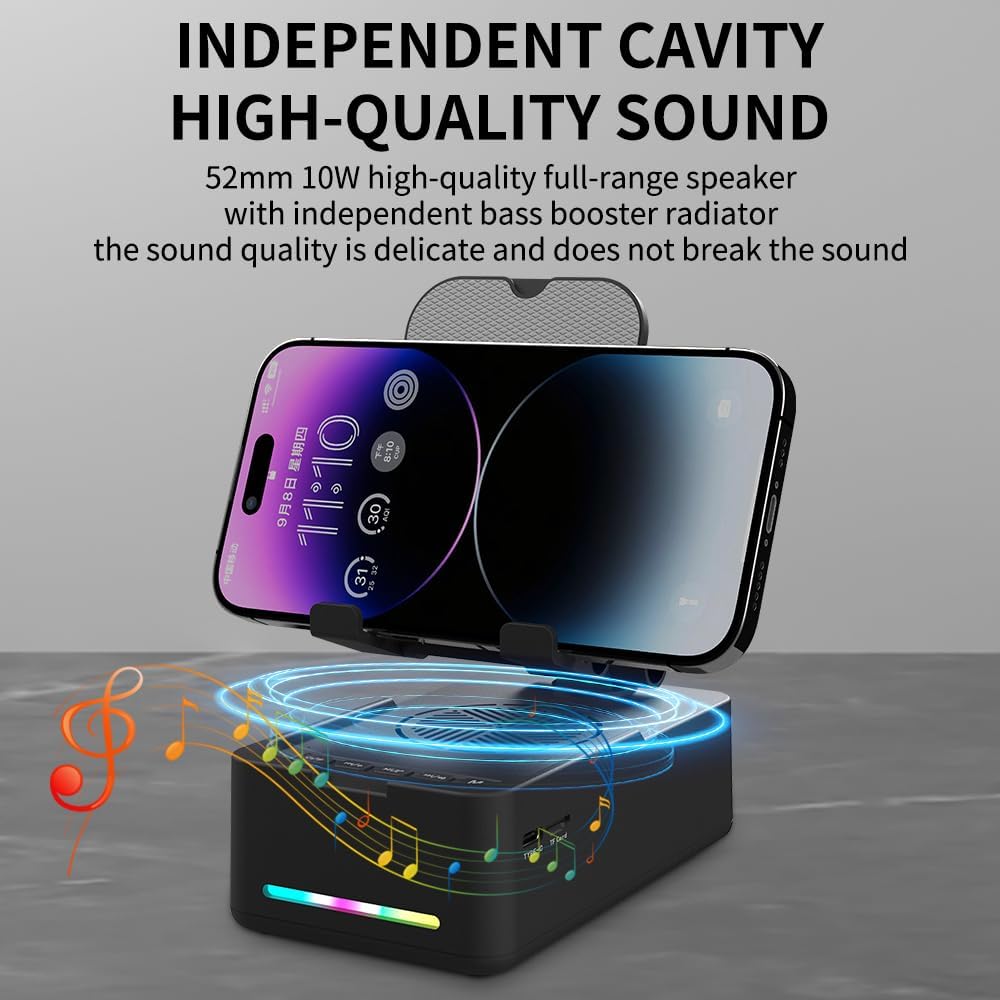
Image: The phone stand with its telescopic arm extended to a higher position, illustrating the adjustable height feature. A phone is shown on the stand at an elevated level.
The sturdy hook and anti-slip pads ensure your device remains secure and protected from scratches.
3.2 Įjungimas / išjungimas
- Norėdami įjungti: Press and hold the Power/Light button (⏻ / ✱) for approximately 3 seconds until you hear an audible prompt and the LED light bar illuminates.
- Norėdami išjungti: Press and hold the Power/Light button (⏻ / ✱) for approximately 3 seconds until you hear an audible prompt and the LED light bar turns off.
4. Naudojimo instrukcijos
4.1 Bluetooth poravimas
Norėdami prijungti įrenginį per Bluetooth:
- Ensure the speaker is powered on. The LED light bar will indicate it is in pairing mode (often a flashing blue light).
- Išmaniajame telefone, planšetiniame kompiuteryje ar kitame „Bluetooth“ įrenginyje eikite į „Bluetooth“ nustatymus.
- Ieškokite available devices and select "CYBORIS T203" (or similar name) from the list.
- Once connected, you will hear a confirmation sound, and the LED light bar will typically show a solid blue light.
- Įjungus įrenginį, jis automatiškai bandys prisijungti prie paskutinio suporuoto įrenginio.
4.2 Medijos atkūrimas
Control your audio playback using the buttons on the speaker:
- Leisti / pristabdyti: Short press the Play/Pause/Call button (▶ / ⏸ / 📞), kad paleistumėte arba pristabdytumėte dabartinį takelį.
- Pagarsink: Short press the Next Track/Volume Up button (⏭ / 🔊+).
- Patildyti: Short press the Previous Track/Volume Down button (⏮ / 🔊-).
- Kitas takelis: Long press the Next Track/Volume Up button (⏭ / 🔊+).
- Ankstesnis takelis: Long press the Previous Track/Volume Down button (⏮ / 🔊-).
Note: Some instructions may incorrectly state the long press functions for track control. Please follow the above corrected instructions for proper operation.
4.3 Skambinimo funkcijos
Integruotas mikrofonas leidžia skambinti laisvų rankų įranga:
- Atsiliepti į skambutį: Short press the Play/Pause/Call button (▶ / ⏸ / 📞) when an incoming call is received.
- Baigti skambutį: Short press the Play/Pause/Call button (▶ / ⏸ / 📞) during a call to hang up.
- Atmesti skambutį: Long press the Play/Pause/Call button (▶ / ⏸ / 📞) when an incoming call is received.
4.4 LED šviesos režimų
To cycle through the LED light modes:
- Short press the Power/Light button (⏻ / ✱) to change the LED light pattern or turn it off.
4.5 TF kortelės atkūrimas
Norėdami leisti muziką tiesiai iš TF (MicroSD) kortelės:
- Įdėkite TF kortelę su MP3 garsu files į TF kortelės lizdą.
- Paspauskite režimo mygtuką (M) to switch to TF card mode. The speaker will automatically begin playing music from the card.
- Use the media playback buttons (Play/Pause, Next/Previous Track, Volume Up/Down) to control the audio.

Vaizdas: Stambus planas view of the side of the speaker base, clearly showing the TF card slot and the Type-C charging port, indicating multiple music playback options.
5. Įkrovimas
To charge your CYBORIS T203 speaker:
- Prijunkite pridėtą USB įkrovimo laidą prie garsiakalbio C tipo įkrovimo prievado.
- Kitą USB kabelio galą prijunkite prie suderinamo USB maitinimo šaltinio (pvz., sieninio adapterio, kompiuterio USB prievado).
- LED indikatorius rodys įkrovimo būseną (pvz., raudona spalva kraunant, išjungta arba mėlyna, kai visiškai įkrauta).
- Pilnas įkrovimas paprastai trunka maždaug 2–3 valandas.
Note: The device has a battery capacity of 1800mAh and requires a DC 5V/1A input for charging.

Image: The phone stand with a phone displaying battery life estimates: up to 6 hours at maximum volume and 30 hours at 50% volume, highlighting its long-lasting battery.
6. Priežiūra
- Laikykite prietaisą sausą ir atokiau nuo drėgmės.
- Nelaikykite prietaiso ekstremaliose temperatūrose.
- Valykite įrenginį minkšta, sausa šluoste. Venkite naudoti stiprias chemines medžiagas ar abrazyvinius valiklius.
- Nenaudojamą prietaisą laikykite vėsioje, sausoje vietoje.
7. Problemų sprendimas
| Problema | Galima priežastis | Sprendimas |
|---|---|---|
| Įrenginys neįsijungia. | Senka baterija. | Įkraukite įrenginį naudodami pateiktą USB laidą. |
| Nepavyksta susieti per „Bluetooth“. | Bluetooth not enabled on source device; device too far; speaker not in pairing mode. | Ensure Bluetooth is on and the speaker is in pairing mode. Move devices closer. Restart both devices. |
| Nėra garso arba garsas per mažas. | Garsiakalbyje arba šaltinio įrenginyje per mažas garsumas; įrenginys neprijungtas. | Padidinkite garsumą tiek garsiakalbyje, tiek prijungtame įrenginyje. Patikrinkite „Bluetooth“ ryšį. |
| Track control buttons (Next/Previous) not working as expected. | Neteisinga mygtuko paspaudimo trukmė. | For Next/Previous track, ilgai paspauskite the respective buttons. Short press is for volume control. |
| TF kortelės muzika negroja. | Incorrect mode selected; TF card not inserted correctly or corrupted. | Press the 'M' button to switch to TF card mode. Reinsert the TF card. Ensure fileyra MP3 formatu. |
8. Specifikacijos
- Modelio pavadinimas: T203
- Prekinis ženklas: KIBORIS
- Suderinami įrenginiai: Smartphones, Tablets (4 to 13 inches)
- Formos faktorius: Laikiklis
- Montavimo tipas: Stalviršis
- Baterija: 1800 mAh
- Įvestis: DC 5V/1A
- Prekės matmenys: 5.51 x 3.15 x 2.44 colio
- Prekės svoris: 0.44 kilogramo
- Korpuso medžiaga: Plastikas, Guma
- Integruota laikmena: Speaker, USB cable, Manual book
9. Garantija ir palaikymas
The CYBORIS Foldable Phone Stand with Speaker (Model T203) comes with a 1 metų garantija nuo įsigijimo datos. Ši garantija taikoma gamybos defektams ir gedimams įprasto naudojimo metu.
For warranty claims, technical support, or any questions regarding your product, please contact CYBORIS customer service through the retailer where you purchased the product or visit the official CYBORIS websvetainė kontaktinei informacijai.
Prašome išsaugoti pirkimo įrodymą garantijos galiojimui.