
1. Įvadas
Ačiū, kad pirkoteasing the Audizio Genua DAB Radio. This manual provides essential information for the safe and efficient operation of your device. Please read it thoroughly before use and retain it for future reference. The Audizio Genua is a versatile DAB+/FM stereo radio featuring Bluetooth connectivity, USB playback, and an alarm function, designed for both home and portable use.
2. Saugos informacija
- Maitinimo šaltinis: Naudokite tik pateiktą maitinimo adapterį. Įsitikinkite, kad įtampatage atitinka jūsų regiono reikalavimus.
- Vanduo ir drėgmė: Saugokite įrenginį nuo lietaus, drėgmės ar lašančių/taškomų skysčių. Nestatykite ant įrenginio daiktų, pripildytų skysčių, pavyzdžiui, vazų.
- Vėdinimas: Užtikrinkite tinkamą vėdinimą. Neužblokuokite ventiliacijos angų.
- Šiluma: Laikykite įrenginį atokiau nuo šilumos šaltinių, tokių kaip radiatoriai, šildytuvai, viryklės ar kiti prietaisai (įskaitant ampkeltuvai), kurie gamina šilumą.
- Valymas: Valykite tik sausa šluoste.
- Aptarnavimas: Nemėginkite patys aptarnauti šio gaminio. Visą techninę priežiūrą patikėkite kvalifikuotam aptarnavimo personalui.
- Antena: Do not bend or force the antenna.
3. Pakuotės turinys
Išpakuodami patikrinkite, ar yra visi daiktai ir ar jie geros būklės:
- Audizio Genua DAB Radio
- Nuotolinio valdymo pultas
- Maitinimo adapteris
- Quick Start Guide (language not guaranteed)
4. Produktas baigtasview
4.1 Priekinio skydelio valdikliai ir ekranas

4.1 pav.: priekis view of the Audizio Genua DAB Radio.
The front panel features a clear color TFT display, two speaker grilles, and an array of control buttons and a central rotary knob. The display shows station information, track details, time, and menu options. Buttons include Menu, Preset, Scan, Dimmer, Alarm, and playback controls (Play/Pause, Skip). The central knob is used for volume adjustment, tuning, and selection.
4.2 Galinio skydelio jungtys
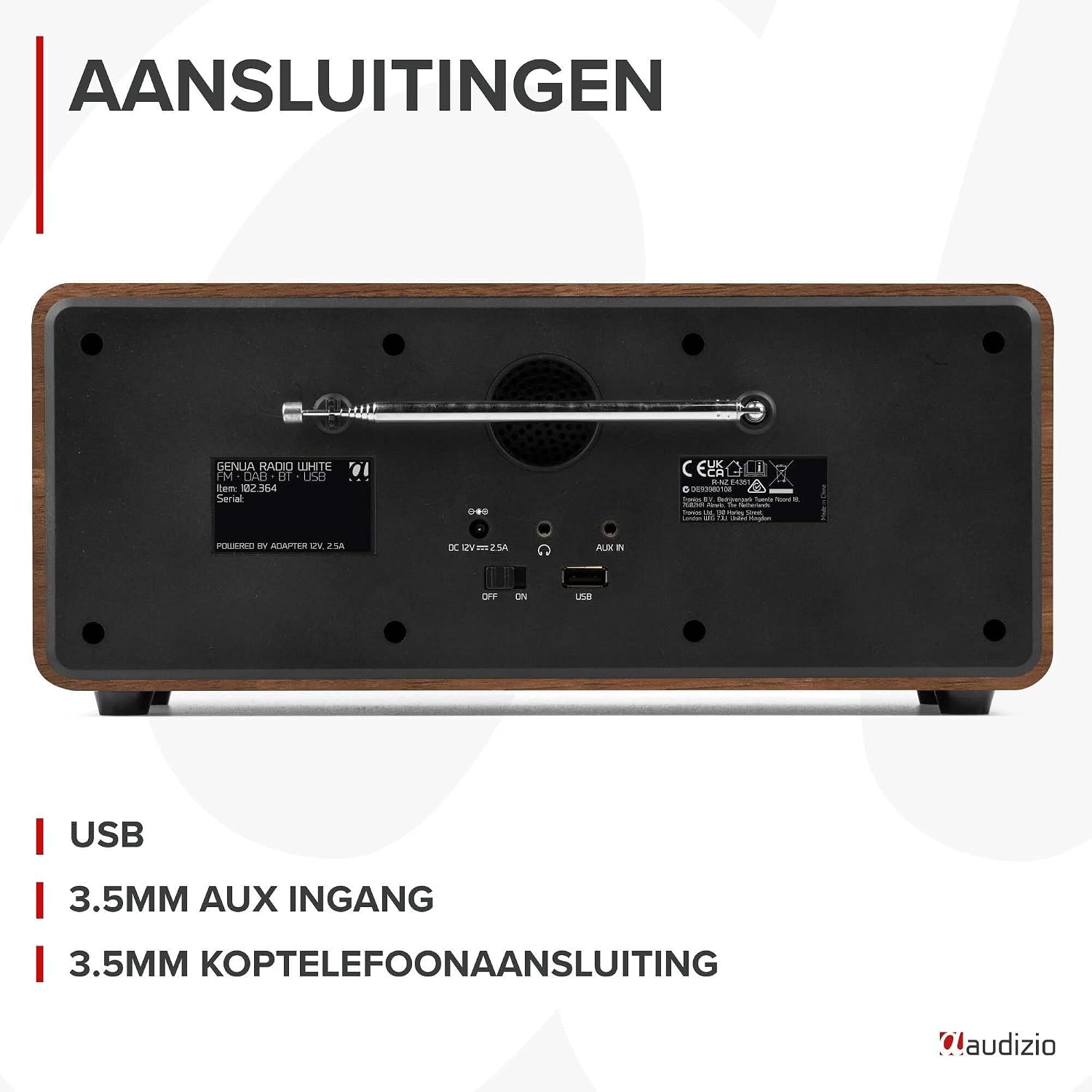
4.2 pav.: galinis view of the Audizio Genua DAB Radio with connections.
The rear panel includes the telescopic antenna for radio reception, a USB port for media playback, a 3.5mm AUX input for external audio devices, a 3.5mm headphone output, a DC 12V power input, and a main power ON/OFF switch.
4.3 Nuotolinis valdymas

Figure 4.3: Remote control for the Audizio Genua DAB Radio.
The included remote control provides full functionality, allowing you to power on/off, adjust volume, change modes, navigate menus, set alarms, and control playback from a distance.
5. Sąranka
5.1 Maitinimo jungtis
- Connect the power adapter to the DC 12V input on the rear of the radio.
- Prijunkite maitinimo adapterį į tinkamą sieninį lizdą.
- Flip the main power switch on the rear panel to the 'ON' position.
5.2 Antenos reguliavimas
Visiškai ištieskite teleskopinę anteną, kad gautumėte optimalų DAB+ ir FM radijo priėmimą. Sureguliuokite jos padėtį, kad signalo kokybė būtų geriausia.
5.3 Initial Setup and Auto Scan
- Upon first power-on, the radio may prompt you to perform an auto-scan for DAB+ stations. Select 'Yes' or press the 'Scan' button.
- Radijas ieškos prieinamų DAB+ stočių ir jas išsaugos. Šis procesas gali užtrukti kelias minutes.
- Kai paieška bus baigta, radijas įsijungs pirmąją galimą stotį.
6. Naudojimo instrukcijos
6.1 Režimo pasirinkimas
Press the 'Mode' button on the remote control or the 'Menu' button on the unit to cycle through available modes: DAB+, FM, Bluetooth, USB, and AUX In.
6.2 DAB+ radijo veikimas
- Pasirinkite DAB+ režimą.
- If no stations are found or you wish to rescan, press the 'Scan' button to perform a full scan.
- Use the 'Tune/Select' knob or the navigation buttons on the remote to browse through the list of available stations.
- Press the 'OK' button (on remote) or push the 'Tune/Select' knob to select a station.
- Iš anksto nustatytų duomenų saugojimas: To store a favorite station, press and hold the 'Preset' button until the preset menu appears. Use the knob/navigation to select a preset number (1-30) and press 'OK' to confirm.
- Išankstinių nustatymų atšaukimas: Briefly press the 'Preset' button, then use the knob/navigation to select the desired preset and press 'OK'.
6.3 FM radijo veikimas
- Pasirinkite FM režimą.
- Automatinis nuskaitymas: Press the 'Scan' button to automatically scan for and store available FM stations.
- Rankinis derinimas: Use the 'Tune/Select' knob to manually tune to a specific frequency.
- Iš anksto nustatytų duomenų saugojimas: Similar to DAB+ mode, press and hold 'Preset', select a number, and confirm.
- Išankstinių nustatymų atšaukimas: Briefly press 'Preset', select the desired preset, and confirm.
6.4 „Bluetooth“ ryšys
- Pasirinkite „Bluetooth“ režimą. Ekrane bus rodoma „Pairing“ (susiejimas) arba „Waiting for connection“ (laukiama ryšio).
- Išmaniajame telefone ar kitame „Bluetooth“ įrenginyje įjunkite „Bluetooth“ ir ieškokite galimų įrenginių.
- Select "Audizio Genua" from the list of devices.
- Once paired, the radio will confirm the connection, and you can start playing audio from your device.
6.5 USB atkūrimas
- Įdėkite USB atmintinę su MP3 fileį USB prievadą galiniame skydelyje.
- Select USB mode. The radio will automatically detect the USB drive and begin playing the first compatible audio file.
- Use the playback control buttons (Play/Pause, Skip Forward/Backward) on the unit or remote to manage your music.
6.6 AUX įvestis
- Connect an external audio device (e.g., MP3 player, smartphone) to the 3.5mm AUX IN port on the rear panel using an audio cable (not included).
- Pasirinkite AUX režimą.
- Valdykite atkūrimą ir garsumą iš išorinio įrenginio.
6.7 Žadintuvas ir miego laikmatis
- Signalo nustatymas: Press the 'Alarm' button on the unit or remote. Follow the on-screen prompts to set Alarm 1 and Alarm 2, including time, source (DAB/FM/Buzzer), and volume.
- Snaudimo funkcija: When the alarm sounds, press any button (except Power) to activate snooze. The alarm will sound again after a set interval.
- Miego laikmatis: Press the 'Sleep' button on the remote to set a sleep timer (e.g., 15, 30, 60 minutes). The radio will automatically turn off after the selected time.
6.8 Ekrano pritemdymas
Press the 'Dimmer' button on the unit or remote to adjust the brightness of the display. This is useful for different lighting conditions or for use in a bedroom.
7. Priežiūra
- Valymas: Radijo imtuvo išorę valykite minkštu, sausu skudurėliu. Nenaudokite abrazyvinių valiklių, vaško ar tirpiklių.
- Antena: Handle the telescopic antenna with care to prevent damage.
- Saugykla: Jei radijo imtuvą ilgesnį laiką laikysite nenaudojamą, atjunkite jį nuo maitinimo šaltinio.
8. Problemų sprendimas
| Problema | Galima priežastis | Sprendimas |
|---|---|---|
| Nėra galios | Power adapter not connected; Main power switch off | Ensure power adapter is securely connected and plugged in; Turn main power switch to 'ON' |
| Prastas radijo signalo priėmimas (DAB+/FM) | Antena neištiesta; Silpno signalo zona; Trukdžiai | Fully extend and adjust the telescopic antenna; Try repositioning the radio; Move away from other electronic devices |
| „Bluetooth“ nesusieja | Radio not in Bluetooth mode; Device not discoverable; Already paired with another device | Select Bluetooth mode on the radio; Ensure Bluetooth is enabled on your device and it's in pairing mode; Disconnect from other Bluetooth devices |
| USB atkūrimas neveikia | USB atmintinė netinkamai įdėta; nesuderinama file formatavimas; USB diskas sugadintas | Įsitikinkite, kad USB atmintinė yra visiškai įdėta; patikrinkite, ar files are in MP3 format; Try a different USB drive |
| Nėra garso | Per mažas garsumas; Įjungtas nutildymas; Pasirinktas neteisingas šaltinis | Increase volume; Check if mute is active; Ensure correct input source (DAB/FM/BT/USB/AUX) is selected |
9. Specifikacijos

Figure 9.1: Audizio Genua DAB Radio dimensions.
- Prekinis ženklas: Audizio
- Modelio numeris: Genua
- Spalva: Baltas
- Ypatinga funkcija: Bluetooth Connectivity, DAB+ Radio
- Ryšio technologija: Aux, Bluetooth, USB
- Gaminio matmenys (I x P x A): 13.5 x 31 x 13.3 cm
- Tuner technologija: DAB+
- Stilius: Modernus
- Maitinimo šaltinis: Su laidu elektra
- Palaikomos radijo juostos: FM, DAB+
- Suderinami įrenginiai: Smartphone, Tablet, Laptop, MP3 Player, Headphones, Speaker
- ttage: 220 voltų
- Maksimali garsiakalbio išvesties galia: 50 vatų
- Baterijų skaičius: 1 Non-standard battery (Type of battery required)
- Ekrano tipas: TFT
- Prekės svoris: 2.25 kilogramo
10. Garantija ir palaikymas
This product is covered by a standard manufacturer's warranty. For detailed warranty terms and conditions, please refer to the documentation provided at the time of purchase or contact your retailer. For technical support or service inquiries, please contact the Audizio customer support team through their official websvetainėje arba savo pirkimo vietoje.