Įvadas
This manual provides essential information for the safe operation, assembly, maintenance, and troubleshooting of your new Electric Children's Buggy Can-am Maverick. Please read this manual thoroughly before assembly and use to ensure proper function and safety.

Paveikslėlis: Dinamiška pusė view of the Electric Children's Buggy Can-am Maverick, showcasing its robust design and vibrant blue and black color scheme.
Svarbi saugos informacija
To reduce the risk of injury, adult supervision is required at all times. Never use this vehicle on roadways, near cars, near steep inclines or steps. Do not submerge the vehicle in water or other liquids.
- Always ensure the child is wearing appropriate safety gear, such as a helmet.
- Prieš kiekvieną naudojimą įsitikinkite, kad visi tvirtinimo elementai yra tvirtai priveržti.
- Only operate on flat, dry surfaces away from hazards.
- Laikykite rankas, plaukus ir drabužius atokiau nuo judančių dalių.
Sąranka ir surinkimas
Šiam gaminiui reikalingas surinkimas. Atidžiai atlikite toliau nurodytus veiksmus.
Išpakavimas ir pirminė apžiūra
Carefully remove all components from the packaging. Verify that all parts listed in the packing list are present and undamaged. If any parts are missing or damaged, do not proceed with assembly and contact customer support.
Surinkimo žingsniai
- Rato montavimas: Attach the wheels to the axles, ensuring they are securely fastened with the provided hardware.
- Vairo mazgas: Connect the steering wheel to the steering column. Ensure it clicks into place or is secured with the designated screw.
- Sėdynės montavimas: Place the seats into the designated slots and secure them. Ensure seatbelts are accessible and functional.
- Baterijos prijungimas: Connect the battery terminals. Refer to the battery compartment for specific instructions. Ensure the connection is firm.
- Pirmasis įkrovimas: Prieš pirmą kartą naudojant, pilnai įkraukite bateriją 8–12 valandas. Neperkraukite.

Vaizdas: Galinis view of the electric buggy with the door open, highlighting the spacious interior and robust rear suspension components.
Naudojimo instrukcijos
Kontroliuojaview

Image: The dashboard of the electric buggy, featuring the steering wheel, a digital speedometer display, and a multimedia screen.
- Start/Stop mygtukas: Located near the key slot, press to turn the vehicle on or off.
- Akceleratoriaus pedalas: Press to move forward. Release to brake.
- Vairas: Norėdami vairuoti transporto priemonę, pasukite į kairę arba į dešinę.
- Pavarų perjungiklis: (If applicable) Switch between forward, neutral, and reverse.
- Multimedia Screen: Provides entertainment and vehicle information.
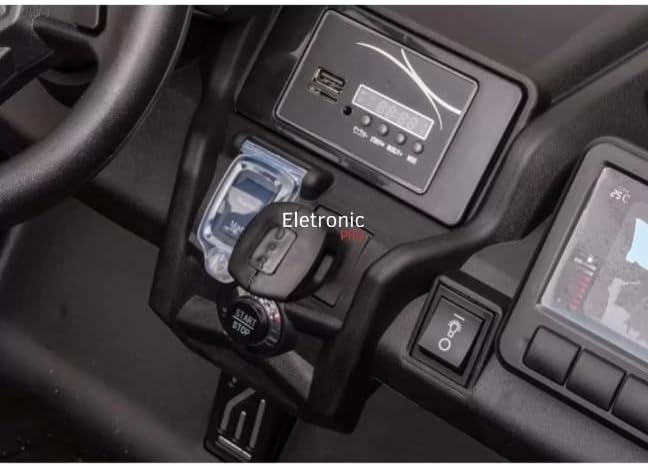
Vaizdas: Stambus planas view of the electric buggy's central console, showing the start/stop button and the key ignition slot.
Transporto priemonės vairavimas
- Ensure the child is seated properly and the seatbelt is fastened.
- Press the Start/Stop button to power on the vehicle.
- Gently press the accelerator pedal to move forward. Release the pedal to stop.
- Use the steering wheel to navigate.
- Visada prižiūrėkite vaiką veikimo metu.

Image: The interior of the electric buggy, featuring two black, contoured seats equipped with safety seatbelts.
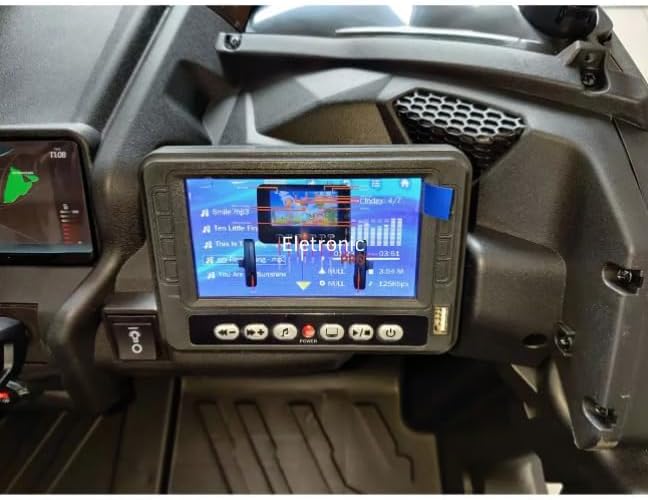
Image: A close-up of the electric buggy's multimedia screen, showing a music playback interface with song titles and an equalizer display.
Priežiūra
Akumuliatoriaus priežiūra
- Įkraukite akumuliatorių po kiekvieno naudojimo.
- Neleiskite akumuliatoriui visiškai išsikrauti.
- If storing for extended periods, charge the battery once a month.
- Naudokite tik prie transporto priemonės pridėtą įkroviklį.
Valymas ir sandėliavimas
- Nuvalykite transporto priemonę reklamaamp audinys. Nenaudokite abrazyvinių valiklių.
- Transporto priemonę laikykite sausoje, vėsioje vietoje, apsaugotoje nuo tiesioginių saulės spindulių ir drėgmės.
- Protect the vehicle from extreme temperatures.
Trikčių šalinimas
| Problema | Galima priežastis | Sprendimas |
|---|---|---|
| Transporto priemonė nejuda | Battery is low or disconnected; Loose wire connection; Blown fuse. | Charge battery; Check battery connections; Check fuse and replace if necessary. |
| Transporto priemonė važiuoja lėtai | Battery is low; Overloaded vehicle; Operating on rough terrain. | Recharge battery; Reduce load; Operate on smoother surfaces. |
| No sound from multimedia screen | Volume is too low; Audio cable disconnected. | Increase volume; Check audio connections. |
Specifikacijos
- Modelis: DK-CA001
- Prekinis ženklas: Bendras
- Rekomenduojamas amžius: 36 mėnesių – 8 metų
- Medžiagos: Plastic, Rubber, Steel Alloy
- Gaminio matmenys: 145 x 84 x 79 cm
- Produkto svoris: 42 kg
- Reikalingas surinkimas: Taip
- Sertifikavimas: Netaikoma
Garantija ir palaikymas
This product comes with a return policy of 7 days from the date of purchase. For any issues, questions, or to claim warranty support, please contact the seller directly. Please retain your proof of purchase for any warranty claims.
Pardavėjas: ELETRONIC PRO LTDA