
1. Įvadas
This manual provides detailed instructions for the installation, operation, and maintenance of your INQMEGA ST-598-6M-20X-WIFI-1021 Wireless Outdoor Solar Security Camera. Please read this manual thoroughly before using the product to ensure proper functionality and safety.
2. Produktas baigtasview
Pagrindinės funkcijos:
- Ryšys: 2.4G WiFi support (5G WiFi not supported). WiFi range up to 15 meters.
- Resolution & Night Vision: 6MP HD video with three night vision modes (infrared, full color, intelligent). Effective night vision distance up to 300 feet (approx. 91 meters).
- Optical Zoom & View: 20X optical zoom for clear close-ups. Dual screens offer 355° horizontal (pan) and 90° vertical (tilt) rotation, controllable via the application.
- Judesio aptikimas: Supports PIR human detection wake-up (Max 12M). The camera sends object movement information to your phone.
- Maitinimo šaltinis: Solar powered with a 6W solar board and a built-in 12000mAh battery.
- Saugykla: Supports Amazon Cloud storage and TF Card (MAX 128GB, not included).
- Garsas: Features 2-Way Audio.
- Patvarumas: IP66 International Protection Rating, waterproof metal material.
Pakuotės turinys:
- INQMEGA Wireless Outdoor Solar Security Camera (SOLAR CAMERA)
3. Sąranka
3.1 Fotoaparato montavimas
The camera is designed for outdoor wall mounting. Choose a location with optimal sunlight exposure for the solar panel and a clear view of the area you wish to monitor. Ensure the mounting surface is sturdy enough to support the camera's weight.
- Pažymėkite gręžimo taškus ant sienos, naudodami kameros tvirtinimo laikiklį kaip šabloną.
- Gręžkite skyles pažymėtose vietose.
- Jei reikia, įkiškite sieninius inkarus.
- Pritvirtinkite tvirtinimo laikiklį prie sienos naudodami pateiktus varžtus.
- Pritvirtinkite kamerą prie tvirtinimo laikiklio, užtikrindami, kad ji tvirtai laikytųsi.
3.2 Įjungimas
The camera is solar-powered and includes a built-in 12000mAh battery. Ensure the solar panel is exposed to direct sunlight for optimal charging. The camera will automatically power on once sufficient charge is detected or if it has been charged via USB (if applicable, refer to product packaging for USB charging details).
3.3 Prisijungimas prie „Wi-Fi“.
This camera supports 2.4G WiFi networks only. It does not support 5G WiFi. The WiFi range is approximately 15 meters.
- Download the UBOX application on your smartphone (available for iOS and Android).
- Užregistruokite paskyrą ir prisijunkite.
- Norėdami pridėti kamerą, vadovaukitės programėlėje pateiktomis instrukcijomis. Paprastai tai reiškia, kad reikia nuskaityti QR kodą kameroje arba rankiniu būdu įvesti jos ID.
- Connect the camera to your 2.4G WiFi network by entering your network credentials in the app.
- Once connected, the camera status indicator will confirm successful pairing.
4. Fotoaparato valdymas
4.1 Multi-Angle View ir Valdymas
The camera features a wide-angle lens that can be manually adjusted up to 350 degrees. Additionally, the PTZ (Pan-Tilt-Zoom) lens allows for remote control of its rotation via the UBOX application.
- Plačiakampis objektyvas: Manual adjustment up to 350°.
- PTZ Zoom Lens: Control horizontal rotation (Pan) up to 355° and vertical rotation (Tilt) up to 90° using the application.
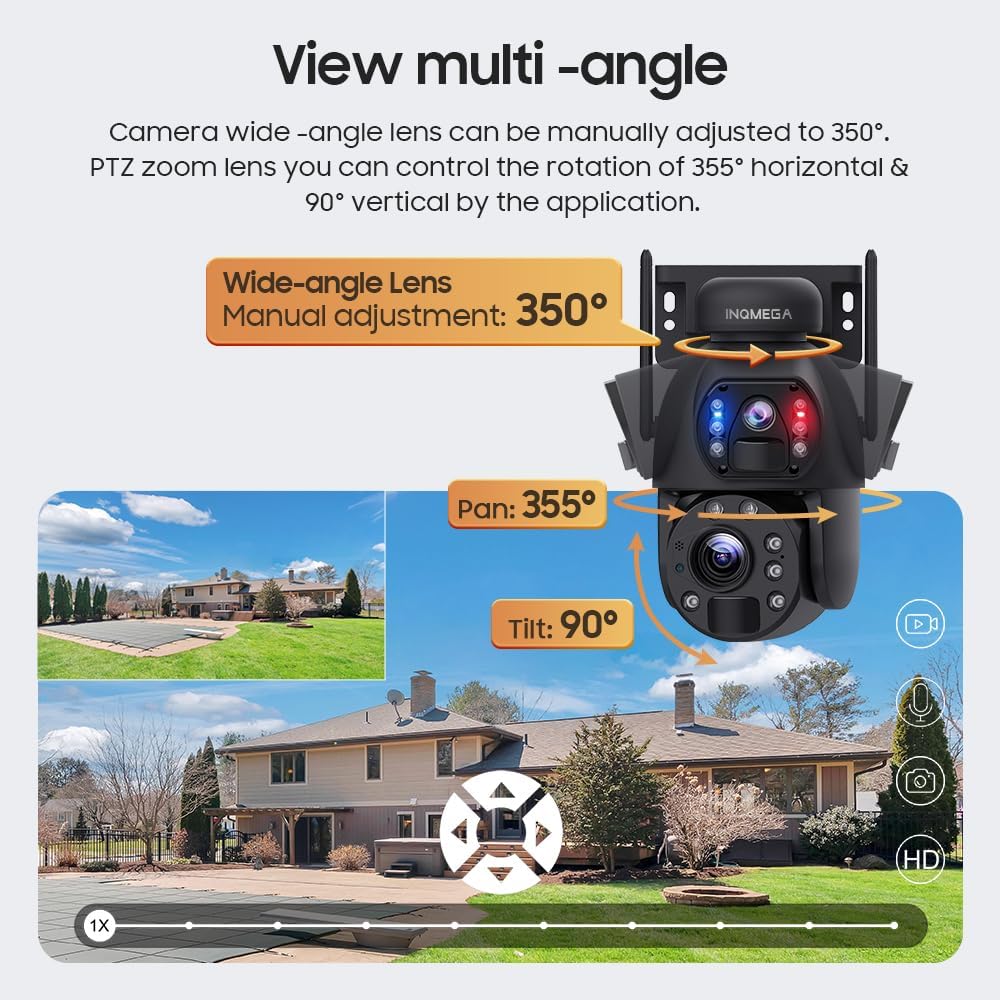
Image: Illustration of the camera's multi-angle viewing capabilities, including manual wide-angle adjustment and app-controlled pan/tilt for the PTZ lens.
4.2 Naktinio matymo režimai
The camera offers three night vision modes to suit different monitoring needs:
- Infraraudonųjų spindulių nakties vizija: Provides clear black and white images in low light conditions.
- Spalvotas naktinis matymas: Utilizes built-in white lights to provide color images at night.
- Pažangus naktinis matymas: Automatically switches between infrared and full-color modes based on detected motion or specific settings.
4.3 Judesio aptikimas ir įrašymas
The camera supports PIR (Passive Infrared) human detection. When motion is detected, the camera will wake up, record video, take photos, and send notifications to your mobile phone via the UBOX app.
- Recording Policy: To conserve battery life, the camera does not support continuous video recording. It records only when motion is detected.
- Stebėjimas: The camera does not support automatic tracking of moving objects. The camera angle can only be adjusted manually or through the app.
4.4 Dvipusis garsas
Utilize the two-way audio feature through the UBOX app to communicate with individuals near the camera. This allows for real-time conversation.
5. Priežiūra
5.1 Saulės baterijos valymas
Regularly clean the solar panel to ensure optimal charging efficiency. Dust, dirt, and debris can reduce the panel's ability to absorb sunlight. Use a soft, damp šluoste švelniai nuvalykite paviršių.
5.2 General Camera Care
- Keep the camera lenses clean for clear image quality. Use a lens cleaning cloth if necessary.
- Įsitikinkite, kad visi laidai ir jungtys yra tvirti ir nepažeisti.
- Periodically check the mounting for stability, especially after strong winds or adverse weather conditions.
6. Problemų sprendimas
6.1 Kamera neįsijungia
- Įsitikinkite, kad saulės kolektorius gauna pakankamai saulės šviesos.
- Check if the built-in battery has sufficient charge. Allow several hours of direct sunlight for initial charging.
6.2 „Wi-Fi“ ryšio problemos
- Verify that your router is broadcasting a 2.4G WiFi signal. The camera does not support 5G WiFi.
- Ensure the camera is within the 15-meter WiFi range of your router.
- Iš naujo paleiskite maršrutizatorių ir kamerą.
- Double-check your WiFi password in the UBOX app.
6.3 Prasta vaizdo kokybė
- Kameros objektyvus valykite minkštu skudurėliu.
- Įsitikinkite, kad kameros matymo lauke nėra jokių kliūčių view.
- Patikrinkite interneto ryšio greitį, nes lėtas ryšys gali paveikti transliacijos kokybę.
6.4 Judesio aptikimas neveikia
- Verify that motion detection is enabled in the UBOX app settings.
- Adjust the sensitivity settings for PIR detection in the app.
- Ensure there are no physical obstructions blocking the PIR sensor.
7. Specifikacijos
| Funkcija | Detalė |
|---|---|
| Modelio numeris | ST-598-6M-20X-WIFI-1021 |
| Naudojimas viduje / lauke | Lauke |
| Ryšio technologija | Wireless (2.4G WIFI) |
| Maitinimo šaltinis | Varomas saulės energija |
| Vaizdo įrašymo raiška | 6 MP |
| Optinis priartinimas | 20X |
| Naktinio matymo diapazonas | Iki 200 pėdų (apie 61 metrų) |
| Pasukimas / pakreipimas | Pakreipimas: 355°, pakreipimas: 90° |
| Wide-angle Lens Adjustment | Rankinis 350° |
| Baterija | 12000mAh (built-in), 6 Lithium Ion batteries included |
| Baterijos galia | 9.36 vatų valandos |
| Sandėliavimas | Amazon Cloud & TF Card (Max 128GB, not included) |
| Medžiaga | Metalas |
| Atsparumo vandeniui lygis | Neperšlampamas (IP66) |
| Kontrolės metodas | App (UBOX) |
| Prekės svoris | 0.16 uncijos (apie 4.5 gramų) |
8. Informacija apie garantiją
INQMEGA products are designed for reliability and performance. For specific warranty terms and conditions, please refer to the warranty card included with your product or contact INQMEGA customer support. Keep your purchase receipt as proof of purchase for warranty claims.
9. Pagalba klientams
If you encounter any issues or have questions regarding your INQMEGA Wireless Outdoor Solar Security Camera, please contact our customer support team. Refer to the product packaging or the INQMEGA official websvetainė, kurioje rasite kontaktinius duomenis.