
1. Įvadas
Thank you for choosing the Tongtion Wireless HDMI Transmitter and Receiver Kit. This device allows you to wirelessly transmit high-definition video and audio signals from your source device to a display, eliminating the need for long HDMI cables. It supports 1080P@60Hz resolution, operates on dual 2.4G/5G bands, and offers a plug-and-play experience for various applications, including home entertainment and office presentations.
2. Saugos informacija
- Nelaikykite įrenginio drėgmės, tiesioginių saulės spindulių ar ekstremalių temperatūrų veikiamo.
- Avoid disassembling or modifying the device, as this will void the warranty and may cause damage.
- Use only the provided power cables and adapters.
- Užtikrinkite tinkamą vėdinimą, kad išvengtumėte perkaitimo.
- Laikyti vaikams nepasiekiamoje vietoje.
3. Pakuotės turinys
Patikrinkite pakuotės turinį, kad įsitikintumėte, jog yra visi reikalingi daiktai:
- 1x HDMI Transmitter (TX)
- 1x HDMI Receiver (RX)
- 1x USB Type-C to HDMI Adapter (supports max 4K input)
- 1x Mini HDMI Adapter
- 1x Micro HDMI Adapter
- 2x USB Type-C Power Cables
- 1x vartotojo vadovas

Image: Contents of the Tongtion Wireless HDMI Transmitter and Receiver Kit, including the transmitter, receiver, various adapters, and cables.
4. Produktas baigtasview
The Tongtion Wireless HDMI Kit consists of a Transmitter (TX) and a Receiver (RX). Both units are compact and designed for ease of use.
4.1 siųstuvas (TX)
The Transmitter connects to your source device (e.g., laptop, PC, game console). It features an HDMI output and a USB-C port for power. For laptops manufactured after 2022, the transmitter may draw power directly from the HDMI port, eliminating the need for a separate power cable.
4.2 imtuvas (RX)
The Receiver connects to your display device (e.g., TV, projector, monitor). It has an HDMI input and a USB-C port for power. The receiver typically requires external power via the USB-C cable.

Vaizdas: priekis view of the Tongtion Wireless HDMI Transmitter and Receiver units.

Vaizdas: Šoninė view of the Tongtion Wireless HDMI Transmitter and Receiver, highlighting the HDMI and USB-C ports.
5. Sąrankos instrukcijos
Norėdami greitai ir lengvai nustatyti, atlikite šiuos veiksmus:
- Connect the Receiver (RX) to your Display: Plug the HDMI end of the Receiver into an available HDMI port on your TV, projector, or monitor. Connect the USB-C power cable to the Receiver and then to a USB power source (e.g., TV's USB port, USB wall adapter).
- Connect the Transmitter (TX) to your Source Device: Plug the HDMI end of the Transmitter into the HDMI output port of your laptop, PC, game console, or other source device. If your source device is a laptop manufactured after 2022, it may power the transmitter directly. Otherwise, connect the USB-C power cable to the Transmitter and then to a USB power source.
- Įjungiami įrenginiai: Įsitikinkite, kad įjungti ir šaltinio, ir ekrano įrenginiai.
- Automatinis susiejimas: The Transmitter and Receiver are pre-paired from the factory. They should automatically connect within a few seconds. The display will show the content from your source device.
- Naudojant adapterius: For devices with Mini HDMI, Micro HDMI, or USB Type-C video output, use the included adapters to connect the Transmitter.

Image: Diagram illustrating the simple plug-and-play connection of the Transmitter to a laptop and the Receiver to a TV.
Image: Visual representation of compatible source devices (laptop, TV box, PC, phone/touch screen, camera) with the Transmitter, and compatible display devices (projector, display, TV) with the Receiver.
Video: A demonstration of the Tongtion Wireless HDMI Transmitter and Receiver setup, highlighting its plug-and-play functionality, dual-band support, and compatibility with various devices and display modes.
6. Naudojimo instrukcijos
6.1 Display Modes (Mirror/Extend)
The system supports both Mirror Mode and Extend Mode, depending on your operating system settings:
- Veidrodinis režimas: The display shows the exact same content as your source device's screen. This is ideal for presentations or sharing content directly.
- Išplėsti režimą: The display acts as a secondary monitor, extending your desktop. This allows you to have different content on your source device and the external display, improving multitasking.
To switch between modes, adjust the display settings on your source device (e.g., Windows Display Settings, macOS System Settings > Displays).

Image: Illustration showing a laptop connected to a large screen, demonstrating both Mirror Mode (duplicate display) and Extend Mode (extended desktop).
6.2 Multiple Transmitters (Optional)
The system supports connecting up to 4 Transmitters (TX) to 1 Receiver (RX). To switch the video signal from another transmitter, simply press the button on that transmitter to initiate the switch.

Image: A meeting room setup showing multiple laptops connected via transmitters to a single receiver, displaying content on a large screen.
6.3 Transmission Range and Performance
The device offers a transmission range of up to 30 meters (98 feet) in an open environment. Performance may vary based on environmental factors:
- Obstacles such as walls, furniture, or other electronic devices can reduce the transmission distance and signal quality.
- Interference from other wireless devices (e.g., Wi-Fi routers, Bluetooth devices) operating on the 2.4G or 5G bands can affect performance.
- For optimal performance, ensure a clear line of sight between the Transmitter and Receiver.
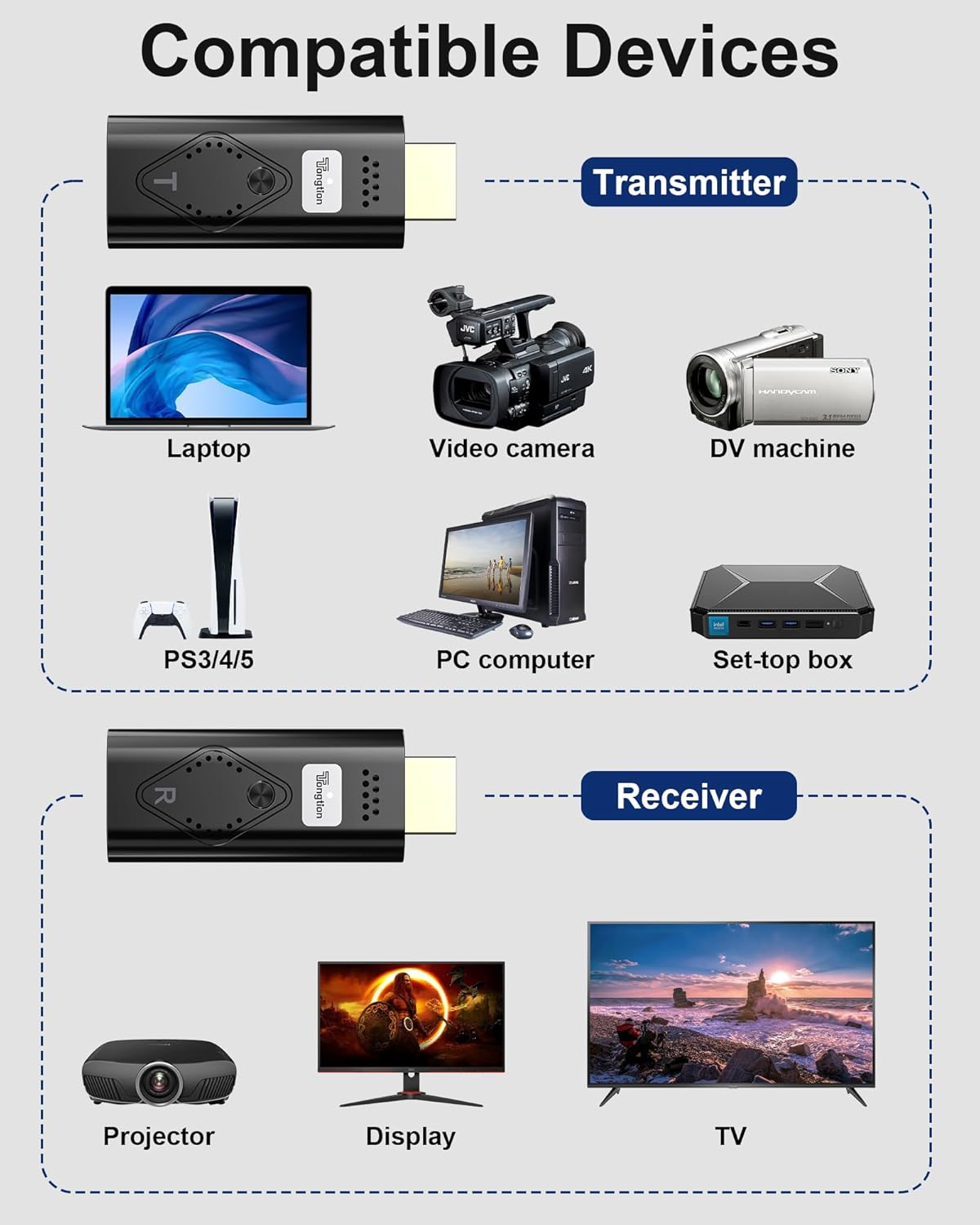
Image: A visual representation of the wireless transmission range, showing a laptop (TX) transmitting to a projector (RX) across a distance of 30 meters (98 feet) with low latency.
7. Specifikacijos
| Funkcija | Aprašymas |
|---|---|
| Prekės ženklas | Tongtion |
| Modelis | Wireless HDMI Transmitter & Receiver Kit |
| Spalva | Juoda |
| Rezoliucijos palaikymas | Input up to 4K, Output 1080P@60Hz |
| Belaidis dažnis | 2.4G/5G dviejų dažnių |
| Perdavimo atstumas | Up to 30m (98ft) in open environment |
| Latencija | <0.1 sekundės |
| HDCP palaikymas | HDCP1.2 Certified |
| Compatible Devices (Source) | Laptop, PC, Game Consoles (PS3/4/5), Blu-ray Players, Smartphones, Tablets, Video Cameras, Set-top boxes |
| Compatible Devices (Display) | Television, Projector, Monitor |
| Uostai | HDMI, USB Type-C (for power) |
| Pridedami adapteriai | USB Type-C to HDMI (max 4K), Mini HDMI, Micro HDMI (max 8K) |
8. Problemų sprendimas
Jei kyla problemų, žr. šiuos įprastus sprendimus:
- Ekrane nėra signalo:
- Ensure both Transmitter (TX) and Receiver (RX) are properly connected and powered.
- Verify that the HDMI input on your display is set to the correct port where the Receiver is connected.
- Patikrinkite visas kabelių jungtis, ar jos nėra atsilaisvinusios.
- Pabandykite iš naujo paleisti ir šaltinio įrenginį, ir ekraną.
- Poor Video/Audio Quality or Intermittent Signal:
- Sumažinkite atstumą tarp siųstuvo ir imtuvo.
- Remove any obstacles (walls, large furniture) between the units.
- Minimize interference from other wireless devices by moving them further away.
- Įsitikinkite, kad abu įrenginiai gauna pakankamai energijos.
- Transmitter Not Powering On (for laptops):
- If your laptop is older than 2022, it may not provide sufficient power via HDMI. Connect the USB-C power cable to the Transmitter.
- Ensure the USB-C power cable is connected to a reliable power source.
- Cannot Switch Between Multiple Transmitters:
- Ensure all Transmitters are powered on and within range of the Receiver.
- Press the button on the desired Transmitter firmly to initiate the switch.
9. Priežiūra
Kad užtikrintumėte savo įrenginio ilgaamžiškumą ir optimalų veikimą:
- Prietaisą valykite minkštu, sausu skudurėliu. Nenaudokite skystų valiklių ar aerozolių.
- Nenaudojamą prietaisą laikykite vėsioje, sausoje vietoje.
- Stenkitės, kad prietaisas nenumestų ar nepatirtų stipraus smūgio.
10. Garantija ir palaikymas
Tongtion products come with a standard manufacturer's warranty. For detailed warranty information, technical support, or customer service, please refer to the contact information provided on the product packaging or the official Tongtion websvetainėje. Prašome išsaugoti pirkimo įrodymą garantiniams reikalavimams.