
CPVAN FSI-3001
CPVAN Remote Control User Manual
For CP-SD01 (FSI-3001) Smoke Alarm, FSI-3002 Heat Alarm, and FSI-3003 Carbon Monoxide Detector
1. Įvadas
This manual provides detailed instructions for the proper use, setup, operation, and maintenance of your CPVAN Remote Control. This remote control is specifically designed to work with CPVAN FSI-3001 Smoke Alarms, FSI-3002 Heat Alarms, and FSI-3003 Carbon Monoxide Detectors, operating on a 433MHz frequency. It allows for convenient testing and silencing of your interconnected alarm system.

1.1 paveikslas: The CPVAN remote control facilitates interaction with an interlinked alarm system, allowing for centralized control of multiple smoke, heat, and carbon monoxide detectors within a home environment.
2. Produktas baigtasview
The CPVAN Remote Control features a simple, intuitive design with essential buttons for managing your compatible CPVAN alarms.

2.1 paveikslas: Key components of the CPVAN Remote Control. The Indikatoriaus lemputė shows operational status, the Bandymo / tylėjimo mygtukas is used for testing and silencing alarms, and the Poravimo mygtukas (Sync) is for connecting with compatible detectors.
Komponentai:
- Indikatoriaus lemputė: Displays status (e.g., pairing, button press confirmation).
- TEST/Hush Button: Used to test the alarm system or silence a sounding alarm.
- Sinchronizavimo mygtukas: Used for pairing the remote control with compatible CPVAN alarms.
3. Sąranka
3.1 Akumuliatoriaus įdėjimas
The remote control requires one 23A 12V battery (typically pre-installed). If replacement is needed, follow these steps:
- Nuotolinio valdymo pulto gale raskite baterijų skyriaus dangtelį.
- Atidarykite dangtelį.
- Insert one 23A 12V battery, ensuring the correct polarity (+/-) as indicated inside the compartment.
- Stumkite baterijų skyriaus dangtelį atgal į vietą, kol jis tvirtai spragtelės.
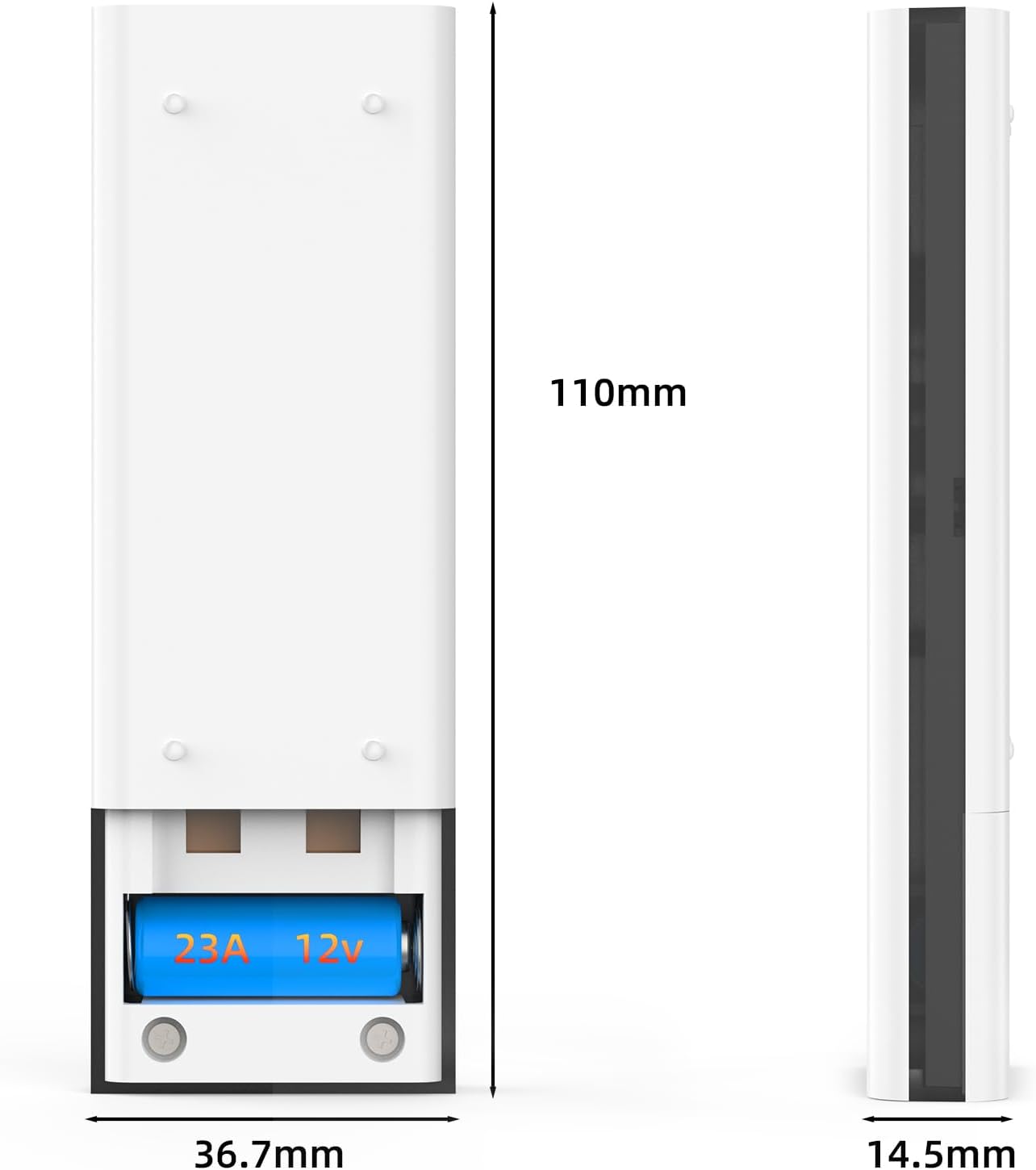
3.1 paveikslas: View of the CPVAN remote control's battery compartment with a 23A 12V battery installed.
3.2 Pairing with Alarms
To ensure the remote control functions correctly with your CPVAN alarms, it must be paired. Refer to your specific CPVAN alarm's manual for detailed pairing instructions, as the process may vary slightly between models (FSI-3001, FSI-3002, FSI-3003). Generally, the pairing process involves:
- Ensure your CPVAN alarms are powered on and within range.
- Activate the pairing mode on your CPVAN alarm (usually by pressing a button on the alarm itself).
- While the alarm is in pairing mode, press and hold the Sinchronizavimo mygtukas on the remote control until the indicator light on the remote flashes or the alarm confirms successful pairing.
- Test the connection by pressing the TEST/Hush Button nuotolinio valdymo pulte.
4. Naudojimo instrukcijos
The remote control provides convenient functions for managing your CPVAN alarm system.
4.1 Testing Alarms
Regularly test your alarms to ensure they are functioning correctly. It is recommended to test your alarms at least once a month.
- To test all paired alarms, simply press the TEST/Hush Button nuotolinio valdymo pulte.
- All interconnected alarms should sound briefly.
- Atleiskite mygtuką, kad sustabdytumėte testą.
4.2 Silencing (Hush) Alarms
In the event of a nuisance alarm (e.g., from cooking fumes), you can temporarily silence the alarms using the remote control.
- When an alarm is sounding, press the TEST/Hush Button nuotolinio valdymo pulte.
- The alarms should temporarily silence for a period (refer to your alarm's manual for the exact duration of the hush period).
- The alarm will automatically reset after the hush period if the smoke/heat/CO condition has cleared. If the condition persists, the alarm will sound again.

4.1 paveikslas: The CPVAN remote control offers a convenient way to test and mute alarms, eliminating the need for ladders or reaching devices.
5. Priežiūra
5.1 Akumuliatoriaus keitimas
The remote control uses one 23A 12V battery. If the remote control's indicator light does not illuminate or its functions become unreliable, it may be time to replace the battery. Follow the instructions in Section 3.1 for battery installation.
5.2 Valymas
Norėdami išlaikyti nuotolinio valdymo pulto išvaizdą ir funkcionalumą:
- Nuvalykite paviršių minkšta, sausa šluoste.
- Do not use abrasive cleaners, solvents, or strong chemicals, as these can damage the plastic.
- Avoid getting moisture into the remote control's internal components.
6. Problemų sprendimas
If you experience issues with your CPVAN Remote Control, refer to the following common problems and solutions:
| Problema | Galima priežastis | Sprendimas |
|---|---|---|
| Nuotolinio valdymo pultas nereaguoja. | Neveikianti arba neteisingai įdėta baterija. | Replace the 23A 12V battery, ensuring correct polarity. |
| Alarms do not respond to remote control. | Remote not paired with alarms, or out of range. | Ensure alarms are within range. Re-pair the remote control with your alarms (refer to Section 3.2). |
| Remote control indicator light flashes erratically. | Žema akumuliatoriaus įkrova arba trukdžiai. | Replace the battery. Ensure no strong radio frequency interference sources are nearby. |
| Alarms do not silence after pressing Hush button. | Smoke/heat/CO concentration is too high, or remote not paired. | Ventilate the area. If the alarm continues, it indicates a genuine threat. Re-pair the remote if necessary. |
7. Specifikacijos
The following are the technical specifications for the CPVAN Remote Control:
| Funkcija | Specifikacija |
|---|---|
| Modelio numeris | FSI-3001 (Remote Control) |
| Veikimo dažnis | 433 MHz |
| Maitinimo šaltinis | 1 x 23A 12V baterija |
| Medžiaga | ABS |
| Gaminio matmenys | 1 x 3 x 5 cm (apytiksliai) |
| Prekės svoris | 50 gramų |
| Compatible Alarms | CPVAN FSI-3001 Smoke Alarm, FSI-3002 Heat Alarm, FSI-3003 Carbon Monoxide Detector |
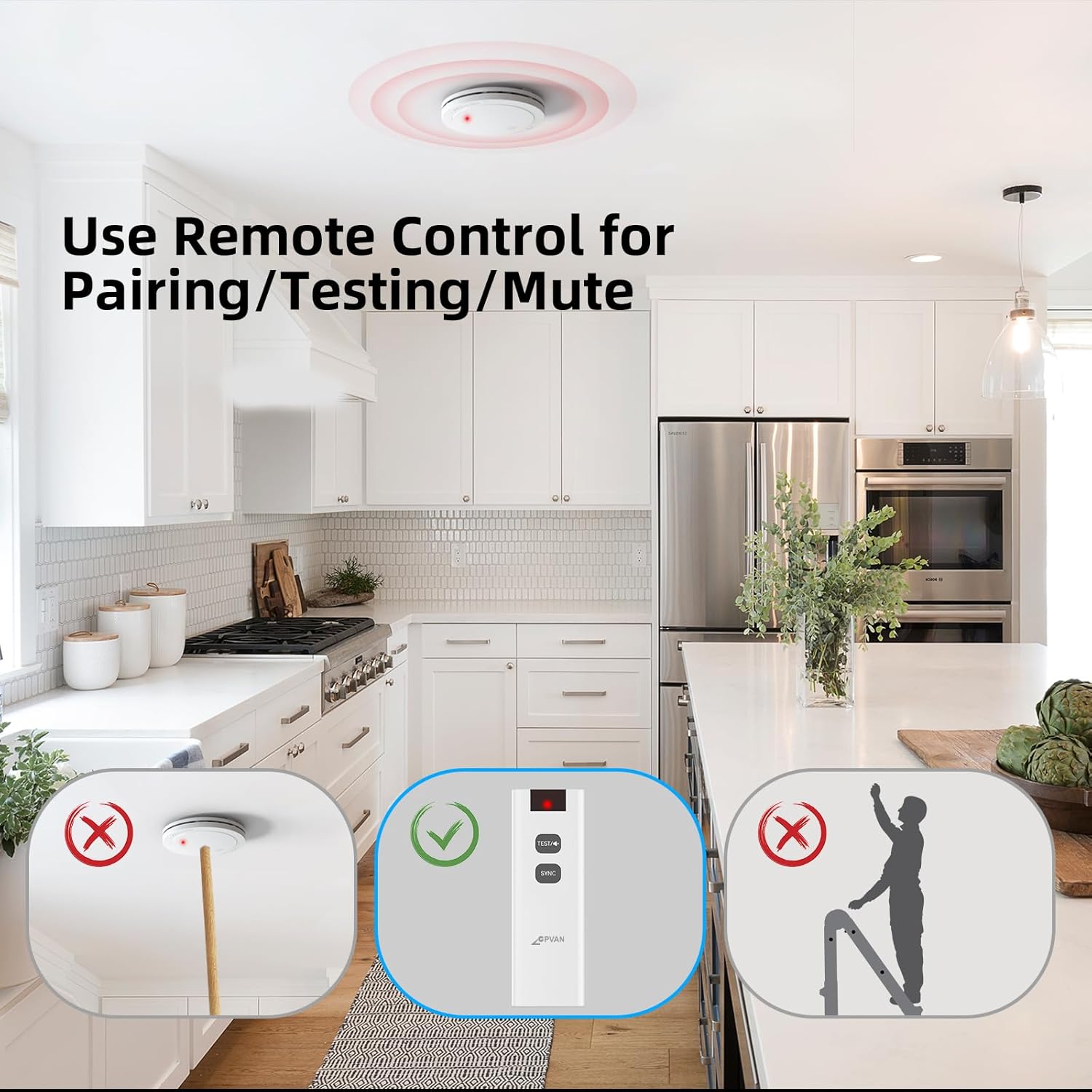
7.1 paveikslas: Dimensions of the CPVAN Remote Control.
8. Garantija ir palaikymas
For warranty information and technical support, please refer to the documentation provided with your CPVAN alarms or visit the official CPVAN websvetainėje. Išsaugokite pirkimo kvitą kaip pirkimo įrodymą bet kokiems garantiniams prašymams.
For further assistance, please contact CPVAN customer service through the contact information provided on their official websvetainėje arba produkto pakuotėje.
Ask a question about this manual
Ask about setup, troubleshooting, compatibility, parts, safety, or missing instructions. Manuals+ will review the question and use this page’s manual context to help answer it.