
Įvadas
This manual provides detailed instructions for the operation and maintenance of your HANNLOMAX HX-208Wi CD/MP3 Player with Alarm Clock Radio and Wireless Charger. Please read this manual thoroughly before using the product to ensure proper function and to maximize your user experience. Keep this manual for future reference.
Saugos informacija
- Maitinimo šaltinis: Use only the provided AC adapter. Ensure the voltage atitinka jūsų vietinį maitinimo šaltinį.
- Vanduo ir drėgmė: Saugokite įrenginį nuo lietaus, drėgmės ar lašančių/taškomų skysčių. Nestatykite ant įrenginio daiktų, pripildytų skysčių, pavyzdžiui, vazų.
- Vėdinimas: Neužblokuokite jokių ventiliacijos angų. Užtikrinkite pakankamai vietos aplink įrenginį tinkamam oro cirkuliavimui.
- Šiluma: Laikykite įrenginį atokiau nuo šilumos šaltinių, tokių kaip radiatoriai, šildytuvai, viryklės ar kiti prietaisai (įskaitant ampkeltuvai), kurie gamina šilumą.
- Valymas: Prieš valydami atjunkite įrenginį nuo elektros lizdo. Naudokite tik minkštą, sausą šluostę.
- Aptarnavimas: Nemėginkite patys aptarnauti šio gaminio. Visą techninę priežiūrą patikėkite kvalifikuotam aptarnavimo personalui.
- CD tvarkymas: Handle CDs by their edges. Avoid touching the playing surface. Keep discs clean and free from scratches.
Produktas baigtasview
The HANNLOMAX HX-208Wi is a versatile audio device combining a CD/MP3 player, PLL FM radio, dual alarm clock, and wireless charging capabilities. It features a clear 1.2-inch green LED display with dimmer control, USB ports for both charging and MP3 playback, and an Aux-in jack for external audio devices.
Pagrindinės funkcijos:
- Top-loading CD/MP3 player for CD/MP3 disc playback.
- 5W Wireless charger for compatible smartphones.
- PLL FM Radio with preset station memory.
- USB port for MP3 playback from a USB flash drive.
- USB port for 2.1A charging of smart devices.
- 1.2" Green LED display with adjustable dimmer.
- Digital clock with dual alarm functionality (wake to CD, buzzer, or radio).
- SLEEP and SNOOZE functions.
- Aux-in jack for connecting external audio sources.
- AC operation only.
Unit Components and Controls
Familiarize yourself with the various parts and controls of your HX-208Wi unit.
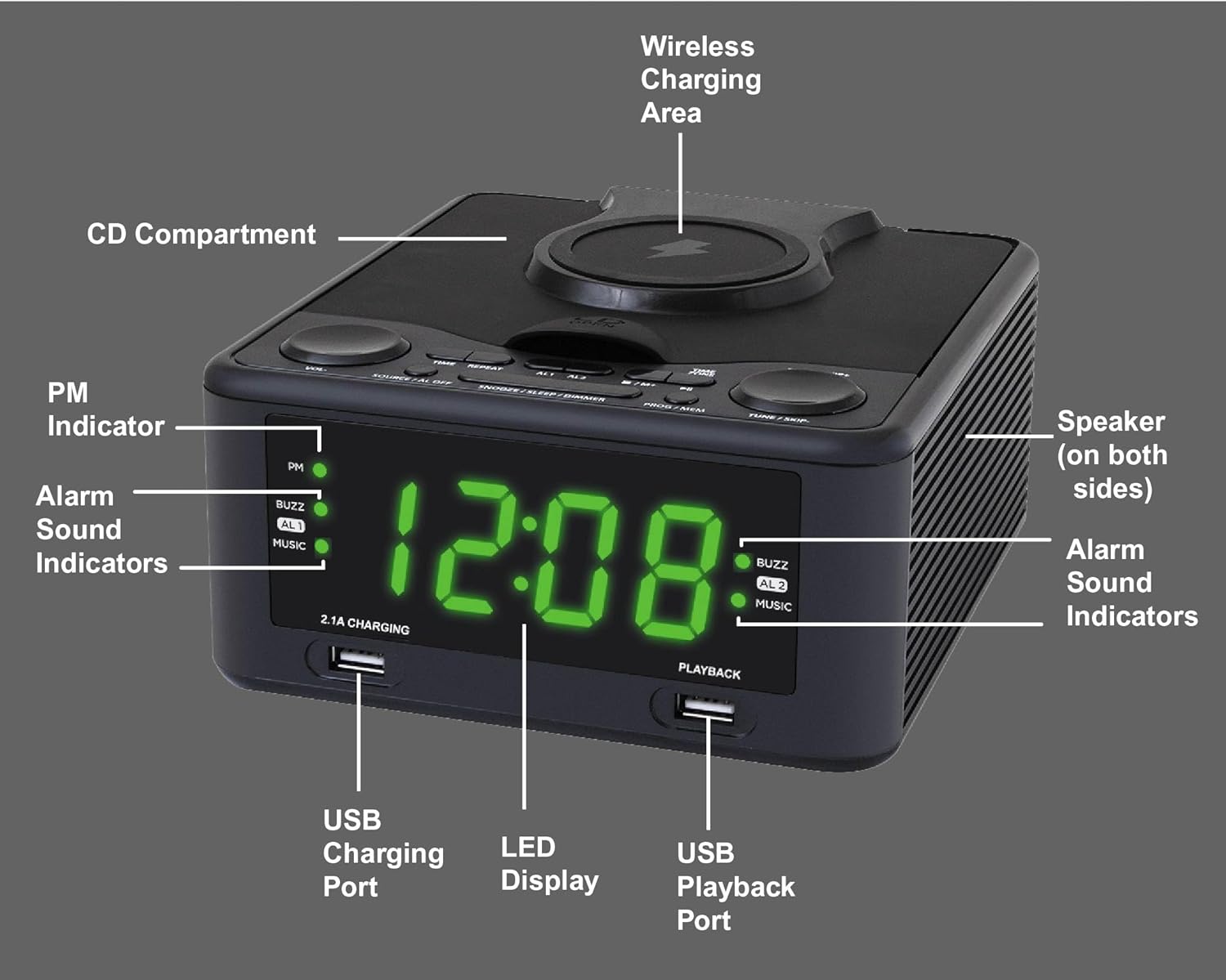
Vaizdo aprašymas: This image displays the HANNLOMAX HX-208Wi unit from a slightly elevated front-right angle. Key components are labeled with white text and lines pointing to them. These include the PM Indicator, Alarm Sound Indicators (AL1, AL2, BUZZ, MUSIC), USB Charging Port (2.1A CHARGING), LED Display, USB Playback Port (PLAYBACK), Wireless Charging Area (on top), CD Compartment (on top), and Speaker (on both sides). This diagram helps users identify the physical features of the device.

Vaizdo aprašymas: Šis paveikslėlis pateikia stambų planą view of the top panel of the HANNLOMAX HX-208Wi, highlighting the control buttons. Each button is labeled with its primary function: Volume +, Volume -, Power / Source / Alarm Off, Repeat, Alarm 1, Alarm 2, Snooze / Sleep / Dimmer, Program / Memory, Time Zone / Play / Pause / Skip +, Tuning + / Skip +, Stop / Memory +, and Time / 10 +. This visual guide assists users in understanding the purpose of each control.
Vieneto matmenys
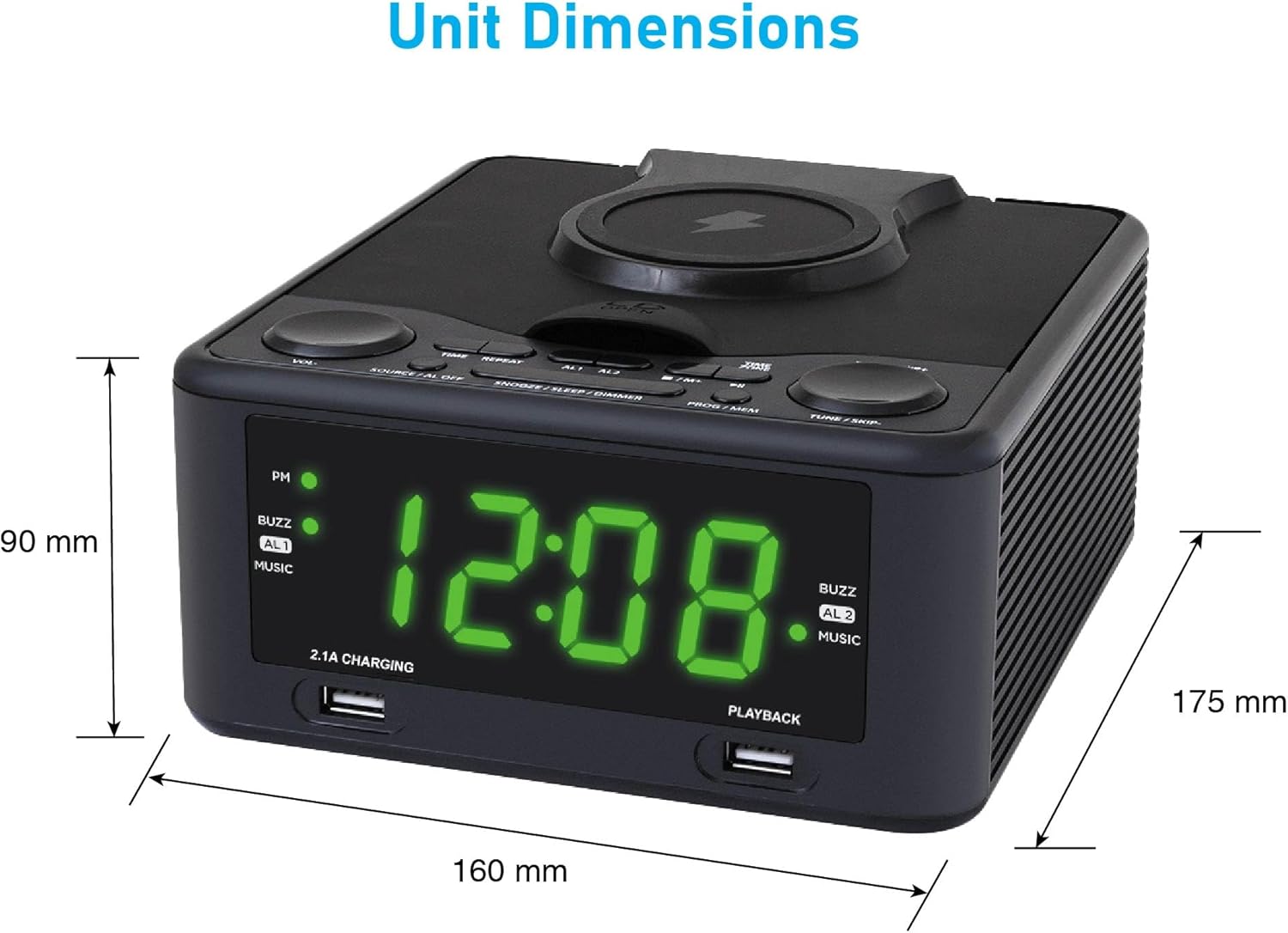
Vaizdo aprašymas: This image illustrates the physical dimensions of the HANNLOMAX HX-208Wi. The width is indicated as 160 mm, the depth as 175 mm, and the height as 90 mm. This information is useful for planning placement of the unit.
Sąranka
Maitinimo prijungimas
- Unpack the unit and all accessories.
- Connect the provided AC adapter to the DC IN jack on the back of the unit.
- Plug the AC adapter into a standard 120V AC wall outlet. The unit will power on and the display will light up.
Initial Clock Setting
Upon first power-up or after a power interruption, you may need to set the clock.
- Paspauskite ir palaikykite LAIKAS mygtuką, kol pradės mirksėti valandų skaitmenys.
- Naudokite TUNE + / SKIP + or TUNE - / SKIP - mygtukais nustatykite valandas. Jei naudojate 12 valandų formatą, atkreipkite dėmesį į PM indikatorių.
- Paspauskite LAIKAS button again. The minute digits will begin to flash.
- Naudokite TUNE + / SKIP + or TUNE - / SKIP - mygtukai minutėms reguliuoti.
- Paspauskite LAIKAS button once more to confirm and save the time.
Vaizdo įrašo aprašymas: This video demonstrates how to set the clock and alarm on a similar alarm clock device. It visually guides the user through pressing the time set button, adjusting hours and minutes, and then setting the alarm times and wake-up sources. While the device in the video may differ slightly in appearance, the button functions and setting process are generally applicable to the HANNLOMAX HX-208Wi.
Operacija
CD/MP3 atkūrimas
- Paspauskite MAITINIMAS / ŠALTINIS mygtuką, kad įjungtumėte įrenginį.
- Paspauskite MAITINIMAS / ŠALTINIS mygtuką kelis kartus, kol ekrane pasirodys „CD“.
- Atidarykite CD skyriaus dangtelį švelniai jį pakeldami.
- Place a CD or MP3 disc onto the spindle with the label side facing up.
- Close the CD compartment lid. The unit will read the disc and begin playback automatically.
- Naudokite GARSUMAS + / - mygtukai garso lygiui reguliuoti.
- Naudokite TUNE + / SKIP + or TUNE - / SKIP - mygtukai, skirti praleisti takelius. Paspauskite ir palaikykite, norėdami greitai persukti pirmyn arba atgal.
- Paspauskite ŽAISTI / Pauzė mygtuką, norėdami pristabdyti arba tęsti atkūrimą.
- Paspauskite STOP mygtuką sustabdyti atkūrimą.
PLL FM Radio Operation
- Paspauskite MAITINIMAS / ŠALTINIS mygtuką, kad įjungtumėte įrenginį.
- Paspauskite MAITINIMAS / ŠALTINIS mygtuką kelis kartus, kol ekrane pasirodys „FM“.
- Optimaliam priėmimui visiškai ištieskite FM anteną.
- Automatinis nuskaitymas: Paspauskite ir palaikykite PROGRAM / MEMORY mygtuką, kad automatiškai nuskaitytumėte ir išsaugotumėte galimas FM stotis.
- Rankinis derinimas: Paspauskite TUNE + / SKIP + or TUNE - / SKIP - buttons briefly to fine-tune the frequency. Press and hold to scan for the next available station.
- Išankstinių nustatymų atšaukimas: Naudokite 10+ button to cycle through stored preset stations.
Belaidis įkrovimas
The unit features a 5W wireless charging pad on top for compatible devices.
- Ensure the unit is powered on and connected to AC power.
- Place your wireless charging compatible smartphone directly onto the wireless charging area on top of the unit.
- Ensure the phone is centered on the charging pad. The phone's display should indicate that it is charging.
- If charging does not begin, reposition the phone.

Vaizdo aprašymas: This image shows the HANNLOMAX HX-208Wi with a smartphone placed on its top surface, indicating wireless charging in progress. The front of the unit also highlights the 2.1A USB Charging port and the MP3 Playback USB port, demonstrating the multiple charging and playback options available.
USB MP3 Playback
- Įdėkite USB atmintinę su MP3 files into the USB Playback port (labeled "PLAYBACK") on the front of the unit.
- Paspauskite MAITINIMAS / ŠALTINIS button repeatedly until "USB" appears on the display.
- Įrenginys automatiškai aptiks ir pradės groti MP3 files iš USB atmintinės.
- Naudokite TUNE + / SKIP + or TUNE - / SKIP - mygtukai, skirti naršyti tarp takelių.
USB įkrovimas
The unit provides a 2.1A USB port for charging external devices.
- Connect your smart device (e.g., smartphone, tablet) to the USB Charging port (labeled "2.1A CHARGING") on the front of the unit using a compatible USB cable.
- Įsitikinkite, kad įrenginys prijungtas prie kintamosios srovės maitinimo.
- Jūsų įrenginys turėtų pradėti krauti automatiškai.
Aux-In jungtis
Connect external audio devices using the Aux-in jack.
- Connect one end of a 3.5mm audio cable (not included) to the Aux-in jack on the unit.
- Kitą laido galą prijunkite prie išorinio įrenginio (pvz., išmaniojo telefono, MP3 grotuvo) ausinių lizdo arba garso išvesties.
- Paspauskite MAITINIMAS / ŠALTINIS button repeatedly until "AUX" appears on the display.
- Start playback on your external device. The audio will be routed through the HX-208Wi speakers.
- Reguliuokite garsumą naudodami GARSUMAS + / - buttons on the unit or your external device.
Signalizacijos nustatymas
Įrenginys turi dvigubus žadintuvus (1 žadintuvas ir 2 žadintuvas).
- 1 signalo nustatymas: Paspauskite ir palaikykite 1 pavojaus signalas mygtuką, kol pradės mirksėti valandų skaitmenys.
- Naudokite TUNE + / SKIP + or TUNE - / SKIP - mygtukus, kad nustatytumėte norimą žadintuvo valandą.
- Paspauskite 1 pavojaus signalas mygtuką dar kartą. Pradės mirksėti minučių skaitmenys.
- Naudokite TUNE + / SKIP + or TUNE - / SKIP - mygtukus, kad nustatytumėte norimas žadintuvo minutes.
- Paspauskite 1 pavojaus signalas button again to select the wake-up source (CD, BUZZER, or RADIO). The corresponding indicator will light up.
- Paspauskite 1 pavojaus signalas button once more to confirm and save Alarm 1 settings.
- Pakartokite procesą naudodami 2 pavojaus signalas mygtuką, kad nustatytumėte 2 signalą.
Vaizdo įrašo aprašymas: This video demonstrates how to set the clock and alarm on a similar alarm clock device. It visually guides the user through pressing the time set button, adjusting hours and minutes, and then setting the alarm times and wake-up sources. While the device in the video may differ slightly in appearance, the button functions and setting process are generally applicable to the HANNLOMAX HX-208Wi.
Miego laikmatis
Miego laikmatis leidžia užmigti klausantis muzikos ar radijo, kuris automatiškai išsijungs po nustatyto laiko.
- While the unit is playing (CD, USB, FM, or AUX), press the SNOOZE / SLEEP / DIMMER pakartotinai spauskite mygtuką, kad perjungtumėte galimus miego laikus (pvz., 10, 20, 30, 60, 90 minučių).
- The display will show the selected sleep time. The unit will automatically turn off after the set duration.
Snaudimo funkcija
Kai suskamba žadintuvas, paspauskite SNOOZE / SLEEP / DIMMER mygtuką, kad laikinai nutildytumėte žadintuvą maždaug 9 minutėms. Po šio laikotarpio žadintuvas vėl suskambės.
Ekrano reguliatorius
Sureguliuokite LED ekrano ryškumą.
- When the unit is in standby mode (clock displayed), press the SNOOZE / SLEEP / DIMMER button repeatedly to cycle through different brightness levels for the LED display.
Priežiūra
Įrenginio valymas
- Prieš valydami, visada ištraukite įrenginį iš maitinimo lizdo.
- Išorinius paviršius valykite minkštu, sausu skudurėliu. Nenaudokite abrazyvinių valiklių, vaško ar tirpiklių, nes jie gali pažeisti apdailą.
- CD lęšiui valyti naudokite specializuotą CD lęšių valymo diską arba minkštą, nepūkuotą šluostę, skirtą optiniams lęšiams.
CD priežiūra
- Keep CDs in their cases when not in use to prevent scratches and dust accumulation.
- Diskus valykite minkštu, nepūkuotu skudurėliu, šluostydami nuo centro į išorę.
Trikčių šalinimas
| Problema | Galima priežastis | Sprendimas |
|---|---|---|
| Įrenginys neįsijungia. | Kintamosios srovės adapteris netinkamai prijungtas. | Įsitikinkite, kad kintamosios srovės adapteris yra tvirtai prijungtas prie įrenginio ir veikiančio sieninio lizdo. |
| No sound from CD/USB/AUX. | Garsumas per mažas arba nutildytas. Pasirinktas neteisingas šaltinis. | Padidinkite garsumą. Paspauskite MAITINIMAS / ŠALTINIS to select the correct input. Check connections for AUX. |
| Kompaktinis diskas praleidžia arba negroja. | Diskas nešvarus, subraižytas arba neteisingai įdėtas. | Clean the CD. Try another disc. Ensure the disc is placed correctly with the label side up. |
| Prastas FM radijo priėmimas. | Antena neištiesta. Silpnas signalas. | Fully extend the FM antenna. Try repositioning the unit or antenna. |
| Belaidis įkrovimas neveikia. | Phone not compatible or not positioned correctly. | Ensure your phone supports wireless charging. Reposition the phone on the charging pad. Remove thick phone cases. |
| Signalizacija neskamba. | Alarm not set or turned off. Volume too low. | Verify alarm settings and ensure it is enabled. Increase the volume. |
Specifikacijos
| Funkcija | Specifikacija |
|---|---|
| Modelio numeris | HX-208Wi |
| Maitinimo šaltinis | AC 120V |
| Gaminio matmenys (I x P x A) | 16L x 8.3W x 8.3H Centimetres (approx. 160 x 83 x 83 mm) |
| Svoris | 1.09 kg |
| Ekranas | 1.2 colio žalias šviesos diodas |
| CD suderinamumas | CD, MP3 disc |
| Radijo imtuvas | PLL FM Radio with preset stations |
| Belaidžio įkroviklio išvestis | 5W |
| USB įkrovimo prievado išvestis | 2.1A |
| USB atkūrimas | Supports MP3 playback from USB flash drive |
| Aux-In | 3.5 mm lizdas |
| Signalizacijos | Dual Alarms (Wake to CD, Buzzer, or Radio) |
| Gamintojas | Hannix Ltd. |
| Kilmės šalis | Kinija |
Garantija ir palaikymas
HANNLOMAX products are designed for reliability and performance. For specific warranty information, please refer to the warranty card included with your purchase or contact your retailer. For technical support or service inquiries, please contact the manufacturer or your point of purchase.